








Have you ever stared at the little check mark next to that message while using WhatsApp? What does one check mark mean on WhatsApp? Why is there only one check on WhatsApp sometimes? These check marks on WhatsApp not only determine whether the message is delivered successfully, but also whether the other party sees your messages. If you have also been anxious and entangled because of only one tick, or want to read the message quietly but don't want to leave a blue tick, then here is a complete guide for you.
- Part 1. What Do the Check Marks Mean on WhatsApp?
- Part 2. Why Is There Only One Check on WhatsApp?
- Part 3. How to Fix WhatsApp Only One Check Mark
- Part 4. Bonus Tip: Read WhatsApp Messages without Blue Ticks
- Part 5. FAQs about WhatsApp One Check Mark
- Part 6. Conclusion
Part 1. What Does One Check Mark Mean on WhatsApp?
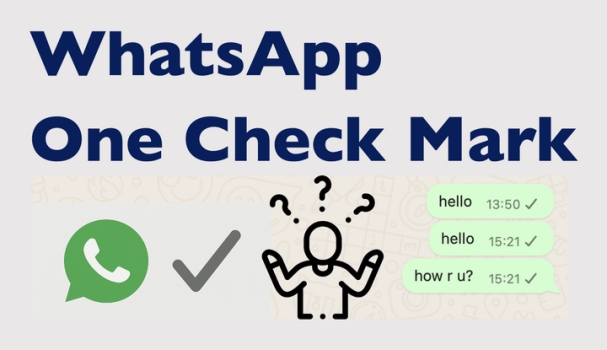
During daily use, you must have seen the one check mark on WhatsApp. One check on WhatsApp means that your message has been sent to WhatsApp's servers successfully, while the recipient hasn't received it. Besides one check mark on WhatsApp, there are several different check marks that will appear next to the message. Here is the decoding of each WhatsApp check mark's meaning.
| WhatsApp Check Marks Meaning | |
|---|---|
| One grey check on WhatsApp | The message was sent from your phone successfully, but the recipient's phone has not received it. |
| Two grey checks on WhatsApp | The message was delivered to the recipient, but the recipient hasn't open WhatsApp yet. |
| WhatsApp blue check marks | The messages were read by the recipient. |
Part 2. Why Is There Only One Check on WhatsApp?
When your WhatsApp message only shows one check mark or a gray tick, it means that the message has been successfully sent from your phone but has not yet reached the recipient's device. The reasons can include a variety of situations:

The recipient has no internet connection
If the recipient's device has the mobile data turned off, is not connected to Wi-Fi, has a weak network signal, or is in airplane mode, the message can't be delivered.
The recipient's device is turned off
If the recipient's device is turned off, your message will stay on a single tick until the device is powered on and connected to the internet.
There are errors with WhatsApp servers
When there is a problem with WhatsApp's servers, messages cannot be delivered to the other device, and there may also be a prolonged one-tick status.
Part 3. How to Fix WhatsApp Only One Check Mark
Knowing that the possible causes of only one check on WhatsApp, here are the corresponding addresses to fix this issue.
Solution 1. Check the Internet Connection
If there is an error in the network connection on both sides, the WhatsApp check mark status may be delayed. It's suggested that both sides check the network condition.

Solution 2. Resend WhatsApp Message
Due to unexpected conflicts, the message can't be sent successfully sometimes. You can try to resend the message to bypass this situation.
Solution 3. Restart WhatsApp or Your Phone
If there is a temporary bug with your WhatsApp or your phone, the check mark may be stuck on one tick. You can quit WhatsApp and reopen it to check the status. You can also restart your device to pause the faulty processes.
Solution 4. Use WhatsApp Web or Desktop
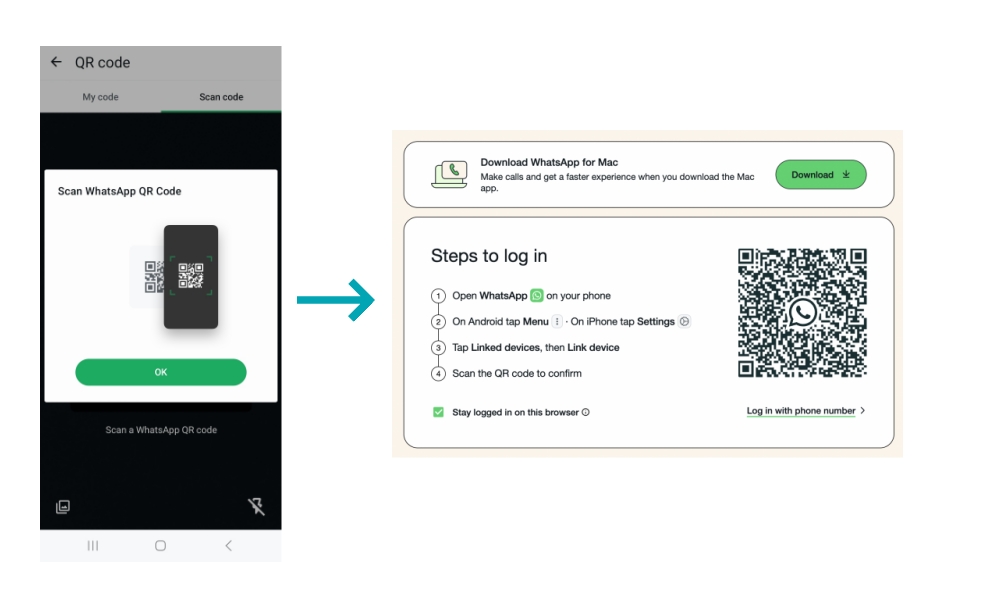
If you have logged in to your WhatsApp account on the web or a desktop, the messages will sync between the devices. You can open WhatsApp on your computer to check if the message shows only one check mark.
Solution 5. Update WhatsApp
Running an older version of WhatsApp may also cause only one check on WhatsApp. Update your WhatsApp to the latest version to avoid this issue.
On Android:
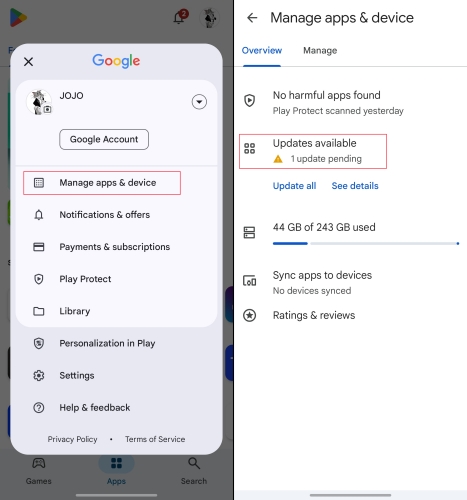
Step 1. Open the Google Play Store and tap your account icon.
Step 2. Tap Manage apps & devices > Updates available to see if WhatsApp is waiting for an update.
On iPhone:
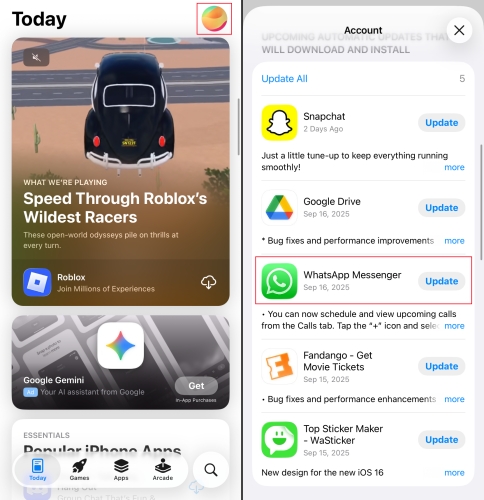
Step 1. Open the App Store and tap your Apple ID account.
Step 2. Scroll to check if WhatsApp is in the update list. Tap Update if available.
Solution 6. Clear WhatsApp Cache
An accumulated WhatsApp cache will cause your WhatsApp to be stuck on the one check mark. Free up WhatsApp storage to ensure a smooth performance.
On Android:
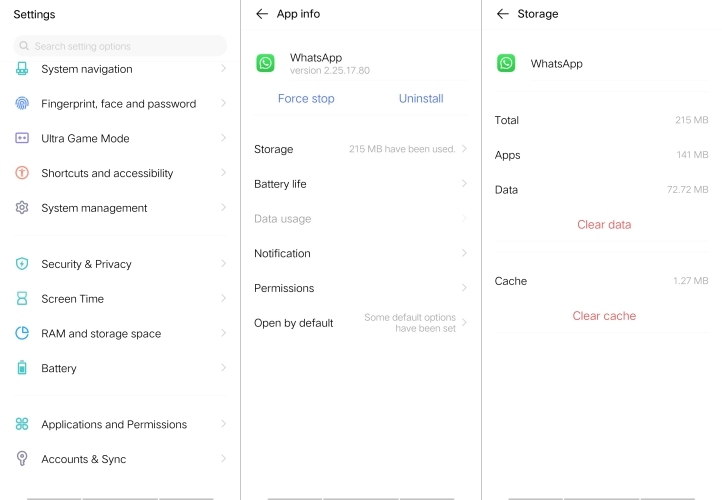
Step 1. Head for Settings > Apps > WhatsApp > Storage.
Step 2. Tap Clear cache to free up the space.
On iPhone:
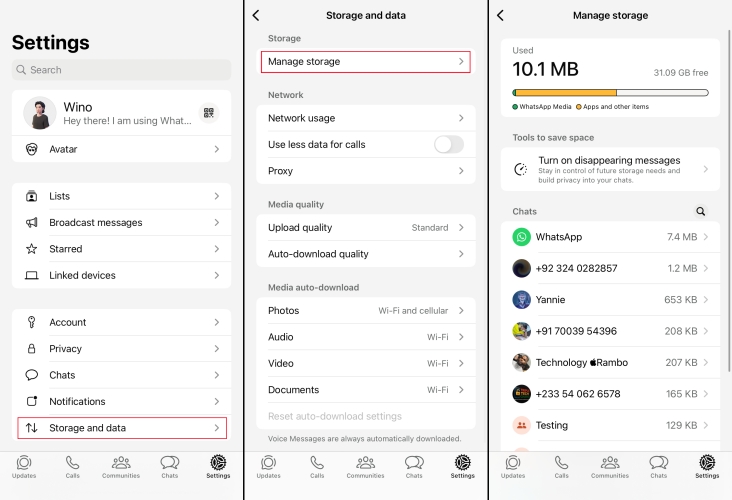
Step 1. Open WhatsApp and tap Settings.
Step 2. Tap Storage and data > Manage storage.
Step 3. Enter a chat to delete trivial WhatsApp data to free up space.
Part 4. Bonus Tip: Read WhatsApp Messages without Blue Ticks
As long as the read receipts feature is turned on, both sides of the chat will see the message status. Wonder if there is a way to read WhatsApp messages without blue check? Without the sender knowing and opening WhatsApp, MagFone WhatsApp Transfer provides a method to read WhatsApp messages safely and secretly. Besides a WhatsApp message viewer, it also helps you back up and manage WhatsApp data flexibly on your computer.

MagFone Chats Transfer
Easily back up and access all your important WhatsApp content to computers without loss or hassle — everything moves with you, just as it was.
Step 1 Download and Install MagFone Chats Transfer
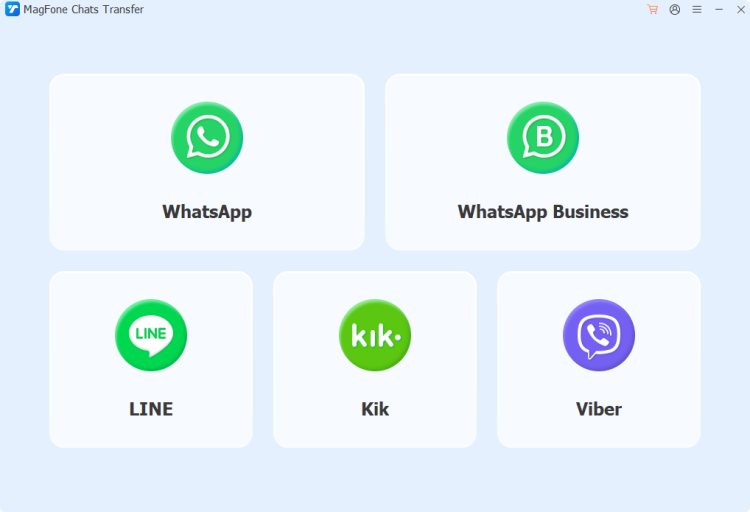
Download and install MagFone Chats Transfer on your computer. During the process, connect your iPhone to the computer via a data cable. Launch this tool after installation. Click the WhatsApp button to access more features.
Step 2 Back Up WhatsApp Messages
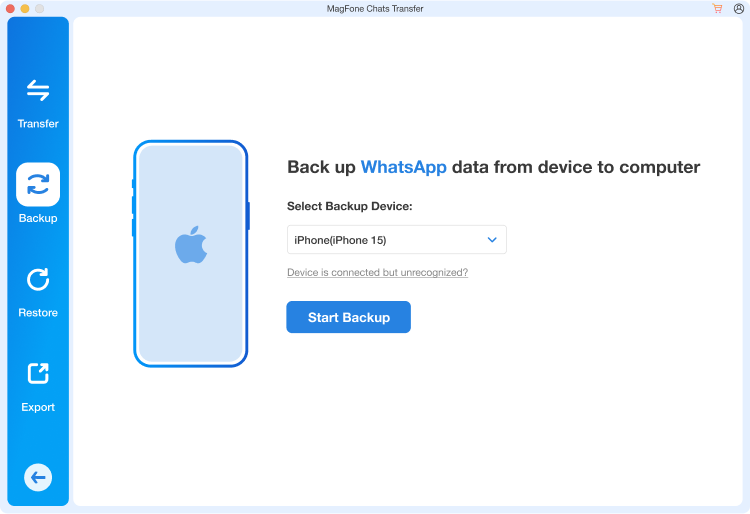
Click the Backup button in the left menu bar. Wait for your iPhone to be detected. Once your device is detected successfully, click Start Backup to back up your WhatsApp messages. If it's the first time you're using this tool, you need to unlock your iPhone to forward the operation.
Step 3 Read WhatsApp Messages without Blue Ticks
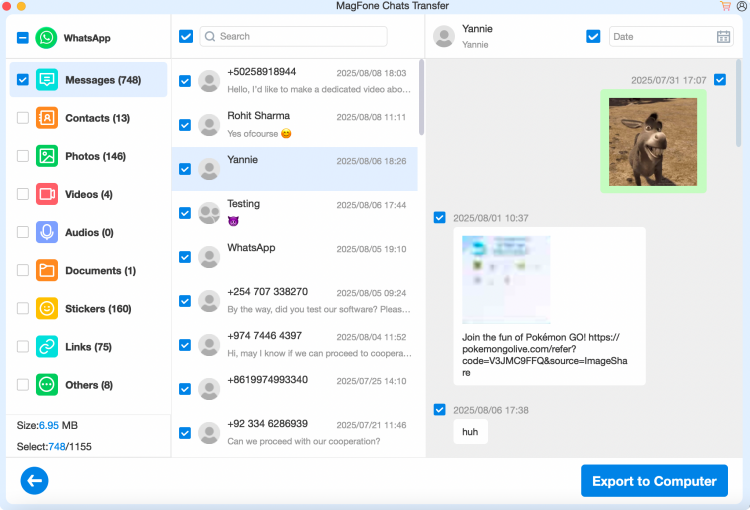
After the backup, click the Export option. Here, you can see the backup data, and you can click the view icon to read WhatsApp messages. In this way, you can read WhatsApp messages without blue ticks, as well as the sender knowing.
Part 5. FAQs about WhatsApp One Check Mark
Does one check mark on WhatsApp mean blocked?
One check mark on WhatsApp doesn't confirm blocking. If someone blocks you, your messages will stay on one gray check mark forever. Also, you won't see their last seen, online status, or profile photo updates. One check tick could just be no signal on the recipient's device or the recipient's is off.
What does one gray check mean on WhatsApp?
One gray check means that the message has been sent from the sender to WhatsApp's servers successfully. And it will turn into two gray checks if it has been delivered to the recipient's device.
Part 6. Conclusion
Mastering the WhatsApp check marks meaning can help you understand when your messages have been sent, delivered, and read. And knowing the reasons and fixes to only one check on WhatsApp can avoid communication interrupt and ensure clear communication with your contacts. But if you want to keep your activity more secretly, you can consider MagFone Chats Transfer to track your WhatsApp messages.

Edgar Davis
Editor in chief





