








When you use WhatsApp in daily life, you'll often encounter unwanted issues or contacts. Whether you want to block harassment or simply stop someone from messaging you, WhatsApp allows users to block and report contacts. In this guide, we will show you how to block someone on WhatsApp, explain what happens when you block someone, and how to check if you've been blocked yourself.
- Part 1. What Does Block on WhatsApp Mean?
- Part 2. How to Block Someone on WhatsApp
- Part 3. How to Know If Someone Blocked You on WhatsApp
- Part 4. FAQs about WhatsApp Block
- Part 5. Conclusion
Part 1. What Does Block on WhatsApp Mean?
Block is a privacy feature of WhatsApp, a simple way to protect your privacy and avoid unwanted conversations without any confrontation. Once you block someone on WhatsApp:
- The blocked contact can't message or call you anymore.
- The chat will remain on the WhatsApp chat thread, and you can decide to delete or archive the chat.

MagFone Chats Transfer
Back up WhatsApp messages before blocking and restore WhatsApp messages to your WhatsApp account at any time.
Part 2. How to Block Someone on WhatsApp
You can block someone in WhatsApp from the chat list, contact info page, and WhatsApp Settings. In this section, we will detail how to block a contact in WhatsApp on different devices.
01Block a WhatsApp contact from the chat list:
On iPhone:
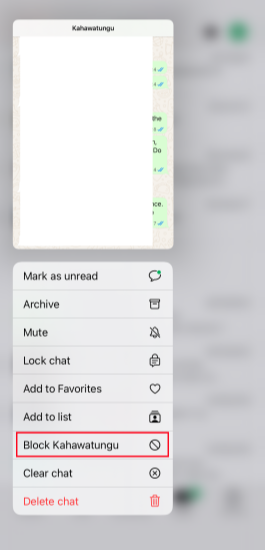
Just long-press the chat and tap Block [Name], then tap Block to confirm.
On Android:
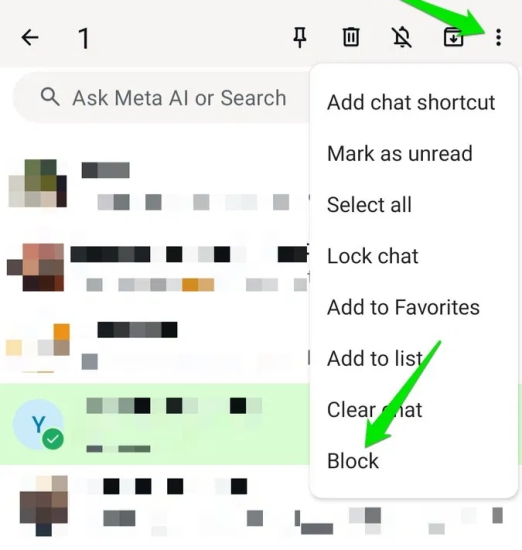
Long-press the target contact chat, tap the triple-dot icon, and choose Block.
On WhatsApp Web/ Desktop:
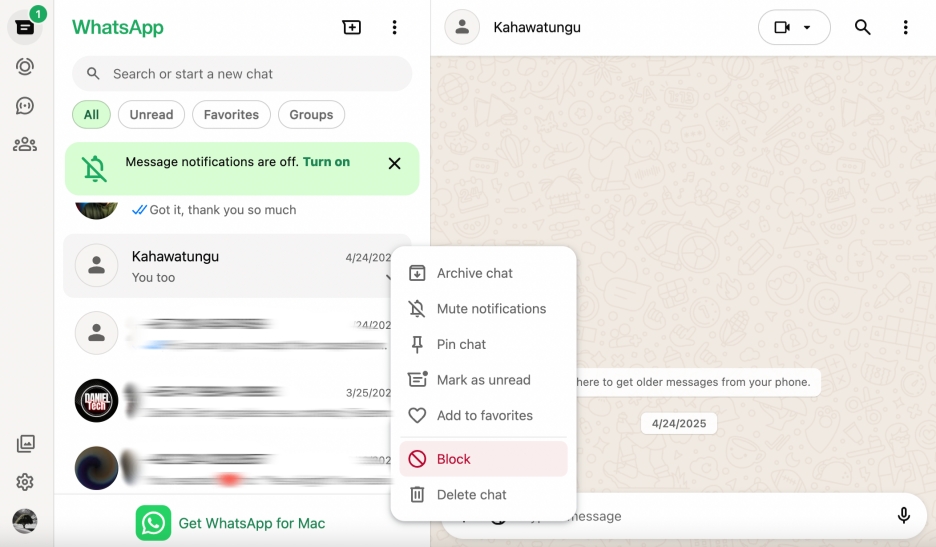
Right-click the contact you want to block and click Block. Then click Block again to block the contact.
02Block a WhatsApp contact from the Contact info page:
On iPhone:
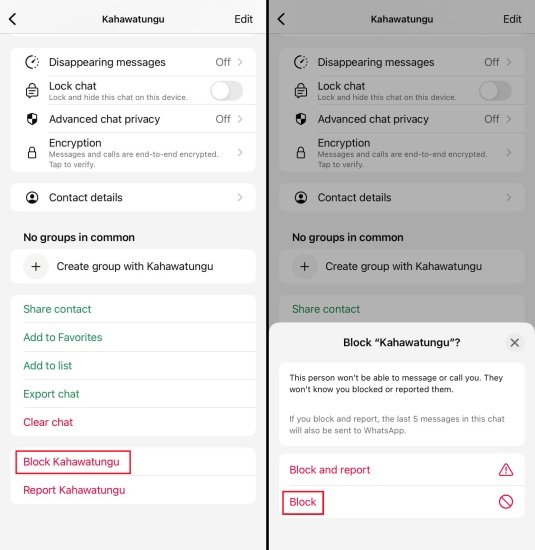
Step 1. Enter the chat and tap the contact profile picture.
Step 2. Scroll down to the bottom and tap Block [Name].
Step 3. Tap Block again to confirm.
On Android:
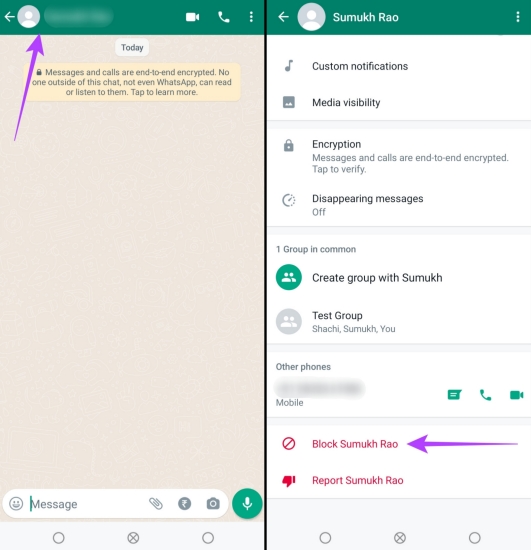
Step 1. Open the chat you want to block.
Step 2. Tap the profile icon, and Block [Name].
Step 3. Tap Block again to confirm the operation.
On WhatsApp Web/ Desktop:
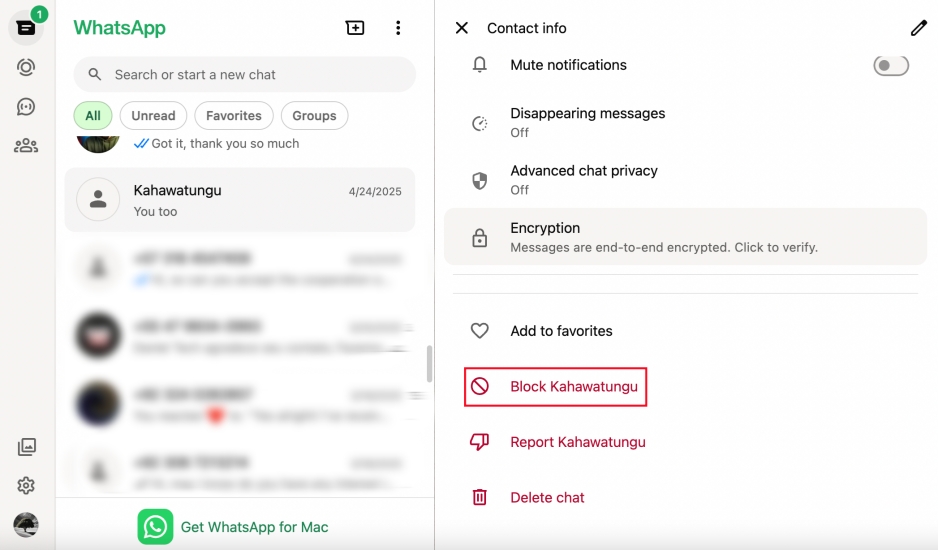
Step 1. Click the target WhatsApp chat.
Step 2. Click the contact profile picture.
Step 3. Scroll to the bottom, click Block [Name], and click Block to block the contact.
03Block a WhatsApp contact in WhatsApp Settings:
On iPhone:
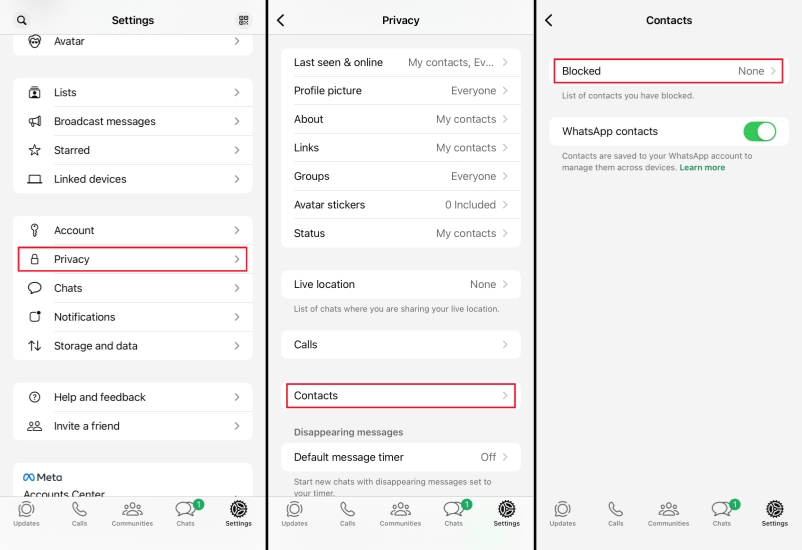
Step 1. Go to WhatsApp Settings > Privacy > Contacts.
Step 2. Tap Blocked > Add new and select the WhatsApp contacts you want to block.
Step 2. Tap Block to block the selected WhatsApp contacts.
On Android:
Step 1. Tap the triple-dot icon in WhatsApp
Step 2. Tap More > Settings > Privacy > Contacts.
Step 3. Tap Blocked > Add new to select the WhatsApp contact you want to block.
On WhatsApp Web/Desktop:
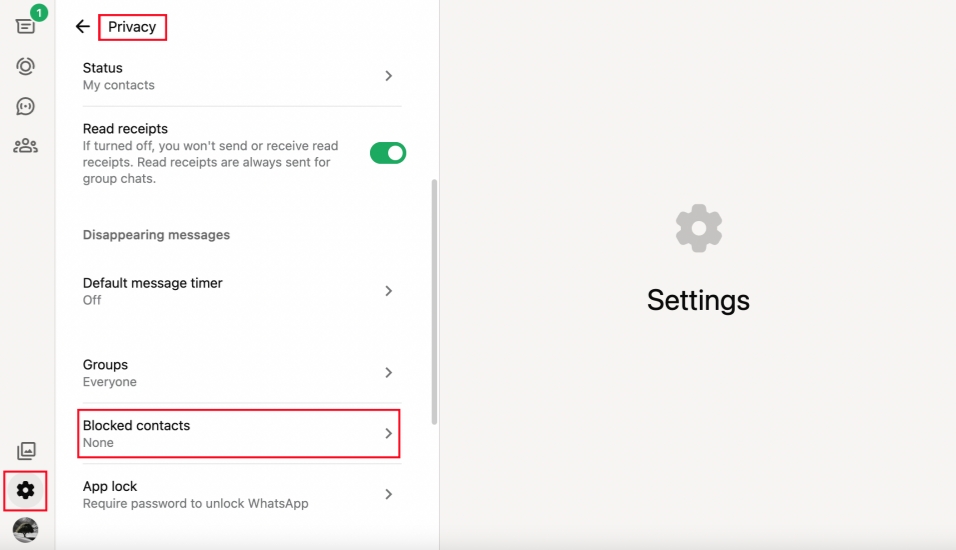
Step 1. Click the Settings icon on WhatsApp Web.
Step 2. Click Privacy > Blocked contacts > Add blocked contact.
Step 3. Select the WhatsApp contact you want to block and click Block again to block.
Part 3. How to Know If Someone Blocked You on WhatsApp
WhatsApp doesn't directly notify you when someone blocks you, but there are several signs you can look for. If you suspect you've been blocked, here are some key indicators:
- You can no longer see their Last seen or Online status in the chat window.
- Their profile photo no longer updates for you, or it disappears entirely.
- Messages you send only show one check mark and never a second check mark.
- You can't add them to a WhatsApp group. If you try, an unblocking inquiry will appear.
- Compatible with Location-based Apps
- You can't see their WhatsApp Status.
None of these signs alone are 100% proof. You might also see them if the person has no internet connection, changed their privacy settings, or deleted their account. However, if you notice several of these indicators at the same time over a longer period, it's very likely that you've been blocked.
Part 4. FAQs about WhatsApp Block
How to block someone from seeing your status on WhatsApp?
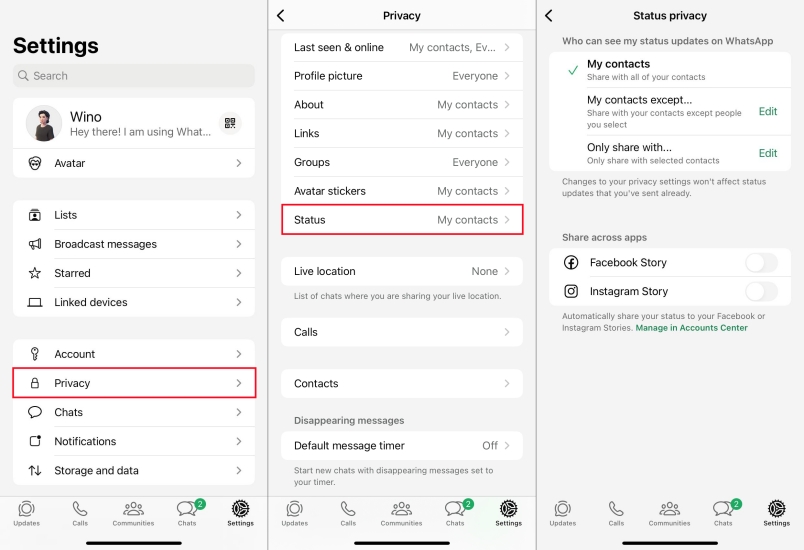
If you don't want a WhatsApp contact to see your Status, you can adjust the Status privacy setting. You can go to WhatsApp Settings > Privacy > Status to set who can see your status updates on WhatsApp.
How to block someone on WhatsApp without them knowing?
By default, when you block someone on WhatsApp, they will not be informed. But they can suspect from the possible indicators.
How to unblock someone on WhatsApp?
You can check all blocked WhatsApp contacts and unblock them in the Blocked contacts list.
Step 1. Go to Settings> Privacy > Contacts > Blocked.
Step 2. Tap the contact you want to unblock and scroll down to the bottom
Step 3. Tap Unblock [Name] to unblock the contact.
Can you see blocked messages on WhatsApp?
No, if you block someone, the blocked messages will not be delivered to you. And if you unblock someone afterwards, the blocked messages during the blocking time can not be recovered as well.
Part 5. Conclusion
Knowing how to block someone on WhatsApp gives you more control over your conversations and privacy. Whether you want to stop unwanted contact, limit what certain people can see, or simply take a break, WhatsApp provides flexible tools to manage communication on your own terms. At the same time, protecting your data is just as important as protecting your peace of mind. If you want a safer way to back up and manage your WhatsApp data, MagFone WhatsApp Transfer can be a helpful tool for securely backing up, restoring, and transferring your WhatsApp chats.

Edgar Davis
Editor in chief





