








WhatsApp makes it easy to stay connected, but sometimes, you just don't want everyone to know you're online. Whether you're dodging work messages, avoiding small talk, or simply craving a little privacy, that online indicator and the Last Seen time can feel a bit exposing. The good news is that you can take back control. In this guide, we'll break down everything about WhatsApp online status, show you how to hide online status on WhatsApp, and share simple tips to appear offline on WhatsApp.

- Part 1. What Does Online Mean on WhatsApp?
- Part 2. How to Hide Online Status on WhatsApp
- Part 3. How to Appear Offline on WhatsApp
- Part 4. Conclusion
Part 1. What Does Online Mean on WhatsApp?
When WhatsApp shows you as Online, it simply means you have the app open and are connected to the internet. It doesn't necessarily mean you're chatting with someone. Last Seen, on the other hand, shows the last time you were active in the app. This timestamp lets others know when you were last using WhatsApp.
Part 2. How to Hide Online Status on WhatsApp
WhatsApp includes built‑in privacy settings that let you limit who can see your activity or hide it altogether. In this part, we'll walk through the simple steps to hide your online status so you can use WhatsApp more comfortably, without feeling like you're constantly being watched.
On iPhone:

Step 1. Open WhatsApp and press Settings at the bottom.
Step 2. Go to Privacy > Last seen and online.
Step 3. Set Nobody to see your last seen and choose Same as last seen for WhatsApp online status.
On Android:

Step 1. Open WhatsApp and press the top-right icon.
Step 2. Access Settings > Privacy > Last seen and online.
Step 3. Choose Nobody can see your WhatsApp last seen, then choose Same as last seen to hide online status on WhatsApp.
Part 3. How to Appear Offline on WhatsApp
If you have read here, you must be focused on privacy. Turning off online status is a great step, but if you want to go even further and appear offline while still checking messages? That's where a few extra privacy tricks come in. In this part, we will show you how to appear invisible on WhatsApp without going offline.
Tip 1. Turn Off Read Receipts
One of the easiest ways to appear less active on WhatsApp is to turn off read receipts. When you disable this feature, your contacts will only see that their message was delivered, not whether you've read it. This gives you more freedom to check messages on your own time without feeling pressured to respond immediately. Though turning off read receipts works both ways, which means that you also won't be able to see when others have read your messages.
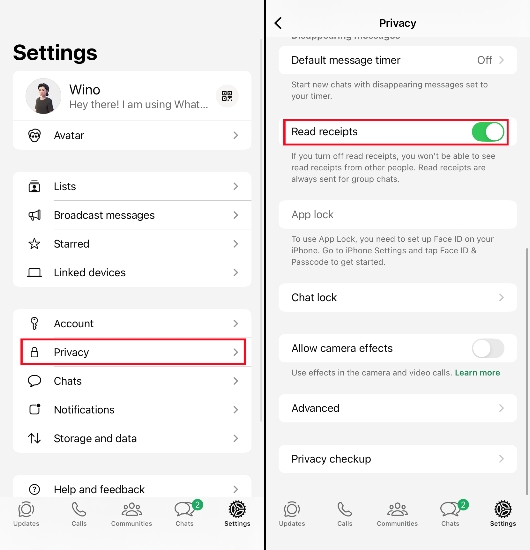
Step 1. Open WhatsApp and go to Settings.
Step 2. Tap Privacy and turn off Read receipts.
Tip 2. Read WhatsApp Messages without the Sender Knowing
Another tip to appear offline on WhatsApp is to read WhatsApp messages using MagFone WhatsApp Transfer. As a helpful WhatsApp data management tool, MagFone WhatsApp Transfer can help you read WhatsApp messages without triggering the read receipts and even without opening WhatsApp. In this way, others on WhatsApp can't track your online status, and you can stay invisible. Just follow the simple steps below to operate MagFone:

MagFone Chats Transfer
Efficiently back up your WhatsApp content without loss or hassle — everything moves with you, just as it was.
Step 1 Launch MagFone Chats Transfer
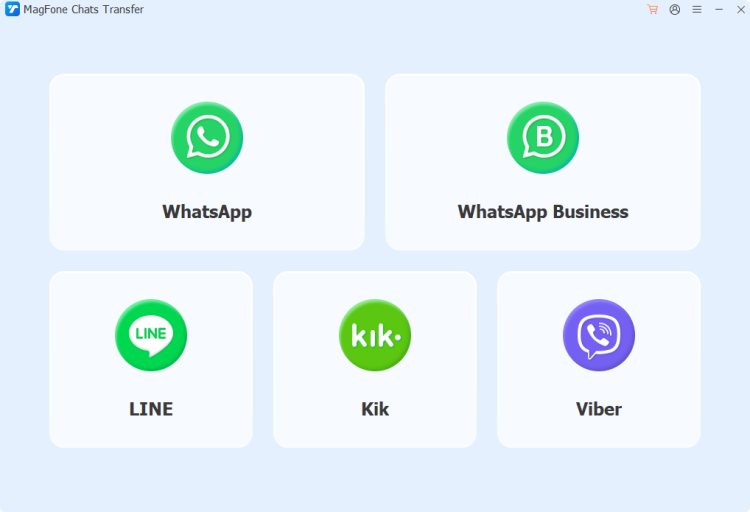
To read WhatsApp messages invisibly, you need to download and install MagFone Chats Transfer on your computer first. Then connect your iPhone to the computer using a data cable. When all is done, launch MagFone.
Step 2 Back up WhatsApp Messages
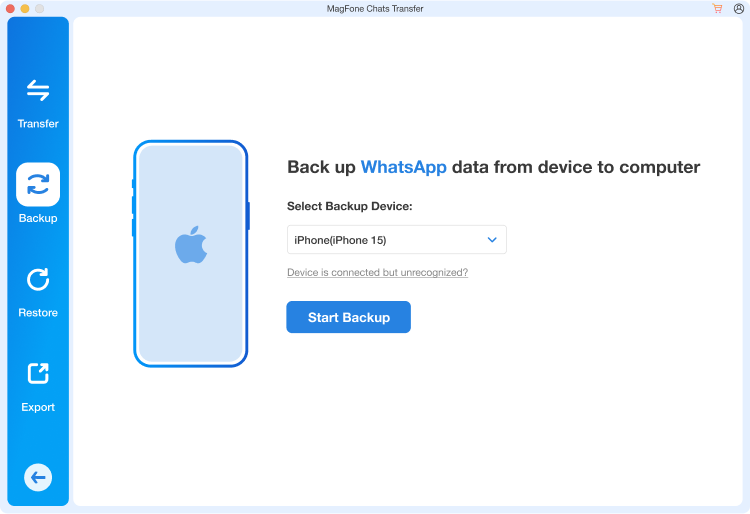
Click WhatsApp from the main interface, and you will be prompted to the Backup feature. Click Start Backup to back up your WhatsApp messages.
Step 2 Read WhatsApp Messages While Staying Online
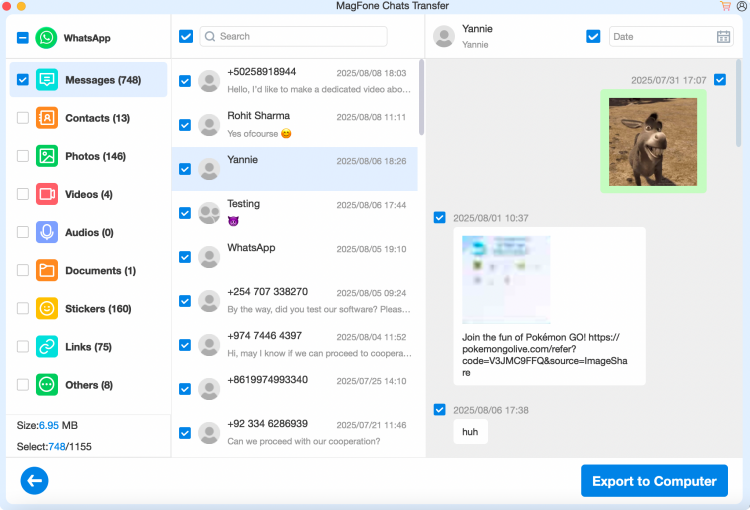
When the backup is finished, click Done. Then click the view icon. Now you can read your WhatsApp messages without the sender knowing and without triggering the online status.
Part 4. Conclusion
WhatsApp may be designed for constant connection, but that doesn't mean you have to be constantly visible. By adjusting the privacy settings, like Last seen and online, and Read receipts, and using MagFone Chats Transfer to read WhatsApp messages quietly, you can choose when and how you appear invisible and offline. These simple changes won't stop you from enjoying chats or calls, but they will help you stay in control, protect your privacy, and use WhatsApp in a way that feels more relaxed and less exposed.

Olivia Wood
Editor in chief




