








How to recover photos from an old iPhone without iCloud backup? photos loss from old iPhone without iCloud backup”
——From Apple Community
How do I recover photos from old iPhone with no iCloud access? hello! I'm not sure how to explain this properly but hopefully it makes sense. I found two of my old iPhones, I've charged one of them up and can see a load of old pictures that I don't have anywhere else (not on iCloud etc)...
——From Apple Community
There may be many photo recovery needs from iPhone users. We've found some users in the Apple Community are asking for help to recover photos from an old iPhone, either due to photo loss, or wanting to recover photos that aren't anywhere else. Is it possible to recover photos from an old iPhone? In this guide, we will show you three ways to recover photos from an old iPhone, whether you have a backup or not.
- Part 1. How Do I Recover Photos from My Old iPhone?
- Part 2. How to Recover Photos from Old iPhone
- Part 3. How to Recover Photos from Old iPhone [With Backup]
- Part 4. FAQs about Recovering Photos from Old iPhone
- Part 5. Conclusion
Part 1. How Do I Recover Photos from My Old iPhone?
When you find an old iPhone and find some missing photos, it can be surprising and you are eager to recover them. Whether you have the old iPhone or not, there are chances to recover your photos. If the old iPhone is available and workable, you can recover photos using iCloud or a data transfer tool. If the iPhone is not available, you may still recover photos from an old iPhone backup.
In the following parts, we will show you three ways to recover old photos from an old iPhone, including permanently deleted photos on old iPhone.
Part 2. How to Recover Photos from Old iPhone [No Backup]
If the iPhone is still accessible and can be unlocked, you can get photos from the old iPhone and transfer them to your other iPhone or a computer. For those deleted photos on the iPhone, you may need a data recovery tool to recover them.
MagFone Photos Data Recovery is a professional and effective data management tool, combining data recovery and data backup in one. If your photos are lost from your iPhone, it offers three recovery modes to recover photos. Among the three recovery modes, recovering from iOS devices works for all scenarios and can be used to transfer photos across your devices. So if you have a recovery need, follow the steps below to recover photos from your old iPhone.

MagFone iPhone Data Recovery
Recover old photos on old iPhone, even permanently deleted photos.
Step 1 Launch MagFone iPhone Data Recovery
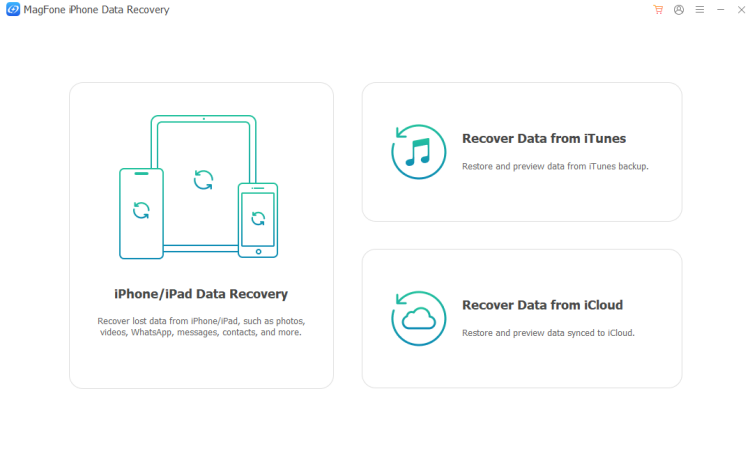
First, download and install MagFone iPhone Data Recovery on your computer. Afterwards, use a data cable to link your iPhone to the computer and launch the MagFone tool.
Step 2 Scan Recoverable Photos from iPhone
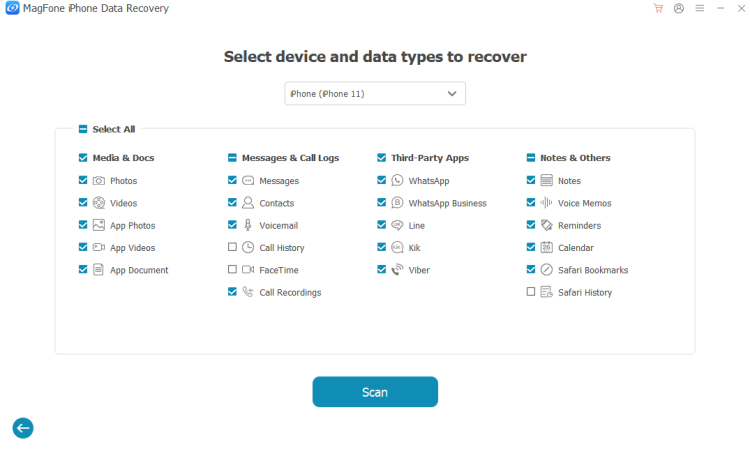
Choose iPhone/iPad Data Recovery from MagFone's portal. If your iPhone is detected, you will be directed to select the data you want to recover. Select Photos and click Scan to allow MagFone to scan recoverable photos from your old iPhone.
Step 3 Recover Photos from Old iPhone
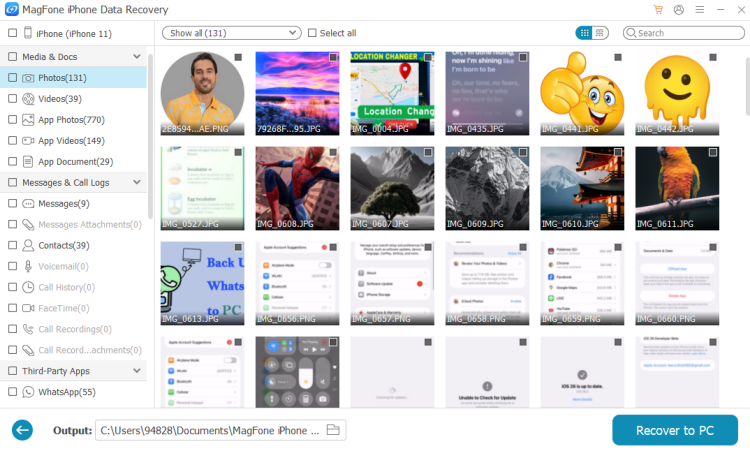
When the scan is complete, you can preview the recoverable photos on MagFone. If you find what you need, you can select photos and click Recover to PC or Recover to Mac to save these photos to your computer.
Part 3. How to Recover Photos from Old iPhone [With Backup]
Besides recovering data directly from iPhone devices, there are two more methods to recover photos from an old iPhone if you have an old iPhone backup, iCloud backup, or iTunes backup.
📝Note:
If the iPhone is still accessible and all data remains on the iPhone, you can also make a new iPhone backup and restore the backup to other iPhone devices.
Option 1. Recover Photos from iTunes Backup
If you have backed up the old iPhone to a computer, it's likely to recover photos from the old iPhone backup. Since restoring photos from an iTunes backup requires restoring the full backup, you may need a new spare iPhone to restore the backup to.
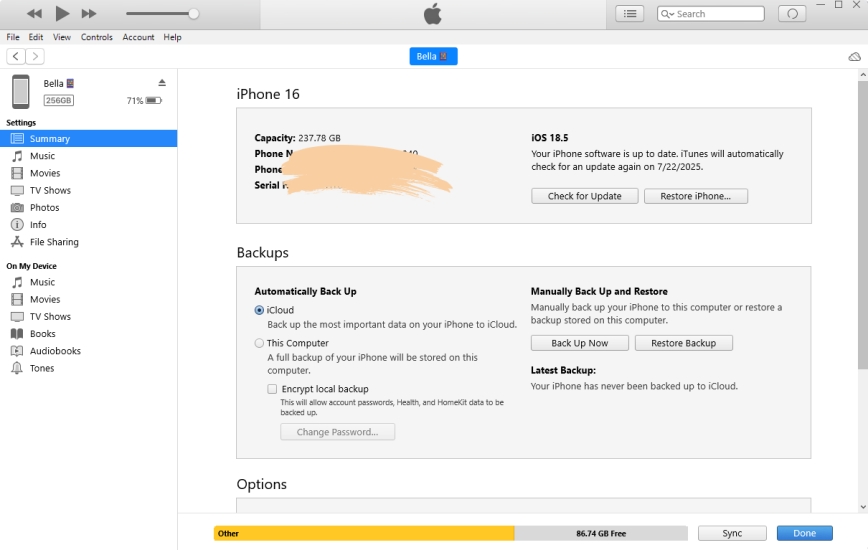
Step 1. Connect the iPhone to the computer you used to back up the iPhone.
Step 2. Open iTunes and click the device icon on its main portal.
Step 3. Click Restore Backup, then choose the correct old iPhone backup and click Restore.
Option 2. Recover Photos from iCloud Backup
If you have backed up the iPhone to iCloud, you can also recover photos from an iCloud backup. Since restoring an iCloud backup also requires a full restore, you may need a spare iPhone to operate.
Factory Reset iPhone:
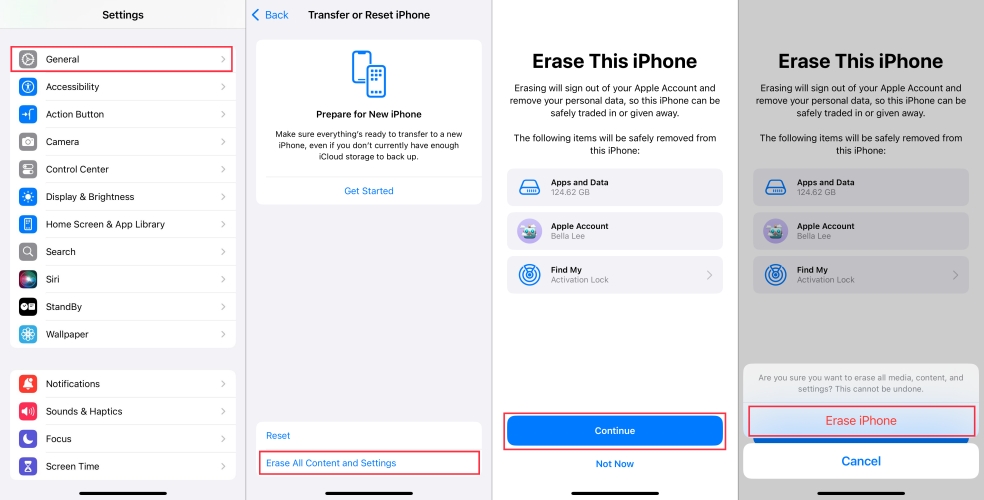
Step 1. Go to iPhone Settings > General > Transfer or Reset iPhone.
Step 2. Tap Erase All Content & Settings > Erase iPhone.
Step 3. Enter the required iPhone passcode or Apple ID password to confirm.
Set Up iPhone and Restore iCloud Backup:
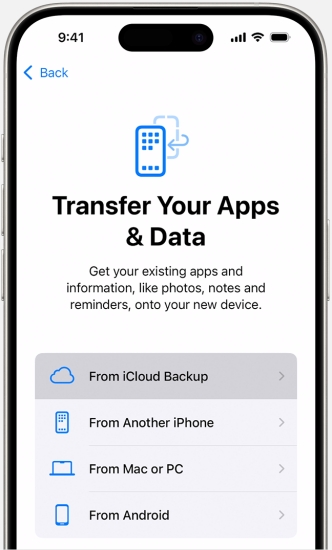
Step 1. Open the refreshed iPhone and set it up manually.
Step 2. When you see the Transfer All Apps & Data screen, choose Restore from iCloud Backup.
Step 3. Enter your Apple ID and password, and finish the verification.
Step 4. After verification, you will see a list of iCloud backups; choose the one that is related to the old iPhone, then wait for the iCloud backup to be restored.
Part 4. FAQs about Recovering Photos from Old iPhone
How to recover old photos from old iPhone?
If the old iPhone can be opened, you can directly open the Photos app to get the old photos. If its old permanently deleted photos, MagFone iPhone Data Recovery can help you get them back. If the old iPhone is no longer usable, you may need to repair it first, then get the old photos.
How to recover photos from old iPhone to new iPhone?
You can recover photos from an old iPhone to a new iPhone with iCloud Photos or an iCloud backup. You can also consider MagFone iPhone Data Recovery to transfer photos across your iPhone devices.
How to recover photos from an old iPhone backup?
You can recover an old iCloud backup or old iTunes backup to an iPhone to recover photos. But this will cause current data to be removed from the iPhone. If you want to only recover photos from an old backup, you can consider MagFone iPhone Data Recovery to extract photos selectively from a backup.
Part 5. Conclusion
When the old iPhone is still accessible and all data is kept on the old iPhone, you can easily transfer photos or recover the old photos to other devices. When it is not accessible, you may turn to an old iPhone backup. To recover photos from an old iPhone quickly, try MagFone iPhone Data Recovery.

Edgar Davis
Editor in chief




