








When you need to check your iCloud email, or share your iCloud email address with someone, it can be incredibly frustrating if you forgot the iCloud email address and don't know where to find it. Don't panic. Finding your iCloud email address is usually just a few taps away. In this practical guide, we will cut through the confusion and show you exactly how to find your iCloud email address on your device, the web, or mail apps. And we will also offer a way to find your iCloud email password if you forgot it. Keep reading and look up your iCloud email.
- Part 1. How Can I Find My iCloud Email Address?
- Part 2. How to Find iCloud Email Address
- Part 3. Bonus Tip: Find Forgot iCloud Email Password
- Part 4. FAQs about iCloud Email Address
- Part 5. Conclusion
Part 1. How Can I Find My iCloud Email Address?
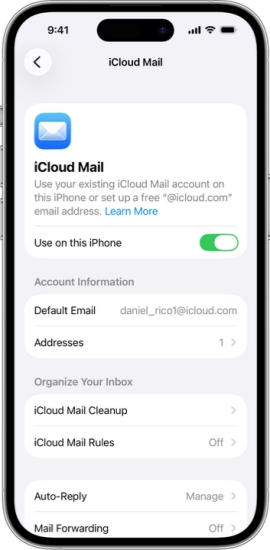
If you have set up an iCloud email account on your device, you can find your iCloud email address directly from your Apple device or by visiting the iCloud Mail website. Additionally, your iCloud email address may be visible in Apple's Mail app or even in a third-party mail app, depending on where you've used it.
Part 2. How to Find iCloud Email Address
There are multiple options to find your iCloud email address, depending on the device or platform you use. Let's explore the different options available to help you quickly find your iCloud email address.
Option 1. Find iCloud Email Address in Settings
iCloud email is generally linked with your Apple ID. On devices where you have signed in with your Apple ID, you can usually find the iCloud email address in Settings.
On iPhone/iPad:
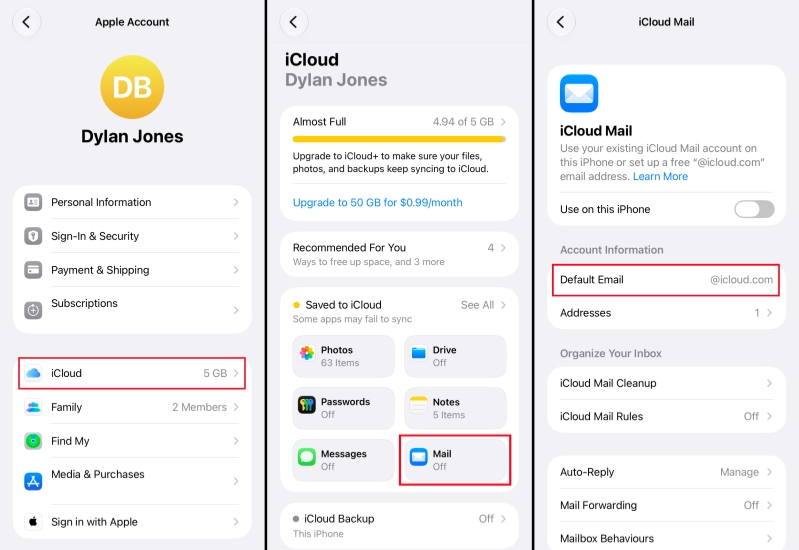
Step 1. Head to Settings > Apple ID.
Step 2. Tap iCloud > Saved to iCloud > iCloud Mail.
Step 3. Your iCloud email address is in the Default Email field. If you have multiple addresses, you can tap Addresses to check any details.
On Mac:
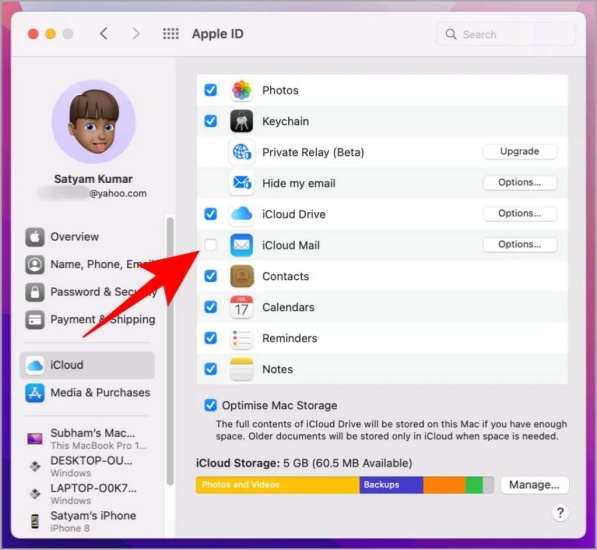
Step 1. Open System Preferences and click Apple ID.
Step 2. Click iCloud and click Options next to iCloud Mail. You will see your iCloud email address.
Option 2. Find iCloud Email Address on iCloud Web
Thanks to the iCloud service, you can also look up your iCloud email on any browser. By signing in with your Apple Account on the iCloud Mail website, you can access synced iCloud email on the web. Then you can find your iCloud email address in iCloud Mail Settings.
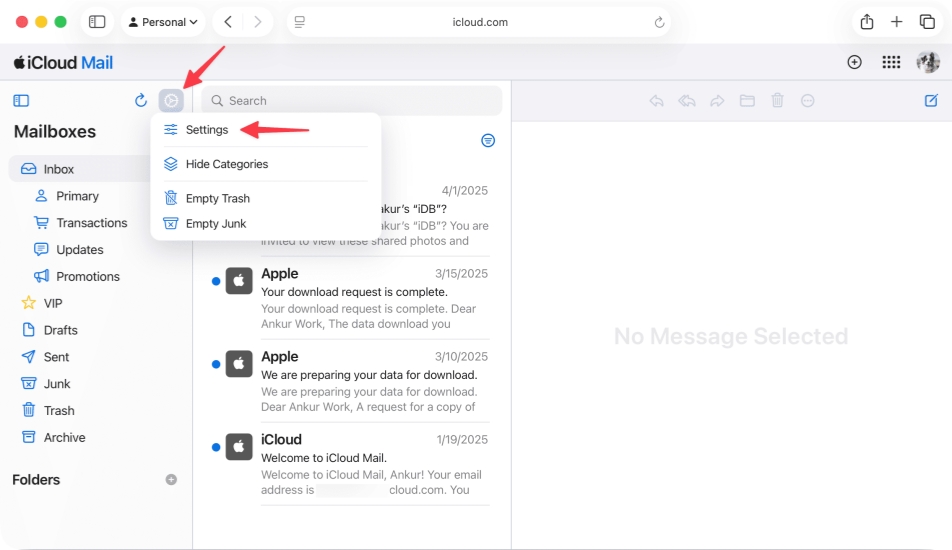
Step 1. Go to the iCloud Mail website and sign in with the Apple Account you linked the iCloud email with.
Step 2. Click the Gear icon, and click Settings.
Step 3. Click Account to see your iCloud email address.
Option 3. Find iCloud Email Address in the Mail App
If you have previously signed in to your iCloud account in the Mail app or have sent emails from your iCloud address to another account, you can easily find your iCloud email by checking your email apps.
- In the Mail App: Open the Mail app on your device and tap on any message you have sent. Your iCloud email address will appear in the "From" or "To" field, depending on whether you sent or received the message.
- In a Third-Party Mail App: Use the search function to look for "iCloud" in your mailbox. This will help you locate any emails associated with your iCloud account, making it easier to identify your iCloud email address from the search results.
Part 3. How to Reset Forgotten iCloud Email Password
If you've forgotten your iCloud email password, using a professional iOS password manager like MagFone iPhone Unlocker can help. MagFone is designed to manage, retrieve, and remove various types of passwords and passcodes on your iPhone, including lock screen, Screen Time, Apple ID, and MDM passwords. With MagFone, you can quickly recover or reset your forgotten iCloud email password, making it easier to regain access to your iCloud account and check your emails without delay.

MagFone iPhone Unlocker
Find saved email passwords and login credentials on iOS device quickly and securely.
Step 1 Install MagFone iPhone Unlocker
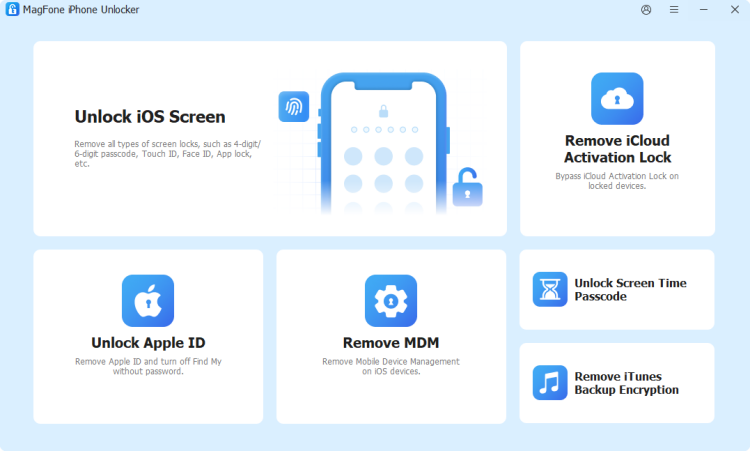
First, download and install MagFone iPhone Unlocker on your computer. Then run this password manager and choose Password Manager from the main interface.
Step 2 Scan for iCloud Email Address and Password
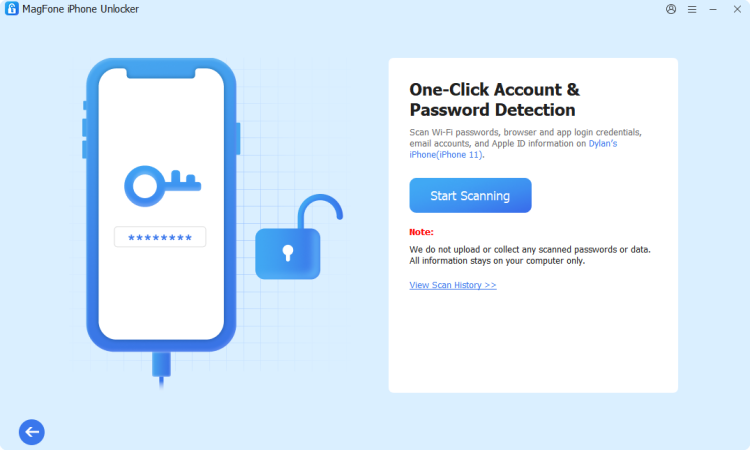
Use a data cable to link your iPhone to the computer. Then click Start Scanning to scan saved passwords on your iPhone.
Step 3 Find Forgotten iCloud Email
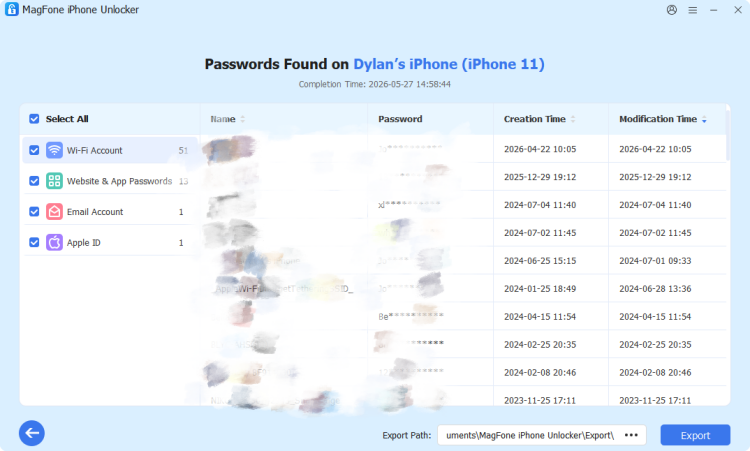
After scanning, click Apps & Website Passwords to browse and check accounts related to Apple services. If you find your Apple Account or iCloud account, click the view icon to reveal it.
Part 4. FAQs about iCloud Email Address
How to recover my iCloud email password?
The iCloud email password is the same as your Apple ID password. If you forgot your iCloud email password, you can sign in with the linked Apple ID.
How to change my Apple iCloud email address?
You can't change your iCloud email address after you created the iCloud email. You can instead create an alias to your iCloud email.
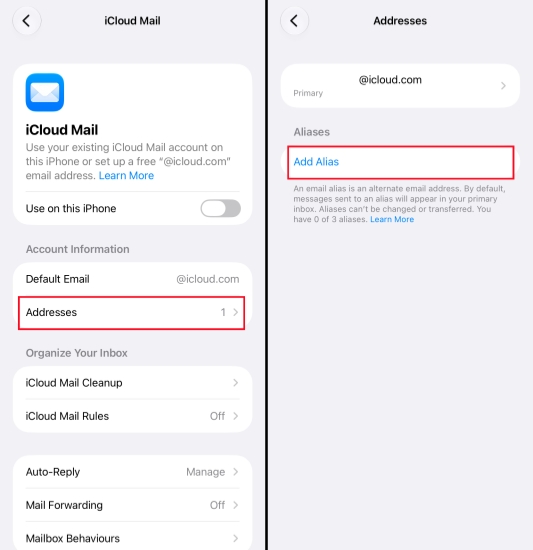
Step 1. Go to Settings > Apple ID > iCloud.
Step 2. Tap iCloud Mail > Addresses.
Step 3. Tap Add alias to create a new iCloud email address.
Can you change your iCloud email name?
Yes, you can change your iCloud email name in iCloud Settings.
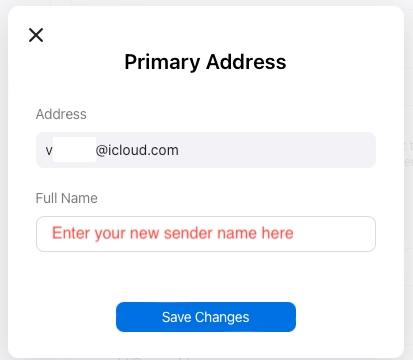
Step 1. Go to the iCloud Mail website and log into your Apple Account.
Step 2. Click the Gear icon and select Settings.
Step 3. Click the iCloud email address and change the full name.
Step 4. Click Save Changes to change it.
Part 5. Conclusion
Knowing how to find your iCloud email address is essential for uninterrupted access to your Apple services. By following the steps above, you'll be able to easily locate your iCloud email address whenever you need it. And if you ever forget your iCloud email password, a tool like MagFone iPhone Unlocker can help you efficiently recover and regain access to your account, keeping your Apple experience seamless.

Dylan Jones
Editor in chief




