








vnROM is an online platform that provides ROM downloads and an APK tool designed for FRP bypass on Android devices. Essentially, it helps users to regain access to Android smartphones and tablets locked by Google account verification after a factory reset. However, many users know a little about vnROM FRP Bypass. Today, here we'll help you figure out what is vnROM FRP Bypass and how to use it for FRP bypass. Also, we'll introduce an alternative once vnROM FRP Bypass doesn't work, so you have another option.

- Part 1. Main Features of vnROM FRP Bypass
- Part 2. Does vnROM FRP Bypass Really Work?
- Part 3. Pros and Cons of vnROM FRP Bypass
- Part 4. Where to Download vnROM for FRP Bypass
- Part 5. How to Use vnROM APK bypass Android 15/14/13/12/11
- Part 6. What to Do If vnROM Bypass Not Working [Alternative]
- Part 7. Conclusion
Part 1. Main Features of vnROM FRP Bypass
vnROM FRP Bypass refers to a collection of methods and tools associated with the vnROM platform that are designed to help users regain access to Android devices when FRP blocks normal setup. The popularity of it is not accidental. vnROM FRP Bypass stands out because it focuses on accessibility, device compatibility, and consistent results across a wide range of Android manufacturers. Key features of vnROM FRP Bypass include:
Supports a wide range of Android brands, including Samsung, Xiaomi, Vivo, OPPO, Huawei, Motorola, and more.
Compatible with multiple Android versions, from older releases like Android 5–8 to newer systems such as Android 12 and above.
Simple and user-friendly interface for bypass Google account verification.
Free vnROM APK download without the need for complex installations.
Part 2. Does vnROM FRP Bypass Really Work?
Most searches for vnROM FRP Bypass come from users who forgot Google account credentials after a factory reset or bought a second-hand device that's Google-locked. But vnROM FRP Bypass is only most effective on older Android versions, since FRP security changes with each Android update. Here's a summary of vnROM FRP Bypass for different Android versions.
| Android Version | Success Likelihood | Notes |
| Android 5 - 8 | High | Tested on older Samsung and Motorola phone |
| Android 9 - 11 | Medium | Some devices may fail due to security patches |
| Android 12 - 15 | Low | Likely blocked; consider alternatives |
Part 3. Pros and Cons of vnROM FRP Bypass
For mobile repair professional and IT technicians, vnROM FRP Bypass offers operational efficiency. It reduces turnaround time and minimizes expensive subscriptions. While vnROM FRP Bypass is effective, it is not without limitations. Android security continues to evolve, and newer patches may restrict certain access points. Professional benefits and potential challenges include:
 Professional Benefits
- Reduced operational costs
- High success rates on supported models
- Simplified training requirements
- Consistent workflow across brands

- Incompatibility with the latest security updates
- Variations caused by regional firmware differences
- Temporary access limitations requiring updates
- Manufacturer-specific restrictions
Part 4. Where to Download vnROM for FRP Bypass
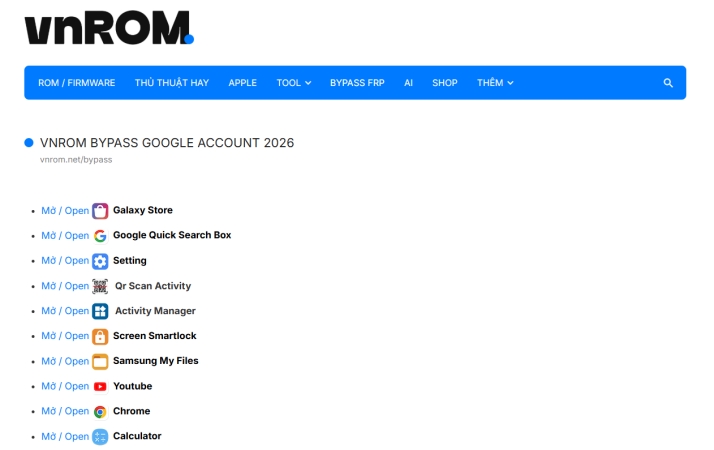
vnROM FRP Bypass is intended for users who own the locked device legally and forgot the Google account credentials after a factory reset. You can navigate to the official website of vnROM FRP Bypass and select a FRP Bypass APK to download.
Part 5. How to Use vnROM APK bypass Android 15/14/13/12/11
After downloading the APK, you can follow the steps below to use vnROM for bypassing FRP locks on Android 15, 14, 13, 12, and 11 devices.
Step 1 Activate TalkBack and Select an App
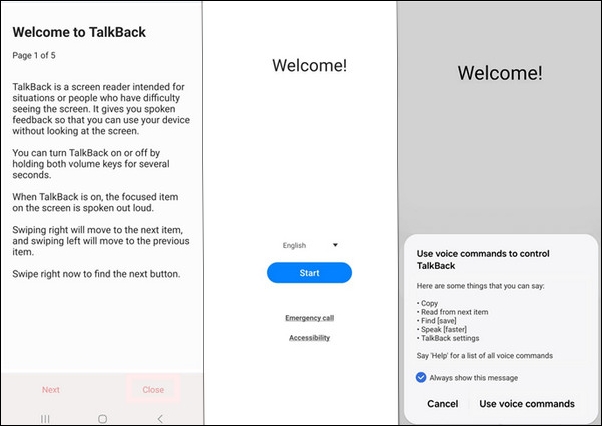
Triple-tap the Home button to activate TalkBack, which will open a new menu. Then press the Home button three times to open the Help & Feedback panel. Select Get Started with Voice Access, stream a YouTube video, and choose Get Started with Voice.
Step 2 Install vnROM FRP Bypass APK File
Tap the User Profile icon in the upper right corner and select Terms and Privacy Policy > Cancel. Then long-tap Bookmarks and select Download History > My Files. Go to find and install the vnROM FRP Bypass APK file.
Step 3 Start to Factory Reset Android Device
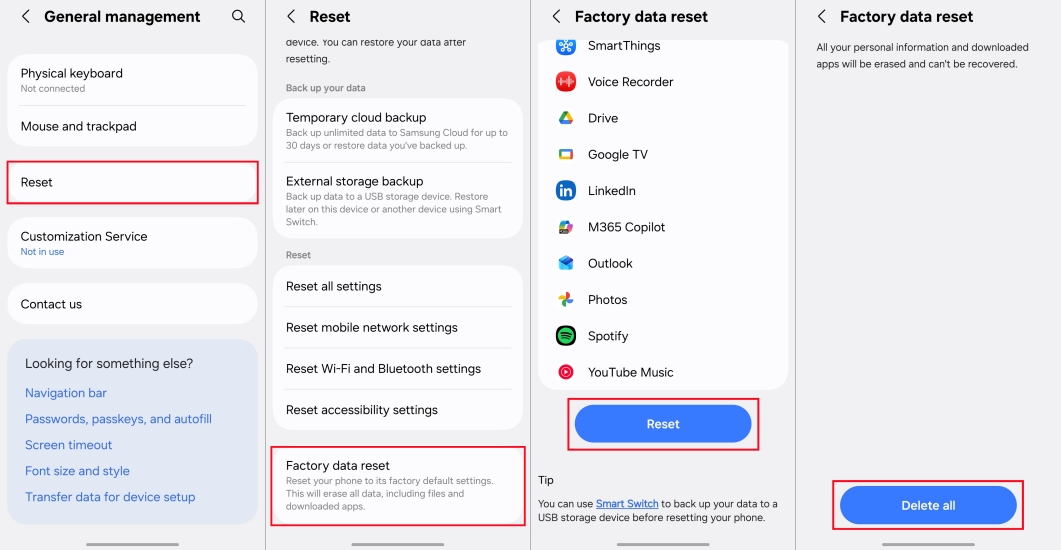
After installing the vnROM FRP Bypass APK, open the Settings app on your phone and tap System Settings > Reset Phone > Erase All Data to start a factory reset. Wait to complete the factory reset, then the FRP lock will be removed.
Part 6. What to Do If vnROM Bypass Not Working [Alternative]
When it comes to regaining access to a FRP-locked Android device, users often look for reliable solutions beyond web-based methods like vnROM FRP Bypass. One powerful alternative in the mobile servicing landscape is MagFone Android Unlocker, a dedicated tool designed to help users unlock various types of Android locks. If vnROM FRP Bypass fails to bypass FRP locks on your Android phone, MagFone Android Unlocker is really an ideal option.
Why Consider MagFone Android Unlocker?
MagFone Android Unlocker is a professional Android unlocking tool that supports a broad range of security remove scenarios, including screen lock patterns, PIN, and factory reset protection locks. Unlike purely online FRP bypass approaches that rely on device-side vulnerabilities or web loopholes, Magfone Android Unlocker is a PC-based utility that helps authorized users regain access to devices when standard authentication isn't possible. As an alternative to vnROM FRP Bypass, MagFone Android Unlocker stands out because:
- Offer intuitive interface that walks users through each unlocking stage
- Support numerous Android brands across multiple Android versions
- Address Google FRP lock and screen lock removal in different scenarios
- Capable of handling many Android lock types with consistent results
How MagFone Android Unlocker Compares with vnROM FRP Bypass?
While vnROM FRP Bypass is known for web-based accessibility and ease of use without a PC, MagFone Android Unlocker differentiates itself as a desktop-assisted solution with a broader unlock feature set. Differences between MagFone Android Unlocker and vnROM FRP Bypass include:
| Features | MagFone Android Unlocker | vnROM FRP Bypass |
|---|---|---|
| Primary Purpose | Comprehensive Android unlocking solution | Web-based Google FRP bypass |
| Supported Lock Types | FRP, PIN, Pattern, Password, Fingerprint, Face Lock | FRP only |
| PC Required | ✔️ | ❌ |
| Ease of Use | Guided step-by-step interface | Manual navigation required |
| Android Version Support | Android 5 to newer versions | Android 5–11 |
| Brand Compatibility | Samsung, Xiaomi, Redmi, Oppo, Vivo,Realme, Motorola, and more | Samsung, Huawei, Xiaomi, Oppo, and others |
| Success Rate Stability | High and consistent | Depends on firmware and patch |
| Risk of Patch Failure | Lower | Higher on newer updates |
| Technical Skill Needed | Low to moderate | Moderate to high |
How to Bypass FRP Lock with MagFone Android Unlocker
It is easy and safe to bypass FRP locks on Android devices with MagFone Android Unlocker. First, download and install MagFone Android Unlocker on your computer. Then follow the steps to remove FRP lock on Android devices.

MagFone Android Unlocker
Remove multiple kinds of screen locks on over 5000 Android devices and delete Google FRP lock without a password.
Step 1 Connect Samsung Phone and Run MagFone
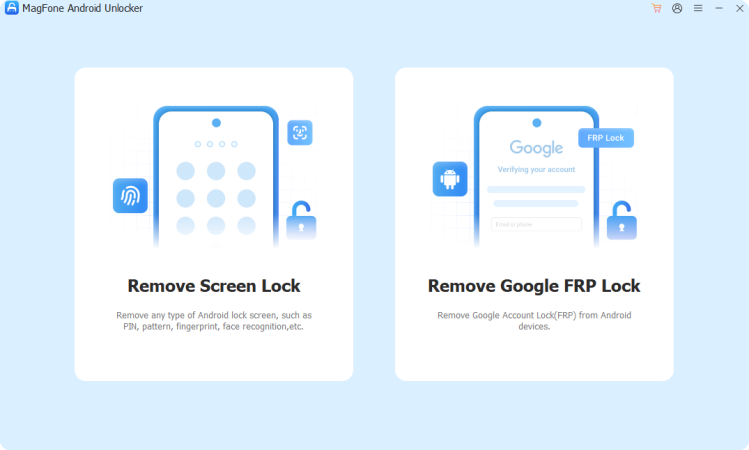
Use a USB cable to connect your Samsung phone to your computer, then run MagFone Android Unlocker and select Remove FRP Lock on the interface.
Step 2 Wait for Detection and Select Android Version
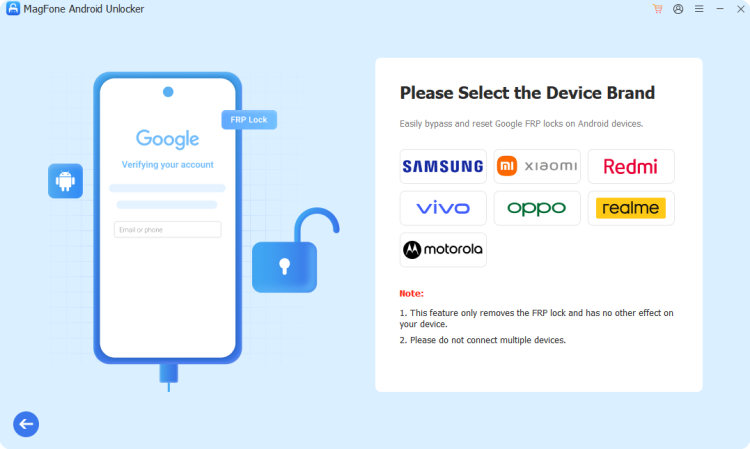
After selecting Remove FRP Lock, wait the program to detect your device. If it fails to recognize your device, select your device brand and choose All Android Versions.
Step 3 Remove Google FRP Lock on Samsung Phone
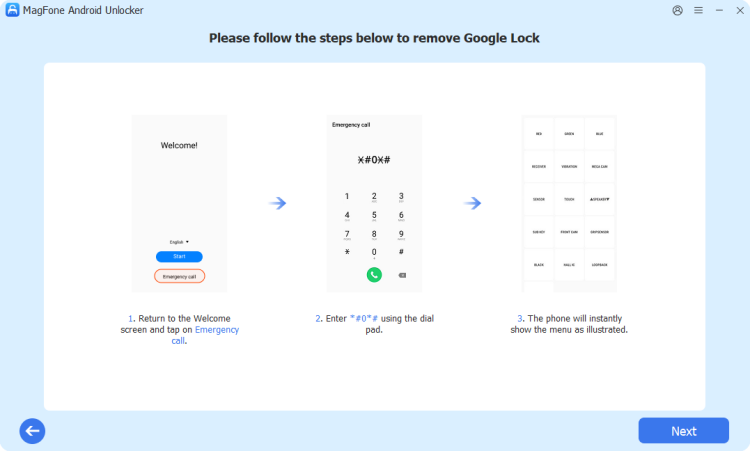
Proceed with the onscreen instructions on your device, then go back to click the Next button. In the removal process, tap Allow on your device to enable USB debugging.
Part 7. Conclusion
vnROM FRP Bypass provides a free and straightforward solution for bypassing Google account verification on Android devices, especially older ones. However, newer Android versions may block this method. If you want to remove FRP lock on an Android device running the latest Android version, consider MagFone Android Unlocker, an ideal alternative to vnROM FRP Bypass that delivers a more robust and professional unlocking solution. Have a try now!

Dylan Jones
Editor in chief





