








Locked out of an Android phone after a factory reset, forgotten Google account, or stubborn FRP screen? Mobile repair technicians and everyday users alike constantly run into this wall. That's exactly the gap UnlockTool was built to fill. Whether you're hunting for the UnlockTool download or simply comparing options, this guide covers everything you need to know about UnlockTool and how to use it to bypass the FRP lock.
- Part 1. UnlockTool Full Reviews in 2026
- Part 2. UnlockTool Latest Version Download
- Part 3. UnlockTool Latest Version FRP Bypass
- Part 4. UnlockTool Best Alternative FRP Unlocker
- Part 5. Conclusion
Part 1. UnlockTool Full Reviews in 2026
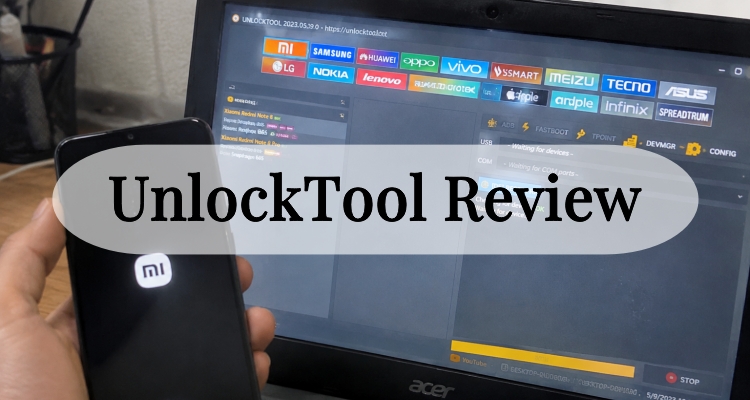
What is the UnlockTool? In short, it's a Windows-based servicing application built for GSM technicians and repair shops that need to unlock, flash, reset, or repair Android and iOS devices.
01Features of UnlockTool
It handles tasks like FRP (Factory Reset Protection) removal, bootloader unlocking, firmware flashing, MDM/iCloud bypass on supported Apple devices, and Mi Cloud resets, all from a single interface that talks directly to Qualcomm, MediaTek, and Spreadtrum (UniSOC) chipsets.
02Benefits of UnlockTool
UnlockTool has built a loyal following among repair professionals for good reason. Below are the standout advantages that keep technicians coming back to this software rather than juggling several separate tools for different brands and chipsets.

1. Wide Brand Coverage
UnlockTool works across a huge range of manufacturers in one program, including Samsung, Xiaomi, Huawei, OPPO, Vivo, Realme, OnePlus, Motorola, Tecno, Infinix, and several smaller brands, so technicians rarely need a second application on the bench.
2. Frequent Updates
The developers push out new builds almost every few weeks, adding support for newly released chipsets and handset models, which means the tool tends to stay current with the latest flagship and budget releases.
3. All-in-One Functionality
Beyond basic unlocking, the software bundles firmware flashing, factory reset, backup and restore, and account-service operations, cutting down the number of separate utilities a shop has to own and license.
4. Credit-Free Operation
Model Unlike some competing tools that charge per operation through a credit system, UnlockTool runs on a flat-rate subscription.
5. Active Community Support
A large base of GSM forums, Telegram groups, and YouTube tutorials surrounds the tool, making troubleshooting and learning curve issues easier to work through than with more niche software.
03Limitations of UnlockTool
No servicing tool is perfect, and UnlockTool has a handful of drawbacks worth knowing before you commit money or time to it. Here's an honest look at where it tends to fall short for some users.

1. Not Genuinely Free
Despite "unlocktool free" being a common search term, the installer itself is free, but real functionality is locked behind a paid activation plan, so casual users hoping for a no-cost solution will be disappointed.
2. Windows-Only Software
The program only runs natively on Windows PCs, leaving Mac and Linux users unable to use it without running a virtual machine or dual-boot setup.
3. Technical Learning Curve
Because it's aimed at professional technicians, the interface assumes familiarity with driver installation, bootloader modes, and chipset terminology, which can overwhelm first-time or non-technical users.
4. Risk of Bricking
Incorrect flashing or interrupted operations, especially on MediaTek or Spreadtrum devices, can leave a phone unresponsive, so a degree of caution and backup discipline is required.
5. Driver and Antivirus Conflicts
Some users report that Windows Defender or third-party antivirus software flags UnlockTool components, requiring temporary exceptions that not every user is comfortable granting.
04Compatibility of UnlockTool
UnlockTool is designed primarily for Windows 7, 8, 10, and 11, running on both 32-bit and 64-bit systems, and it needs a reasonably modern PC with USB drivers properly installed to detect handsets.
On the device side, it supports Android phones and tablets built around Qualcomm Snapdragon, MediaTek, and Spreadtrum/UniSOC chipsets from brands such as Samsung, Xiaomi, Redmi, POCO, Huawei, Honor, OPPO, Realme, Vivo, OnePlus, Motorola, Tecno, Infinix, ZTE, Nokia, LG, Asus, and several regional brands like AGM and Ulefone.
It also offers limited support for iOS servicing tasks such as activation lock troubleshooting and ramdisk-based operations on select iPhone and iPad models, though Apple support tends to lag behind the Android side in terms of coverage.
05Price Plan of UnlockTool
UnlockTool is not a free product; the setup file itself can be downloaded at no charge, but actually using its unlocking and flashing features requires an activation subscription. The developers offer three standard billing cycles, letting you choose a plan that matches how often you expect to use the tool.
| License | Unlock Tool 3 Months | Unlock Tool 6 Months | Unlock Tool 12 Months |
|---|---|---|---|
| Price | $20 | $30 | $50 |
Part 2. UnlockTool Latest Version Download
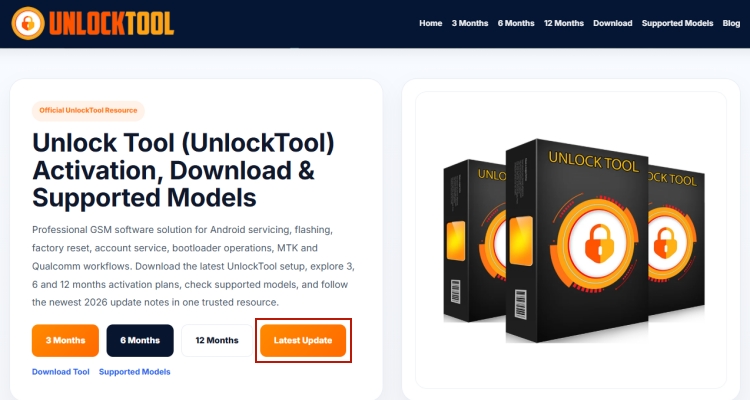
You can download UnlockTool from its official website by selecting the Latest Update button. This section provides access to the newest release version, including the latest software details and available download sources. If you need an older release, you can also check the previous versions listed here and choose the suitable download option based on your requirements.
Part 3. UnlockTool Latest Version FRP Bypass
Once installed, using UnlockTool for an FRP bypass follows a fairly consistent workflow across supported Android brands, though exact button labels can shift slightly between chipset types. Below is a general step-by-step walkthrough for performing an FRP removal.
Step 1. Launch UnlockTool and log in with your activated account credentials.
Step 2. Connect the target Android device to the PC using a reliable USB cable, and put the phone into the required mode (such as EDL, Download mode, or ADB debugging) as indicated for its chipset.
Step 3. Select the correct brand tab in the software, for example Samsung, Xiaomi, or MediaTek, matching the device you're servicing.
Step 4. From the model or chipset dropdown, choose the exact device variant to ensure the correct loader or firmware profile is used.
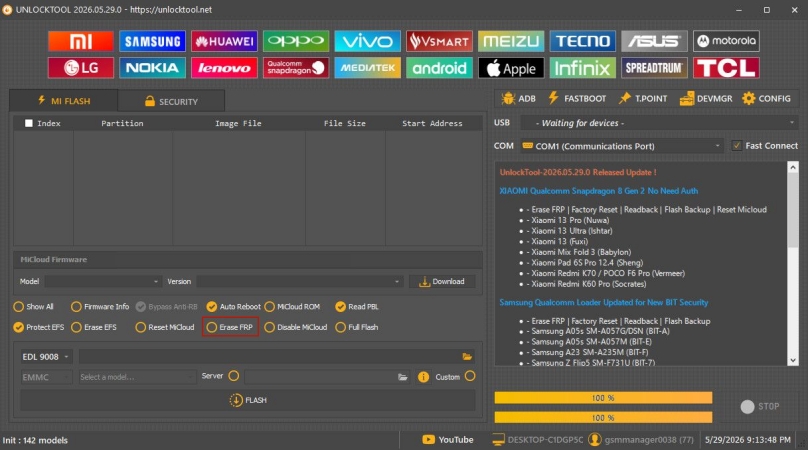
Step 5. Click the "Erase FRP" operation button and wait for the software to detect the connected device.
Step 6. Reboot the device once prompted and verify that the Google account lock screen has been cleared.
Part 4. UnlockTool Best Alternative FRP Unlocker
If you'd rather skip the chipset-level complexity that UnlockTool demands, a more streamlined option worth considering is MagFone Android Unlocker. Built specifically for everyday Android users rather than repair professionals, it focuses on getting past screen locks and Google FRP restrictions through a guided, beginner-friendly process, without requiring driver expertise. Here's how to use MagFone program for FRP bypass.

MagFone Android Unlocker
Remove multiple kinds of screen locks on over 5000 Android devices and delete Google FRP lock without a password.
Step 1 Link Your Phone to MagFone
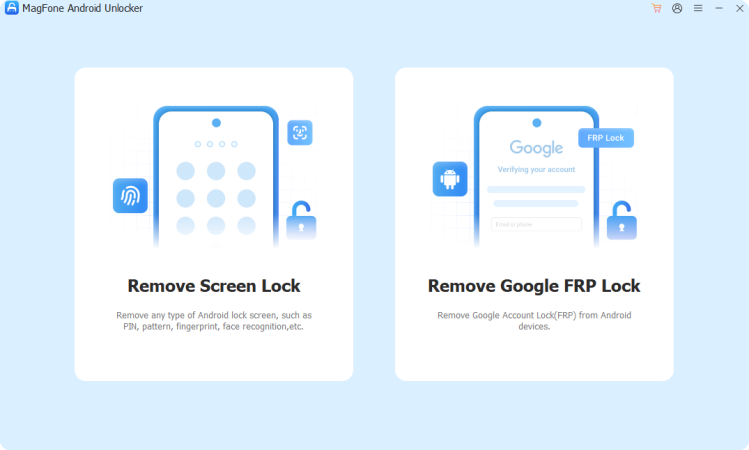
Install MagFone Android Unlocker on your computer, launch it, and pick the Remove FRP Lock option from the main menu. Plug your Android device into the computer with a USB cable.
Step 2 Let the Program Identify Device
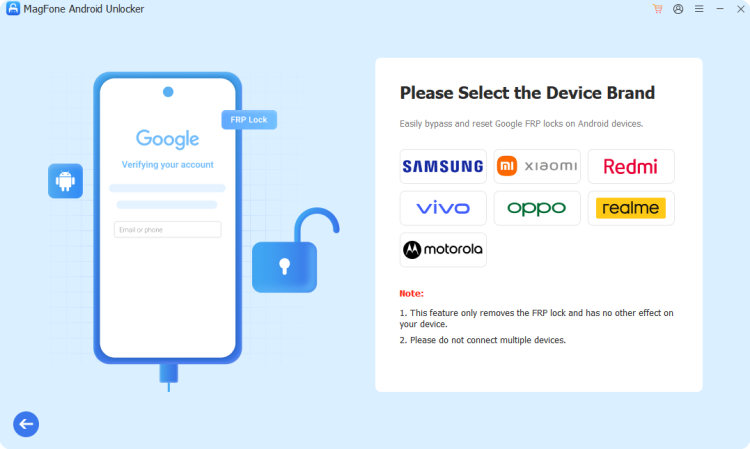
Give MagFone a moment to recognize your phone automatically. If detection doesn't happen on its own, manually pick your phone's brand from the list, then set the version option to All Android Versions.
Step 3 Clear the Google FRP Lock
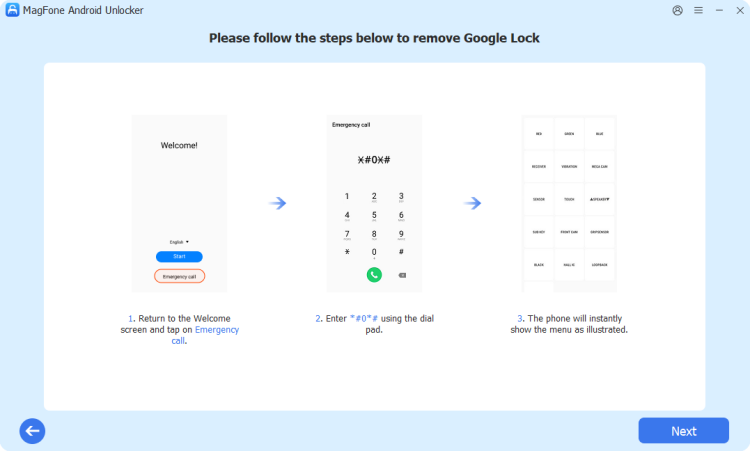
Follow the prompts that appear on your phone's screen, then return to the app and hit Next to continue. When asked during the process, tap Allow on the device itself so USB debugging can be enabled.
Part 5. Conclusion
UnlockTool remains one of the most capable all-in-one GSM servicing tools for 2026, offering broad brand coverage, frequent updates, and flexible subscription plans for professional technicians. It does come with a learning curve and isn't truly free. Casual users seeking a simpler FRP removal experience may find a consumer-focused alternative like MagFone Android Unlocker a more comfortable fit.

Dylan Jones
Editor in chief




