








Searching for a reliable way to unlock, repair, or flash Android phones often leads users to Chimera Tool. But is the subscription fee worth it, and is using a cracked version really safe? This guide explores Chimera Tool's features, pricing, user experiences, and potential risks. It also introduces a smoother FRP bypass alternative that offers a more convenient solution for you. Let's dive into more details now.
- Part 1. Chimera Tool: What Is It?
- Part 2. Chimera Tool: Is It Legit?
- Part 3. UnlockTool Latest Version FRP Bypass
- Part 4. Best Alternative to Chimera Tool FRP Bypass
- Part 5. Conclusion
Part 1. Chimera Tool: What Is It?
As a Windows-based servicing program, Chimera Tool provides Android technicians and enthusiasts with tools to unlock, restore, and reflash mobile devices. It bundles a wide range of diagnostic and repair utilities into a single desktop application, aiming to reduce the time it takes to fix common device problems.
01Chimera Tool Features
The software packs in a long list of repair and unlocking utilities meant to cover most of the everyday headaches technicians run into. Below are some of the standout tools bundled into the package:
- Firmware Flashing: Update or reinstall firmware to fix software issues.
- Carrier Unlocking: Unlock carrier restrictions for flexible SIM card compatibility.
- FRP Removal: Clear Factory Reset Protection blocking access after a reset.
- IMEI Repair: Restore or correct a device's IMEI number.
- Bootloader Management: Unlock or relock the bootloader for deeper access.
- Device Diagnostics: Pull hardware and software details for troubleshooting.
02Chimera Tool Price
Chimera Tool isn't a free application. Getting access to its full toolkit requires an annual license, and there are three tiers to pick from: the Basic plan at $99.9/year, the Professional plan at $149.9/year, and the Premium plan at $189.9/year, each unlocking a wider set of supported operations.
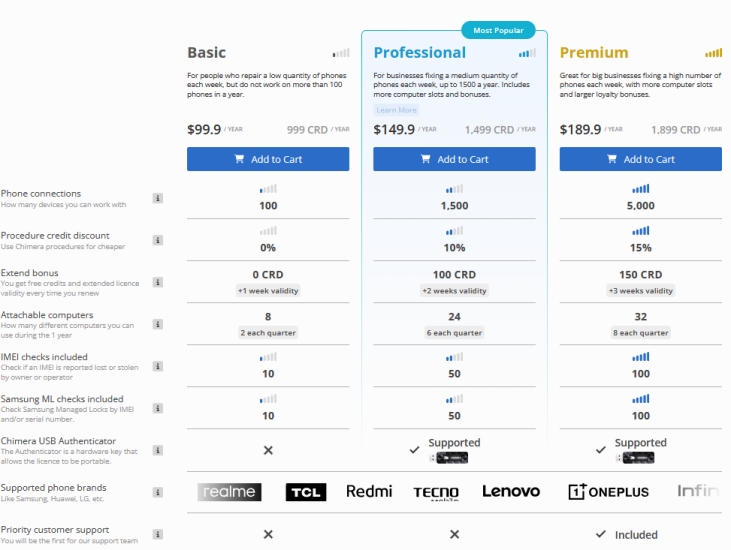
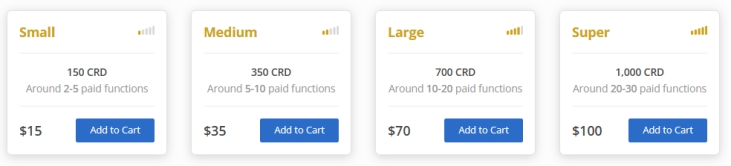
However, even after paying for one of these plans, the license doesn't necessarily cover everything. Some advanced features require extra credits beyond the subscription for specialized tasks.
03Chimera Tool Crack
Given the recurring cost, it's no surprise some users go looking for a cracked or pirated version instead of paying for a license. A crack seems tempting when budgets are tight or when someone only needs the software for a single repair job. However, cracked installers are a common vector for malware, spyware, and corrupted files, and they typically lose access to updates that keep the tool compatible with newer devices.
Part 2. Chimera Tool: Is It Legit?
Deciding whether any repair tool deserves your money usually comes down to what actual customers experience after buying it. Rather than take marketing claims at face value, it helps to look at independent reviews. Next, we explore feedback from actual users while discussing the platform's main benefits and drawbacks.
01User Feedback of Chimera Tool
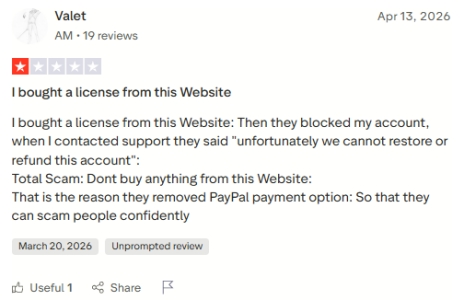
On Trustpilot, the sentiment toward Chimera Tool skews largely negative. A recurring complaint involves paying customers getting their accounts suspended or flagged simply for logging in on a second device, with the system mistakenly treating it as an attempt to share or rent out a single license. Adding to the frustration, several reviewers note that support staff refuses to issue refunds even when the software fails to work as promised.
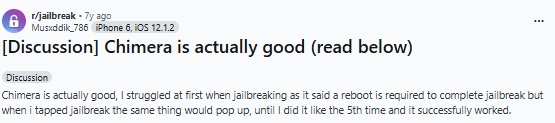
The picture looks different in jailbreak-focused communities. A Reddit thread describes one user's switch away from unc0ver toward the Chimera jailbreak, and the poster came away impressed. They singled out how snappy and stable the jailbreak felt day-to-day, noted improved battery performance, and appreciated the extras that came bundled with Sileo.
02Pros and Cons of Chimera Tool
No tool is perfect, and Chimera Tool is no exception. Weighing its strengths against its weaknesses can help you decide if it fits your specific repair or unlocking needs before committing to a plan.
 Pros
Pros- Regularly updated software
- Strong option for jailbreaking
- Broad device compatibility
- Deep feature set overall

- Risk of account suspension
- Windows-only, no macOS
- Extra paid add-ons needed
- Steep cost for casual users
Part 3. How to Download and Use Chimera Tool
Getting Chimera Tool running on your PC is a fairly quick process once you know where to look. Here, we'll go through the installer download process, setup instructions, and the steps for using the tool's FRP bypass function.
01Chimera Tool Latest Version Download
Chimera Tool runs on Windows 10 and Windows 11 in both 32-bit and 64-bit builds. It also supports a wide range of languages, including English, Spanish, French, Hungarian, Turkish, Arabic, Russian, Portuguese, and Chinese, making it accessible to technicians across different regions.
Step 1. Visit the official Chimera Tool website and locate the download section.
Step 2. Download the installer file and save it to a folder on your computer.
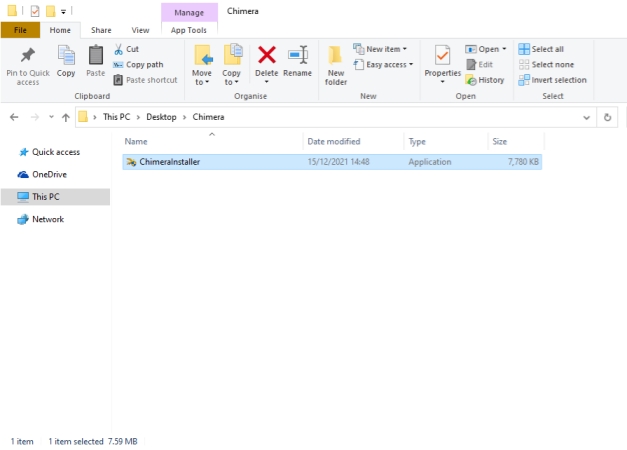
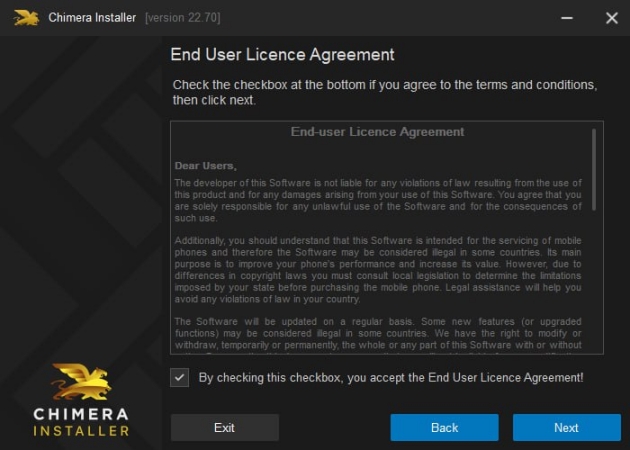
Step 3. Launch the installer and approve the software license agreement.
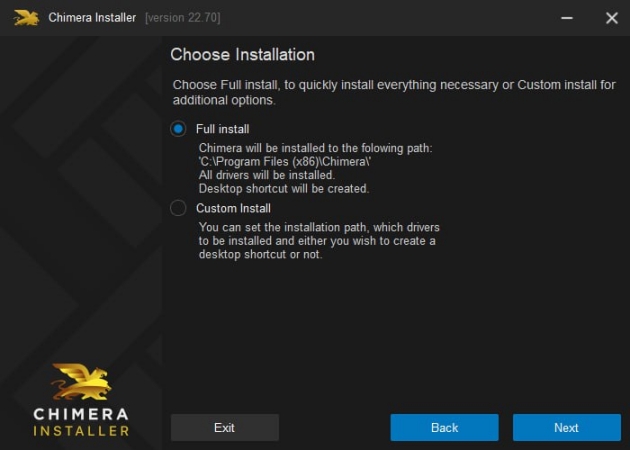
Step 4. Select either the Full or Custom installation option to ensure all necessary drivers are installed.
Step 5. Launch the program and sign in with your account credentials to begin.
02Chimera Tool FRP Bypass Guide
Beyond flashing and unlocking, one of the most frequently used functions is clearing a Factory Reset Protection lock. Here's a general walkthrough for using Chimera Tool to remove FRP from an Android device.
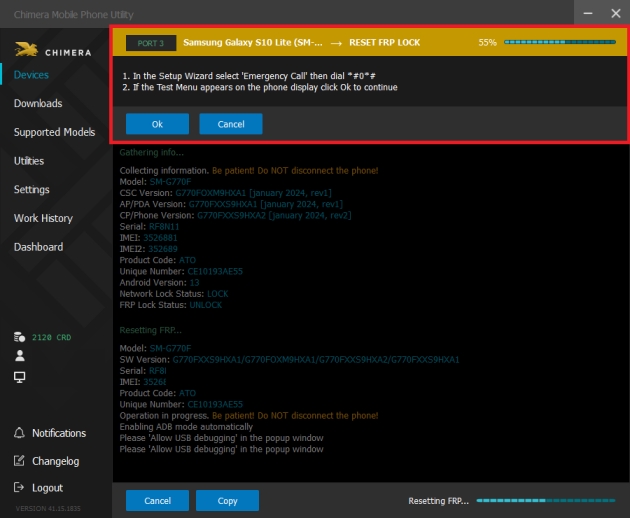
Step 1. Check whether the device has an active Factory Reset Protection (FRP) lock. If a factory reset can be performed, complete the reset process. If the reset fails, reflash the device before proceeding.
Step 2. Upon completion of the reset or flashing process, the phone will restart and bring up the Setup Wizard.
Step 3. Connect the phone to Chimera Tool and select the correct device model.
Step 4. Start the FRP removal process by choosing the Reset FRP Lock option.
Step 5. During the operation, Chimera Tool may pause and require manual interaction on the phone.
Step 6. From the Setup Wizard, tap the Emergency Call button.
Step 7. Input the service code #0# on the device to proceed.
Step 8. Return to Chimera Tool and click OK to continue the process.
Step 9. On the phone screen, accept the prompt by selecting Allow USB debugging.
Step 10. The Reset FRP Lock process will resume and complete automatically. After completion, the device will reboot without the FRP lock.
Part 4. Best Alternative to Chimera Tool FRP Bypass
If the pricing structure or Windows-only limitation of Chimera Tool doesn't suit you, MagFone Android Unlocker is a solid substitute built specifically for FRP removal. It works on both Windows and Mac and supports a wide variety of Android brands, so you're not locked into one ecosystem. Its guided process means you can clear an FRP lock from your phone in just a handful of steps. Here's how to.

MagFone Android Unlocker
Remove multiple kinds of screen locks on over 5000 Android devices and delete Google FRP lock without a password.
Step 1 Plug in Phone and Run MagFone
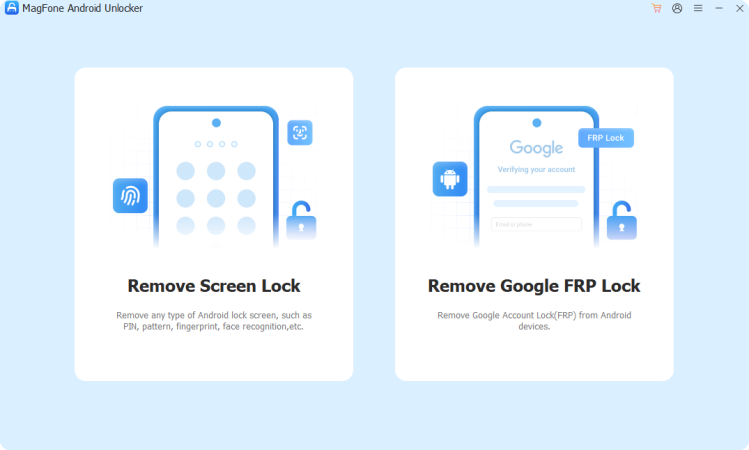
Use a USB cable to connect both the phone and PC. After launching MagFone Android Unlocker, choose the FRP bypass feature from the main interface.
Step 2 Confirm Your Device Details
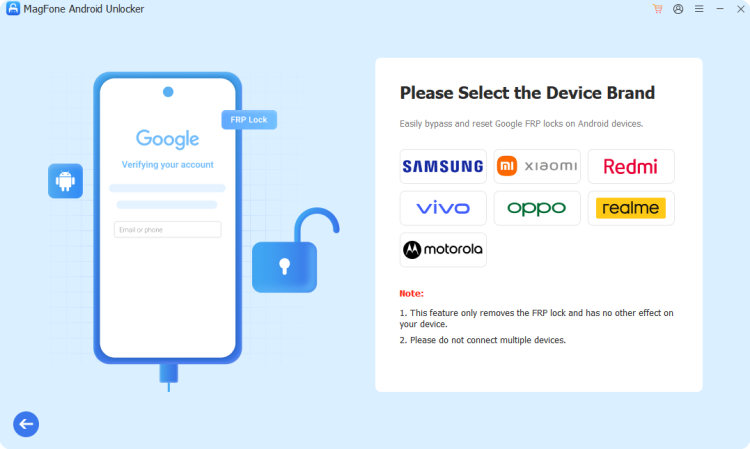
The program can automatically identify your phone, or you can manually select your brand from the list. Choose the matching Android version, then hit Start to move forward, confirming the next prompt when it appears.
Step 3 Complete the FRP Removal
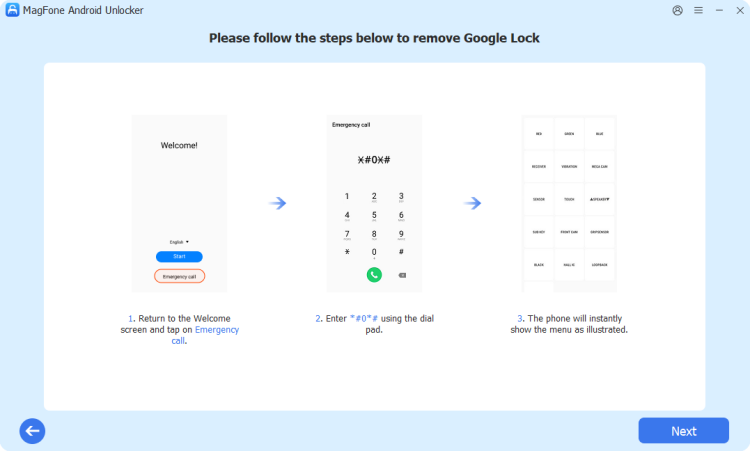
Follow the on-screen guidance carefully to complete the required actions on your phone. MagFone will then process the bypass, and you can click Done once it finishes.
Part 5. Conclusion
Chimera Tool offers a genuinely powerful set of repair and unlocking features, but its recurring cost, Windows-only support, and mixed user reviews are worth weighing carefully. For anyone who just needs a straightforward, cross-platform way to clear an FRP lock, MagFone Android Unlocker offers a simpler, more accessible path to the same result.ss

Dylan Jones
Editor in chief





