









Are WhatsApp's default features too limited to meet your needs? If you're looking for a modified version of WhatsApp, WhatsApp Plus may have caught your attention. But what exactly is it, and is it safe to use? In this guide, we'll explain what WhatsApp Plus is, explain its main features, and show you how to download and install it.

- Part 1. What Is WhatsApp Plus?
- Part 2. Why Do Users Use WhatsApp Plus Despite Risks?
- Part 3. How to Download and Install WhatsApp Plus
- Part 4. How to Back up Chats on WhatsApp Plus
- Part 5. Conclusion
Part 1. What Is WhatsApp Plus?
WhatsApp Plus is a modified version of the official WhatsApp messenger, developed by independent third-party developers rather than Meta. This unofficial app is built on WhatsApp's original code but includes numerous additional features and customization options that aren't available in the official WhatsApp application.
Main Features of WhatsApp Plus
The most attractive aspect of WhatsApp Plus is its features. WhatsApp Plus offers more convenient and advanced features that meet users' needs. We can collect WhatsApp Plus's features as follows:
Display Features:
- Adjust home screen UI and style
- Change WhatsApp theme directly from the landing page.
- Different themes for download, load, save, and restore
- Set universal colors for action bar text, chat background, list background, status bar, and navigation bar
- Set font style, emoji variant, launcher icon, and notification icon
- Adjust chat bubbles style
Display Features:
- Adjust home screen UI and style
- Change WhatsApp theme directly from the landing page.
- Different themes for download, load, save, and restore
- Set universal colors for action bar text, chat background, list background, status bar, and navigation bar
- Set font style, emoji variant, launcher icon, and notification icon
- Adjust chat bubbles style
Messages Features:
- Schedule WhatsApp messages
- Set auto reply
- Send mass messages to contacts
Privacy Features:
- Hide online status and freeze last seen status
- Hide message status, including hiding the blue ticks, second tick, blue microphone, typing, and recording
- Set who can call you
- Disable messages forwarded
- Anti-delete messages (others can't delete the message for you)
- Hide the status view and the anti-delete status
Security Features:
- Set WhatsApp lock, fingerprint, pattern, or PIN
- Set recovery question
- Change lock/pattern wallpaper
- Make the pattern invisible
- Disable pattern vibration
Confused Questions about WhatsApp Plus
Before deciding to download WhatsApp Plus, we will address a few questions you are curious about:
Is WhatsApp Plus safe?
Not completely. We cannot claim that a modified and unofficial app is safe. Using an unauthorized app on an unsupported device is a breach of WhatsApp's terms and may result in your WhatsApp account being blocked.
Is WhatsApp Plus banned?
No, WhatsApp Plus is neither banned nor authorized by WhatsApp's official. But using WhatsApp Plus violates WhatsApp's Terms of Service, and Meta actively bans users who are detected using it.
Is WhatsApp Plus still working?
Yes, WhatsApp Plus still works, and you can still use it. But according to the information we collect from the internet, WhatsApp Plus hasn't been updated for a long time, and there is no claimed latest version of WhatsApp Plus.
Is WhatsApp Plus free to use?
Yes, WhatsApp Plus is free to use. But the process to download and install it may take time.
Part 2. Why Do Users Use WhatsApp Plus Despite Risks?
Although WhatsApp Plus offers a range of appealing extra features, it is important to understand that this modified app also comes with notable risks, such as possible account bans, security issues, and privacy concerns.
So why do some users still choose it? The answer lies in the significant feature gap between what users want and what official WhatsApp offers. In this part, we'll look at how WhatsApp Plus differs from the official WhatsApp app and explore why some people continue to use it despite the risks.
| Comparison | WhatsApp Plus App | WhatsApp Official |
|---|---|---|
| Customization | Extensive themes, fonts, colors, and styles | Limited color and theme changes |
| Privacy Options | Provide more specific options and extra controls | Limited privacy options |
| Media Sharing | Larger media size and number | Limited media size and number |
| Best For | Users who want more customization | Users who prioritize safety, stability, and official support |
Now, WhatsApp is gradually rolling out Plus subscription plans for users. By upgrading to a WhatsApp Plus subscription, users can unlock a range of extra features, including:
- Set unique WhatsApp themes & app icons
- Pin up to 20 chats (Only 3 in standard WhatsApp)
- Send a premium sticker with animation
- 10 exclusive ringtones
For users who want enhanced features safely, a WhatsApp Plus subscription may be a good choice.
Part 3. How to Download and Install WhatsApp Plus
Unlike the official WhatsApp that you download from Google Play Store or Apple App Store, WhatsApp Plus is distributed as an APK file and must be installed manually on devices.
To use WhatsApp Plus on your device, you need to uninstall the current official WhatsApp on your device. Before switching from WhatsApp to WhatsApp Plus, it's important to back up your WhatsApp first. Backing up WhatsApp to iCloud, Google Drive, or to a computer using tools like MagFone WhatsApp Transfer allows you to reinstall WhatsApp without data loss afterwards.
How to Download WhatsApp Plus for Android
For Android users, downloading WhatsApp Plus is quite easy. You can directly download the WhatsApp Plus APK from a supported website and install it manually on your phone. Here are a few available WhatsApp Plus Download websites:
- https://www.malavida.com/en/soft/whatsappplusplus/iphone/
- https://whatsapp-plus.en.softmany.com/android/download
- https://gbproapp.com/whatsapp-plus-download/
How to Download WhatsApp Plus for iOS
For iPhone users, it's quite complicated to download and install WhatsApp Plus. Because WhatsApp Plus is not officially supported and verified by Apple, you can't download and install it on your iPhone directly from the App Store. To do this, you can jailbreak your iPhone or use a third-party store.
Method 1. Download and Install WhatsApp Plus by Jailbreaking
By jailbreaking your iPhone, you can bypass iOS restrictions and install third-party apps outside the App Store. Before jailbreaking, you need to be aware of the risks and back up your iPhone if necessary.
Step 1. Choose a jailbreaking tool to jailbreak your device. You can find a specific solution for your device on this page: https://ios.cfw.guide/.
Step 2. After jailbreaking, download a package manager on your device to download modified versions of software for your jailbroken device. You can download common package managers like Sileo or Cydia.
Step 3. Open the package manager after installation, and search for WhatsApp Plus in the manager. Then follow the app instructions to download and install WhatsApp Plus on your device.
Method 2. Download and Install WhatsApp Plus from a Third-Party Store
If you don't want to jailbreak your iPhone, there are some sideloading tools, like AltStore can help you download and install apps on your iPhone beyond iOS restrictions.
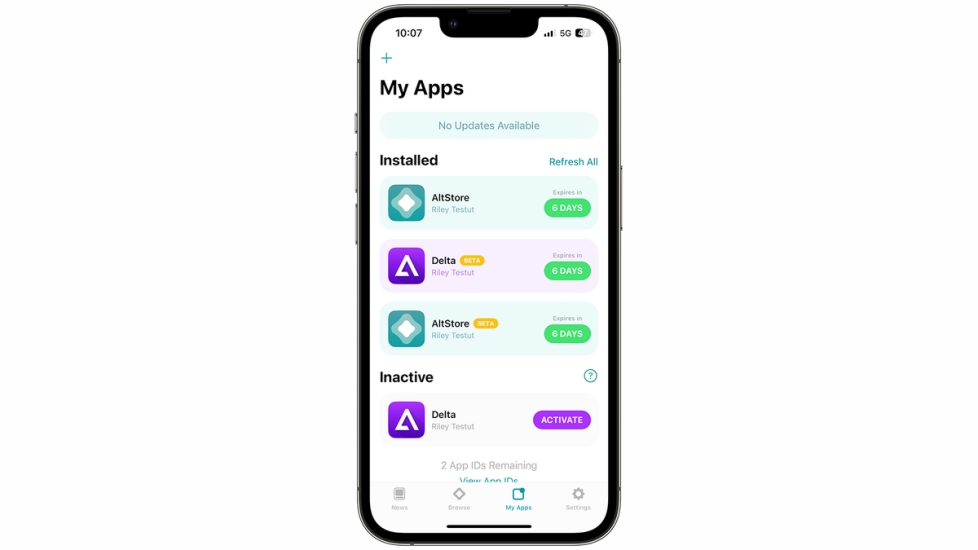
Step 1. Install AltStore on your device and download the WhatsApp Plus IPA on your device.
Step 2. Open AltStore and tap My Apps. Then tap the plus icon and choose the downloaded IPA file from your iPhone. Then follow the onscreen instructions to download and install WhatsApp Plus on your device.
How to Download WhatsApp Plus for PC
If you want to use WhatsApp Plus on your computer, it's also possible. While there is no official desktop version, there are still ways to use it on a PC with the help of additional tools such as an Android emulator.
Step 1. Choose an Android emulator to download and install on your computer.
Step 2. Download the WhatsApp Plus APK from an available website.
Step 3. Install the downloaded APK via the Android emulator.
Part 4. How to Back up Chats on WhatsApp Plus
After downloading and installing WhatsApp Plus to use on your device, you may be curious whether you can also back up your chat just like on WhatsApp official. WhatsApp Plus supports data backup as well. Just follow the steps below:
Step 1. Open WhatsApp Plus and tap the triple-dot icon.
Step 2. Tap Settings > Plus Settings > Universal.
Step 3. Tap Backup and restore > Backup WhatsApp data to back up your WhatsApp Plus chats.
Part 5. Conclusion
Overall, WhatsApp Plus appeals to users who want more customization, extra privacy options, and features not available in the official WhatsApp app. However, because it is an unofficial modified version, it also comes with potential risks, like security concerns and possible account bans. Before downloading or using it, you should think carefully. If you decide to try WhatsApp Plus, it is also necessary to back up your chats with MagFone WhatsApp Transfer in advance to reduce the risk of data loss.

Olivia Wood
Editor in chief





