








Deleting messages on Kik can be really stressful. While Kik itself doesn't offer a built-in way to restore deleted messages, there are a few effective methods you can try, whether you use an iPhone or an Android device. In this guide, we'll walk you through 4 feasible methods to recover deleted Kik messages.

- Part 1. Can You Recover Deleted Kik Messages?
- Part 2. How to Recover Deleted Kik Messages on iPhone
- Part 3. How to Restore Deleted Kik Messages on Android
- Part 4. FAQs about Deleted Kik Messages
- Part 5. Conclusion
Part 1. Can You Recover Deleted Kik Messages?
Once you delete Kik messages, you cannot cancel the operation. But fortunately, you can still recover deleted Kik messages with some proven methods, including restoring Kik data from a backup or using a data recovery tool. Whether you are using an iPhone or an Android device, we will introduce methods for each in the following part. Just go ahead.
Part 2. How to Recover Deleted Kik Messages on iPhone
Because Kik doesn't store your chat on its servers long term, once the messages are deleted from the app, the only possible way to get deleted Kik messages back is to recover them from somewhere you previously saved your iPhone data, such as an iCloud backup or iTunes backup, or to scan your device for traces that haven't been overwritten. Below are three methods iPhone users can try.
Method 1. Get Deleted Kik Messages from iCloud Backup
If you have enabled iCloud Backup, then you may be able to recover deleted Kik messages from the iCloud backup. Since iCloud backup contains all apps and data on your iPhone, when you restore your iPhone from an iCloud backup, the deleted Kik messages will also be recovered to your iPhone.
| Works for | There's an iCloud backup that includes deleted Kik messages. |
| Result | Restore the whole device to the backup date. Bring deleted Kik messages but remove data created after that backup |
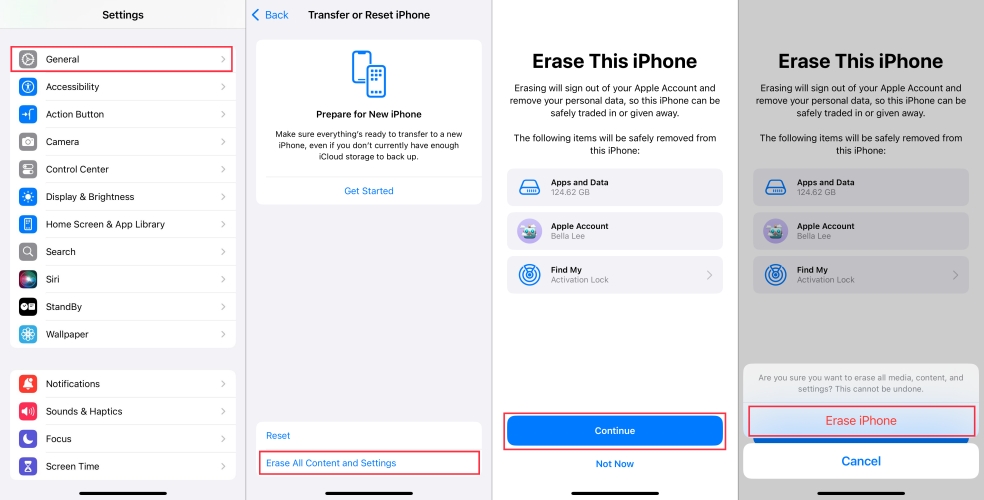
Step 1. Go to iPhone Settings and tap General.
Step 2. Tap Transfer or Reset iPhone at the bottom, then tap Erase All Content and Settings.
Step 3. Tap Continue > Erase iPhone, and enter the required iPhone passcode and Apple ID password to proceed.
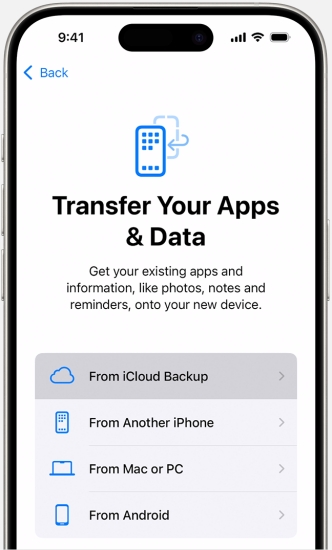
Step 4. Once the iPhone restarts after the erasing, follow the onscreen instructions to set it up. When you see the Transfer Your Apps & Data prompt, choose From iCloud Backup. Then sign in to your iCloud and choose one backup to restore.
Step 5. After all the apps' data has been restored to your iPhone, you can open the Kik to check the deleted messages.
Method 2. Get Deleted Kik Messages from iTunes Backup
If you have backed up your iPhone on a computer using iTunes, you may also be able to recover deleted Kik messages from the iTunes backup.
| Works for | The iTunes backup includes deleted Kik messages. |
| Result | Returns iPhone and Kik to the state of the backup. Recover deleted Kik messages, but overwrite current iPhone data. |
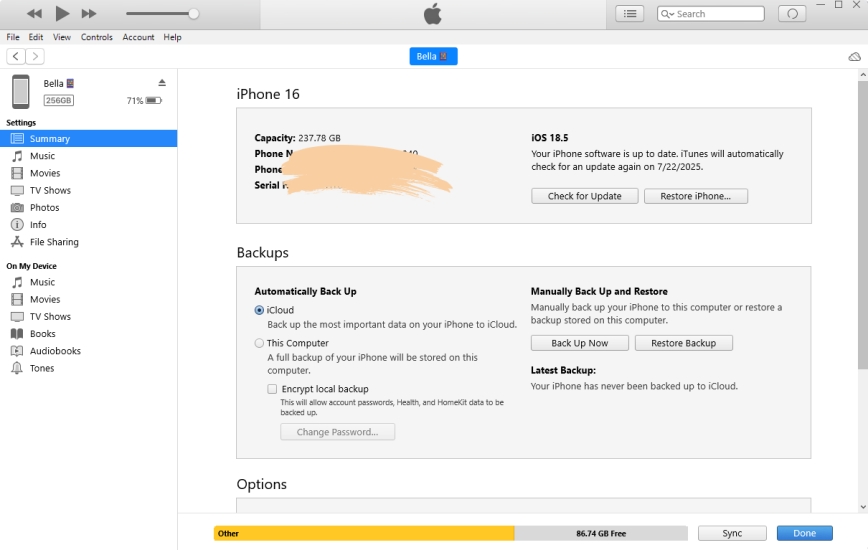
Step 1. Link your iPhone to the computer you used to back up this iPhone.
Step 2. Launch iTunes, and when the iPhone is detected by iTunes, click the device icon.
Step 3. Click Summary, then click Restore Backup and choose one backup to restore to your iPhone.
Method 3. Get Deleted Kik Messages Using MagFone iPhone Data Recovery
Since Kik keeps a limited number of messages on your device, if the Kik messages are out of the iCloud backup or iTunes backup, you can't restore a backup to get deleted Kik messages. Another possible method to get deleted Kik messages is to use a data recovery tool like MagFone Kik Data Recovery. Though Kik messages are no longer displayed on your device, MagFone iPhone Data Recovery can still help you scan Kik data and allow you to selectively restore Kik data. With this data management tool, you can recover both old Kik messages and deleted Kik messages. The operation is quite simple as follows:
| Works for | You don't have a backup. Kik messages are deleted automatically or accidentally. |
| Result | Restore deleted Kik messages without data overwriting. Export deleted Kik messages in a readable format. |

MagFone iPhone Data Recovery
Recover data from iPhone and iPad in three recovery modes without data overwritting and device reset.
Step 1 Run MagFone iPhone Data Recovery
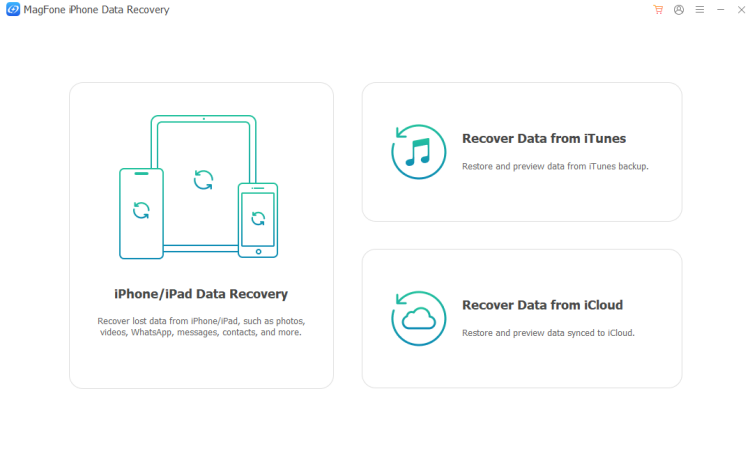
Start by downloading and installing MagFone iPhone Data Recovery on your computer. Then launch the software on your computer.
Step 2 Scan Deleted Kik Messages on iPhone
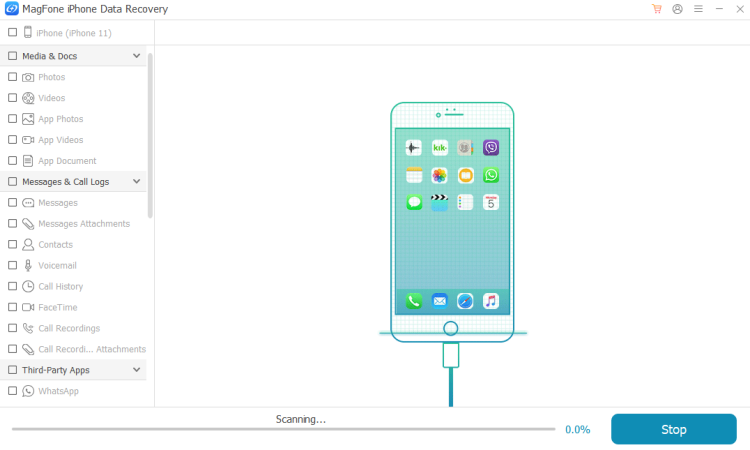
Connect your iPhone to the computer using a data cable, then click iPhone/iPad Data Recovery on the landing page. Select Kik and click Scan to scan Kik data on iPhone.
Step 3 Recover Deleted Kik Messages on iPhone
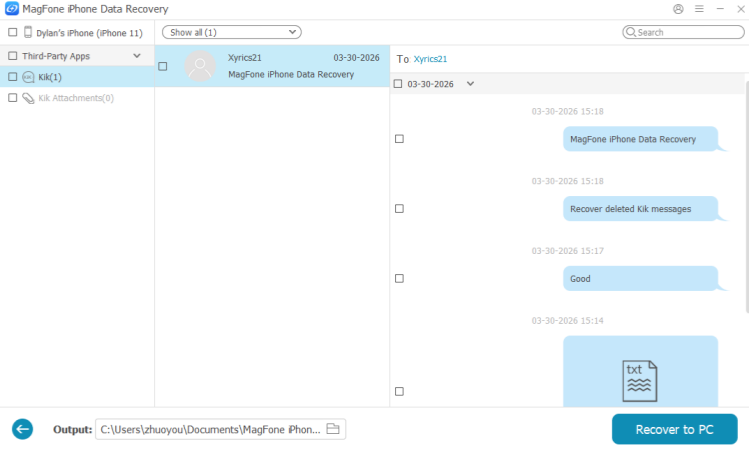
After scanning, check the Kik messages on the computer. You can select and click Recover to PC or Recover to Mac to export them to your computer.
Part 3. How to Restore Deleted Kik Messages on Android
Android phones can also use cloud backup services, such as Google Drive or the phone manufacturer's own backup solution. If you have enabled cloud backup before your Kik messages were deleted, you may be able to restore your phone to an earlier state and get some of those chats back. Keep in mind that this restore will return your Kik to how it was at the time of the backup, which means any newer data that wasn't included in that backup may be lost from the device.
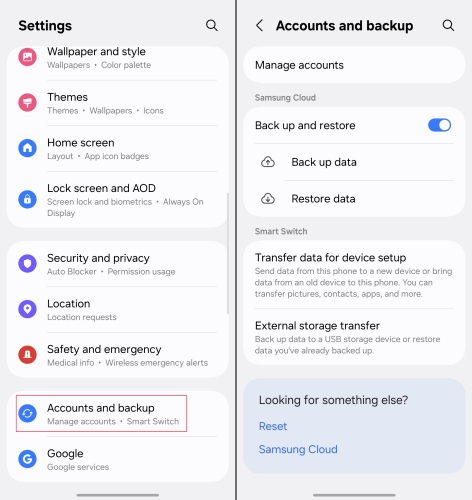
Step 1. Open Settings and tap Accounts and backup.
Step 2. Tap Restore data and choose a backup to restore data from.
Step 3. Tap Apps and mark Kik, then tap Restore to restore the Kik data.
Part 4. FAQs about Deleted Kik Messages
How to delete Kik messages on both ends?
Since Kik messages are stored locally on the individual device, you can only delete Kik messages from your own side, and you can't delete Kik messages on both ends.
Are Kik messages deleted forever?
Once Kik messages are deleted, they are deleted forever from your device. But if you have a backup made before the deletion, there may be a chance to get deleted Kik messages.
Do Kik messages automatically delete?
Yes, Kik messages will be automatically deleted on your device. For iOS users, Kik will only keep the last 1000 messages for recent chats in the past 48 hours and the last 500 messages for older chats. For Android users, Kik will only keep the last 600 messages for recent chats in the past 48 hours and the last 200 messages for older chats.
How to back up Kik messages to avoid data loss?
Kik itself doesn't provide an official service to back up Kik messages. So, if you want to back up Kik messages to avoid data loss, you can use tools like MagFone Kik Transfer, which can help you manage Kik data effortlessly.
Part 5. Conclusion
Kik's messages policy is a little unfriendly to frequent users. And if your messages are accidentally deleted by yourself or deleted by Kik automatically, it's not easy to get them back. Fortunately, it's possible if you have an available backup or use MagFone iPhone Data Recovery. To better protect your Kik chats, using a dedicated tool such as MagFone Kik Transfer to create secure backups and manage your Kik data can greatly reduce the risk of permanent loss.

Edgar Davis
Editor in chief





