








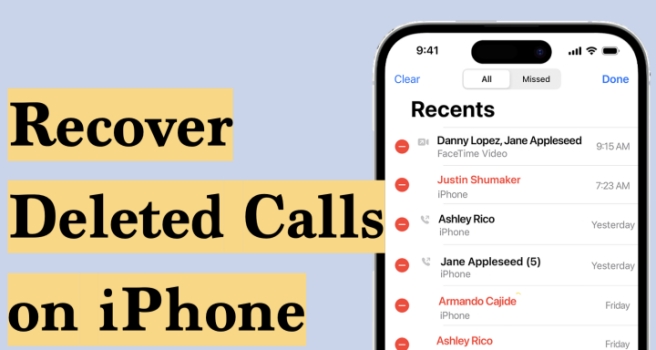
Accidentally deleted your iPhone call history and need it back? Whether it's saved contacts or an unknown number, a received call or missed call, losing call history can feel stressful, especially if you need to call back or make a record. The good news is that recovery is often possible. This guide will walk you through every available method to recover deleted calls on iPhone, from official Apple backup methods to carrier records and third-party tools. Let's start with the most important question.
- Part 1. Can You Recover Deleted Calls on iPhone?
- Part 2. How to Recover Deleted Phone Calls on iPhone
- Part 3. FAQs about Recovering Deleted Calls on iPhone
- Part 4. Conclusion
Part 1. Can You Recover Deleted Calls on iPhone?
Actually, once you delete the call history on an iPhone, it's gone permanently from your iPhone, as there is no recently deleted feature for Phone calls. And you cannot recover deleted calls directly. You need to resort to a previous backup to find deleted call logs or use a data recovery tool to help you get deleted calls on iPhone back, or reach for the carrier's app to find deleted call history.
Part 2. How to Recover Deleted Phone Calls on iPhone
Though phone calls cannot be recovered from a recently deleted folder, you can still restore them from carrier usage recording, a backup, or device cache. Below are four methods to recover deleted calls on iPhone. Check which scenario applies to you before choosing a method.
| Method | Suitable Scenario | Selective Recovery | Uncertainty | Convenience | Recommendation |
|---|---|---|---|---|---|
| Carrier's App | Call usage is accessible in carrier's app | ❌ | Low | ⭐⭐⭐⭐⭐ | ⭐⭐⭐⭐⭐ |
| iCloud Backup | iCloud backup includes deleted calls on iPhone | ❌ | High | ⭐⭐⭐ | ⭐⭐ |
| iTunes Backup | iTunes backup includes deleted calls on iPhone | ❌ | High | ⭐⭐⭐ | ⭐⭐ |
| Data Recovery Tool | All scenarios | ✔️ | Low | ⭐⭐⭐⭐⭐ | ⭐⭐⭐⭐⭐ |
Note:
Before you restore any backup, make sure you have the latest backup so that you can restore the latest backup to your iPhone later.
Method 1. Check Your Carrier's Call Records
🌟 Best For: The call log can be tracked in the carrier’s app, and users who want a full log of deleted calls.
Even when call records are gone from your iPhone, your phone carrier keeps its own records of all cellular calls made through its network. Importantly, carrier records only cover standard cellular calls, not WhatsApp, FaceTime, or other internet-based calls. You can check the details in your carrier's app. Here's how on Verizon:
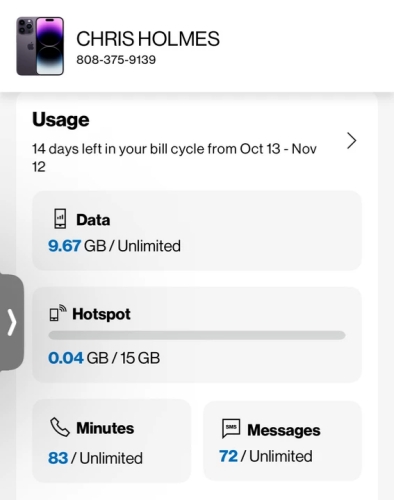
Step 1. Log in to your Verizon account in the Verizon app.
Step 2. Tap Mobile at the bottom, then tap Minutes under the Usage section. You can see your call logs here.
Method 2. Restore Deleted Calls on iPhone from iCloud Backup
🌟 Best For: Users who have iCloud Backup enabled and have a backup created before the calls were deleted.
As long as you have an iCloud backup that was created before you delete the call history, the deleted calls are kept in the iCloud backup. You can restore deleted calls on iPhone from the iCloud backup. But you need to erase your iPhone first, then restore it from the iCloud backup.
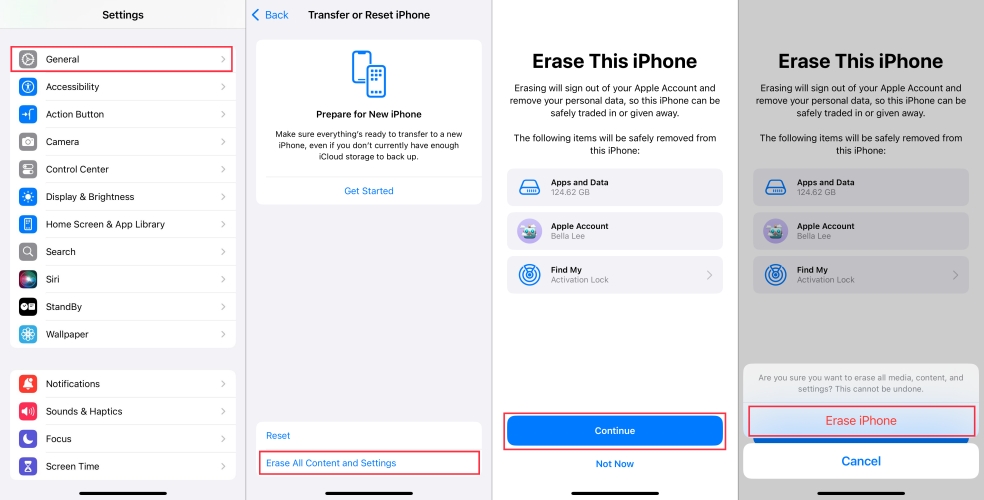
Step 1. Go to iPhone Settings > General > Transfer or Reset iPhone.
Step 2. Choose Erase All Contents and Settings > Continue > Erase iPhone.
Step 3. Input your iPhone passcode and linked Apple ID password to proceed with the erase.
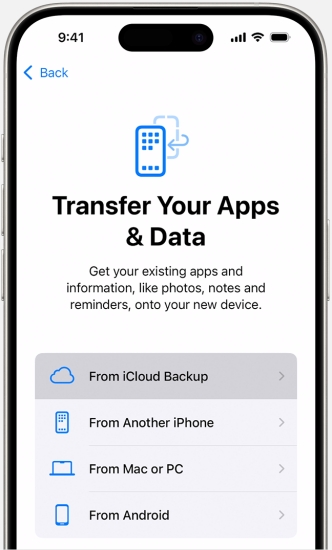
Step 4. After the iPhone data has been wiped, start setting it up. Choose Set Up Manually and follow the onscreen instructions to proceed. When you reach the Transfer Your Apps & Data screen, choose From iCloud Backup.
Step 5. Sign in to your iCloud and choose a previous backup that included the deleted calls to your iPhone. Then finish setting up.
Method 3. Restore Deleted Calls on iPhone from iTunes/Finder Backup
🌟 Best For: Users who have an iTunes or Finder backup that included the deleted calls on iPhone.
Similarly, if you have an iTunes backup that includes the deleted calls, you can also restore the iTunes or Finder backup to your iPhone to get back deleted calls. What matters is that you can figure out if the deleted calls are included in the backup. If you are confirmed about it, follow the steps below to get back deleted calls on iPhone:
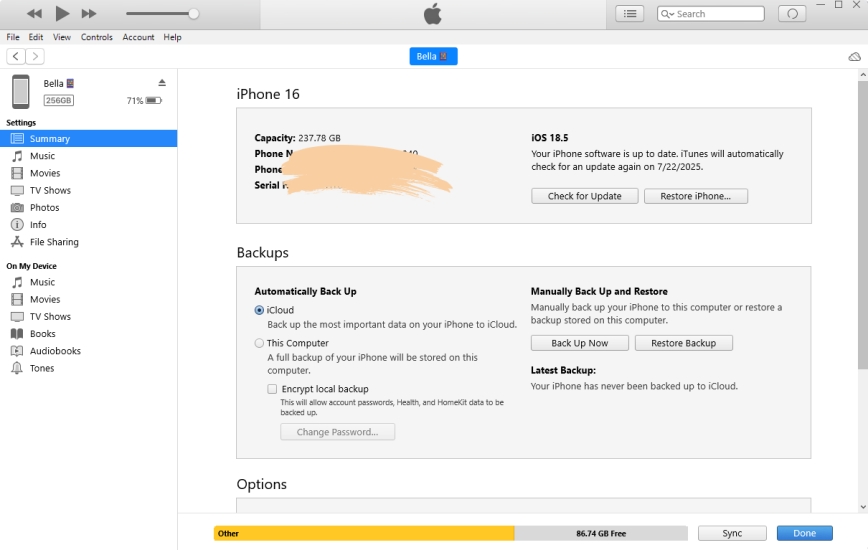
Step 1. Connect your iPhone to the computer you used to back it up.
Step 2. Open iTunes, then click the iPhone icon.
Step 3. Click Summary > Restore Backup, choose the correct backup to restore to your iPhone.
Method 4. Restore Deleted Calls on iPhone Using a Recovery Tool
🌟 Best For: Users who don’t have a backup and want to recover deleted calls on iPhone selectively and transparently.
When no backup exists, specialized third-party data recovery tools can scan your iPhone's internal storage for deleted call data that hasn't yet been overwritten. Tools commonly used for this purpose include MagFone iPhone Data Recovery, which can not only help you preview deleted calls on iPhone, but also allows you to export the call history on iPhone for various purposes. If you want to recover deleted calls on iPhone more flexibly, just follow the steps below:

MagFone iPhone Data Recovery
Recover data from iPhone and iPad in three recovery modes without data overwritting and device reset.
Step 1 Connect the iPhone to Computer
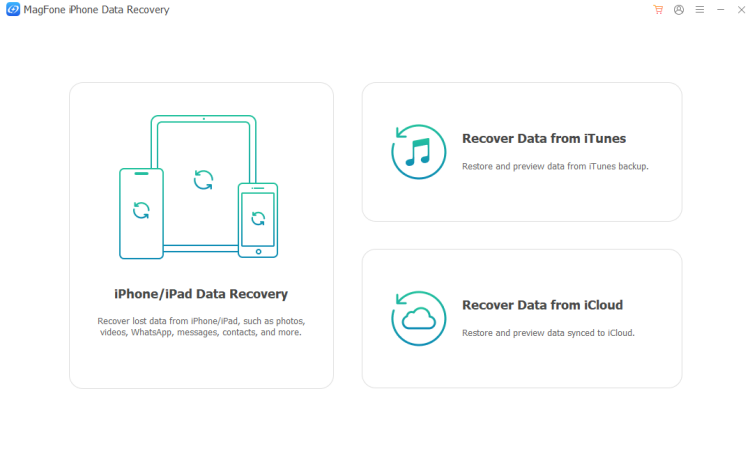
Download and install MagFone iPhone Data Recovery on your computer, then connect your iPhone to the computer using a data cable.
Step 2 Scan Deleted Calls on iPhone
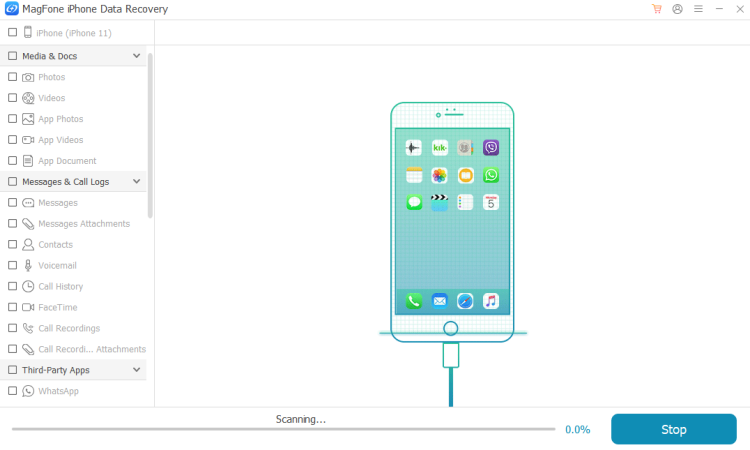
Launch MagFone and choose iPhone/iPad Data Recovery from the main features. Then select Call Logs and click Scan to scan deleted calls on iPhone.
Step 3 Retrieve Deleted Calls on iPhone
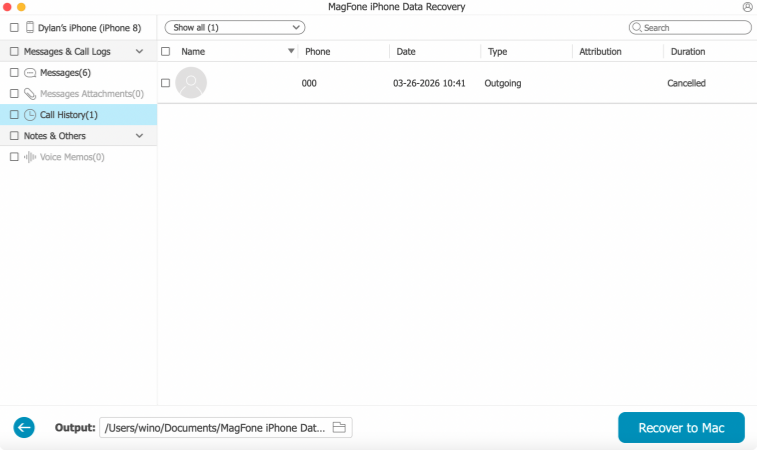
You can view the scanned data once it's completed. Select the deleted calls and click Recover to PC or Recover to Mac to export the deleted call logs to your computer.
Part 3. FAQs about Recovering Deleted Calls on iPhone
How to recover deleted WhatsApp calls on iPhone?
You can recover WhatsApp data, including the deleted WhatsApp calls on iPhone, from a WhatsApp backup on iPhone. Or you can use MagFone iPhone Data Recovery to recover deleted WhatsApp call selectively.
How to recover deleted FaceTime calls on iPhone?
FaceTime calls are similar to Phone calls, so you can also apply iCloud backup, iTunes Backup, or MagFone iPhone Data Recovery to recover deleted FaceTime call history.
How to recover deleted recent calls on iPhone?
If you have a backup, you can restore deleted recent calls on iPhone from an iCloud or iTunes backup. If no backup is available, you can contact your carrier to request call detail records or try a third-party tool like MagFone iPhone Data Recovery as an alternative method.
Part 4. Conclusion
Recovering deleted calls on iPhone is possible in many cases, but the success depends heavily on whether you have a backup or the timing of the deletion. To recover deleted calls in the most effective manner, MagFone iPhone Data Recovery is highly recommended. In addition to data recovery, a backup is always a reliable path to recovering anything you've lost or deleted. We also recommend that you enable iCloud backup and make sure there is sufficient storage in iCloud.

Edgar Davis
Editor in chief





