








When you need to find an important number or check when you last spoke to someone, discovering that you've deleted the call or even emptied your entire call log can be incredibly frustrating. So, how can you recover deleted call history on an iPhone? In this guide, we'll walk you through several practical methods to restore deleted call logs on your iPhone, both without a backup and using iCloud or iTunes backups when available.

- Part 1. Can You Recover Deleted Call History on iPhone?
- Part 2. How to Recover Deleted Call History on iPhone without Backup
- Part 3. How to Recover Deleted Call History on iPhone with Backup
- Part 4. Conclusion
Part 1. Can You Recover Deleted Call History on iPhone?
Unlike the Photos or Notes app on iPhone, there is no recently deleted folder for call history in the Phone app. So once a call log is deleted, it might seem like it's gone forever. In reality, though, your deleted call history may still be recoverable in certain situations. For example, your carrier may keep records of your incoming and outgoing calls for a period of time, and your call logs could also be stored in an iCloud or iTunes backup created before the deletion. In the following section, we will introduce these methods in detail to help you get your deleted call history back.
| Recovery Method | Require Backup | Overwrite Data | Selective Recovery | Operation |
|---|---|---|---|---|
| Contact Carrier | ❌ | ❌ | ❌ | Easy |
| Recovery Tool | ❌ | ❌ | ✔️ | Quite easy |
| iCloud Backup | ✔️ | ✔️ | ❌ | Moderate |
| iTunes Backup | ✔️ | ✔️ | ❌ | Moderate |
Part 2. How to Recover Deleted Call History on iPhone without Backup
When there is no backup, you can contact the carrier or use a data recovery tool to recover deleted call history on iPhone.
Method 1. Contact Your Carrier Service
🌟 Recommendation: ⭐⭐⭐⭐| 🏆 Success Rate: High| ⚠️ Risk: 0%
Your mobile carrier usually keeps a record of your incoming and outgoing calls for billing and account management purposes. Depending on your carrier, you may be able to view some or all of the call history through their official website or mobile app after signing in with your account.
If the information you need isn't available online, you can contact the carrier's customer service or visit a local carrier store. Bring a valid ID that matches the name on the account and the phone number in question, then ask them to provide or print out your recent call history.
Method 2. Use MagFone Call Data Recovery
🌟 Recommendation: ⭐⭐⭐⭐⭐| 🏆 Success Rate: High| ⚠️ Risk: 0%
Unlike photos or notes on an iPhone, deleted call history does not go to a Recently Deleted folder. Once you tap the delete button, those call logs are removed from the Phone app and can't be restored directly from iOS. In this case, you can turn to a professional tool like MagFone iPhone Data Recovery to recover deleted call history on your iPhone. This software scans your device storage, allows you to preview deleted data before restoring, and lets you selectively recover only the items you need. In addition to call history, MagFone can also help you recover other important data, such as lost contacts from your iPhone. Check the simple steps below:

MagFone iPhone Data Recovery
Recover data from iPhone and iPad in three recovery modes without data overwritting and device reset.
Step 1 Install MagFone iPhone Data Recovery
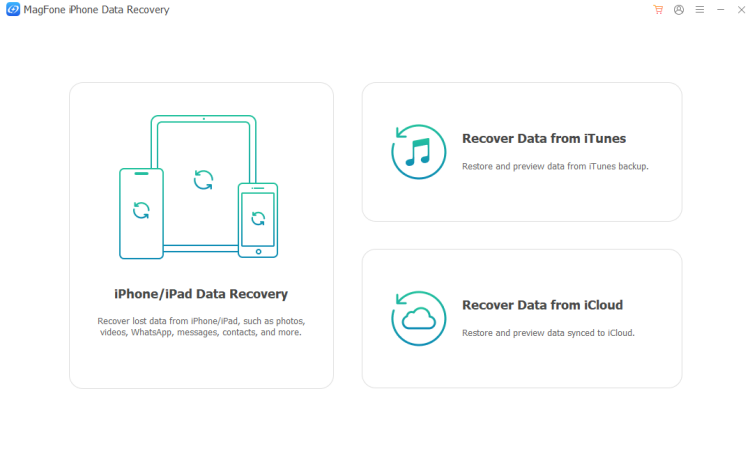
First, download and install MagFone iPhone Data Recovery on your computer. And connect your iPhone to your computer via a data cable. Then launch the tool to start.
Step 2 Scan Deleted Call History on iPhone
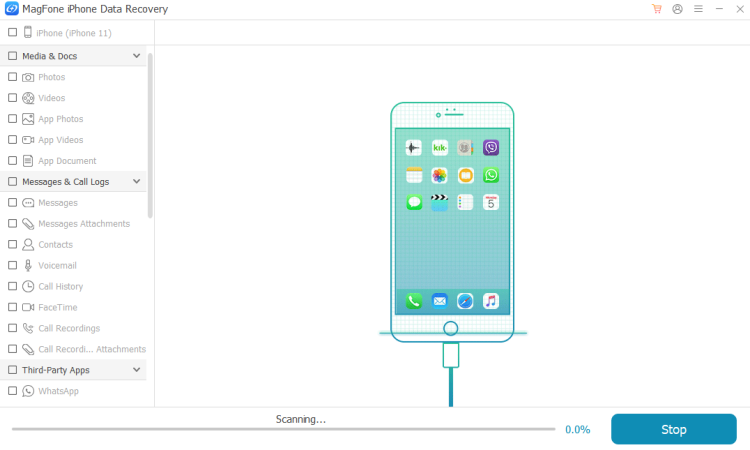
Click iPhone/iPad Data Recovery from the provided features. Then select Call History and click Scan to scan call history on your iPhone.
Step 3 Recover Deleted Call History on iPhone
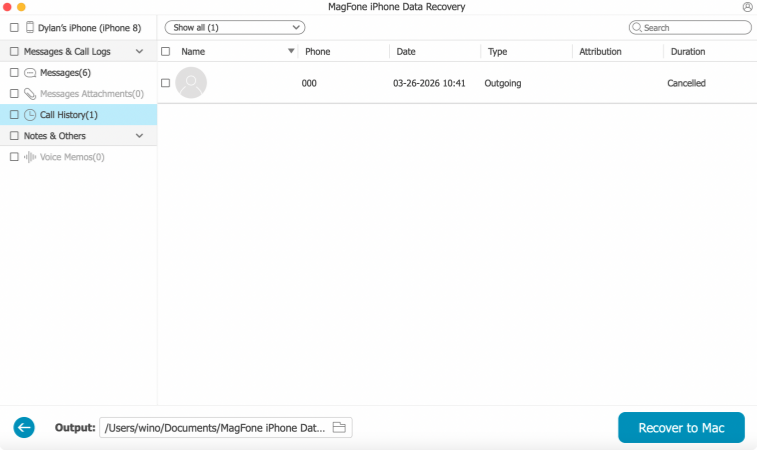
When the scan is completed, you can check your call log on the computer. And you can select the deleted call history, then click Recover to PC or Recover to Mac to restore them.
Part 3. How to Recover Deleted Call History on iPhone with Backup
If you have a backup created before you delete call history on iPhone, you can restore the deleted call history on iPhone from the previous backup. However, you should be aware that newer data after the restored backup will be overwritten. Be cautious when you try restoring a backup.
Method 1. Restore Deleted Call History from iCloud Backup
🌟 Recommendation: ⭐⭐| 🏆 Success Rate: 80%| ⚠️ Risk: 85%
As long as you have enabled the Phone app for iCloud Backup and you have a backup before the deletion time, you can choose to restore deleted call history from the iCloud backup. Before restoring deleted call history from iCloud backup, you need to first erase the iPhone data.
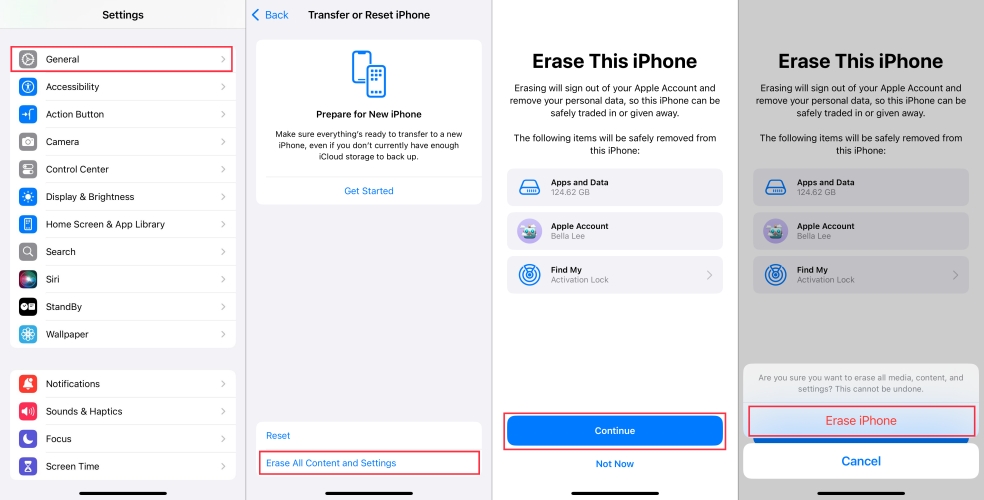
Step 1. Open iPhone Settings and press General.
Step 2. Choose Transfer or Reset iPhone > Erase All Contents and Settings > Continue > Erase iPhone.
Step 3. Type your iPhone passcode and Apple ID password to confirm.
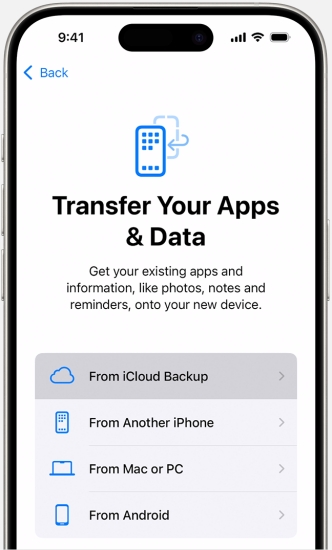
Step 4. Open the rebooted iPhone and get started to set it up. Choose Set Up Manually and follow the on-screen instructions to set up. When you reach the Transfer Your Apps & Data screen, choose From iCloud Backup.
Step 5. Sign in to your Apple Account and choose a previous backup made before the deletion. Then wait for the deleted call history to be restored from the backup.
Method 2. Restore Deleted Call History from iTunes Backup
🌟 Recommendation: ⭐⭐| 🏆 Success Rate: 80%| ⚠️ Risk: 90%
If you have an iTunes backup before the deletion, you can also restore an iTunes backup to restore the deleted call history on iPhone. But this will also overwrite the current data on iPhone with the data in the iTunes backup. So you should be careful when you restore the iTunes backup.
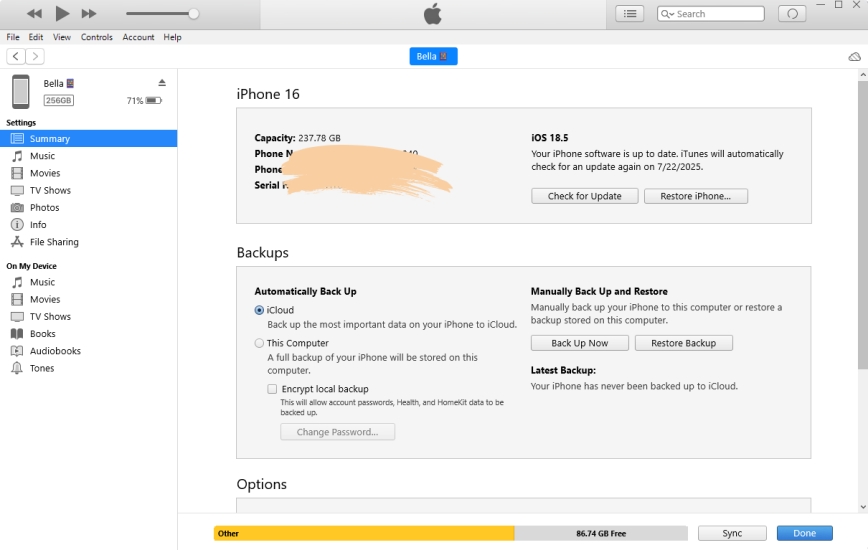
Step 1. Open iTunes and connect your iPhone to the computer using a data cable.
Step 2. Click the device icon, then click Summary in the left bar.
Step 3. Click Restore Backup, pick the backup before the deletion, then click Restore to recover the deleted call history on iPhone.
Part 4. Conclusion
When you suddenly need to check a call record or call someone back, discovering that the call history has been deleted can be very stressful. Fortunately, there are still several ways to try to get that information back. Among them, using a professional tool like MagFone iPhone Data Recovery is often the most convenient and efficient option, as it can scan your iPhone for deleted call logs and help you preview and recover the data you need. In addition, you can contact your carrier to request a copy of your recent call records, or restore your iPhone from an iCloud or iTunes backup if you created one before the deletion. Choose the method that fits your situation!

Edgar Davis
Editor in chief




