









Monster Hunter Now has taken the mobile gaming world by store, blending augmented reality with the trill of monster hunting. However, many players seek spoofing methods to bypass location restrictions, gain advantages, and enhance their gameplay. In this guide, we cover everything about Monster Hunter Now spoofing, the best spoofer for Monster Hunter Now available, risks involved, and how to spoof in Monster Hunter Now. Let's dive deep into Monster Hunter Now spoofing.

- Part 1. Can You Spoof in Monster Hunter Now?
- Part 2. How to Spoof on Monster Hunter Now
- Part 3. Top 5 Monster Hunter Now Spoofers [iOS & Android]
- Part 4. Conclusion
Part 1. Can You Spoof in Monster Hunter Now?
Yes, you can spoof Monster Hunter Now with third-party software. However, detection systems are getting stricter, so choosing a reliable tool is important to reduce the risk of bans. To make things easier, we've rounded up five of the most reliable spoofing tools you can try.
| MHN Spoofer | Platform | Ease of Use | Risk Level |
|---|---|---|---|
| MagFone Location Changer | iOS & Android | Easy | Low |
| iSpoofer | iOS | Moderate | Medium |
| PGSharp | Android | Easy | Medium |
| iToolsBT | iOS | Moderate | Low |
| Fake GPS Location | Android | Moderate | Medium |
Monster Hunter Now allows players to hunt and battle monsters in real-world locations using their smartphones. The game encourages movement, exploration, and teamwork. By spoofing in Monster Hunter Now, players don't need to physically walk but can:
- Access Rare Monsters: Some monsters spawn only in specific areas.
- Save Time and Effort: No need to physically walk long distances.
- Avoid Dangerous Locations: Play safely from home instead of venturing into unsafe areas.
- Complete Quests Faster: Move between locations instantly.
- Enhance Multiplayer Experience: Join friends across different regions.
Part 2. How to Spoof on Monster Hunter Now
To start Monster Hunter Now spoofing, players usually install GPS spoofing apps or use desktop location changers. Other techniques are also shared within experienced player communities. Reddit groups such as r/MonsterHunterSpoofing often discuss topics like cooldown timing, limiting rapid teleports, and simulating realistic movement speeds. These discussions are generally aimed at helping beginners understand the practice in a broader context.
Part 3. Top 5 Monster Hunter Now Spoofers [Android/iOS]
Location-based gameplay in Monster Hunter Now has led many players to explore GPS spoofing tools for convenience and exploration flexibility. Below are five commonly mentioned spoofers for iOS and Android users.
No 1. MagFone Location Changer
Among these location changers, MagFone Location Changer stands out with its wonderful compatibility and stability. It supports both iOS and Android devices in spoofing Monster Hunter Now. It also specifically offers a dedicated game mode for smoother gameplay adjustments tailored to location-based games. The interface is simple, making it easy to set up and use on your phone. Here's how to use this tool to spoof in Monster Hunter Now.
Pros and Cons of MagFone Location Changer:
 Pros
Pros- Easy-to-use and intuitive interface for beginners
- Offer multiple movement simulation modes
- Compatible with both iOS and Android devices
- Work with location-based games like Monster Hunter Now
- Reduce the risks of being banned by the game

- Premium features require a subscription plan
Steps to Use MagFone Location Changer:
Step 1. Use a USB cable or Lightning cable to connect your device to your computer. Then launch MagFone Location Changer, select Start, and select Next on your computer.

Step 2. On the map, select a location to teleport. Or directly enter the address or GPS coordinate in the search bar. Then you can click the Start Modifying button to change the location on your device.

No 2. iSpoofer
iSpoofer is a GPS location spoofing tool designed to simulate virtual movement on iOS devices. It works by modifying the device's location data so games like Monster Hunter Now read a different position than the real one. Users can set custom routes, teleport to areas, and adjust movement speed for gameplay advantages.
Pros and Cons of iSpoofer:
Pros- Easy interface and navigation
- Supports custom movement routes
- Works on iOS devices
- Flexible location simulation options
- iOS only compatibility limitation
- Risk of app instability
- Requires frequent updates needed
Steps to Use iSpoofer:
Step 1. Visit the official iSpoofer website and select Download, then choose Direct install.
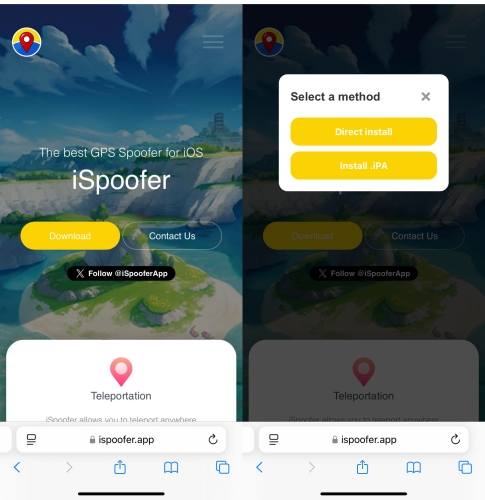
Step 2. Once installed, open Settings > General > VPN & Device Management, locate the profile, and tap Trust.
Step 3. Restart your device. When prompted, finish installing the profile, then use iSpoofer to spoof in Monster Hunter Now.
No 3. PGsharp
PGSharp offers an Android-based GPS Monster Hunter Now spoofing APK that allows users to modify their in-game location in Monster Hunter Now and other location-dependent games. It provides built-in joystick controls for real-time movement and teleport features for instant location changes.
Pros and Cons of PGsharp:
Pros- Smooth joystick navigation control
- Real-time movement simulation feature
- Easy setup for beginners
- Supports multiple game apps
- Not available on iOS
- Potential detection risk present
- Requires device compatibility checks
Steps to Use PGsharp:
Step 1. Visit the official PGSharp website and tap the Download button to get the PGSharp APK.
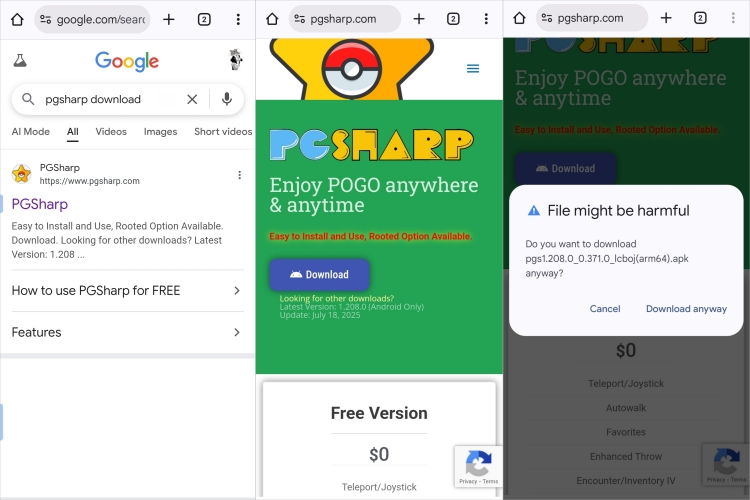
Step 2. Go to your phone's Settings > Security (or Privacy) and enable Install unknown apps.
Step 3. Open your file manager, find the downloaded PGSharp APK file, and tap it to begin installation. Follow the prompts to complete the process.
Step 4. After that, you can launch PGSharp and open Monster Hunter Now to try spoofing features.
No 4. iToolsBT
The iTools Bluetooth device works as an external GPS modifier, overriding your iPhone's real location without needing jailbreak access. It communicates through Bluetooth and its companion app, letting you simulate movement or set fixed coordinates, which games like Monster Hunter Now then recognize as your actual in-game position.
Pros and Cons of iToolsBT:
Pros- No jailbreak required
- Stable external GPS override
- Easy Bluetooth connectivity
- Works with multiple location apps
- Requires extra hardware purchase
- Limited movement speed
- Battery dependency issues
- Possible game detection risk
Steps to Use iToolsBT:
Step 1. Visit the official PGSharp website and tap the Download button to get the PGSharp APK.
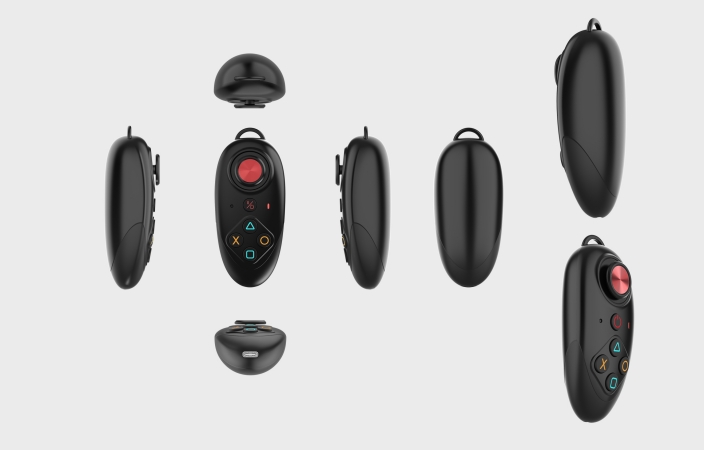
Step 2. Purchase the iTools Bluetooth device from the official website or a reliable seller.
Step 3. Turn on the device and check that it's charged. Then open your iPhone's Bluetooth settings and connect to the iTools device.
Step 4. Download and install the official iTools BT app on your iPhone. Launch the app and tap the Connect option to sync it with your Bluetooth device.
Step 5. Inside the app, choose and set your spoofing type, then open Monster Hunter Now.
No 5. Fake GPS Location
For Android users, Fake GPS Location is one of the most popular spoofing apps due to completely free service and instant location teleportation. Fake GPS Location is available in the Google Play Store and doesn't require users to root their devices. With Fake GPS Location, you can mock your location on your Android device and spoof in Monster Hunter Now.
Pros and Cons of Fake GPS Location:
Pros- Completely for users to use without paying fee
- Not require users to root devices
- Compatible with most location-based games
- Allow to change GPS location to anywhere
- Full of various advertisements
- Exist the risk of account banned
- Lack of app updates and technical support
Steps to Use Fake GPS Location:
Step 1. Install Fake GPS location from the Google Play Store.
Step 2. Go to your phone's Settings, find About Phone, and tap Build Number seven times to unlock Developer Options.
Step 3. Launch the app and browse the map or search for the place you want to simulate as your location.
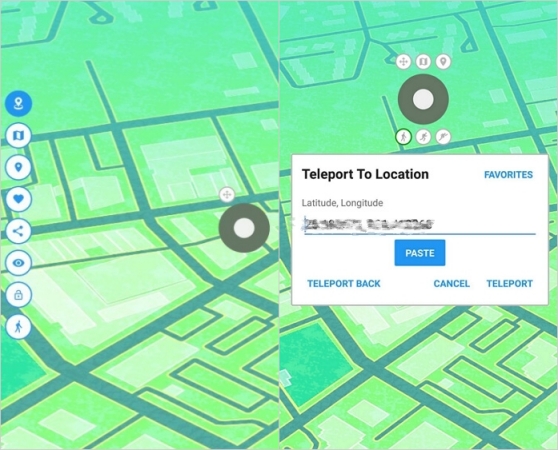
Step 4. Press the TELEPORT button to activate the fake location. With the spoof active, your MHN location will update, letting you explore and hunt in that selected area.
Part 4. Conclusion
And voila! That's all! By following the steps introduced above, you can spoof in Monster Hunter Now on both iPhone and Android device. What you need to know is that spoofing in Monster Hunter Now can be tempting, but it comes with risks. If you decide to use Monster Hunter Now GPS spoofing, ensure you follow safety precautions to avoid detection. Just select a spoofer for Hunter Monster Now with the cooldown timer feature, then you can reduce the risk of being banned by the game. Try using MagFone Location Changer, and have a great experience.

Edgar Davis
Editor in chief





