








Pikmin Bloom is a relaxing augmented reality game that encourages players to walk, explore, and grow adorable plant-like creatures called Pikmin. By syncing real-world movement with in-game progress, it turns everyday walking into a fun adventure. However, some players look for faster progression methods, leading to location spoofing. This guide explains how the Pikmin Bloom spoofing works, spoofing tools, benefits, risks, and step-by-step methods for iOS and Android users.

- Part 1. How Does Pikmin Bloom Location Work?
- Part 2. Pros and Cons of Pikmin Bloom Spoofing
- Part 3. How to Spoof Pikmin Bloom [iOS/Android]
- Part 4. FAQs about Pikmin Bloom Spoofing
- Part 5. Conclusion
Part 1. How Does Pikmin Bloom Location Work?
In Pikmin Bloom, location is based primarily on your device's GPS (satellite-based location), not your IP address. Your phone continuously uses GPS, nearby Wi-Fi, and cell tower signals to estimate your location. Pikmin Bloom reads that GPS position to place your character on the map and spawn location-based rewards.
Part 2. Pros and Cons of Pikmin Bloom Spoofing
In Pikmin Bloom, spoofing refers to faking your GPS location so the game believes you are moving or visiting places different from your actual location. While it can offer faster progress and more flexibility, it also comes with risks. Below are the key advantages and disadvantages.
 Pros
Pros- Faster game progress
- Access global Pikmin
- Join remote events
- Save physical effort

- Possible ban risk
- Possible game glitches
- Spoofers may be paid
Part 3. How to Spoof Pikmin Bloom [iOS/Android]
Many players use third-party tools to simulate movement or change GPS locations in Pikmin Bloom. These methods can help unlock distant regions and speed up gameplay progression. Below are some popular Pikmin Bloom spoofing solutions for different devices.
01MagFone Location Changer
MagFone Location Changer is a powerful desktop-based tool designed to modify GPS location on both iOS and Android devices. It is useful for Pikmin Bloom players who want precise control over virtual movement without physically traveling. With its user-friendly interface, it allows instant location switching, making gameplay more flexible and efficient.
| Supported Device | Supported Version | Supported Platform |
|---|---|---|
| iPhone, iPad, iPod touch Android |
iOS 12 to iOS 26 Android 6 to Android 16 |
Windows 10 or later macOS Big Sur 11 or later |

MagFone Location Changer
Easily change your GPS location on iOS and Android devices to anywhere with one click, while not requiring root or jailbreaking!
Step 1 Connect Device and Launch Software
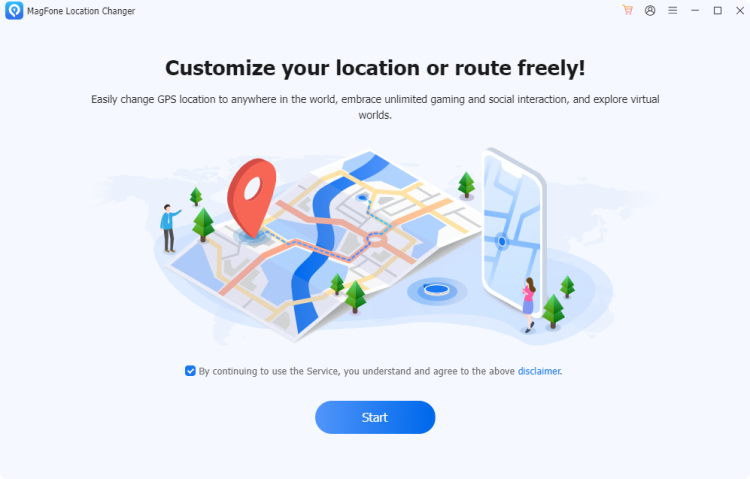
Hold a USB cable to connect your phone and a pc. Enable developer options on your device, then open MagFone Location Changer. Click the Start button and choose the General Mode.
Step 2 Select and Apply Location Change
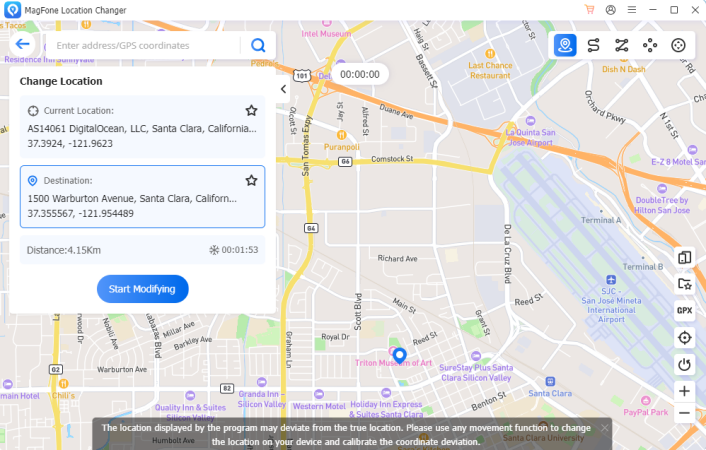
Navigate the map interface or enter a specific address in the search bar. Once you find your desired location, confirm it and press the Start Modifying button to instantly update your Pikmin Bloom GPS position.
02iPOGO
iPogo is a GPS-based spoofer designed for both iOS and Android devices. It provides joystick movement, teleport options, and in-game enhancements that help Pikmin Bloom players simulate walking without physical movement. Its built-in controls make location shifting simple and interactive.
| Supported Device | Supported Version | Supported Platform |
|---|---|---|
| iOS/Android | Not officially reported | iOS/Android |
Step 1 Install the iPOGO APK on Your Phone
Download and install the iPOGO APK on your Android device. If prompted, enable installation from unknown sources in your phone settings.
Step 2 Change Your Location in Pikmin Bloom
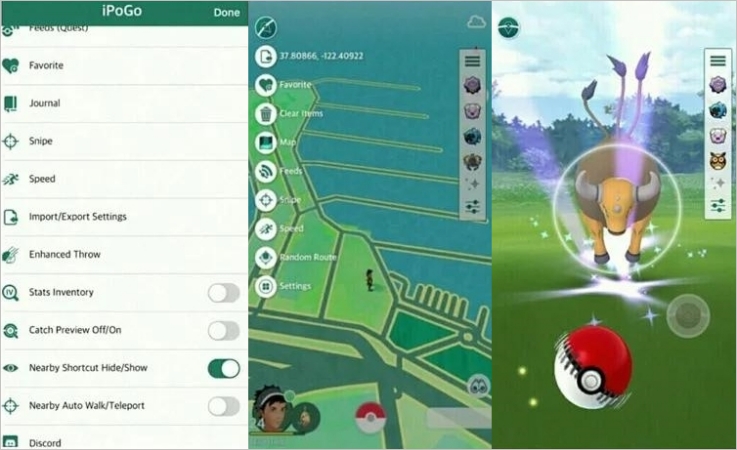
Launch Pikmin Bloom on your device and tap the iPOGO icon to open the menu. Go to the Map section, where you can teleport your location in Pikmin Bloom.
03FlyMeGo
FlyMeGo is another GPS spoofing solution designed to help Android users change their in-game location effortlessly. It supports map-based teleportation, making it useful for Pikmin Bloom players who want to explore distant areas virtually without physically moving.
| Supported Device | Supported Version | Supported Platform |
|---|---|---|
| Android | Not officially reported | Android |
Step 1 Download FlyMeGo from Google Play
Begin by installing the FlyMeGo app from the Google Play Store on your Android phone. Then, launch the app to continue.
Step 2 Customize a Coordinate in FlyMeGo
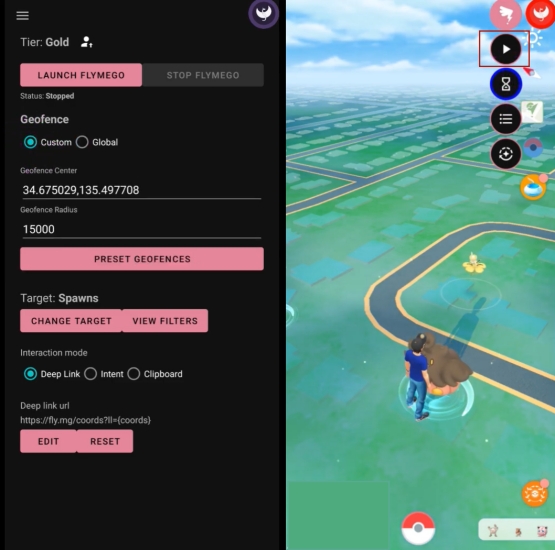
From the main interface, select Custom to set a virtual location by manually entering the coordinates.
Part 4. FAQs about Pikmin Bloom Spoofing
Will you get banned for Pikmin Bloom spoofing?
Yes, there is a real risk of penalties. The game's developer actively monitors unusual movement patterns and may suspend accounts that show repeated spoofing behavior. However, it's safe to use these Pikmin Bloom spoofers if you use cooldown timers and moderate location changes.
How long can Pikmin Bloom spoofing last?
Spoofing duration depends on the tool and the game's detection system. If the spoofer is not detected and your device stays active, it can last for a long time.
Is there any free Pikmin Bloom spoofing tool?
Yes, some basic tools and apps offer free GPS spoofing features. However, free tools can be limited in terms of security, reliability, and advanced capabilities such as server-side teleportation features.
Part 5. Conclusion
Pikmin Bloom blends real-world walking with creative gameplay, making exploration rewarding and fun. However, spoofing has emerged as a shortcut for players seeking faster progress or remote access to events. Balancing convenience with safety is key to enjoying Pikmin Bloom responsibly without harming your account experience.

Edgar Davis
Editor in chief





