








Location spoofing has become a vital tool for gaming, privacy, and professional use. SpooferPro is a GPS spoofing tool that allows Pokemon Go players to changer their location virtually, providing flexibility and security. Whether you're seeking to bypass geo-restrictions or just curious about how to spoof in Pokemon GO, SpooferPro offers a versatile solution. In this review, we will explore SpooferPro's features, pricing, benefits, drawbacks, and how it compares to other location spoofers on the market. Let's dive in!

- Part 1. SpooferPro Review: Key Features
- Part 2. SpooferPro Review: Is It Safe and Legit?
- Part 3. SpooferPro Review: Pros and Cons
- Part 4. SpooferPro Review: Usage Guide
- Part 5. Best Alternative to SpooferPro
- Part 6. Conclusion
Part 1. SpooferPro Review: Key Features
SpooferPro is packed with features designed to enhance user experience. Let's explore some of its most notable ones.
Feature 1. Fake Location
One of the key features of SpooferPro is its ability to spoof location, allowing users to change their geographical location. This is particularly useful if you are trying to catch Pokemon, battle in raids, and finish quests from all over the world.
Feature 2. Real-Time Location Simulation
Users can create customized routes and simulate movement at various speeds like walking and driving, making it ideal for Pokemon GO players. With the speed control feature, users can control their joystick and movement in the way they feel comfortable with.
Feature 3. User-Friendly Interface
SpooferPro offers a sleek and easy-to-navigate interface, allowing both beginners and advanced users to change their location in Pokemon GO effortlessly. The tool is designed with simplicity in mind, ensuring that users don't have to be tech experts.
Feature 4. Built-in Map and GPX Routes
SpooferPro provides a built-in map that shows Pokemon, PokeStops, gyms, and rocket around you. In addition to the built-in map, SpooferPro supports GPX routes, which allows users to import GPX files and automatically generate a route on the map.
Feature 5. One-Click Teleportation
By entering the GPS coordinates or selecting built-in hotspots, SpooferX enables you to instantly change your location to any place in the world with just a single tap. This greatly eliminates the hassle of configuring complex settings.
Part 2. SpooferPro Review: Is It Safe and Legit?
SpooferPro does carry a real ban risk in Pokemon GO because it modifies or fakes GPS data, which goes against Niantic's rules. If you don't want to trigger a ban, you need to strictly follow cooldown rules and avoid frequent teleporting or suspicious movement patterns when using any location spoofer. Here are some real user feedbacks about SpooferPro for you to help decide whether it's worth using for Pokemon GO spoofing.
Positive Reviews:
 User Feedback:
Negative Reviews:
User Feedback:
Part 3. SpooferPro Review: Pros and Cons
SpooferPro is a powerful and reliable GPS spoofing tool that excels in providing location-changing capabilities with advanced customization. But not all tools are perfect, and so does SpooferPro. Before considering using SpooferX, it's necessary to know the benefits and drawbacks.
 Pros
Pros- Advanced customization options;
- Real-time movement simulation;
- User-friendly and intuitive interface;
- Reliable customer support.

- Detection risks in Pokemon Go;
- Require a stable internet connection;
- Limited free features;
- Not compatible with Android devices;
- Need to install from a third-party platform.
Part 4. SpooferPro Review: Usage Guide
If you are a Pokemon GO player, SpooferPro offers an intuitive and effective solution. For those looking for a secure, easy-to-use, and feature-packed GPS spoofing tool for Pokemon GO, SpooferPro stands out as one of the best options available. Here's how to install and use SpooferPro for Pokemon Go on an iOS device.
4.1 How to Download and Install SpooferPro
There is no official version of SpooferPro available in the App Store. To download and install SpooferPor, you can only get it from a third-party platform. Follow the steps below to download and install SpooferPro on an iPhone.
Step 1. Plug your iPhone into your computer with a USB or lighting cable.
Step 2. Open Sideloadly and enter your Apple ID.
Step 3. Drag the SpooferPro IPA file onto Sideloadly.
Step 4. Click the Start button and enter your Apple ID password.
Step 5. Go to Settings > General > VPN & Device Management and trust the installer.
4.2 How to Use SpooferPro Pokemon GO
After completing the installation, you can use SpooferPro on your iPhone. There are many features in SpooferPro available for you to use while playing the game in Pokemon GO. Here we will show you how to spoof in Pokemon GO with SpooferPro.
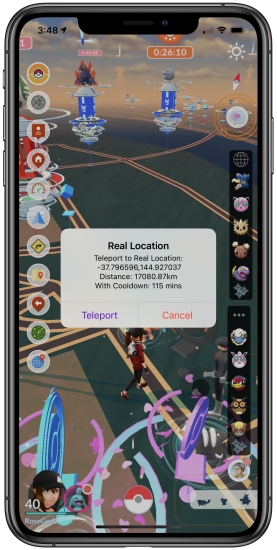
Step 1. Launch SpooferPro on your iPhone, then you'll see a map.
Step 2. Tap the blue arrow icon locating at the left side of the screen.
Step 3. Enter the GPS coordinate you want to teleport.
Step 4. Find the location and tap the Teleport button.
Part 5. Best Alternative to SpooferPro
Unlike many other location spoofing tools for Pokemon GO, SpooferPro doesn't require any jailbreaking, making it a safer and hassle-free option. However, SpooferPro isn't compatible with any Android device and cannot detect risks in Pokemon GO. Here we do recommend an all-in-one spoofing tool called MagFone Location Changer to you.
5.1 Best Alternative to SpooferPro Pokemon GO
MagFone Location Changer is an all-in-one tool that does what it promises without compromising on quality. Its major advantages lies its combination of user-friendly features, affordability, and anti-tracking protection. With MagFone Location Changer, you can not only spoof in various platforms like Pokemon GO and Life360, but also custom the settings for your needs.

MagFone Location Changer
Easily change your GPS location on iOS and Android devices to anywhere with one click, while not requiring root or jailbreaking!
5.2 Comparison: SpooferPro vs MagFone Location Changer
When compared to its competitors, SpooferPro stands out for its ease of use, reliable performance, and robust security features. But MagFone Location Changer has more features, like cross-platform support, anti-tracking capability, and more. Here are the differences between SpooferPro and MagFone Location Changer.
| Features | SpooferPro | MagFone Location Changer |
|---|---|---|
| Compatibility | iOS | Android & iOS |
| GPS Spoofing | ✅ | ✅ |
| Speed Control | ✅ | ✅ |
| Anti-Ban Protection | ❌ | ✅ |
| Joystick | ✅ | ✅ |
| Cooldown Timer | ❌ | ✅ |
| Multiple Devices Supported | ❌ | ✅ |
| Routes Collection | ❌ | ✅ |
5.3 How to Change Location on Any Mobile Device
MagFone Location Changer is a powerful tool for anyone who wants to change location on different platforms. If you're looking for an all-in-one spoofing solution, MagFone Location Changer is definitely worth considering. Here's how to change location on any mobile device by using MagFone Location Changer.
Step 1 Connect Device and Run MagFone Software

First, plug your iPhone or Android device to your computer using a USB cable. Then launch MagFone Location Changer on the computer and select the Change Location option.
Step 2 Start to Change Location on Any Mobile Device

After entering the map, select a location to teleport. Or you can enter an address or the GPS coordinate in the search bar to find the location. Then click the Start Modifying button.
Part 6. Conclusion
SpooferPro is an excellent option for iOS users seeking to spoof in Pokemon GO. With features like location spoofing, speed control, and joystick, it offers a comprehensive solution to have a good experience in Pokemon GO. But if you're curious about of being tracked or banned, MagFone Location Changer might be a better choice, especially having a demand of spoofing on iOS and Android devices. Just have a try, and you'll find it out!

Olivia Wood
Editor in chief





