








Location-based apps, such as Pokemon GO, often require players to remain within specific geographical locations to unlock certain features or complete in-game tasks. However, this can be limiting for players who want to experience the game in different parts of the world without physically travelling. This is where iSpoofer comes in. It is a tool designed to spoof your GPS location, providing users with the ability to manipulate their location on iOS devices.
In this comprehensive review of iSpoofer, we will explore its features, pros and cons, and alternatives. We will also analyze whether iSpoofer is safe to use for users looking to modify their GPS location. This detailed guide aims to give you all the information you need to make an informed decision on whether iSpoofer is the right tool for you. Let's dive into the details.

- Part 1. What Is iSpoofer Pokemon GO?
- Part 2. Is iSpoofer Pokemon GO Safe to Use?
- Part 3. How to Set Up iSpoofer Pokemon GO
- Part 4. iSpoofer vs. MagFone: Which Is Better?
- Part 5. Conclusion
Part 1. What Is iSpoofer Pokemon GO?
Whether you're an avid gamer or someone who needs to fake your GPS position for other reasons, iSpoofer offers a user-friendly solution to achieve your goals. It provides users with an intuitive interface to manipulate their device's location, all without the need for any complex settings. But it's important to decide whether to use iSpoofer for Pokemon GO if you're a newbie. From our analysis below, you'll know everything about iSpoofer Pokemon GO.
01iSpoofer Pokemon GO: Key Features
iSpoofer is a GPS spoofing tool that allows users to fake their location on iOS devices. Initially developed to assist players in location-based games like Pokemon GO, iSpoofer offers a variety of features that appeal to a wide range of users. The following are the key features of iSpoofer.
Feature 1. GPS Location Spoofing
The main feature of iSpoofer is its ability to modify the GPS location of mobile devices. This allows users to appear as if they are in a different city or country, unlocking region-specific features or avoiding geographical restrictions in apps.
Feature 2. Teleportation
iSpoofer allows users to instantly teleport to any location around the world with just a click. This is particularly useful for players who want to join exclusive in-game events and access resources available only in certain regions.
Feature 3. Route Simulation
One of the standout features of iSpoofer is its ability to simulate walking or driving routes. This allows users to mimic movement along a specific path, making it look as though they are physically travelling to different locations.
Feature 4. Catch Pokemon
Popular among Pokemon players, iSpoofer allows users to filter their feeds so they can find Pokemon faster than ever. With spawn booster, iSpoofer also enables users to see Pokemon that are farther away from them in anyplace.
Feature 5. Simple Interface
iSpoofer is designed to be extremely user-friendly, with an intuitive interface that even beginners can use without any technical expertise. This simplicity makes it accessible for users of all experience levels.
02iSpoofer Pokemon GO: Pros and Cons
With iSpoofer, you can modify your GPS coordinates, teleport to any location in the world, and simulate walking routes in Pokemon GO to unlock new game features, complete missions, or bypass location restrictions in apps. However, there are still some drawbacks. Here are the advantages and disadvantages of iSpoofer Pokemon GO.
 Pros
Pros- User-friendly interface makes it simple for anyone;
- Ideal for players to access region-locked features in apps;
- Simulate walking paths to enhance your spoofing experience;
- Offer a cost-effective solutions to spoof the location;
- Teleport your character to anywhere with minimal effort.

- Not compatible with Android devices;
- Not always 100% accurate to spoof the location;
- Exist the potential risk of account ban;
- Not offer the cooldown timer feature.
Part 2. Is iSpoofer Pokemon GO Safe to Use?
The safety of using iSpoofer in Pokemon GO largely depends on how you use it. While the software itself is generally safe to use, there are a few considerations to keep in mind. If you decide to use iSpoofer Pokemon GO, you need to know the following thing:

1. Risk of Account Suspension or Ban:
Many location-based apps like Pokemon GO actively monitor for location spoofing. If you use iSpoofer excessively or engage in activities that raise suspicion, there is a risk that your account could be banned.

2. Avoid Overuse:
To reduce the risk of detection, it's recommended not to overuse iSpoofer. Using the tool in moderation will lower the chances of getting caught.
3. Download from Official Sources:
Always download iSpoofer from the official website to avoid malicious software. Unofficial downloads can expose your device to potential security risks.
Part 3. How to Set Up iSpoofer Pokemon GO
Using iSpoofer is simple and requires no advanced technical technology. Here is a step-by-step breakdown of how to download and set up iSpoofer Pokemon GO.
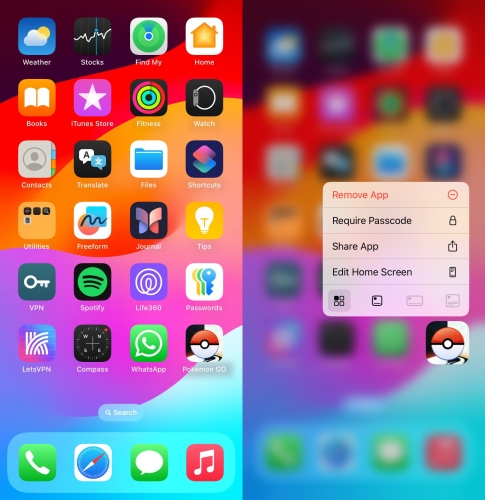
Step 1. On the home screen, touch and hold Pokemon GO to delete it.
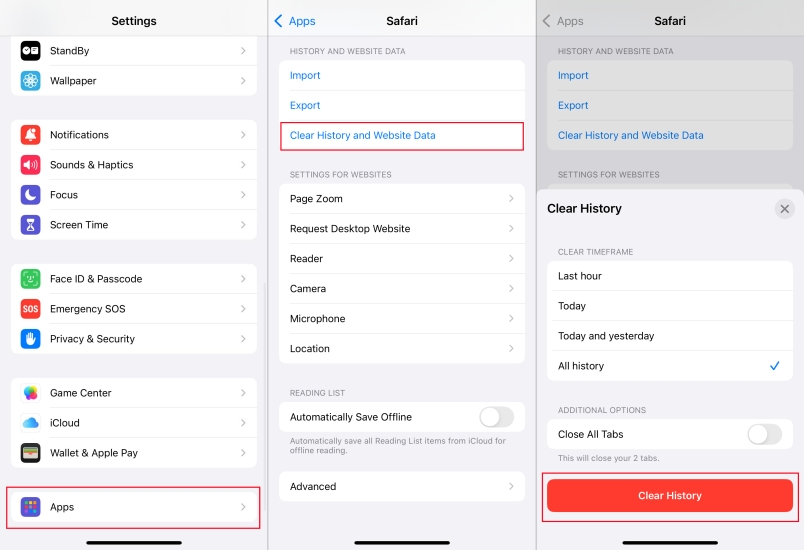
Step 2. Go to Settings > Safari, then scroll down to tap Clear History and Website Data.
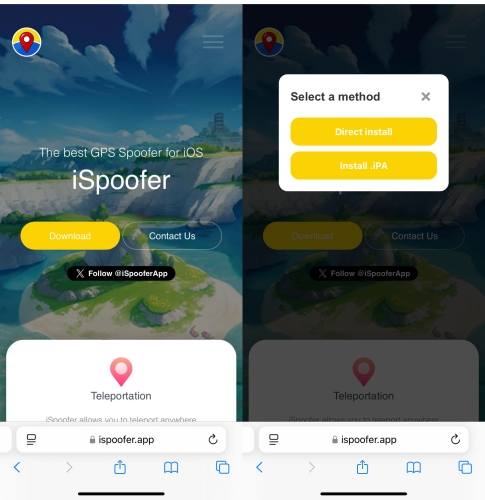
Step 3. Navigate to the official website of iSpoofer and tap Download.
Step 4. Tap Install to allow the installation and go back to the home screen.
Step 5. Open Settings and tap General > VPN & Device Management.
Step 6. Select an Enterprise app and tap Trust twice to confirm.
Step 7. Once completing the setup, run iSpoofer and use it with Pokemon GO.
Part 4. iSpoofer vs. MagFone: Which Is Better?
While iSpoofer is a popular tool for Pokemon GO, there are several alternatives available for users looking for similar functionality. Whether you want to access more features for Pokemon GO or change your location in Pokemon GO on Android devices, you can turn to an iSpoofer alternative. One notable option is MagFone Location Changer, and here are some of the main differences between them.
| Tool | iSpoofer | MagFone Location Changer |
|---|---|---|
| Device Compatibility | iOS | Android & iOS |
| Cooldown Timer | ❌ | ✔️ |
| Success Rate | 85% | 95% |
| Safety | Medium | High |
MagFone Location Changer is a reliable iOS location spoofing tool that offers similar features to iSpoofer. It allows users to change their GPS location and route simulation. Beyond that, MagFone Location Changer offers additional Android support, a higher success rate, and more advanced features, such as a cooldown timer and route collection. If you are a player of Pokemon GO, MagFone Location Changer is what you shouldn't miss.

MagFone Location Changer
Easily change your GPS location on iOS and Android devices to anywhere with one click, while not requiring root or jailbreaking!
Step 1 Connect Device and Run MagFone Software

Plug your device into a computer through a USB cable. Then open MagFone Location Changer on the computer and select Change Location from the main interface.
Step 2 Find the Desired Location and Start to Teleport

Click the Start button, then select a location to teleport on the map. Finally, click the Start Modifying button to change the location.
Part 5. Conclusion
iSpoofer is a powerful and user-friendly GPS spoofing tool that offers a range of features, including teleportation and route simulation. It is ideal for users looking to manipulate their location for gaming or other purposes. However, there are some risks, such as the potential for account suspension or bans from location-based apps. To avoid the risk of account suspension or bans, you can consider MagFone Location Changer - an iSpoofer alternative with the cooldown timer feature.

Olivia Wood
Editor in chief





