








Changing your location on Instagram can enhance your social media experience by unlocking region-specific features, connecting with local communities, and tailoring content to specific audiences. There are multiple methods to adjust your location on Instagram. This comprehensive guide delves into how to change location on Instagram. Let's dive into the details.
- Part 1. Reasons to Change Location on Instagram
- Part 2. Can You Change Location on Instagram?
- Part 3. How to Change Location on Instagram
- Part 4. FAQs about Changing Location on Instagram
- Part 5. Conclusion
Part 1. Reasons to Change Location on Instagram
Adjusting your Instagram location can influence how your content is distributed and who sees it. It plays a key role in shaping your visibility and interactions on the platform, especially if you're targeting a specific audience or market. Here are some benefits:
- Access region-specific features and promotions.
- Connect with local communities and creators.
- Make your posts more discoverable by nearby users.
- Tailor content to the culture or events of a particular area.
Part 2. Can You Change Location on Instagram?
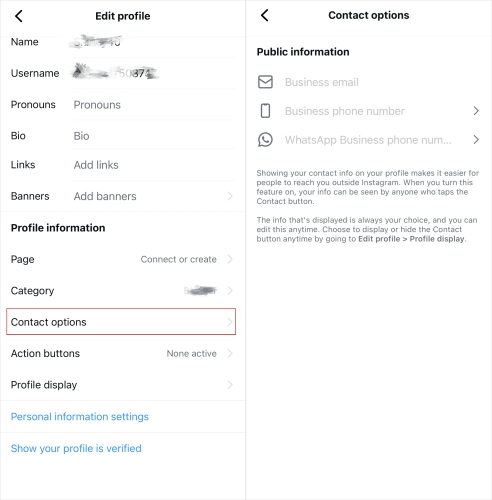
In the latest version of Instagram (2026), you can no longer change your location through your profile's Contact options—the location section has been removed. Now, you can only add a location when creating a post or reel, and once it's published, that location can't be edited. That said, you're not completely stuck. It's still possible to adjust your virtual Instagram location to discover more content and reach users in different regions. Below, we'll walk you through two easy, hassle-free ways to do it.
Part 3. How to Change Location on Instagram
There's no official option within Instagram to directly change your real-time location across the app. However, you can simulate a different location by using a GPS location changer along with a VPN. One modifies your device's GPS data, while the other masks your IP address to better match your virtual location and reduce detection risks.
01How to Change Location on Instagram via MagFone Location Changer
The direct and quick way to change your location in Instagram is to use a location changing tool. MagFone Location Changer is a dedicated location changing tool for both iOS and Android devices. By using this tool, you can spoof your device's GPS location, then you can update your Instagram location to any place you want.

MagFone Location Changer
Easily change your GPS location on iOS and Android devices to anywhere with one click, while not requiring root or jailbreaking!
Step 1 Select a Location to Change

Start by connecting your iPhone or Android device to a computer, then open MagFone Location Changer. Follow the onscreen instruction to complete the setup of your device. Proceed to select the Change Location option on the main interface and click the Start button.
Step 2 Start to Change Device Location

Once entering the map, select a location you want to change or directly enter the location name in the search bar. After loading the location on the map, you can click the Start Modifying button to change your device's location. Finally, your location in Instagram will be updated.
02How to Change Location on Instagram via a VPN
A VPN service allows you to route your internet connection through servers in different countries, effectively masking your real IP address and making it appear as though you are browsing from a different location. If you want to change your location on Instagram, you can enable a VPN service on your device and connect to a server for spoofing your location.
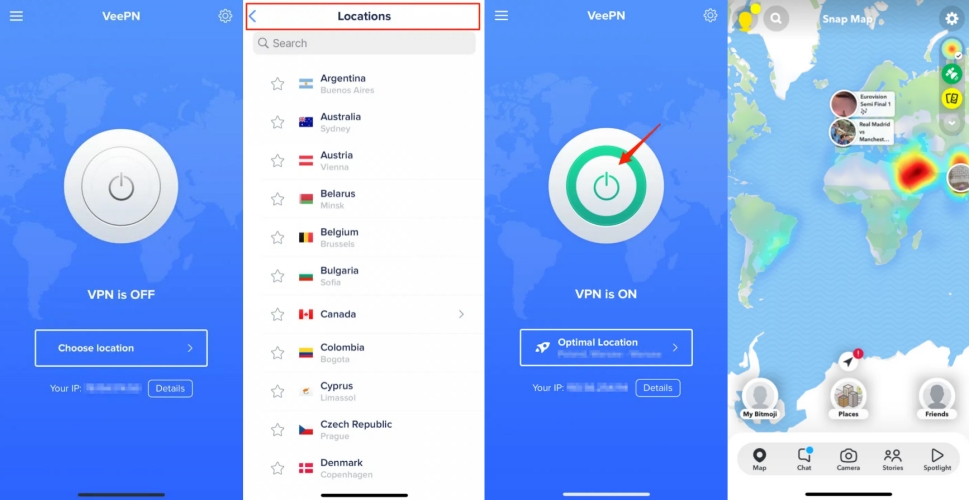
Step 1. Select a reliable VPN service in the Google Play Store or the App Store.
Step 2. Download and install the VPN app on your device.
Step 3. Open the VPN app and connect to a server in the desired location.
Step 4. Launch the Instagram app to view your location.
Part 4. FAQs about Changing Location on Instagram
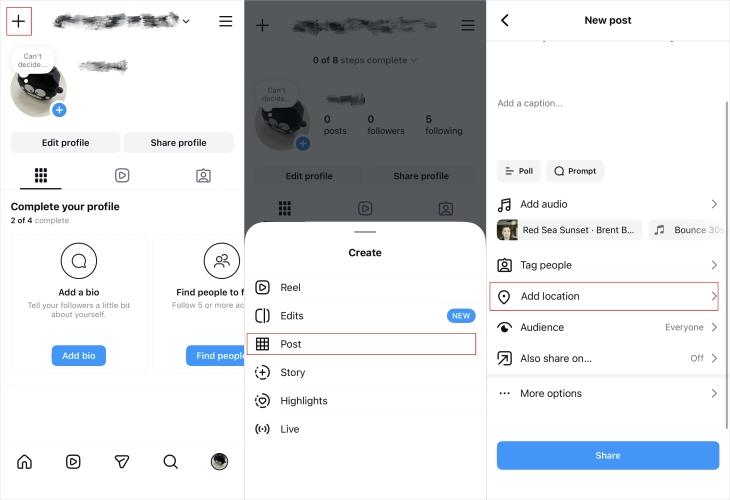
How to add location on Instagram post?
You can go to your profile and tap the "+" icon to create a post. After setting up your content, scroll down and select "Add location" before tapping "Share."
How to turn off location on Instagram?
All users are allowed to turn location services off on their devices. Here's how to turn off location on Instagram across devices.
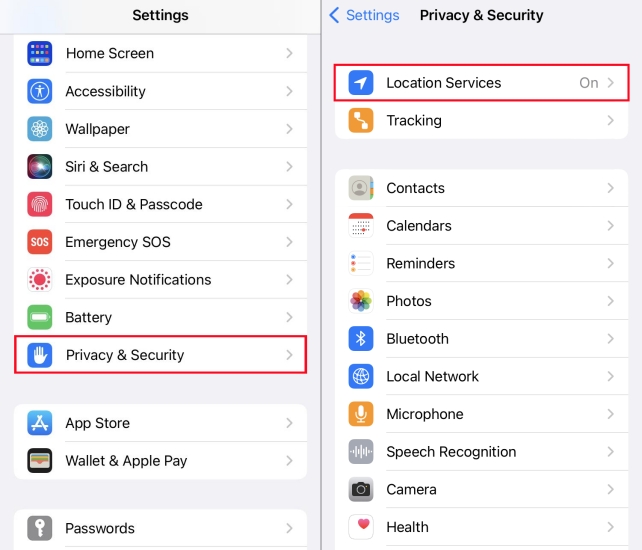
Step 1. Go to Settings on your device and tap Privacy & Security.
Step 2. Tap Location Services, then scroll down and tap Instagram.
Step 3. Select Never to disable location services for Instagram.
Will Instagram ban my account for using a VPN?
Generally, using a VPN won't get your account banned, but excessive location manipulation or suspicious activity might trigger temporary restrictions.
Part 5. Conclusion
If you want to connect with local audiences and increase content discoverability, you can change your location on Instagram. By following the above methods, you can change your location on Instagram. To efficiently change your location on Instagram to anywhere, using a GPS spoofer like MagFone Location Changer is an ideal option. Give it a try, and you'll find out.

Olivia Wood
Editor in chief





