








TikTok is one of the most popular social media platforms, with content being shared globally. But did you know your location can impact the content you see and who sees your content? Changing your location on TikTok can unlock new trends, help you target specific audiences, and even change the ads you encounter. If you are looking for some methods to change your location on TikTok, you'll be glad to be here. In this guide, we'll explore how to change region on TikTok using different methods and why it might be beneficial for you.
- Part 1. Must Know before Changing TikTok Location
- Part 2. How to Change TikTok Region on iPhone and Android
- Part 3. How to Change TikTok Location on PC
- Part 4. FAQs about Changing Location on TikTok
- Part 5. Conclusion
Part 1. Must Know before Changing TikTok Location
TikTok uses location data to recommend content, display ads, and connect users to local trends. There are multiple factors used by TikTok to detect your location and customize your experience, including:
IP Address: The internet location from which you access TikTok.
SIM Card Region: The country associated with your mobile network.
Language Settings: Your selected app and device language.
GPS & Location Services: If enabled, TikTok can use your real-time location.
Engagement Behavior: The type of content you watch, like, and interact with affects your For You page.
Changing your TikTok location can influence the type of content that appears on your For You Page and the people who engage with your videos. Whether you're a casual user, influencer, or business, shifting your location may help you reach a new audience in the location you're targeting and see more content relevant to that region.
Your location greatly influences what you see on TikTok, while your region decides whether you can normally access TikTok. As yet, TikTok is not available in all regions and countries. Also, due to some special policies, TikTok is banned sometimes. So, what region is TikTok available in? TikTok is available in many regions and countries, excluding Afghanistan, Albania, India, Jordan, Kyrgyzstan, Nepal, Senegal, Somalia, South Sudan, and Uzbekistan. If TikTok is not available in your region, changing your TikTok region can break this restriction.
Part 2. How to Change TikTok Region on iPhone and Android
There is no direct option in TikTok's settings to change your location. If you want to adjust your TikTok experience, you can try the following three methods to switch the TikTok region on your iPhone and Android phone.
Method 1. Change TikTok Region by Changing SIM Settings
Changing your SIM card on your mobile device is a way to change your region on TikTok. Few people know that TikTok tracks the location based on the SIM card, IP address, and GPS. Changing your SIM card to another country is really an ideal option, which not only helps you break the region restriction but also enables you to access the desired content in your feed from another country or region.
Step 1. Purchase a SIM card from the country you want to switch to.
Step 2. Insert the new SIM card into your phone.
Step 3. Restart your device and connect to mobile data.
Step 4. Open TikTok and explore localized content.
 Pros
Pros- No need for third-party apps like VPNS
- Not violate TikTok's terms of service

- Not practical for frequent region-switching
- Requires a physical or eSIM purchase
Method 2. Change TikTok Region through a VPN Service
In addition to changing GPS location via a GPS spoofer, using a VPN to change TikTok location is a choice. By connecting to a VPN server in another country, TikTok will register your location as the VPN server's location. This can change the content you see and allow you to engage with different regional trends. There are various VPN services available on the internet, and you can choose one to install on your device, then you can use it to change your location on TikTok.
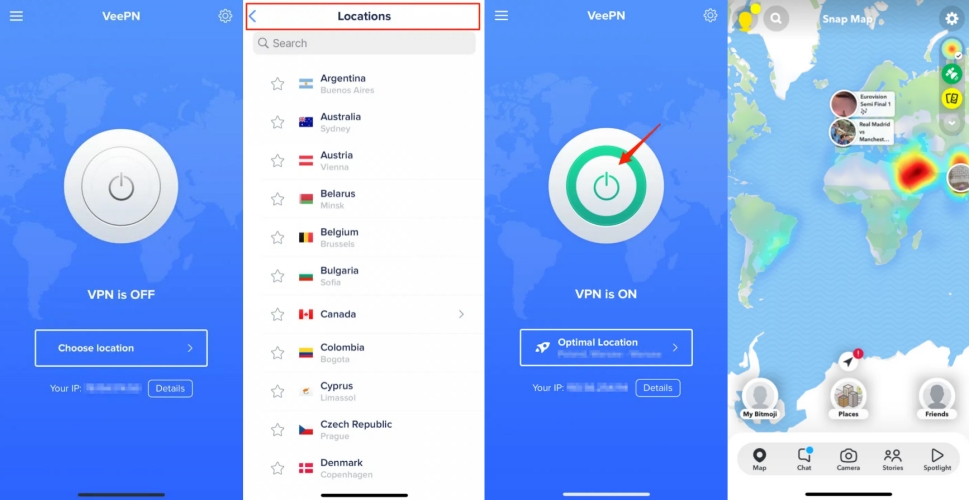
Step 1. Download and install a reliable VPN service on your device.
Step 2. Open the VPN app and connect a server in your desired country.
Step 3. Clear TikTok's cache and open TikTok.
Step 4. Browse content to train the algorithm on your new location.
Pros- Allows access to geo-restricted content
- Fast and easy to set up
- Some free VPNs are slow or unsafe
- Might violate TikTok's terms of service
Method 3. Change TikTok Region Using a Location Changer
In general, using a VPN and selecting a popular region can successfully change your TikTok location. However, this method may not always work. In some cases, the issue occurs because your GPS location does not match the IP address provided by the VPN, creating a conflict.
To fix this, you can try using a location changer such as MagFone Location Changer. This tool helps make your GPS location consistent with your IP address, allowing TikTok to function more smoothly. It is compatible with both Android and iPhone devices. Here's how to change your location on TikTok using this tool:

MagFone Location Changer
Easily change your GPS location on iOS and Android devices to anywhere with one click, while not requiring root or jailbreaking!
Step 1 Select Change Location on MagFone

Run MagFone Location Changer on your computer, then click the Start button. Connect your phone (with the TikTok app installed) to the computer using a USB cable, and enable Developer Mode if prompted. Finally, select General Mode when choosing the operating mode.
Step 2 Start to Change Region on TikTok

In the Change Location mode, you can enter the address into the search bar or pick a location on the map with your mouse. Once you find your target location, you can click the Start Modifying button to change your region on TikTok.
Pros- Works for accessing geo-restricted content
- Easy and simple to set up
- Supports changing TikTok location to anywhere
- Needs to install an external app
- Requires to operate with a computer
Part 3. How to Change TikTok Location on PC
Besides using TikTok on your phone, you can also browse TikTok directly on your computer. Whether you're using the TikTok desktop app or the web version, using a VPN to change your virtual location can help you access content from different regions. Below, we'll show you how to do it on a PC.
Step 1. If you've already installed the TikTok desktop app, uninstall it first. Then download, install, and launch a reliable desktop VPN on your computer.
Step 2. Connect to the region you want to access through the VPN. After that, download and open the TikTok desktop app.
Step 3. Sign in to a TikTok account and start browsing. TikTok will display content more closely related to the region you've selected via the VPN.
You can also use TikTok directly in your browser without installing the desktop app. A VPN browser extension makes it easy to switch locations while browsing TikTok on the web.
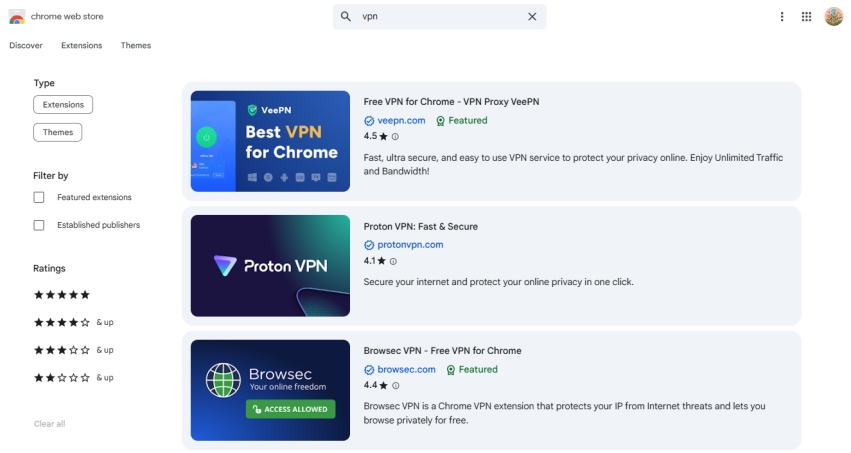
Step 1. Click the More icon in the top-right corner of your browser and select Extensions.
Step 2. Choose Visit Chrome Web Store, find a reliable VPN extension, and click Add to Chrome.
Step 3. Launch the VPN extension and connect to your preferred region. Then open TikTok's website and browse content from the selected location.
Part 4. FAQs about Changing Location on TikTok
How to change TikTok region to Canada?
To change your TikTok region to Canada, you can reset your account settings or use a GPS spoofer like MagFone Location Changer. Alternatively, you can change your SIM card to Canada. You can follow the methods introduced in Part 2 or Part 3.
How to add location to TikTok video after posting?
In most regions, you can add a location to your TikTok video after posting. To add a location to your post, perform the following steps.
Step 1. In the TikTok app, tap the Profile button to find your post.
Step 2. Open your post and tap the three-dot icon.
Step 3. Tap the Edit Post button at the bottom.
Step 4. Tap the Location button to select a location to add.
Step 5. Tap the Save button to save the settings.
How to remove location on TikTok video?
It is impossible to remove location on TikTok video after posting. Currently, TikTok allows users to edit the video after posting, but doesn't support removing location in the video.
How to turn off location on TikTok?
If Location Services is available for TikTok in your region, you can turn Location Services off in your privacy settings. Follow the steps below to turn Location Services off in TikTok.
Step 1. In the TikTok app, tap Profile at the bottom.
Step 2. Tap the Menu button at the top, then select Settings and Privacy.
Step 3. Tap Privacy > Location Services.
Step 4. Choose to turn off the location access permission for TikTok.
Part 5. Conclusion
Changing your location on TikTok opens up new possibilities for content discovery and audience growth. Although it is a bit difficult to change your region on TikTok, you can do it whether you're using a VPN service, changing SIM settings, or adjusting your GPS. To quickly and easily change your region on TikTok, why not use MagFone Location Changer now? Go to have a free trial, and you can change your location on TikTok to anywhere in the world.

Olivia Wood
Editor in chief





