








Forgetting your iPhone passcode, getting locked out after multiple failed attempts, or inheriting a device with an unfamiliar Apple ID can instantly cause frustration. While Apple's official measures are design-focused and robust, recovering access through standard tools like iTunes often results in cryptic error codes, device recognition failures, or overly complicated recovery steps.
Third-party unlock utilities offer a streamlined alternative. TunesKit iPhone Unlocker promises a fast, user-friendly solution to bypass various lock screens, Apple IDs, Screen Time passcodes, and MDM profiles without technical expertise. This review provides a in-depth review of TunesKit iPhone Unlocker, evaluating its performance, features, real-world usability, and pricing to help you decide if it is the right tool for your needs.
- Part 1. What Is TunesKit iPhone Unlocker?
- Part 2. Does TunesKit iPhone Unlocker Work?
- Part 3. Is There Better Option than TunesKit iPhone Unlocker?
- Part 4. FAQs about TunesKit iPhone Unlocker
- Part 5. Conclusion
Part 1. What Is TunesKit iPhone Unlocker?
TunesKit iPhone Unlocker is a desktop utility designed for Windows and macOS. Its primary purpose is to bypass lock screens and security restrictions on iPhones, iPads, and iPod Touch models. Here let's have a comprehensive understanding of TunesKit iPhone Unlocker.
1.1 Core Features & Supported Lock Types
TunesKit iPhone Unlocker serves as an all-in-one iOS utility designed for Windows and macOS platforms. Rather than handling just screen passcodes, the software includes a full suite of unlocking and system maintenance tools.
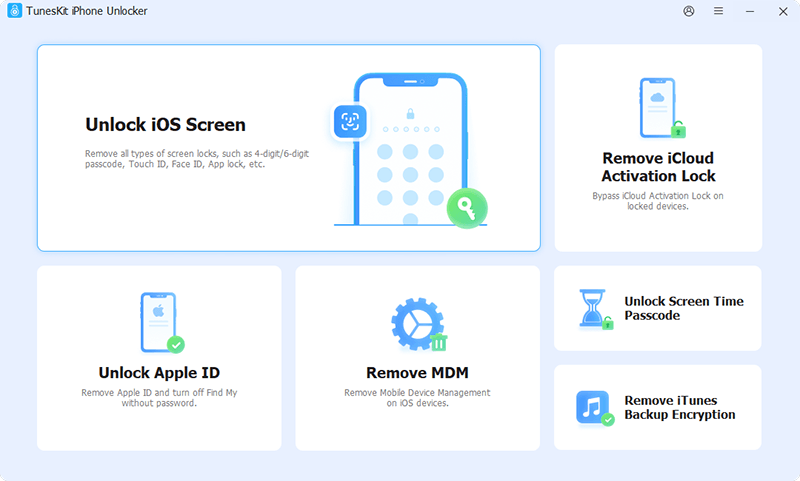
Bypass Screen Lock: Remove 4-digit and 6-digit numeric passcodes, custom alphanumeric codes, Touch ID, and Face. It works on all iPhone, iPad, and iPod touch with disabled, unavailable, security lockout, or physically broken screens.
Remove Apple ID: Remove signed-in Apple ID Accounts without needing the passcode on activated devices. It helps to remove an unknown Apple Account on a second-hand iPhone or sign out of Apple Account when forgetting the password.
Bypass MDM Profile: Bypass Mobile Device Management profiles and remote supervision restrictions without losing data. It is available for bypassing MDM lock on a school-issued or enterprise-controlled iPhone or iPad without the credentials.
Delete Screen Time Passcode: Decode or bypass parental controls and Screen Time restrictions without wiping device contents. It works for parents to remove the forgotten Screen Time passcode on the child's iPhone or iPad.
Bypass iCloud Activation Lock: Bypass iCloud Activation Lock on most models of iPhone and iPad without entering the password. It functions when the iPhone is locked to an iCloud Activation Lock in various scenarios.
Offer Auxiliary Utilities: Include built-in utilities to remove iTunes backup encryption without data loss, silence regional camera shutter sounds, and browse and export saved iOS passwords like WiFi, apps, and websites.
Pricing, Free Trial & Refund Policy
TunesKit offers a "Try-Before-You-Buy" structure. The free trial lets you download the software, test device detection, and download the required firmware package. However, executing the final unlock step requires purchasing a license key.

- 1-Month License: $34.95 (Supports 5 devices / 1 PC or Mac)
- 1-Year License: $49.95 (Supports 5 devices / 1 PC or Mac)
- Lifetime License: $59.95 (Supports 5 devices / 1 PC or Mac)
TunesKit offers a 30-day money-back guarantee. Note that refunds are granted under technical failure conditions, rather than simple change-of-mind cases, which is standard policy across the utility software industry.
1.3 Advantages & Disadvantages
TunesKit iPhone Unlocker stands out as a versatile unlocking tool. However, its primary drawback lies in the unavoidable complete data wipe required when clearing screen passcodes. Here are the main pros and cons of TunesKit iPhone Unlocker.
 Pros
Pros- Clean, intuitive user interface suitable for beginners
- Remove various screen locks like 4-digit or 6-digit passcodes
- Bypass Screen Time passcodes and MDM profiles without data loss
- Handle disabled, unavailable, or broken-screen devices
- Detailed step-by-step instructions for entering Recovery mode

- Wipe all device data when removing a screen lock
- Free trial only for scanning and downloading firmware
- Activation Lock removal limited to specific iOS versions
Part 2. Does TunesKit iPhone Unlocker Work?
Many users are curious about whether TunesKit iPhone Unlocker works or not. To test TunesKit iPhone Unlocker, we we evaluated its primary functions using a disabled iPhone with a forgotten 6-digit passcode, an iPad tied to an active MDM profile, and an iPhone with a broken, unresponsive touchscreen.
Test 1: Disabled iPhone 14 Pro (Screen Passcode Removal)
- Process: The device was connected via a USB cable. TunesKit could not detect it directly due to the security lock, so it displayed step-by-step button combinations to force the phone into Recovery Mode. Once in Recovery Mode, TunesKit automatically recognized the build, fetched the official iOS firmware package, unpacked it, and cleared the lock screen.
- Duration: 14 minutes total.
- Result: Success. The passcode was removed, and the device booted to the initial iOS setup screen. Note that local data was completely wiped as expected under iOS encryption rules.
Test 2: iPad Air (MDM Bypass)
- Process: Connected the iPad while stuck on the Remote Management configuration screen. Selected Bypass MDM in TunesKit and clicked Start.
- Duration: Under 90 seconds.
- Result: The corporate management screen was bypassed immediately without wiping existing files or operating system settings.
Test 3: Unresponsive iPhone SE (Screen Passcode Removal)
- Process: Due to a cracked digitizer, passcode input on the touchscreen was impossible. TunesKit processed the firmware download and system restore entirely through USB controls, eliminating the need for touchscreen interaction during recovery.
- Duration: 12 minutes.
- Result: Success. The device was restored to factory settings, allowing setup via desktop assistance.
| Lock Type | Requires Device Wipe? | Success Rate |
|---|---|---|
| Screen Passcode | ✔️ | Extremely High (98%) |
| MDM Remote Management | ❌ | Very High (95%) |
| Screen Time Passcode | ❌ | Very High (96%) |
| iCloud Activation Lock | ✔️ | High (90%) |
| Apple ID | ✔️ (When Find My is on) | Limited |
Part 3. Is There Better Option than TunesKit iPhone Unlocker?
While TunesKit iPhone Unlocker performs well, users searching for a more seamless recovery process may find MagFone iPhone Unlocker to be a superior option. MagFone iPhone Unlocker addresses key usability pain points found in TunesKit iPhone Unlocker and other unlockers.
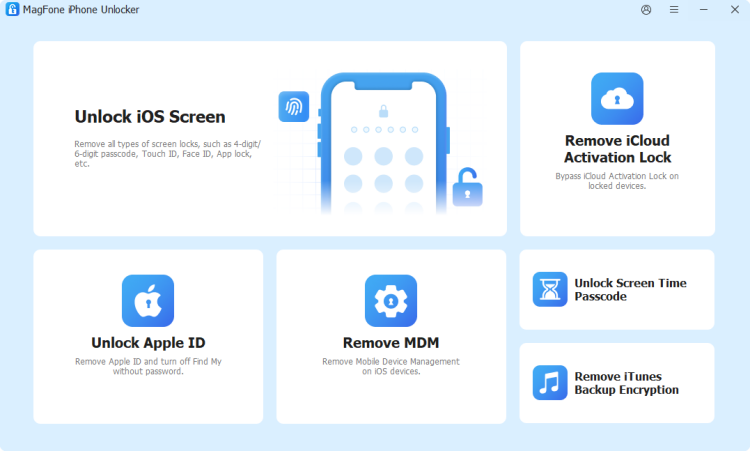

MagFone iPhone Unlocker
Unlock various locks on iOS devices, including screen locks, MDM, Apple ID, and Activation Lock without needing a password.
Advantage 1. Faster & More Stable Firmware Downloads
A common frustration with TunesKit iPhone Unlocker is that downloading large firmware files can occasionally stall or fail on unstable network connections. MagFone utilizes optimized multi-thread CDN servers, delivering noticeably faster, crash-free firmware package downloads during device recovery.
Advantage 2. Streamlined, Modern UI
MagFone iPhone Unlocker features a clean, minimalist user interface designed specifically to eliminate guesswork for beginners. Unlike older utility layouts, MagFone reduces on-screen clutter, presenting clear visual instructions for DFU and Recovery modes across all hardware models.
Advantage 3. Higher First-Time Connection Recognition
During testing, devices that were repeatedly unrecognized by iTunes or took multiple attempts in TunesKit iPhone Unlocker were instantly detected by MagFone's driver architecture, saving valuable troubleshooting time.
Advantage 4. Responsive Customer Support & Updates
MagFone iPhone Unlocker consistently deploys rapid compatibility updates alongside major iOS software updates, ensuring seamless performance with modern hardware and firmware builds.
Part 4. FAQs about TunesKit iPhone Unlocker
-
Is TunesKit iPhone Unlocker free to use?
TunesKit iPhone Unlocker offers a free trial that allows you to download the software, check hardware compatibility, and download required firmware. But performing the actual lock removal requires a paid license.
-
Does TunesKit iPhone Unlocker work on the latest iOS versions?
Yes, TunesKit updates its software regularly to maintain compatibility with major iOS releases, including iOS 27, and supports modern iPhone hardware.
-
Can TunesKit iPhone Unlocker unlock an iPhone without losing data?
For screen locks like 4-digit, 6-digit, Face ID, Touch ID, no. All screen unlockers erase device data due to iOS encryption. However, for Screen Time passcodes and MDM profile bypass, TunesKit iPhone Unlocker can remove restrictions without data loss.
-
Is TunesKit iPhone Unlocker safe to use?
Yes. TunesKit iPhone Unlocker is safe to download and install. Official downloads from the TunesKit website are clean, digitally signed, and free of spyware or adware. The software operates locally on your computer. Your personal data is not uploaded to external servers during the unlock process.
Part 5. Conclusion
TunesKit iPhone Unlocker fulfills its core purpose effectively. It converts a stressful, multi-step technical recovery process into a straightforward, guided procedure. While TunesKit iPhone Unlocker remains a capable tool, MagFone offers a more refined user interface, faster and more stable firmware download performance, and seamless device recognition. If you are looking for a frustration-free unlock process that resolves disabled screens, MDM restrictions, or forgotten passcodes on the first attempt, MagFone iPhone Unlocker is the recommended choice.

Dylan Jones
Editor in chief





