








Running into a network firewall or connection error when trying to open TikTok during a school break is a common frustration. School districts routinely deploy web filters to limit bandwidth consumption and reduce distractions on campus networks. If you are looking for safe, reliable ways to get TikTok unblocked at school, this guide introduces several methods from easiest to most complex. Whether you are using your personal phone on school WiFi or trying to access TikTok on a school-issued Chromebook, here is everything you need to know to get TikTok unblocked at school safely.
- Part 1. Best Way to Get TikTok Unblocked for School
- Part 2. How to Get TikTok Unblocked on School Network
- Part 3. How to Access TikTok on School Devices without Limits
- Part 4. Conclusion
Part 1. Best Way to Get TikTok Unblocked for School
Whether you are trying to stream videos on your personal phone or load the TikTok app on a school-issued laptop, there are several methods to help you get TikTok unblocked at school. To unblock TikTok effectively, it is better to understand the reasons why TikTok is blocked on school networks first. Then you can choose a unblocking method that fits your current device.
- Bandwidth Management: Video platforms like TikTok consume massive amounts of Wi-Fi bandwidth, which can slow down educational activities and classroom streaming.
- Focus and Safety: Schools use web filtering software such as GoGuardian, Lightspeed Systems, or Fortinet to keep students focused during class hours.
- Network Filtering Methods: Schools block TikTok using two main techniques like DNS filtering and app-level blocking.
| Methods | Difficulty | Risk Level | Primary Advantage |
|---|---|---|---|
| Mobile Data & Hotspot | Very Easy | Very Low | Completely bypasses school network with 100% success rate |
| Web-Based Proxies | Easy | Medium | Works directly in Chrome, no installation required |
| Google Translate Proxy | Easy | Low | Leverages trusted Google domain rare to be blocked |
| Custom DNS Settings | Moderate | Low | Changes network resolution without installing apps |
| Encrypted VPN Service | Moderate | Medium | Full network encryption for smartphones and laptops |
Part 2. How to Get TikTok Unblocked on School Network
If you are using a personal phone, tablet, or laptop connected to campus Wi-Fi, several methods can safely bypass network-level restrictions. Let's explore how to access TikTok at school.
Method 1. Use Mobile Data & Hotspots (Phone, Laptop, Computer)
If you are using your personal phone or school-issued computer, the simplest and most effective way to access TikTok unblocked at school is disconnect from the school WiFi network entirely.
Option 1. Use Cellular Data
Because mobile data routes directly through your cellular carrier like Verizon, AT&T, and T-Mobile, it completely bypasses the school's local firewall and Wi-Fi restrictions.
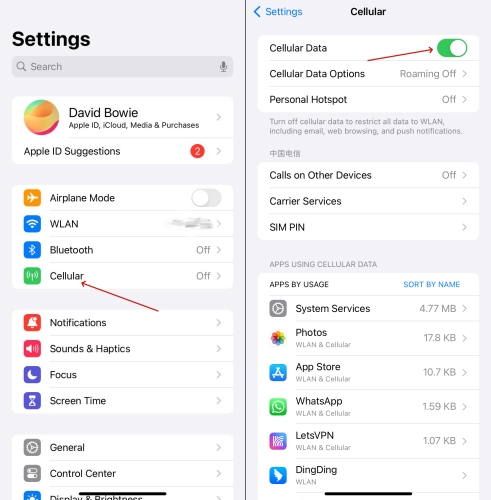
Step 1. Open your phone settings and turn off Wi-Fi.
Step 2. Enable Mobile Data or Cellular Data.
Step 3. Open the TikTok app and start streaming videos.
Option 2. Set Up a Personal Mobile Hotspot
If you need to connect a personal laptop or tablet to the internet, you can set up a personal hotspot on your phone and then make it available for your laptop or tablet.
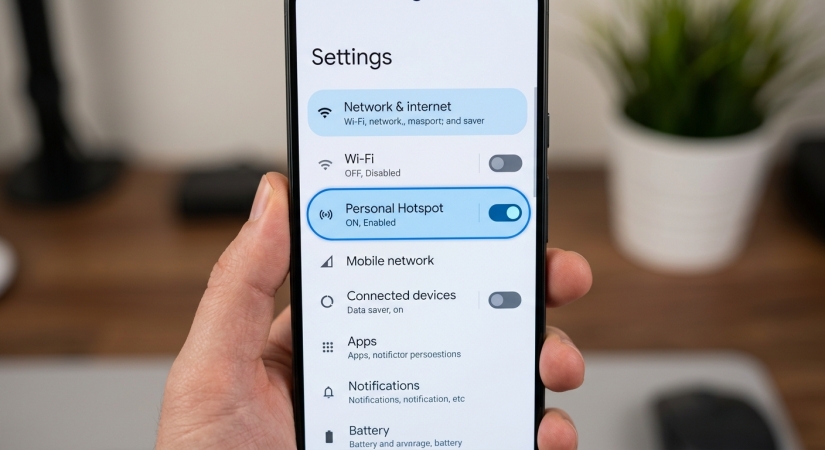
Step 1. Enable the Personal Hotspot feature on your phone.
Step 2. Connect your laptop or tablet to your phone's cellular hotspot Wi-Fi network.
Step 3. Launch TikTok in your web browser and start browsing videos.
Note:
Streaming video over cellular data consumes significant data allowances. Keep an eye on your mobile plan limits if you do not have an unlimited data package.
Method 2. Use Web-Based Proxies (Laptop, Computer)
A web proxy acts as a middleman between your browser and the internet. When you enter a URL into a web proxy, the proxy server fetches the page for you, hiding your destination from local Wi-Fi filters.
Popular Free Proxies for Roblox:
- Hide.me - A reliable, secure, and fast proxy website
- KProxy - A simple and efficient web proxy website
- Proxysite.com - A lightning fast proxy website with multiple servers
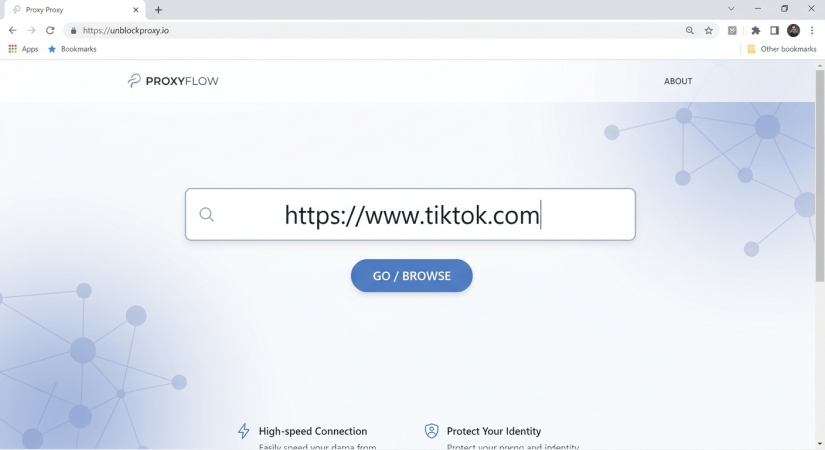
Step 1. Navigate to a reputable web proxy URL in your browser.
Step 2. Type https://www.tiktok.com into the proxy address bar.
Step 3. Click Go or Submit to load TikTok within the proxy interface.
Method 3. Use Google Translate (Laptop, Computer)
Because schools rarely block core educational domains like Google Translate, you can occasionally use it as an improvised web proxy, then access TikTok without limits.
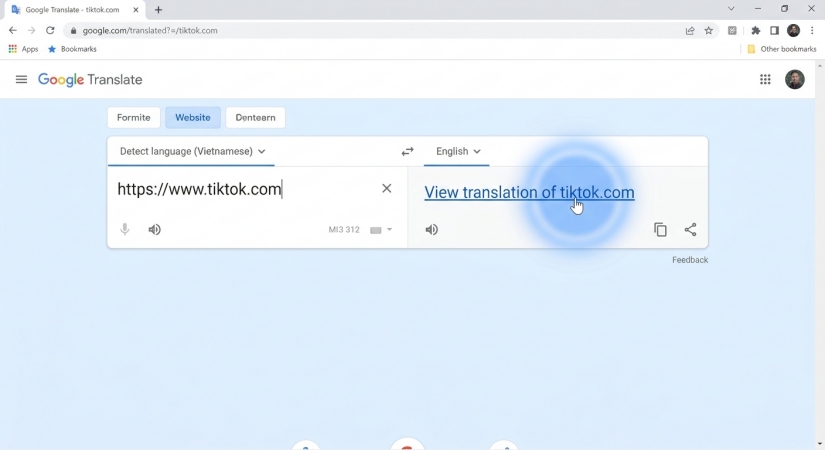
Step 1. Open translate.google.com in your web browser.
Step 2. Click on the Websites tab at the top of the page.
Step 3. Type https://www.tiktok.com into the URL input box.
Step 4. Select any target translation language and click the blue arrow icon.
Step 5. Google will fetch and render the TikTok web interface inside its translation frame.
Method 4. Customize DNS Settings (Laptop, Computer)
Sometimes school filters rely purely on basic DNS blocking, preventing your browser from converting the text address tiktok.com into an IP address. Switching to a custom, public DNS provider can bypass basic domain blocks.
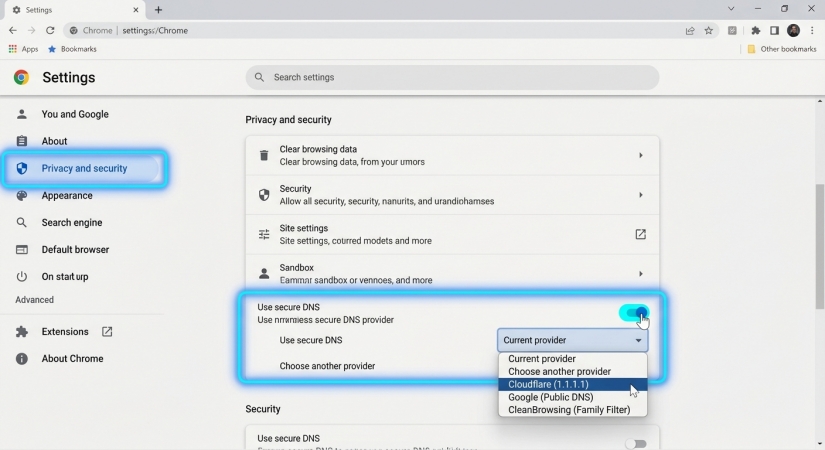
Step 1. Open your Chrome browser settings.
Step 2. Navigate to Privacy and Security > Security.
Step 3. Scroll down to Use Secure DNS.
Step 4. Select With and choose a trusted public provider like Cloudflare (1.1.1.1).
Step 5. Restart your browser and try opening TikTok.
Note:
Custom DNS settings will only work if your school uses basic DNS filtering rather than advanced Next-Generation Firewalls (NGFW) or deep packet inspection.
Method 5. Use VPN Services (Laptop, Computer)
A VPN encrypts all internet traffic leaving your device and routes it through a secure server located outside the school network. Because the school firewall can only see encrypted, unreadable data going to a VPN server address, it cannot detect or block the TikTok traffic.
Best VPN Services for Cookie Clicker:
- NordVPN - Fastest and most secure for school and work networks.
- Surshark - Affordable, works on unlimited devices.
- ExpressVPN - Excellent for mobile play and Chrome extensions.
Step 1. Download a reliable VPN application on your device at home before going to school.
Step 2. Open the VPN application and connect to a local server location.
Step 3. Once the encrypted connection is established, open the TikTok app or website.
Part 3. How to Access TikTok on School Devices without Limits
If your primary obstacle isn't the network firewall but device restrictions such as an unknown Screen Time passcode or an MDM profile blocking social media usage or installation on an school-issued iPad or iPhone, network proxies won't solve the issue. In situations where you own the device but are locked out of Screen Time or MDM restrictions, MagFone iPhone Unlocker can help resolve these device barriers.
MagFone iPhone Unlocker can remove forgotten Screen Time restrictions without wiping personal device data, allowing you to life app time limits or installation blocks. For personal devices restricted by old management profiles, MagFone iPhone Unlocker can bypass MDM locks to restore full administrative control over app installations.

MagFone iPhone Unlocker
Unlock various locks on iOS devices, including screen locks, MDM, Apple ID, and Activation Lock without needing a password.
Step 1 Link iPhone to Computer and Run MagFone
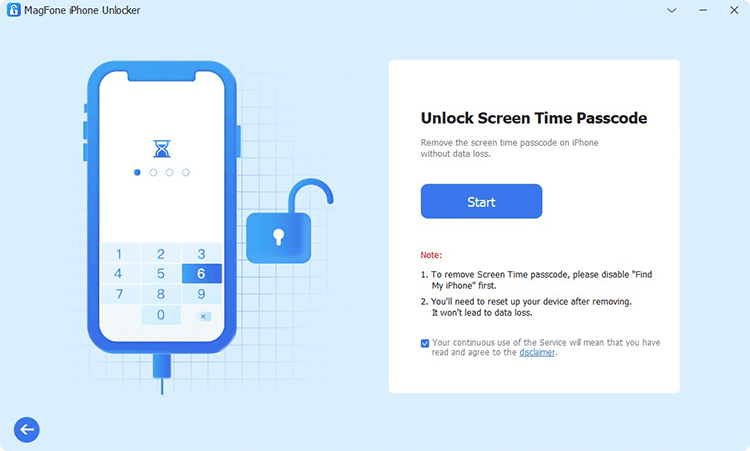
Plug your iPhone into your computer through a USB cable, then open MagFone iPhone Unlocker. To remove Screen Time data, select Unlock Screen Time Passcode on the main interface.
Step 2 Disable Screen Time without Passcode
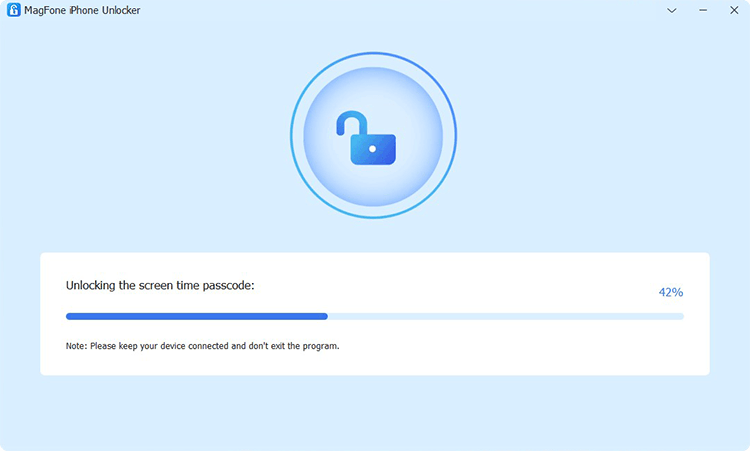
Ensure that Find My iPhone is disabled, then click the Start button to disable Screen Time on your iPhone. Keep your device connected to the computer until the task ends.
Step 3 Go to Set up iPhone without Screen Time
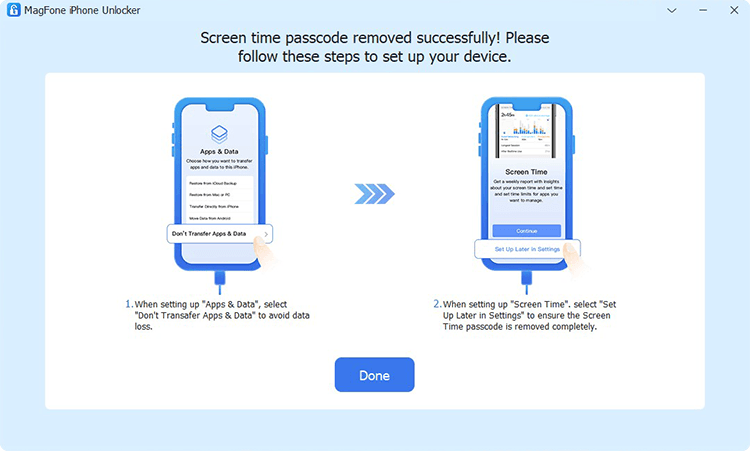
After turning off Screen Time on your iPhone, your device will restart and you need to set it up. Follow the onscreen instruction to set it up, or you will lose the data and content on your device.
Part 4. Conclusion
Getting TikTok unblocked at school ultimately comes down to understanding the type of restrictions in place. To access TikTok on school networks, you can use a reliable encrypted VPN, switch directly to mobile data, or try browser-based workarounds like web proxies or Google Translate. If Screen Time passcodes or MDM profiles are blocking app usage or installation on a device you own, MagFone iPhone Unlocker can help restore full administrative access.

Dylan Jones
Editor in chief





