








Want to play BitLife unblocked at school, work, or on any network with restrictions? Don't worry, we've got you covered. This life simulation game has captured the attention of gamers everywhere, but access is often limited by network restrictions. In this guide, we'll show you how to enjoy BitLife unblocked online. Follow our tips to play smoothly and master key decisions for a winning life in BitLife without any interruptions.

- Part 1. What Is BitLife?
- Part 2. How to Play BitLife Unblocked Anywhere
- Part 3. Tips for BitLife Bitizen
- Part 4. Conclusion
Part 1. What Is BitLife?
BitLife is a free online life simulator game created by Candywriter, LLC. In this game, you can experience countless different lives and shape your own destiny, from birth to death. The game promotes the development of the plot through different stages of choice and decision-making, including childhood learning, youth education and social interaction, adult career and financial management, love and marriage, childbearing and pension, etc.

Part 2. How to Play BitLife Unblocked Anywhere
Due to network restrictions, the BitLife simulator is blocked and not accessible in many schools and workplaces. So, if you want to play BitLife unblocked without restrictions, this guide is for you. In this part, we will show you five proven methods to play BitLife unblocked anywhere.
Method 1. Connect to A VPN
When you want to play BitLife under public Wi-Fi at school or the workplace, only to find that it is inaccessible. This is because network administrators restrict access through IP addresses, domain names, or specific ports, preventing devices from connecting directly to game servers. In this case, you can apply a VPN to help you bypass IP addresses and network restrictions.
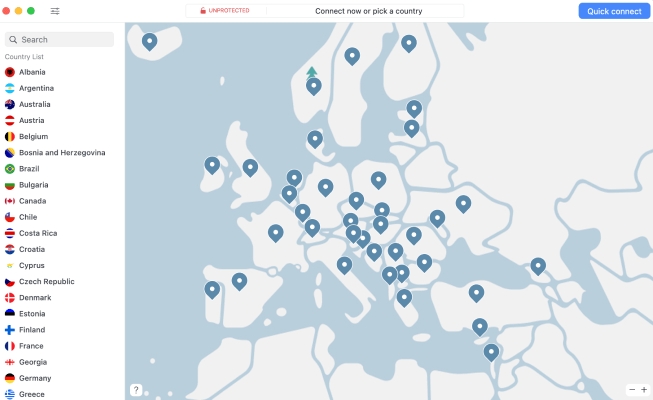
Step 1. Download a VPN application on your device.
Step 2. Open the app and follow the app instructions to configure the VPN connection.
Step 3. Access the game website to play BitLife unblocked.
- 👍Pros:
- Optional region and area
- Bypass all network restriction
- 👎Cons:
- Require a VPN application
- Speed and data limits
Method 2. Use Cellular Data or Hotspot
BitLife is often inaccessible when you're connected to a public Wi-Fi network, as most games are typically blocked on these networks. To play BitLife unblocked, try disconnecting from the Wi-Fi and switching to cellular data or a personal hotspot instead.
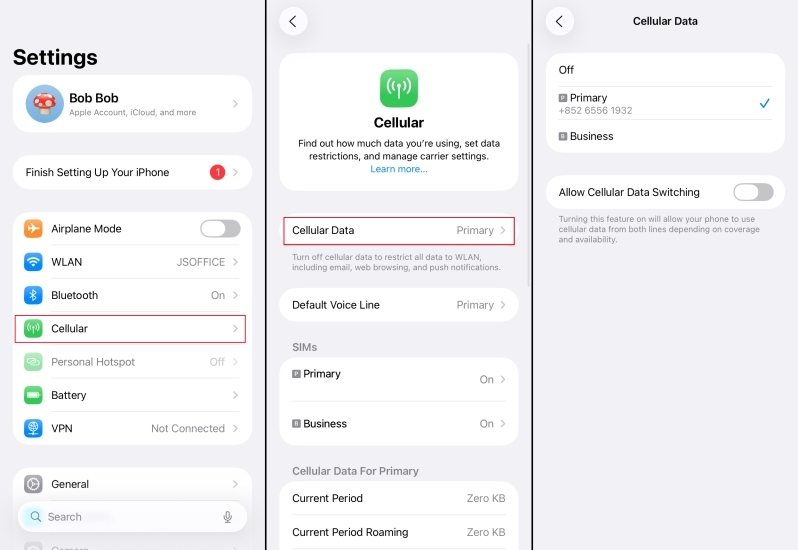
Step 1. Disconnect the Wi-Fi on your device.
Step 2. Enable the cellular data or connect to a known hotspot.
Step 3. Use mobile data to play BitLife.
- 👍Pros:
- Simple and direct
- Require no additional tools
- 👎Cons:
- Consume mobile data
- May cause cost
Method 3. Use A Proxy Server
If you cannot reach BitLife directly through the public network, you can try using a proxy server. A proxy server can help you hide your real IP address and bypass restrictions on public networks. You only need to configure an HTTP or SOCKS proxy on your device, or use a proxy-enabled browser to successfully access blocked websites or games. You need to choose a reliable proxy service to ensure a smoother gaming experience.

Step 1. Navigate to a trustworthy proxy website.
Step 2. Enter the BitLife website to access.
Step 3. Wait for the proxy web to load BitLife, and then play BitLife on the next page.
- 👍Pros:
- Hide IP address
- Bypass network restrictions
- 👎Cons:
- Unstable proxy connection
- A little complex
- Incompatible website
Method 4. Access Unblocked Game Websites
Some websites offer BitLife online or web versions, which are usually not blocked under public networks. By accessing these unrestricted gaming platforms, you can play BitLife directly in your browser without having to modify your network settings or use a VPN. Just navigate to the website and play BitLife online. Some available websites include:
- lifesimulator.online
- bitlifefree.io
- bitlifeonline.github.io/play.html
- 👍Pros:
- Access and play BitLife quickly
- No additional downloads
- 👎Cons:
- Security risk
- Pop-up ads
Method 5. Remove MDM Restrictions
Some schools or companies may have MDM systems installed or Screen Time lock on their devices, which have restrictions on network access and app installation. To play BitLife on such devices, you can try to remove MDM restrictions. Here, MagFone iPhone Unlocker is highly recommended. It can help you remove restrictions like MDM and Screen Time locks quickly and smoothly. And then you can be free to play BitLife on the target device and simulate life.

MagFone iPhone Unlocker
Unlock various locks on iOS devices, including screen locks, MDM, Apple ID, and Activation Lock without needing a password.
Step 1 Launch MagFone iPhone Unlocker
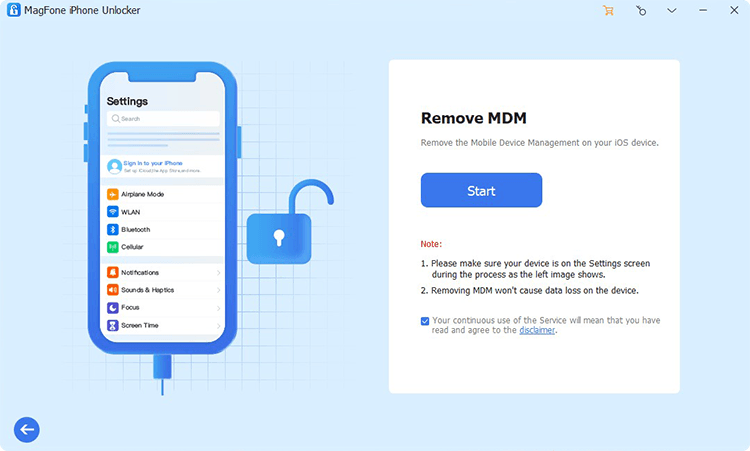
Download and install MagFone iPhone Unlocker on your computer and then connect your device to the computer using a data cable. After all is ready, launch the program and click Remove MDM to forward.
Step 2 Remove MDM from the Device
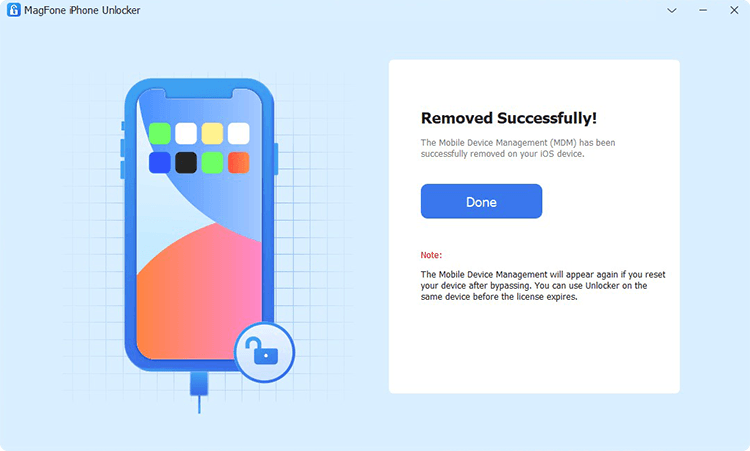
Go to device Settings and tap your Apple ID to check if Find My has been disabled on your device. Click Start and then click the Unlock button to remove MDM restrictions from your device.
Part 3. Tips for BitLife Bitizen
In BitLife, players can pursue different goals and are free to explore different lifestyles and endings. Any choice will affect the future of the characters. Each character has four attributes: happiness, health, smarts and looks, requiring players to balance their actions while facing random events and life opportunities. Here are some tips for a winning bitizen life.

Improve Your Fitness:
Maintaining good health and happiness is the foundation for a high quality of life. Regular fitness, doctor visits, and maintenance can make your role smoother to get opportunities.
Improve Smarts:
Studying more, studying hard, and participating in extracurricular activities can all help you enter high-paying careers in the future.
Manage Financial Rationally:
Allocating assets wisely allows your role to achieve financial freedom faster.
Maintain Good Relationship:
Maintaining good relationships with family and friends can increase happiness and support during critical moments.
Special Experience:
If you want to experience a different life that is untouchable in reality, being a celebrity or a criminal is available to choose from. The former can quickly increase your fame while the latter is at high risk. It is important to choose carefully.
Part 4. Conclusion
BitLife allows you to pursue a totally different life and master your own destiny. Whether you want to play BitLife on a mobile phone or a computer, this guide offers 5 proven methods for you to bypass the restrictions. If you are stopped by Screen Time or MDM restrictions, MagFone iPhone Unlocker is the best choice for you to access BitLife. And you can play the simulation game anywhere and anytime.

Dylan Jones
Editor in chief





