








A forgotten PIN, pattern, or password can lock you out of your own Motorola phone in seconds, and panic usually follows right behind it. Whether you bought a used device with an old lock still active or simply blanked on your code after a software update, knowing how to unlock Motorola phone when forgot password matters can save your data and your sanity. This guide walks through every practical option available today.
- Part 1. How to Unlock Motorola Phone Without Factory Reset
- Part 2. How to Unlock Motorola Phone with Factory Reset
- Part 3. FAQs about Unlocking Motorola Phone
- Part 4. Conclusion
Part 1. How to Unlock Motorola Phone Without Factory Reset
Before wiping your device, it's worth trying the gentler routes first. The three methods below let you regain access to your Motorola while keeping your photos, apps, and files exactly where you left them.
Method 1. Unlock Motorola with Smart Lock
Smart Lock is a built-in Android feature that keeps your phone unlocked under conditions you trust, such as being near a paired Bluetooth device or in a familiar location. If you enabled it before getting locked out, it can bypass the lock screen automatically.
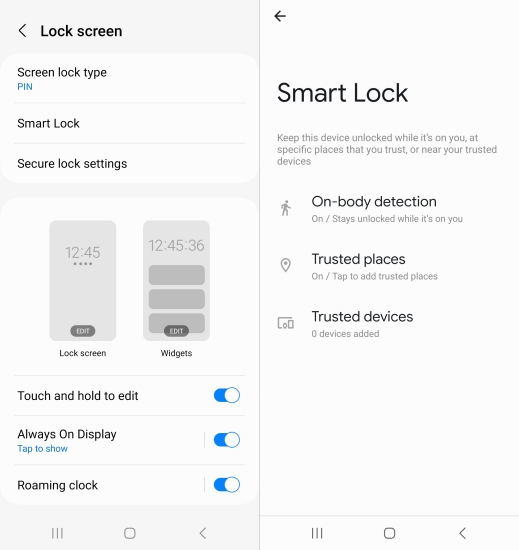
Step 1. Bring your phone into a previously trusted condition, such as connecting it to the Bluetooth accessory or arriving at your saved trusted location.
Step 1. Wait for the screen to unlock on its own, since Smart Lock will recognize the trusted signal and skip the password prompt.
Method 2. Unlock Motorola by Contacting Support
Sometimes the safest route is simply asking the manufacturer or carrier for help. Motorola and most network providers can verify your ownership through proof of purchase or account details and either issue guidance or remotely assist with unlocking, all without erasing anything on the device.
Part 2. How to Unlock Motorola Phone with Factory Reset
When the options above aren't available or simply don't work, a factory reset becomes the fallback. It clears your data completely, so back up anything important beforehand if you're able to access the phone in any way first.
Method 1. Unlock Motorola via MagFone Android Unlocker
For a faster and more reliable fix, MagFone Android Unlocker is worth considering. This desktop tool is built to clear screen lockouts — PIN, pattern, or password — on Motorola devices, and it can also strip away the Google FRP lock left behind after a reset, with support spanning Android 11 through 12. Install the program on your computer and follow the walkthrough below to bypass the lock screen in just a few minutes.

MagFone Android Unlocker
Remove multiple kinds of screen locks on over 5000 Android devices and delete Google FRP lock without a password.
Step 1 Connect Locked Phone to a PC
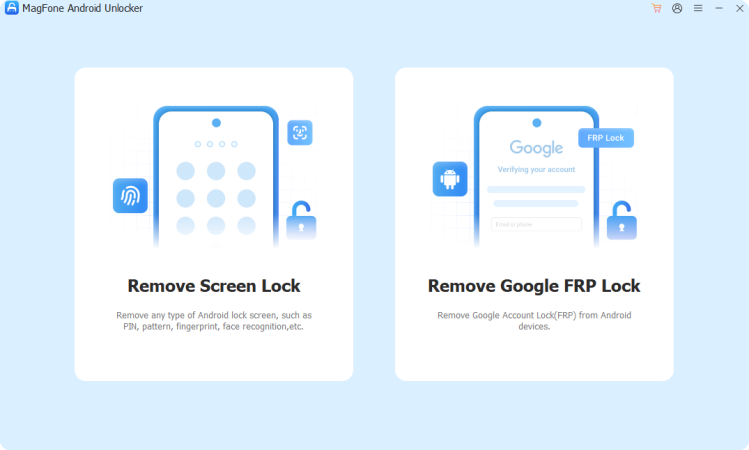
Open MagFone Android Unlocker once installed, then plug your Motorola in using a USB cable. On the home screen, click the option for removing the screen lock. The software usually identifies your device's brand on its own, but you can pick Motorola manually if it doesn't.
Step 2 Enter Recovery Mode Manually
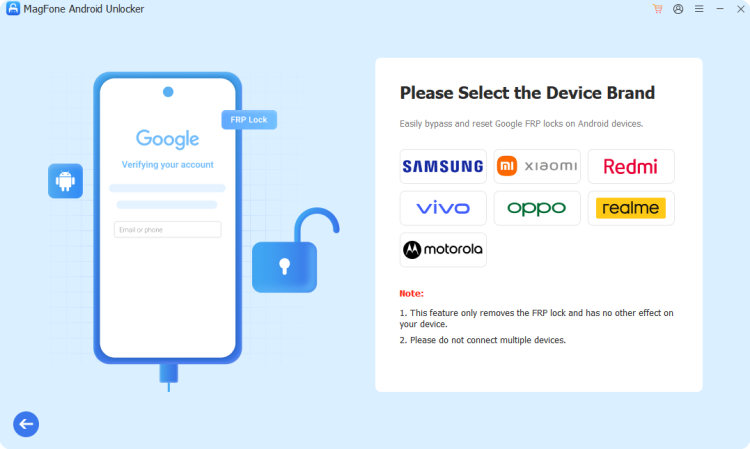
After confirming the brand, hit Start. You'll see a notice that data may be lost during the process — click Continue to move forward. The tool then guides you, step by step, through booting your Motorola into Recovery mode. Once you've completed that, click Next, then Continue again.
Step 3 Clear the Android Lock Screen
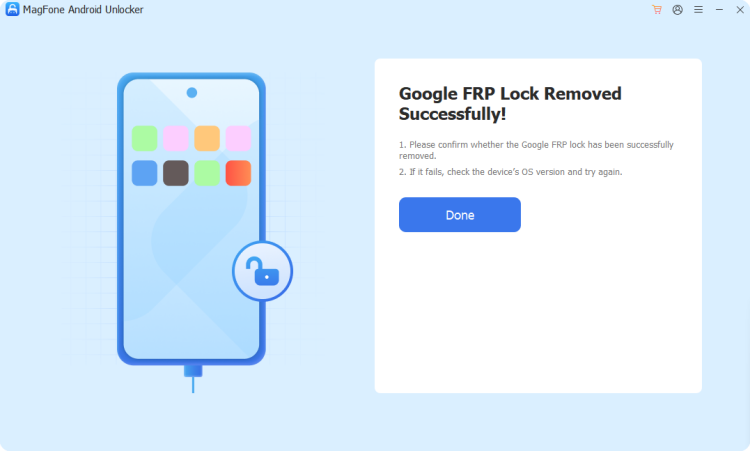
Continue following the on-screen instructions until setup is finished, then click Next and allow the software to strip away the lock. When the process wraps up, your Motorola will restart with no PIN, pattern, or password blocking your way in.
Method 2. Unlock Motorola on Find My Hub
Google's Find Hub isn't only for tracking a lost phone — it can also trigger a remote factory reset. This clears the lock screen entirely, making it a solid backup plan when your phone is online but you can't recall the passcode.
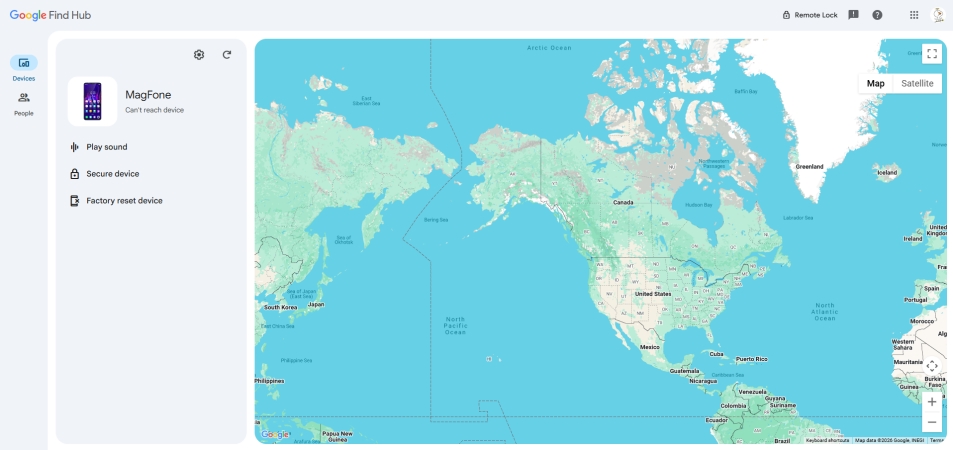
Step 1. Visit the Find Hub website on any browser and sign in with the Google account tied to your Motorola.
Step 2. Select your device from the panel and choose the factory reset option, confirming your account credentials when asked.
Step 3. Wait for the reset command to process, then set up your phone as new once it restarts.
Method 3. Unlock Motorola in Recovery Mode
Recovery mode gives you a way to wipe the device manually using hardware buttons alone, which is handy if the phone won't connect to the internet or your Google account isn't linked.
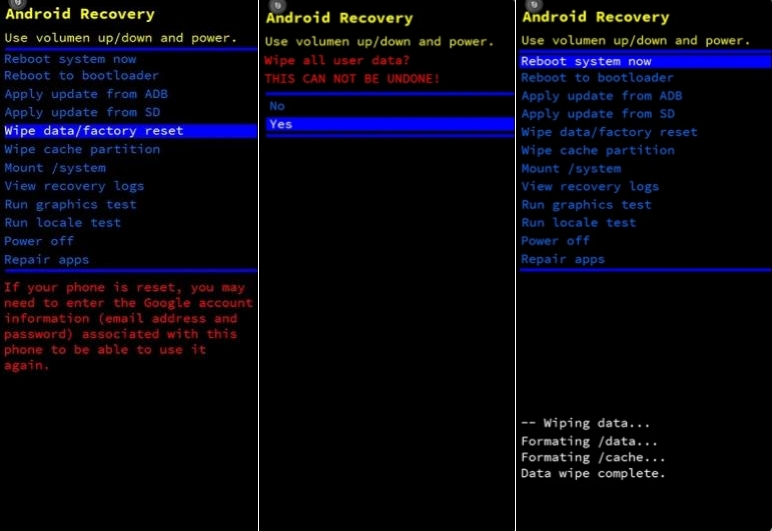
Step 1. Power off the phone completely, then hold Volume Up and Power together until the bootloader screen appears.
Step 2. Use the volume down button to scroll to Wipe data/factory reset and press Power to confirm.
Step 3. From the recovery menu, navigate to Wipe Data/Factory Reset and select it with the Power button.
Step 4. Confirm the wipe, then choose Reboot System Now to restart your Motorola free of the old lock.
Method 4. Unlock Motorola with ADB Command
If USB debugging was switched on before you got locked out, Android Debug Bridge lets you delete the lock file directly from a computer. It's a technical route, but it can work without erasing your data if executed carefully.
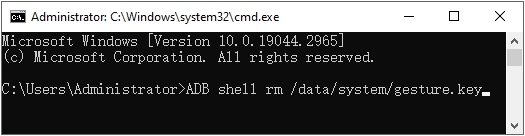
Step 1. Install Android Platform Tools on your computer, then turn on USB Debugging on the Motorola device. Use a USB to connect the phone to the computer.
Step 2. Open Command Prompt on your PC and enter the command below, then press Enter: adb shell rm /data/system/gesture.key
Step 3. Once the command has been executed, enter adb reboot and press Enter to restart the device. After the reboot, the existing lock screen may no longer appear, allowing you to configure a new password or pattern.
Part 3. FAQs about Unlocking Motorola Phone
How to unlock Motorola phone without Google account?
This situation typically comes up against Factory Reset Protection (FRP), which normally requires the original Google account password to pass through. If you no longer have access to that account, a dedicated FRP removal tool such as MagFone Android Unlocker can bypass the check and get you back into the device.
How to unlock Motorola phone password without losing data?
Any method built around a factory reset will wipe your files, so if keeping your data matters, stick to non-destructive routes like contacting support, resetting your password through Google, or relying on Smart Lock, all covered earlier in this guide.
How to unlock Motorola phone to any network?
Network unlocking is a separate process from screen-lock removal. It usually requires meeting your carrier's eligibility rules, the device fully paid off, the account in good standing, and often a minimum active period. After which the carrier issues an official unlock code tied to your phone's IMEI.
How to unlock Motorola phone after factory reset?
A factory reset clears the screen lock, but Google's FRP protection can still remain active afterward. If you didn't remove your Google account before resetting, you'll be asked to sign back in. Entering the correct password clears it instantly; skipping it is trickier and usually calls for an FRP removal tool.
Part 4. Conclusion
Getting locked out of a Motorola phone doesn't have to mean losing your data. Password recovery, carrier support, and Smart Lock can restore access without a reset, while tools like MagFone Android Unlocker, Find Hub, recovery mode, or ADB commands remain reliable backups when a full reset becomes unavoidable.

Dylan Jones
Editor in chief





