








A Tracfone is a prepaid mobile phone that operates on major U.S. wireless networks but typically comes locked to Tracfone's service. Users may want to remove this carrier restriction for various reasons, such as using a local SIM while traveling abroad, moving to a more affordable or reliable network, or preparing the device for resale. This guide explains practical methods to unlock Tracfone devices safely and effectively with simple steps for any user.
- Part 1. Can You Unlock a Tracfone for Free?
- Part 2. How to Unlock Tracfone Device for Free
- Part 3. How to Unlock Tracfone Device on Web
- Part 4. Extra Tip: How to Bypass FRP/Screen Lock on Android
- Part 5. Conclusion
Part 1. Can You Unlock a Tracfone for Free?
The good news is that Tracfone does offer a completely free, official way to unlock your device through its own online request system. However, not every phone qualifies right away. Before you submit a request, your device generally needs to meet the following conditions:
- The phone must be powered on and in good working condition.
- The device must have no reports of loss, theft, or fraud.
- The phone must have been activated with a redeemed Tracfone/Verizon Value airtime plan.
- Devices using the T-Mobile or AT&T network generally require around 12 months of active, paid service before unlocking.
- Devices using the Verizon network are typically eligible after about 60 days of active, paid service.
- Any outstanding payments, balances, or account issues must be cleared before requesting an unlock.
Part 2. How to Unlock Tracfone Device for Free
Once you've confirmed your phone checks all the boxes above, the next move is to submit an actual unlock request through Tracfone's system so the device can start working with other carriers. It takes just a few minutes and requires minimal manual effort.
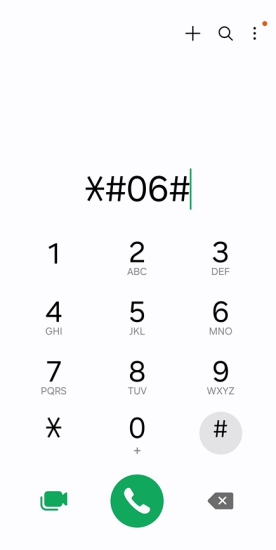
Step 1. Open Settings on your phone, tap "About phone" (or "Status" if the info isn't shown right away), and note down the IMEI. You can also enter #06# to quickly view this number. If the automatic detection on the unlock site doesn't recognize your device, you can always type the IMEI in manually.
Step 2. Head to tfwunlockpolicy.com on any browser. You can even do this from the locked phone itself, with or without a Tracfone SIM inserted. Enter your IMEI or serial number, confirm you're not a robot, and click "Verify Eligibility."
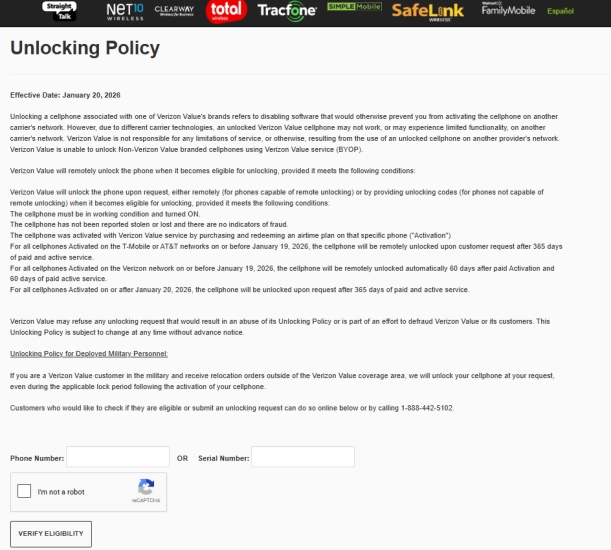
Step 3. If prompted, enter the phone number tied to the service line you want unlocked, then continue to the next screen.
Step 4. Fill in your first and last name, email address, and a reachable phone number, then hit "Submit." You'll land on an order summary page containing two unlock codes. Copy both, since you'll need them shortly. A copy will also be emailed to you for safekeeping.
Step 5. Open the dial pad and enter #TFUNLOCK# (#83865625). This opens the TF Unlock menu on your device.
Step 6. Type in the first code from the order summary and tap Submit.
Step 7. Enter the second code the same way. The screen should display a "Processing" message, followed by confirmation that the codes were accepted and the device is now unlocked.
Part 3. How to Unlock Tracfone Device on Web
Not everyone will meet Tracfone's official eligibility rules right away. Maybe the phone hasn't hit the required months of service, or it was purchased secondhand without full account access. In cases like this, a third-party unlocking portal can be a workaround. One widely used option is directunlocks.com, which processes unlock requests for a wide range of carriers, including Tracfone.
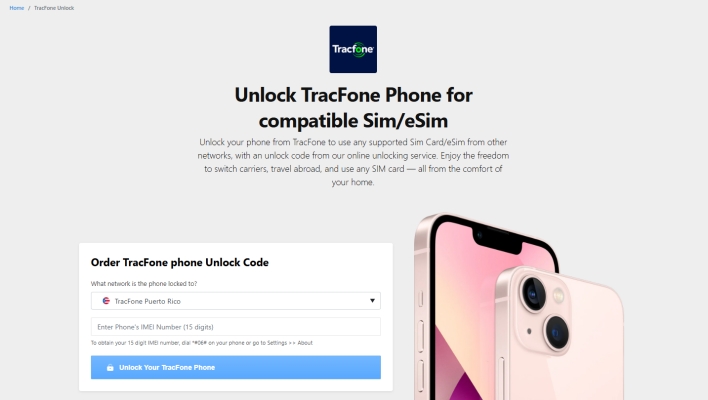
Step 1. To use it, visit the DirectUnlocks site and select your network from the list, then enter your IMEI number.
Step 2. Choose the unlocking service that matches your phone and complete the checkout process, since these portals typically charge a small fee instead of offering the service for free.
Step 3. After submitting your order, you'll receive the unlock information by email within the stated delivery period.
Step 4. Once you receive the code, insert a SIM card from another carrier into your Tracfone, and when prompted, type in the code you were given to complete the unlock.
Part 4. Extra Tip: How to Bypass FRP/Screen Lock on Android
If you've picked up a used Android phone that still has Factory Reset Protection or an unknown screen lock enabled, unlocking the carrier alone won't solve that problem. In this situation, a dedicated tool like MagFone Android Unlocker can help remove these locks. Before getting started, it's worth checking the compatibility list to confirm your specific device model is supported by the software. The steps below outline the general process for clearing a screen lock with the tool.

MagFone Android Unlocker
Remove multiple kinds of screen locks on over 5000 Android devices and delete Google FRP lock without a password.
Step 1 Launch MagFone and Connect
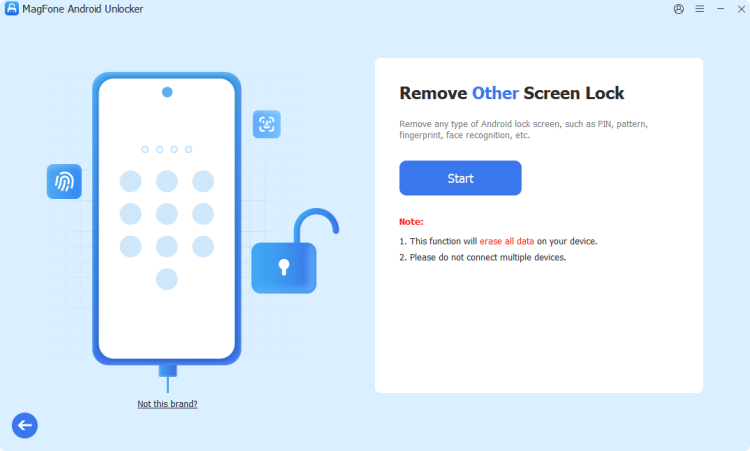
On your Android device, download and install MagFone Android Unlocker onto your computer, then plug your Android phone in using a USB cable. Once the program opens, choose the option to remove the screen lock from the main menu and proceed to the next screen.
Step 2 Access Recovery Mode on the Phone
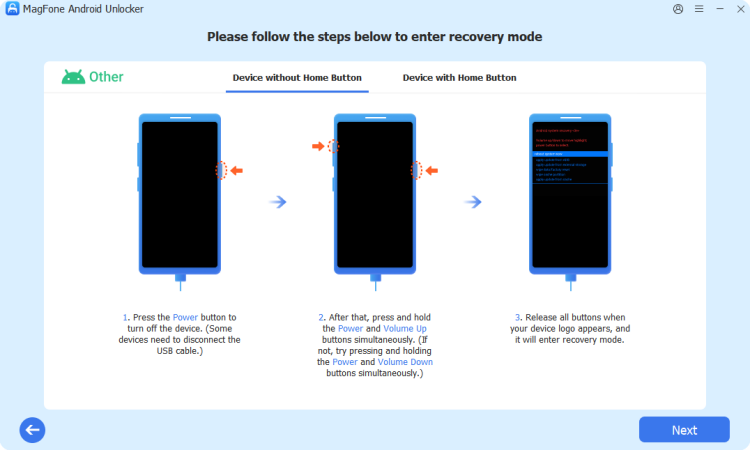
After the software recognizes your connected device, it will walk you through the steps needed to place the phone into recovery mode. Once you've done so, continue through the on-screen prompts to move forward with the process.
Step 3 Clear the Lock from the Device
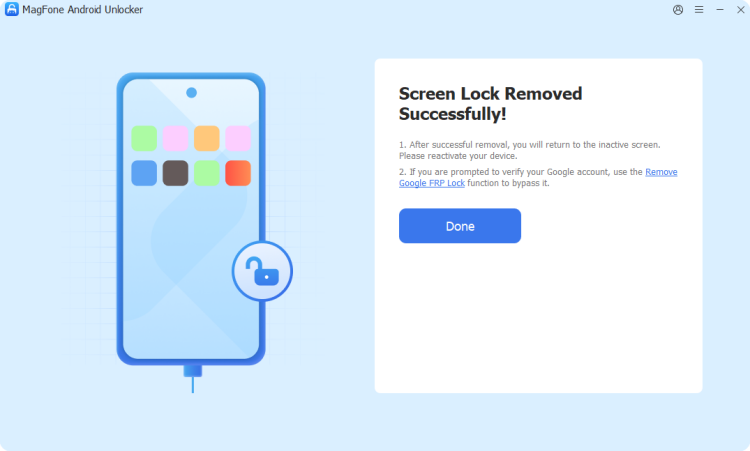
Follow the remaining on-screen guidance provided by the tool to strip away the forgotten pattern, PIN, or password lock. When the process finishes, confirm within the MagFone interface to complete the operation.
Part 5. Conclusion
Unlocking a Tracfone doesn't have to be complicated. Whether you qualify for Tracfone's free official request tool, need to lean on a paid web-based unlocking portal, or you're dealing with a stubborn FRP or screen lock on a used Android phone, there's a method here to fit your situation. Pick the option that matches your circumstances and get your device working freely across networks.

Teresa Miller
Editor in chief




