








Been looking high and low for answers to this. I forgot my pattern on my phone and for some dumb reason it's not even letting me power down without the correct pattern. At this point I've come to terms with lost data and just want to hard reset but without the ability to power off the device that's become almost impossible."
——From Reddit
Forgetting the password, PIN, or pattern on your LG phone can cause lots of troubles, whether you urgently need access to your data or power off your device. If you're searching for how to unlock an LG phone after forgetting the password, you're in the right place. This guide explains all practical, safe, and easy methods to regain access to your LG phone, from solutions that may preserve your data to reset options when nothing else works. Find a solution to help you unlock your LG phone forgot password now.
- Part 1. How Do You Unlock a LG Phone?
- Part 2. How to Unlock LG Phone Forgot Password/Pattern (No Data Loss)
- Part 3. How to Unlock LG Phone Forgot Password/Pattern (100% Working)
- Part 4. FAQs about Unlocking LG Phone
- Part 5. Conclusion
Part 1. How Do You Unlock a LG Phone?
Before jumping into step-by-step tutorials, use this quick comparison table to identify the right solution. This comparison table helps users quickly find the most efficient path instead of trying random solutions. Let's see which one works better for you.
| Your Situation | Recommend Method | Data Loss | Difficulty |
|---|---|---|---|
| Forgot password, older LG phone | Forgot Pattern, Emergency Call, or Backup PIN | ❌ | Medium |
| Forgot password, phone still online | Google Find My Device | ✔️ | Medium |
| Phone locked, no internet | Android unlocker or factory reset via buttons | ✔️ | Easy |
| USB debugging enabled before lock | ADB method | Sometimes | Advanced |
| Smart Lock enabled before lock | Smart Lock | ❌ | Easy |
| Bought used phone, FRP locked | Original Google account needed or FRP bypass tool | Sometimes | Medium |
Part 2. How to Unlock LG Phone Forgot Password/Pattern (No Data Loss)
Worried about data loss, most users searched for a way to unlock an LG phone without resetting. Fortunately, there are some options available to try first because they may not erase your data. But those options only work on some LG phones and older Android versions.
Method 1. Unlock an LG Phone via Forgot Pattern (Android 4 or Earlier)
On an LG phone running Android 4 or earlier, you may see a "Forgot Pattern" or "Forgot Password" option after several failed attempts. This method works for removing the screen lock by logging with your Google account, while not wiping any data on the device.
📝Requirements:
Google account and password
Device running Android 4.0 or below
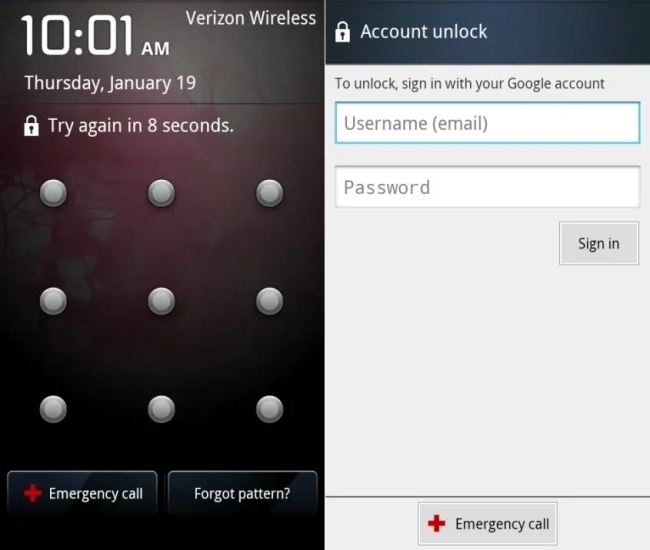
Step 1. Enter the wrong password or draw the incorrect pattern several times.
Step 2. Tap Forgot Pattern or Forgot Password on the lock screen.
Step 3. Sign in using the Google account previously linked to the phone.
Step 4. Set a new screen lock like the password, pattern, or PIN.
 Pros
Pros- No data loss
- Official Android feature

- Work mainly on older Android versions
- Require internet and Google account access
Method 2. Unlock an LG Phone via Backup PIN
Some LG phones allow unlocking using a backup PIN if you have set one before. And if you never change your settings, the default PIN is probably 0000. However, this doesn't appear sometimes, which causes there is no option to enter a backup PIN to unlock the device.
📝Requirements:
Set a backup PIN before
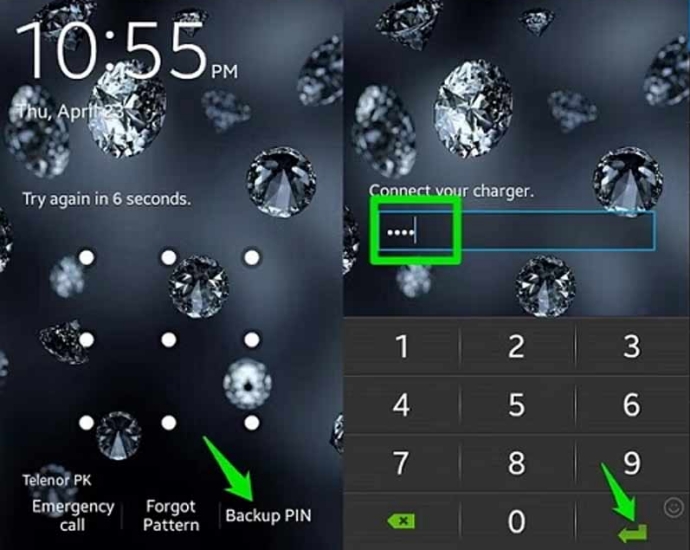
Step 1. Enter the incorrect password until the Backup PIN button appears.
Step 2. Tap Backup PIN, then enter the backup PIN to unlock your device.
Pros- No data loss
- Safe and easy official features
- Need have set a backup PIN before
- Feature doesn't work sometimes
Method 3. Unlock an LG Phone via Emergency Call (Android 5 or Earlier)
Some videos or blogs claim you can unlock an LG phone using the Emergency Call screen. For example, type symbols, use long strings, or exploit the dialer. These were old Android bugs that worked on a few devices years ago. It's almost outdated or fake, but you still can have a try.
📝Requirements:
Older Samsung models
Devices running Android 5 and below
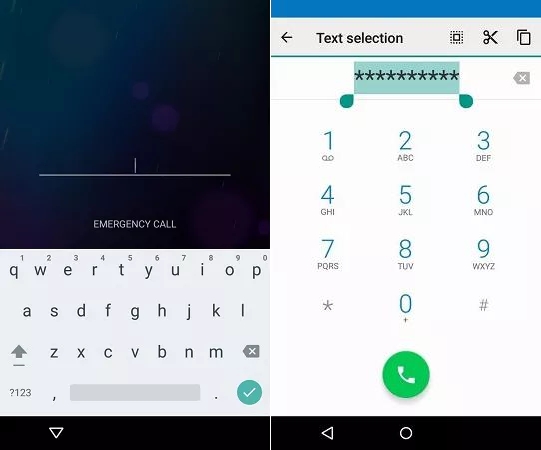
Step 1. Tap the Emergency Call button on the locked screen to open the dialer.
Step 2. In the dial box, type a long string of characters like **********.
Step 3. Go back to the lock screen and tap the Camera mark on the corner.
Step 4. Swipe down the screen and pull down the notification bar.
Step 5. Tap the Settings button, then paste ********** into the password bar.
Step 6. Wait for the screen lock to crash. Then you'll get into the locked device.
Pros- Get into a locked LG phone without a password
- Not cause any data loss
- Not work on modern LG phones or updated Android versions
- Not able to remove the screen lock
Method 4. Unlock an LG Phone via ADB Commands
If USB debugging was enabled before locking and you connected the phone to same computer before, you can use ADB commands to delete the lock files from system memory. This method can delete the screen lock without data loss, but it is complex and unreliable for most users.
📝Requirements:
USB debugging enabled on device
Phone previously trusted your computer
Have a trusted computer
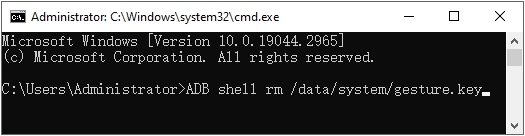
Step 1. Go to install Android SDK Platform Tools on your computer.
Step 2. Plug your LG phone into the the computer using a USB cable.
Step 3. Use Win + R on the keyboard to open a Command Prompt window.
Step 4. In the Command Prompt window, type cmd, then hit Enter.
Step 5. Type adb devices and press Enter on the keyboard.
Step 6. Perform the following commands one by one with the Enter button on the keyboard.
adb shell
cd /data/data/com. Android.providers.settings/databases
sqlite3 settings.db
update system set value=0 where name='lock_pattern_autolock';
update system set value=0 where name='lockscreen.lockedoutpermanently';
.quit
exit
adb reboot
Step 7. Restart the device and perform the following commands in turn.
adb shell
rm /data/system/gesture.key
exit
adb reboot
Pros- May avoid full factory reset
- Useful for technical users
- Rarely works for typical users
- Requires advanced technical knowledge
Method 5. Unlock an LG Phone via Smart Lock
Smart Lock is an Android feature that keeps your phone unlocked under certain trusted conditions, such as trusted places, trusted devices, or on-body detection. If Smart Lock was enabled before, you might regain access without entering your password when you are currently at a trusted location or your phone is connected to a trusted Bluetooth device. For example, if your phone unlocks automatically when connected to your car Bluetooth, you can:
📝Requirements:
Smart Lock must be enabled previously
Options like Trusted Places have been set
Step 1. Get into your car.
Step 2. Let the phone unlock automatically.
Step 3. Go to Settings > Chang lock screen password.
Pros- Support automatic unlocking without the password
- Not cause any data loss and allow to change the lock
- Need to have Smart Lock enabled before
- Fail to unlock the device after locked over 4 hours
Part 3. How to Unlock LG Phone Forgot Password/Pattern (100% Working)
Those above methods that won't cause any data loss may not be suitable for all LG phones. If you have an LG phone running the latest Android version, you may try a reset method or use an Android screen unlocking tool to remove screen locks.
Method 1. Unlock an LG Phone via Find My Device
If your phone is newer and connected to the internet, Find My Device helps you to remotely remove the screen lock by erasing the data. To unlock your LG phone with Find My Device, make sure that your phone has an internet connection enabled and Google account login.
📝Requirements:
Phone must be logged into your Google account
Find My Device must be enabled
Device must be connected to a useful network
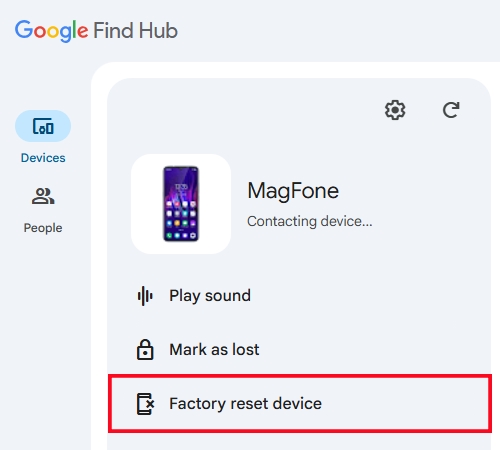
Step 1. Visit Google Find My Device from another device.
Step 2. Log in with the same Google account.
Step 3. Click the Devices button and select your LG phone.
Step 4. Click Factory reset device > Next and enter your Google password.
Step 5. Click Reset to wipe all the settings on the device.
Pros- Official Google method
- Work on most modern LG devices
- Delete all local data
- Require Google account login after reset
Method 2. Unlock an LG Phone via Recovery Mode
If your phone is offline or you can't access your Google account, you can factory reset your LG phone using hardware buttons, which will erase all data and settings, including the screen lock. But the operation process is a bit difficult for some beginners.
📝Requirements:
Google or Samsung account
At least 30% power
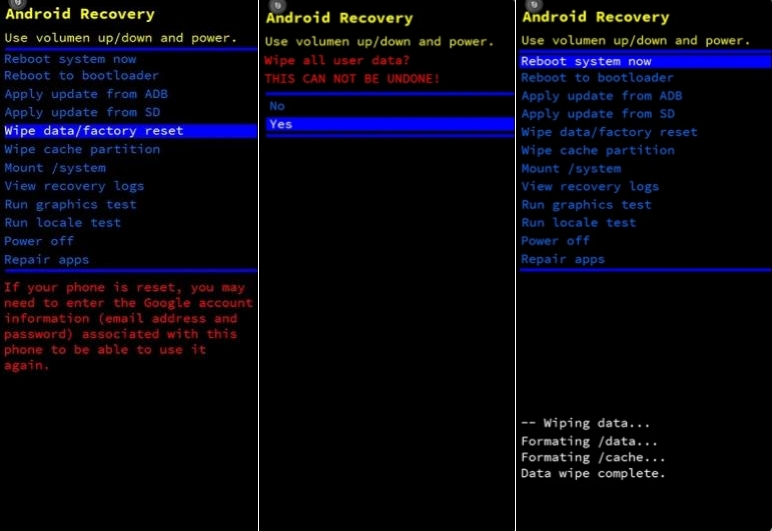
Step 1. Power off your LG phone with the Power button.
Step 2. Pres and hold both Power and Volume Down buttons for approximately 10 seconds.
Step 3. Release both of the buttons when the System recovery screen is displayed.
Step 4. Press the Volume Down or Up buttons to select Factory data reset.
Step 5. On the Factory data reset screen, press either of the Volume buttons to highlight Yes.
Step 6. Press the Power button to confirm. Then wait for the device to restart.
Pros- Work on almost all LG phones
- No account login required to start reset
- Data loss
- Still require original Google account after reset
Method 3. Unlock an LG Phone via Android Unlocker
If you forgot your screen lock and official methods like Google Find My Device or factory reset feel confusing, professional unlocking tools such as MagFone Android Unlocker offer another option to try. MagFone Android Unlocker is designed to help users remove different types of Android lock screens, including PIN, pattern, password, fingerprint, and face lock on supported devices. It provides a visual interface, which can be easier for beginners compared to using recovery mode or commands. Go to unlock your LG phone forgot password or PIN with MagFone Android Unlocker now.

MagFone Android Unlocker
Remove multiple kinds of screen locks on over 5000 Android devices and delete Google FRP lock without a password.
Step 1 Connect between LG Phone and MagFone
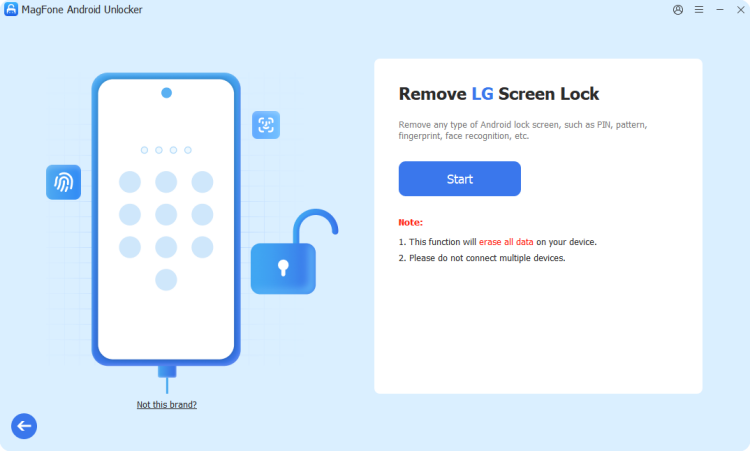
After downloading and installing MagFone Android Unlocker, launch the program on your computer and connect your LG phone with a UBS cable. From the main interface of the MagFone software, select Remove Screen Lock and click Start.
Step 2 Put Locked LG Phone into Recovery Mode
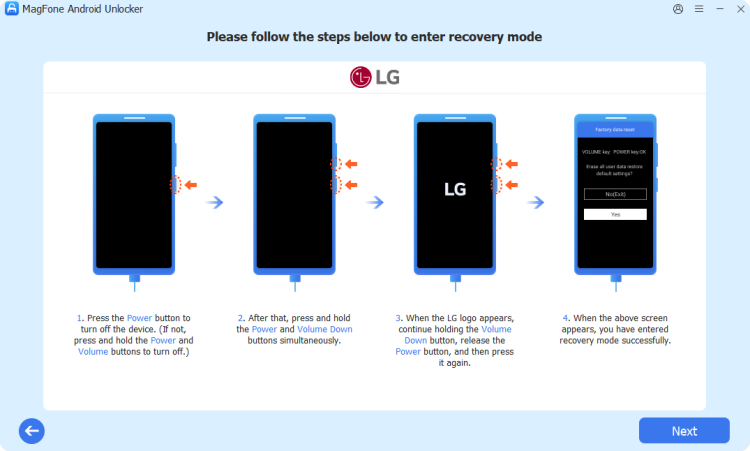
Once the device is connected and detected, follow the steps shown on the screen to boot your locked LG phone into recovery Mode. When the recovery mode screen is displayed, go back to click Next on the computer, then click Continue.
Step 3 Start to Unlock LG Phone without Password
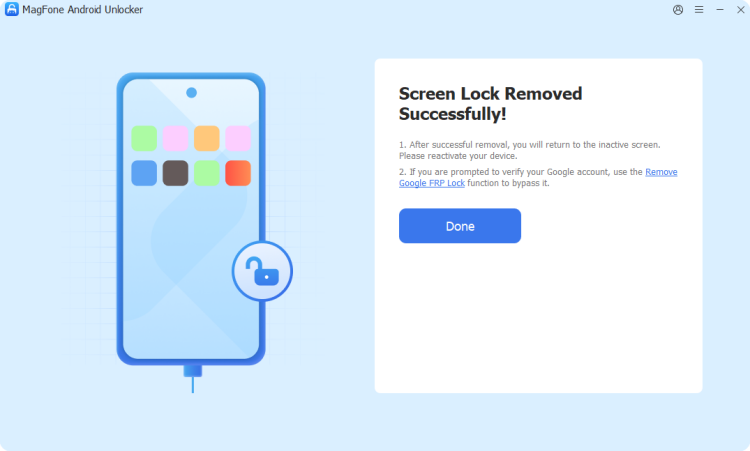
Continue to perform the onscreen instructions to remove PIN, pattern, or password on your device. Wait for the process to continue, then click Next to complete the unlocking. Now you can create a new password, pattern, or PIN for your device.
Part 4. FAQs about Unlocking LG Phone
How to unlock LG phone forgot password without resetting?
To unlock an LG phone forgotten password without resetting, you can use ADB commands to delete the screen lock files. If your LG phone is running in lower Android versions, you can use Google account unlock, Emergency Call or backup PIN to unlock it without resetting. But for a quick and safe unlocking, MagFone Android Unlocker is worth trying.
How to unlock LG phone pattern lock without factory reset?
Factory reset is a common approach to unlock an LG phone whether to use recovery mode or Find My Device. But if you don't want to unlock your LG phone with factory reset, just try Google account unlock, backup PIN, or Emergency Call only when your device is running Android 4 or earlier. Or you can try Smart Lock or ADB commands to unlock a newer LG phone when your device meets those unlocking requirements.
How to unlock LG phone with IMEI number?
When your LG phone is locked by a carrier provide, you can unlock it with an IMEI number. But you cannot directly use an IMEI number to unlock an SIM-locked phone. Only some online platforms that offer unlocking services with IMEI number can let you unlock your LG phone with IMEI number. The success rate of unlocking an LG phone with IMEI number is usually low.
How to unlock a Google locked LG phone?
If your LG phone is locked by Google Factory Reset Protection, you can enter your Google account and password to unlock the FRP lock on the locked screen. This won't cause any data loss and you can get access to Google services on the device as normal. But if you bought a second-hand LG phone with a previous Google account, you may need a third-party FRP bypass tool like MagFone Android Unlocker to unlock a Google lock.
Part 5. Conclusion
If you forgot the password, pattern, or PIN on your LG phone, there is no single "perfect" solution for everyone. Depends on your situation, you can choose the best approach whether to try Google account unlock, Google Find My Device, or a third-party unlock tool like MagFone Android Unlocker. In particular, you can safely choose the most realistic and effective way to regain access to your LG phone by following the methods in this guide.

Dylan Jones
Editor in chief





