








Modern Nokia Android smartphones and classic feature phones are still widely used for their durability and clean interface. If you forget your password, PIN, or pattern, accessing the device can become stressful, especially when important data is stored inside. In this guide, we explore different ways on how to unlock Nokia phone without password, along with additional unlocking tips and solutions. Stay tuned for practical methods and helpful recovery options explained below now included.
- Part 1. How to Unlock Nokia Phone without Password
- Part 2. How to Unlock Nokia Phone with Password
- Part 3. FAQs about Unlocking Nokia Phone
- Part 4. Conclusion
Part 1. How to Unlock Nokia Phone without Password
Unlocking a Nokia phone without a password can be necessary when users forget PIN codes or screen patterns. Several practical solutions exist depending on device model and Android version, ranging from built-in recovery options to advanced software tools that restore access safely.
Method 1. Unlock Nokia Phone by Factory Resetting
Factory resetting is one of the most common ways to unlock a Nokia phone when the password is forgotten. It works by erasing all stored data and returning the device to original settings, but if a Google account is active, FRP lock may appear afterward.
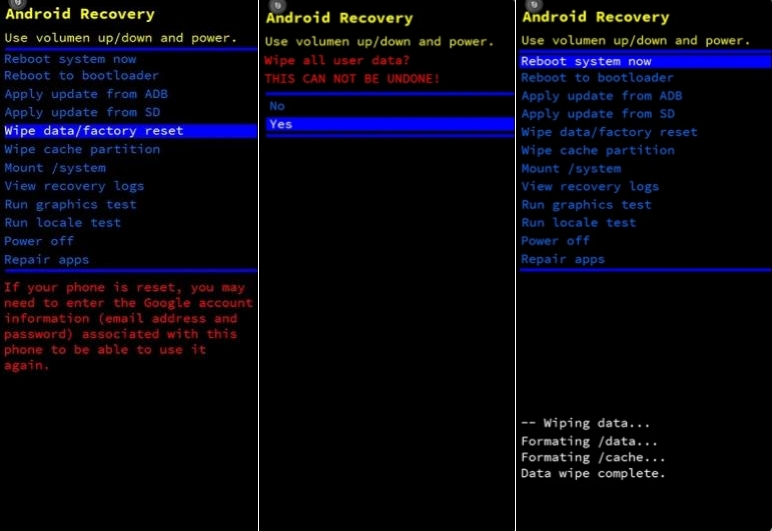
Step 1. Power off your Nokia phone completely.
Step 2. Press and hold the Power + Volume Up buttons together to enter the Fastboot mode.
Step 3. Then release the buttons when the Nokia logo appears and move to the Recovery mode option.
Step 4. Use volume keys to select Wipe data/factory reset, then Reboot system now.
Step 5. Press the power button to confirm the selection.
Step 6. Wait for the reset to complete. Then reboot the device and set it up again without screen lock.
Method 2. Unlock Nokia Phone via MagFone Android Unlocker
MagFone Android Unlocker offers a software-based approach to unlock Nokia phones without requiring the original password. It works by connecting the device to a computer, detecting the phone model, and guiding users to remove screen locks. This method is designed for users who prefer a guided solution with higher success rates and minimal technical effort compared to manual reset methods. Here's how to do that.

MagFone Android Unlocker
Remove multiple kinds of screen locks on over 5000 Android devices and delete Google FRP lock without a password.
Step 1 Connect Nokia Phone to a Computer
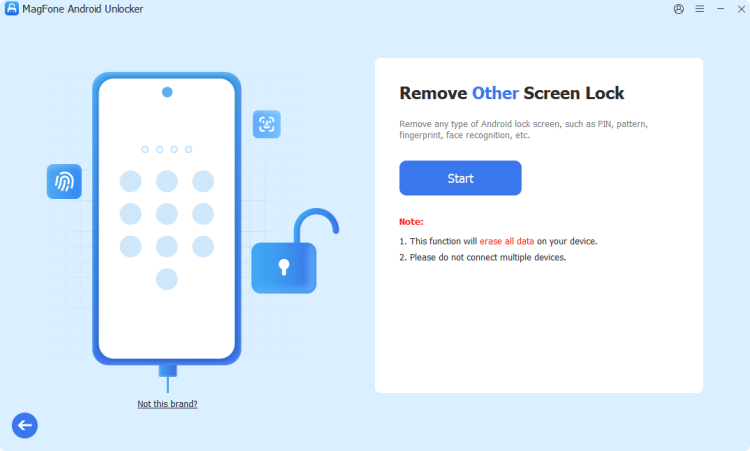
Install and launch MagFone Android Unlocker on your PC. Use a USB cable to link your Nokia phone. The software will automatically detect the device or allow you to select Other if needed.
Step 2 Put Nokia Phone into Recovery Mode
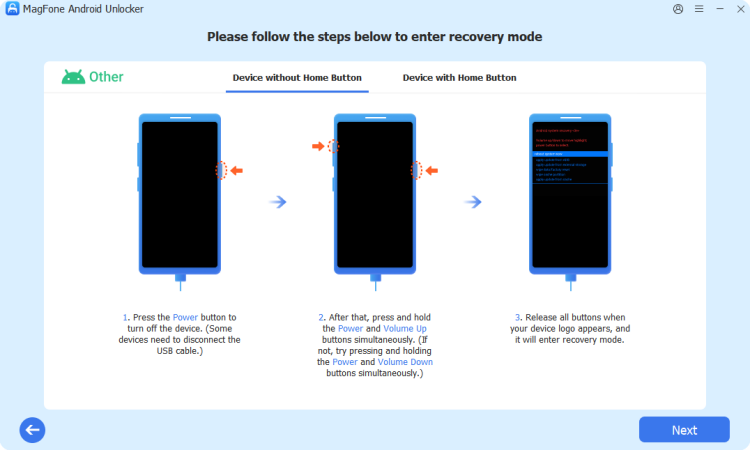
Follow the on-screen instructions carefully to enter Recovery Mode on your Nokia device. Once completed, click Next to continue the process.
Step 3 Unlock Your Nokia Phone Instantly
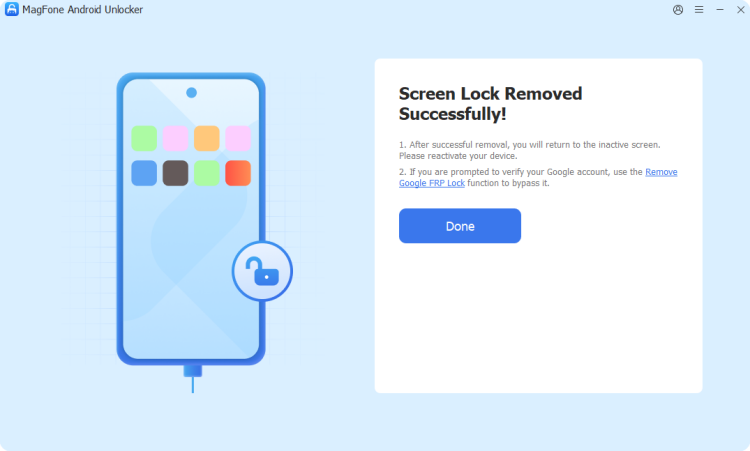
Allow the software to begin removing the screen lock. Wait until the process is completed, then click Next. After finishing, your Nokia phone will be unlocked and ready to use without a password.
Method 3. Unlock Nokia Phone Using IMEI Number
Another method involves using the IMEI number to request an unlock code from online services or carriers. This process usually requires entering device details like model and region. Although multiple IMEI-based unlocking options exist on different websites, the success rate and reliability are not always guaranteed.
Part 2. How to Unlock Nokia Phone with Password
If you still remember your Google account or recovery credentials, unlocking becomes easier without relying on external tools. These methods depend on device compatibility and Android version support.
Method 1. Unlock Nokia Phone in Google Find Hub
Google Find Hub (Find My Device) allows you to remotely erase a locked Nokia phone. It requires your phone to be linked to a Google account and have internet access. You must also know your Google account password to proceed.
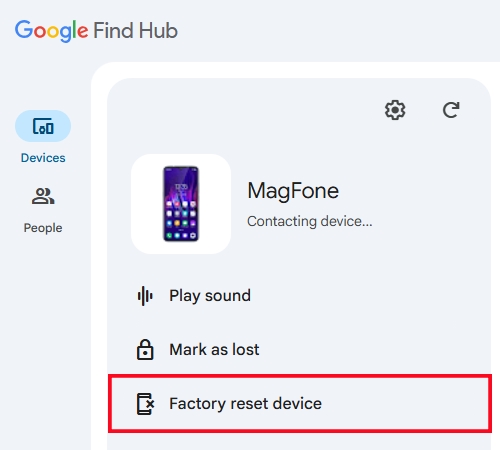
Step 1. Open a browser on another device and visit Google Find Hub. Sign in with the Google account on your Nokia phone.
Step 2. Select your device from the list. Click on Factory reset device and tap Next to confirm your identity to start the reset process.
Method 2. Unlock Nokia Phone in Forgot Pattern
Some older Nokia Android versions support the Forgot Pattern option after multiple incorrect attempts. This method requires your Google email and password to verify identity and regain access.
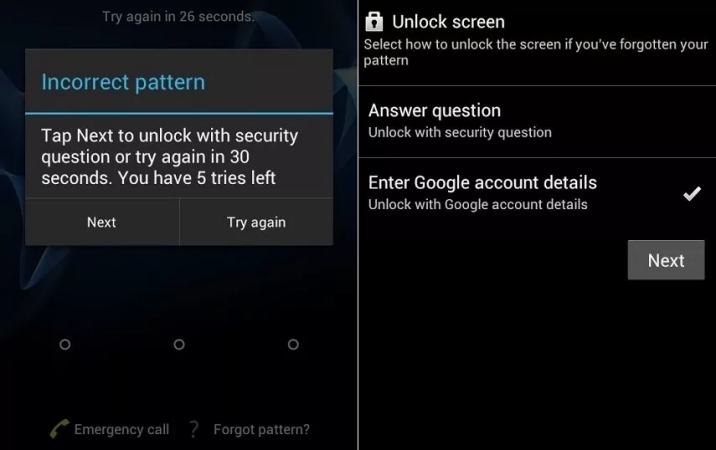
Step 1. Enter incorrect patterns several times until Forgot Pattern appears on the screen.
Step 2. Tap the option and choose to sign in with your Google account.
Step 3. Enter your email and password to unlock your Nokia screen lock.
Part 3. FAQs about Unlocking Nokia Phone
How to unlock Nokia phone PIN code without pc?
You can use methods like factory reset via recovery mode or Google Find My Device. These do not require a computer but will erase data in most cases.
How to unlock a Nokia phone for free?
Free unlocking methods include recovery mode reset, or built-in Forgot Pattern options on older devices. However, all may result in data loss.
How to unlock a Nokia phone to any network?
You usually need an unlock code from your carrier or use IMEI-based services. Once unlocked, the phone can accept SIM cards from different networks.
How to tell if Nokia phone is unlocked for any carrier?
A Nokia phone is considered unlocked if it accepts SIM cards from different carriers. You can insert another network SIM. If it connects successfully without requesting an unlock code, the device is unlocked.
How to unlock Nokia phone password without losing data?
This is only possible if you successfully remember your Google account login or use biometric access. All hard reset methods will erase data.
Part 4. Conclusion
Unlocking a Nokia phone can be done through several reliable methods depending on your situation. Whether you use factory reset, Google tools, or software like MagFone Android Unlocker, each approach helps regain access when you forget your password. However, some methods may erase data or trigger FRP lock. Always choose the safest option based on your device condition and ensure your Google credentials are available.

Teresa Miller
Editor in chief




