








A Mint Mobile phone is any device sold directly through Mint's own store and activated on its prepaid network, which itself rides on T-Mobile's towers. Because Mint locks these handsets to prevent fraud and protect its subsidies, you can't simply swap in another carrier's SIM until the device is released. If you want to switch providers, travel abroad, or resell your phone at full value, continue reading to learn how to unlock a Mint Mobile carrier lock.
- Part 1. What Is the Mint Mobile Unlock Policy?
- Part 2. How to Unlock a Mint Mobile Phone for Any Carrier
- Part 3. How to Unlock a Mint Mobile Phone Screen Lock
- Part 4. FAQs about Mint Mobile Unlock Phone
- Part 5. Conclusion
Part 1. What Is the Mint Mobile Unlock Policy?
Compared to many other prepaid providers, Mint Mobile's approach to unlocking is refreshingly straightforward. The core idea is that a device earns its freedom after a set amount of active, well-behaved usage on the network, though a few conditions apply before that freedom is granted.
The device must be paid in full, or fully financed if purchased on a payment plan.
It must have been actively used on Mint's network for at least 60 days from activation.
It cannot be reported lost, stolen, or linked to suspected fraud.
The account must be in good standing, with no unusual patterns like repeated port-outs.
Deployment papers let military members bypass the waiting period for an immediate unlock.
Part 2. How to Unlock a Mint Mobile Phone for Any Carrier
There isn't a single button that unlocks every Mint phone instantly. Depending on your situation, you'll either wait for the process to trigger on its own, ask Mint directly, or turn to a third-party unlocking service for a faster turnaround. Here's a brief comparision between the three options.
| Method | Requirements | Time Duration |
|---|---|---|
| Automatic Unlock | 60+ days active, account in good standing, phone paid off | Usually instant once eligible; a few days on some models |
| Manual Request | IMEI number, proof of purchase, call or online form | A few days to about a week |
| Online Unlock Service | Device model, IMEI | It depends |
Option 1. Wait for Automatic Unlock
Mint's system is designed to flag a device as unlock-eligible on its own once the 60-day threshold passes and the account checks out. Most modern smartphones receive this release quietly in the background, and the giveaway is that a foreign SIM suddenly starts working, or your carrier settings no longer show a restriction. Here's how to confirm it on each platform.
For iOS:
Step 1. Open Settings. Then select the General section.
Step 2. Select About and scroll to the Carrier Lock entry.
Step 3. Confirm it reads "No SIM restrictions," which means the phone has been released.
For Android:
Step 1. Insert a SIM card from a different carrier, or check the SIM manager if you're using eSIM.
Step 2. Look for a prompt asking for an unlock code; if none appears and the new network connects, the phone is free.
 Pros
Pros- Costs absolutely nothing
- No paperwork or calls needed
- Works automatically for most devices

- Requires a 60-day wait
- Some older models need a manual push
- No control over exact timing
Option 2. Request an Unlock Manually
If the automatic process doesn't kick in, or your device falls outside the standard rules, you can ask Mint's support team to complete the release for you. This path relies on a human agent verifying your account and device before flipping the switch.
Step 1. Check your phone's IMEI number by dialing *#06# or find it in Settings.
Step 2. Call Mint customer care at (800) 683-7392, available daily from 5 a.m. to 7 p.m. PT.
Step 3. Confirm your activation date, account status, and purchase details when asked. Provide proof of purchase if the representative requests it.
Step 4. Wait for confirmation, which typically arrives within a few business days.
Pros- No long wait time
- Direct eligibility check
- No third party involved
- May require a fee
- Request may be denied
Option 3. Use an Online Unlock Service
For anyone who wants to skip Mint's waiting period or eligibility checks entirely, third-party platforms like SafeUnlocks offer a paid alternative. It can process requests using your device's model and IMEI, without other complex requirements.
Step 1. Go to SafeUnlocks and provide your phone model and IMEI number.
Step 2. Review your details and place the order with a small $1 service fee.
Step 3. Wait for the unlock process to complete. You'll receive a confirmation message once successful.
Pros- Skips Mint's eligibility rules
- Relatively fast turnaround time
- Works on iOS and Android
- Possible extra fees
- Requires trusting a third party
- Not officially endorsed by Mint
Part 3. How to Unlock a Mint Mobile Phone Screen Lock
Getting locked out of your own device is a different problem from a carrier lock, and it happens more often than you'd think. Whether you've forgotten your PIN, password, pattern, or your fingerprint and face recognition simply stop working, a dedicated tool like MagFone Android Unlocker can get you back into your phone quickly. It runs on both Windows and Mac and supports popular brands such as Samsung, Xiaomi, and Vivo. Below is a walkthrough for bypassing a screen lock on a Samsung device.

MagFone Android Unlocker
Remove multiple kinds of screen locks on over 5000 Android devices and delete Google FRP lock without a password.
Step 1 Plug In and Select Your Device
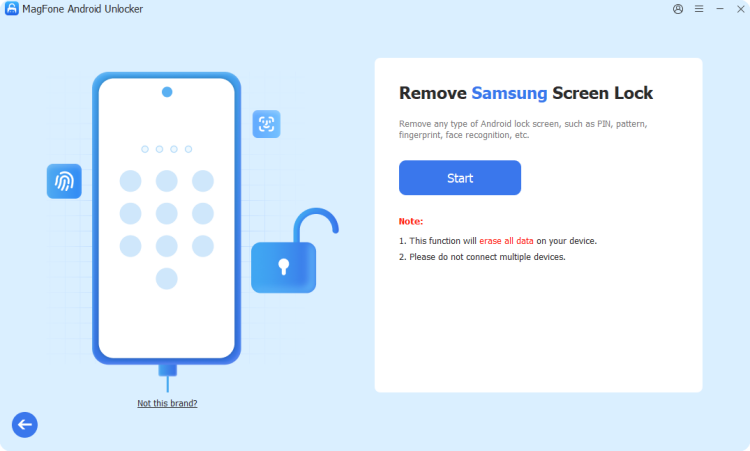
Launch MagFone Android Unlocker on your computer and connect your Samsung phone with a USB cable. From the main menu, click Remove Screen Lock; the program should detect your brand automatically, though you can select Samsung manually if needed.
Step 2 Enter Recovery Mode Manually
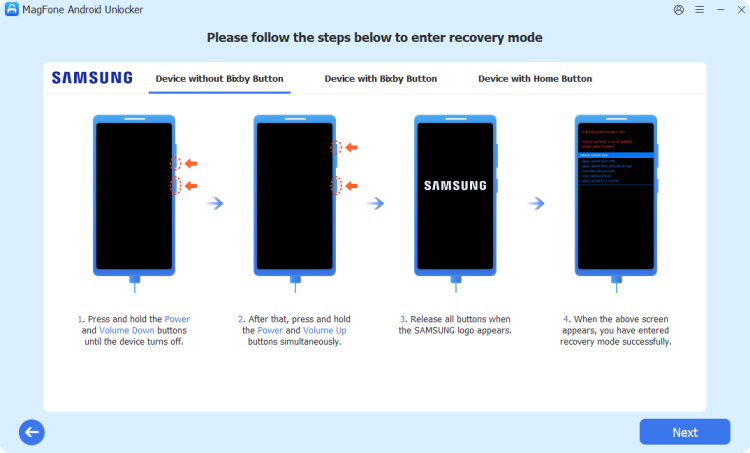
Hit Start to begin, and acknowledge the warning that your data may be erased. The software will then walk you through a series of on-screen prompts to boot your Samsung device into Recovery mode. Once you've completed each prompt, click Next and Continue to proceed.
Step 3 Finish the Screen Lock Bypass
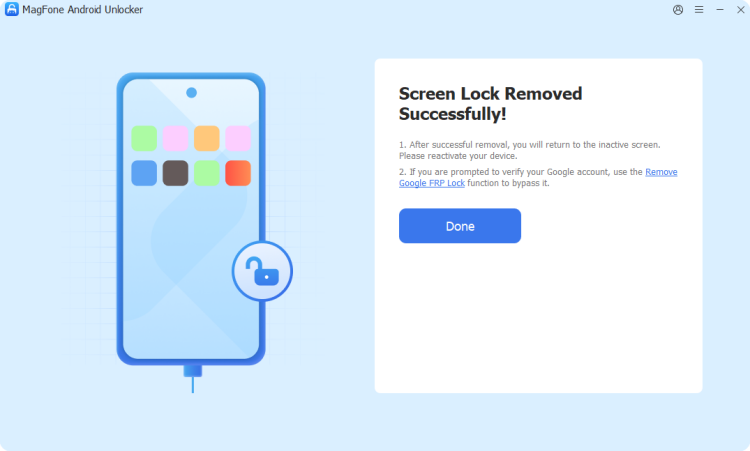
Continue following the on-screen instructions to finish setting up your device, then click Next and let the software do its work clearing the lock screen. When the process finishes, your Samsung phone will be free of its screen lock and ready to use.
Part 4. FAQs about Mint Mobile Unlock Phone
How to unlock a Mint Mobile phone without losing data?
Both the automatic and manual unlock paths only change a network-level permission flag; they never touch your files, apps, or settings. Your data stays intact throughout the process, so there's no need to back up beforehand unless you're also planning a factory reset for an unrelated reason.
How to unlock a Mint Mobile phone for free?
There is no charge to unlock a Mint Mobile phone if you meet the requirements outlined in Mint's unlocking policy. However, if your device does not qualify, you may need to pay for a third-party online unlocking service.
Can I unlock a Mint Mobile phone without a SIM card?
Yes. The unlock is tied to your account and device IMEI rather than a physical SIM being inserted. You can confirm eligibility or submit a manual request even with no SIM in the phone at all, though you'll need one afterward to test a new carrier.
Part 5. Conclusion
Unlocking a Mint Mobile phone doesn't have to be complicated. Most users simply need to wait out the 60-day window and let the automatic process handle everything. If that stalls, a quick call to support or a trusted third-party service can finish the job. Either way, verify eligibility carefully before switching carriers.

Dylan Jones
Editor in chief




