








Locked out of your own phone is one of those moments that makes your stomach drop. Maybe your kid played with the screen, or you simply forgot a pattern you rarely use. Before you panic and consider wiping everything, know this: there are several ways to unlock Android phone pattern lock without factory reset. This guide walks through eight practical options, plus what to do if a reset really is your only path forward. Let's dive into more details.
- Part 1. Quick Check: 8 Ways to Unlock Android Pattern Lock
- Part 2. How to Unlock Android Phone Pattern Lock Without Factory Reset
- Method 1. Unlock Android Phone Pattern Lock Using MagFone Android Unlocker
- Method 2. Unlock Android Phone Pattern Lock Using Forgot Pattern
- Method 3. Unlock Android Phone Pattern Lock Using Backup PIN
- Method 4. Unlock Android Phone Pattern Lock Using Smart Lock
- Method 5. Unlock Android Phone Pattern Lock Using Master Code
- Method 6. Unlock Android Phone Pattern Lock Using ADB Commands
- Method 7. Unlock Android Phone Pattern Lock Using Safe Mode
- Part 3. How to Unlock Android Phone Pattern Lock With Factory Reset
- Part 4. FAQs about Unlocking Pattern Lock Android
- Part 5. Conclusion
Part 1. Quick Check: 8 Ways to Unlock Android Pattern Lock
Not every method works for every phone, so it helps to scan your options before diving in. Some rely on a Google or Samsung account, others need a cable and a computer, and a few work with nothing more than a few taps. Here's a quick side-by-side comparison.
| Method | When to Use | Requirements | Difficulty |
|---|---|---|---|
| MagFone Android Unlocker | When you want a fast, no-tech-skill fix | PC/Mac, USB cable | Easy |
| Forgot Pattern | Older Android versions (4.4 or earlier) | Google account details or answer security questions | Easy |
| Backup PIN | If you set a backup PIN when enabling the pattern | A previously configured backup PIN | Easy |
| Smart Lock | Newer phones with Smart Lock already enabled | Trusted device, place, or on-body detection set up in advance | Easy |
| Master Code | Legacy or feature-phone-era Samsung models | Dialer access | Moderate |
| ADB Commands | Devices with USB debugging enabled beforehand | Computer, USB cable, command-line familiarity | Advanced |
| Safe Mode | Locked out by a third-party lock screen app | None | Easy |
| Samsung SmartThings Find | Samsung devices linked to a Samsung account | Samsung account, internet connection | Easy |
Part 2. How to Unlock Android Phone Pattern Lock Without Factory Reset
Each of the following methods lets you regain access to your device while keeping your files, apps, and settings intact. Pick the one that matches your phone brand, Android version, and what you had set up before you got locked out.
Method 1. Unlock Android Phone Pattern Lock Using MagFone Android Unlocker
If none of the built-in tricks apply to your situation, a dedicated unlocking program can step in. MagFone Android Unlocker is designed to remove a screen PIN, pattern, or password—along with a Google FRP lock—without requiring you to wipe the device. The process runs entirely from your computer and walks you through the removal in just a few clicks. Next is how to bypass Android phone pattern lock using MagFone Android Unlocker.

MagFone Android Unlocker
Remove multiple kinds of screen locks on over 5000 Android devices and delete Google FRP lock without a password.
Step 1 Install MagFone and Connect Phone
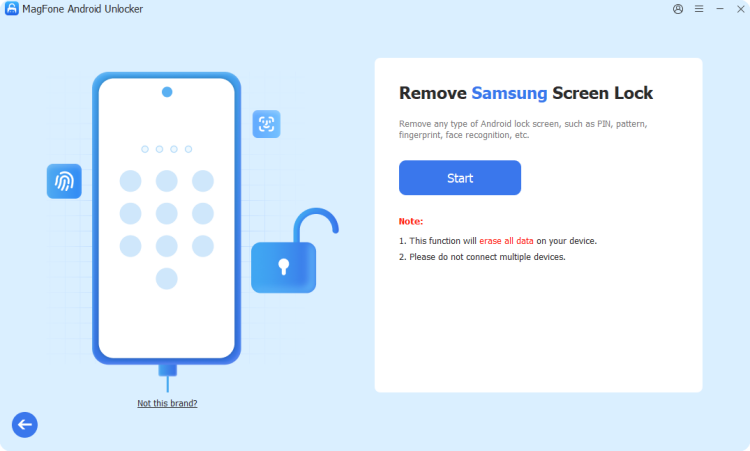
Download and install MagFone Android Unlocker on your computer. Connect your locked Android phone with a USB cable, then select Remove Screen Lock to begin.
Step 2 Enter the Required Unlocking Mode
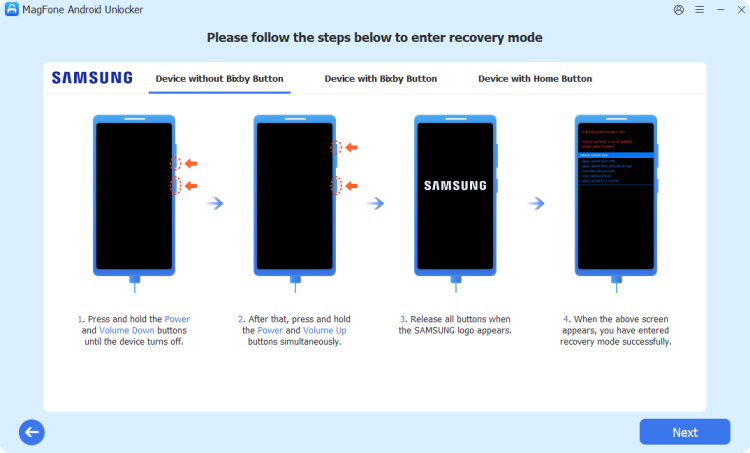
Follow the on-screen instructions to put your Android phone into the required mode. Once your device is recognized, click Next to continue.
Step 3 Remove Android Pattern Lock
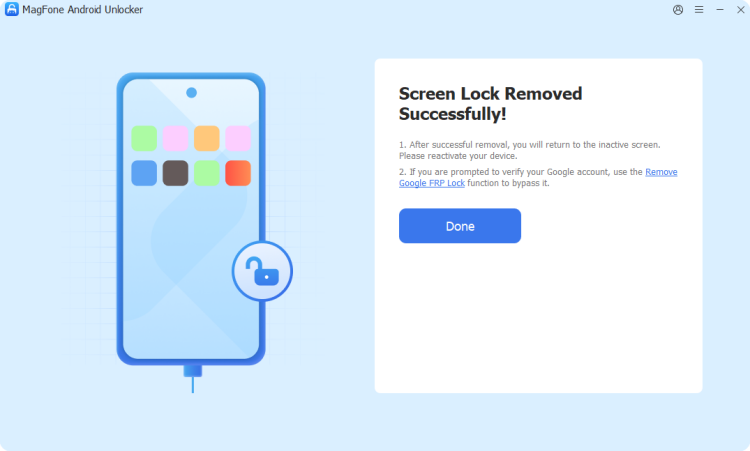
Follow the prompts to complete the unlocking process. When finished, your Android phone will be accessible again without the previous pattern lock.
Method 2. Unlock Android Phone Pattern Lock Using Forgot Pattern
Older Android devices, generally those running version 4.4 or earlier, include a built-in "Forgot Pattern" feature. It uses your linked Google account to verify your identity and lets you reset the pattern without touching your files.
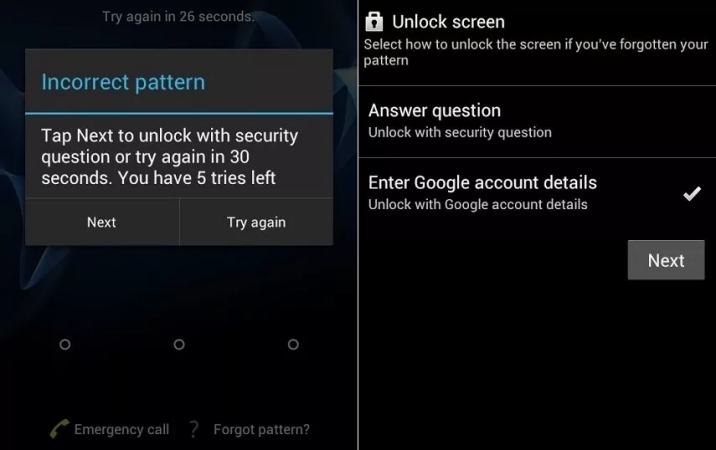
Step 1. Enter an incorrect pattern several times until a prompt appears.
Step 2. Select the Forgot Pattern section at the bottom of the screen.
Step 3. Tap Next and choose to verify your Google account.
Step 4. Sign in with the Gmail address and password linked to the phone.
Step 5. Draw and confirm a new pattern to finish.
Method 3. Unlock Android Phone Pattern Lock Using Backup PIN
When you first set a pattern as your lock method, many Android phones ask you to create a backup PIN as a fallback. If you remember that PIN, it's one of the fastest ways back into your device.
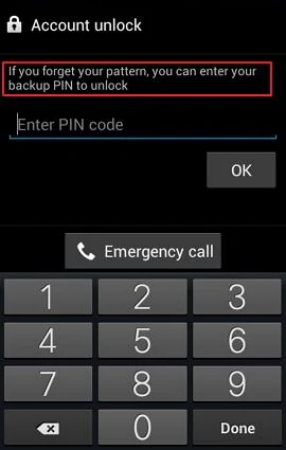
Step 1. Enter the wrong pattern repeatedly until the "try again later" message appears.
Step 2. Find and pick the Backup PIN option on the lock screen.
Step 3. Type in your backup PIN and confirm with OK to unlock your Pattern screen.
Method 4. Unlock Android Phone Pattern Lock Using Smart Lock
Smart Lock, available on Android 5.0 and later, keeps your phone unlocked automatically under conditions you trust, such as a familiar location or a paired Bluetooth device. This only helps if it was switched on before you got locked out.
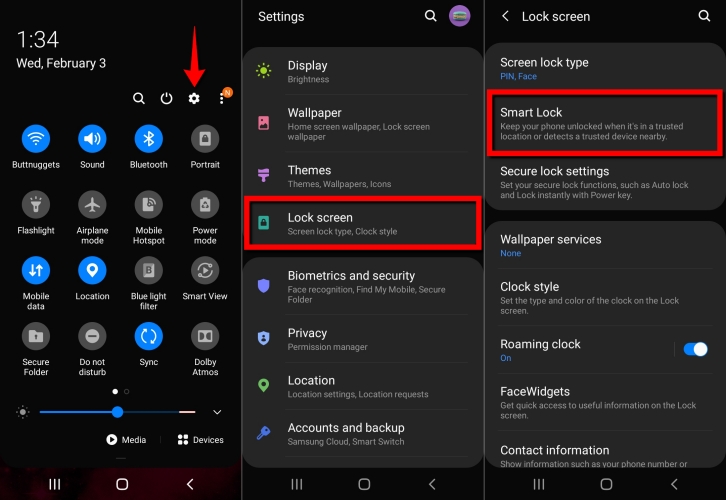
Step 1. Wake the screen with the power button.
Step 2. Then you can swipe up your screen to unlock your Android phone with different Smart lock modes:
- When "On-body detection" is on, your phone stays unlocked while you carry it.
- When "Trusted places" is on, your phone stays unlocked at saved locations.
- When "Trusted devices" is on, your phone stays unlocked with connected trusted devices.
Method 5. Unlock Android Phone Pattern Lock Using Master Code
Some older or feature-style Samsung phones accept a special dialer code that triggers a reset. This method is largely obsolete on modern devices but can still work on legacy hardware.
Step 1. From the lock screen, open the emergency call dialer.
Step 2. Enter the master reset code like *#06# and press call.
Step 3. If the Android phone accepted the code, the phone will automatically unlocked.
Method 6. Unlock Android Phone Pattern Lock Using ADB Commands
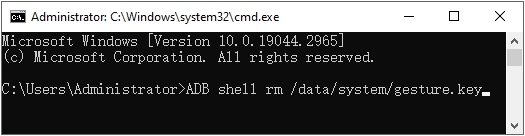
Android Debug Bridge (ADB) is a command-line tool that can remove the lock screen file directly, but only if USB debugging was already turned on before the phone got locked. It's a technical route best suited to users comfortable with a terminal.
Step 1. Download the ADB platform tools from the official Android developer site onto your computer.
Step 2. Link your phone to the a computer using a USB cable.
Step 3. Open a command prompt or terminal in the ADB folder.
Step 4. Run the command adb shell rm /data/system/gesture.key to delete the gesture lock file.
Step 5. Restart your phone; the pattern lock should be gone.
Method 7. Unlock Android Phone Pattern Lock Using Safe Mode
If a third-party app, rather than your phone's built-in security, is responsible for the lock, booting into Safe Mode temporarily disables all non-system apps, giving you a chance to remove the offending app.
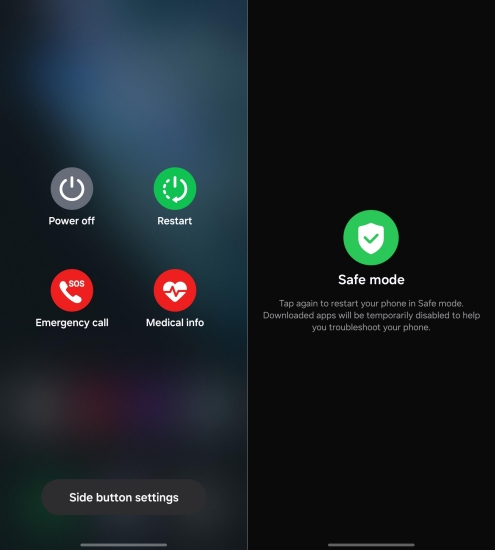
Step 1. Tap and hold the power key, then long-press the Power Off option.
Step 2. Confirm restarting into Safe Mode when prompted.
Step 3. Go to Settings > Apps once the phone restarts.
Step 4. Find and uninstall the suspicious lock screen app.
Step 5. After that, restart your phone normally to get out of the Safe Mode.
Part 3. How to Unlock Android Phone Pattern Lock With Factory Reset
If none of the methods above get you back into your phone, resetting the device is the last resort, but it does erase everything. Keep in mind that if a Google account was signed in before the reset, Factory Reset Protection will ask for that account's password on restart. If you've forgotten that too, a tool like MagFone Android Unlocker can help remove the FRP lock afterward.
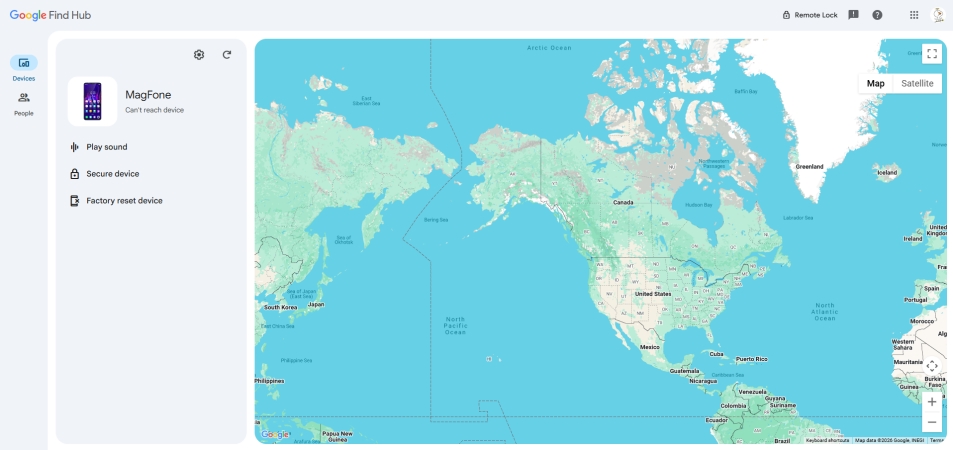
Step 1. On a computer or another phone, go to the Google Find My Device website and sign in with the Google account linked to your locked phone.
Step 2. Select your device from the list of devices associated with the account.
Step 3. Choose the Factory reset device option.
Step 4. Read the warning that all data will be permanently removed, then confirm.
Step 5. Wait for the phone to receive the command; it will erase and restart once connected to the internet.
Step 6. Set up the phone as new, entering the Google account details if FRP prompts for them.
Part 4. FAQs about Unlocking Pattern Lock Android
Is there a code to unlock pattern lock in Android?
On some very old or feature-phone-era Samsung models, a dialer master code could trigger a reset, but this doesn't work on modern smartphones with updated security. Current Android devices rely on account verification, backup PINs, or specialized software instead of a universal code.
How to unlock Android pattern lock without losing data?
In this article, methods like the Forgot Pattern feature, Backup PIN, Smart Lock, Samsung SmartThings Find, or a dedicated unlocking tool such as MagFone Android Unlocker all remove the lock screen while keeping your files intact.s
How to unlock Android pattern lock without password?
If you don't remember any password, PIN, or backup code, tools like MagFone Android Unlocker can bypass the lock screen directly through your computer, since they don't require you to know the original credentials.
How to unlock Android phone pattern lock with broken screen?
A cracked or unresponsive screen makes touch-based methods like Forgot Pattern or Smart Lock impossible. In this case, a computer-based solution such as ADB commands or dedicated unlocking software is usually the more reliable route, since it doesn't rely on interacting with the screen.
How to unlock Android phone pattern lock with Gmail?
On Android 4.4 and earlier, entering the wrong pattern enough times brings up a Forgot Pattern prompt that lets you sign in with the Gmail account linked to the device to reset the lock. Newer Android versions have largely replaced this with Google's Find My Device tool instead.
Part 5. Conclusion
Getting locked out of your Android phone doesn't have to mean losing your data. From built-in options like Forgot Pattern, Backup PIN, and Smart Lock to remote tools like Find My Device and SmartThings Find, most situations have a fix that keeps your files safe. When those don't apply, software like MagFone Android Unlocker offers a dependable backup plan before resorting to a full factory reset.

Dylan Jones
Editor in chief




