








Getting locked out of your HONOR device is frustrating, especially when you can't remember the pattern, PIN, or Google credentials tied to it. Whether you're dealing with a forgotten screen password, a secondhand unit still carrying its previous owner's lock, or an FRP wall blocking access, there are practical fixes available. This guide covers four proven ways to unlock HONOR phone, including how to do so without a password or a linked Google account.
- Part 1. What Is Unlocked Honor Phones?
- Part 2. How to Unlock Honor Phone Without Screen Password
- Part 3. How to Unlock Honor Phone Without Google Account
- Part 4. Conclusion
Part 1. What Is Unlocked Honor Phones?
An unlocked HONOR phone simply means the device is free of whatever barrier was keeping you out, no active screen lock (PIN, pattern, password, or fingerprint prompt), and in some cases, no Google or HONOR ID verification standing in the way either. This isn't about carrier unlocking; it means anyone can boot the phone and reach the home screen without the old credentials, usually after a reset clears the lock settings entirely.
Part 2. How to Unlock Honor Phone Without Screen Password
If you're staring at a locked HONOR screen with no memory of the password, pattern, or PIN. There are a few realistic routes back in. Below are three options, ranging from a dedicated unlocking tool to the phone's built-in recovery menu and Google's remote device management.
Method 1. Use MagFone Android Unlocker
When you're completely shut out of your HONOR phone, the fastest fix is often a dedicated unlocking tool like MagFone Android Unlocker, which strips away the existing screen lock without needing the original password. It runs through your computer and walks you through each stage, so no technical background is required. Here's how to unlock your Honor phone with the MagFone Android Unlocker program.

MagFone Android Unlocker
Remove multiple kinds of screen locks on over 5000 Android devices and delete Google FRP lock without a password.
Step 1 Select the Screen Lock Removal Tab
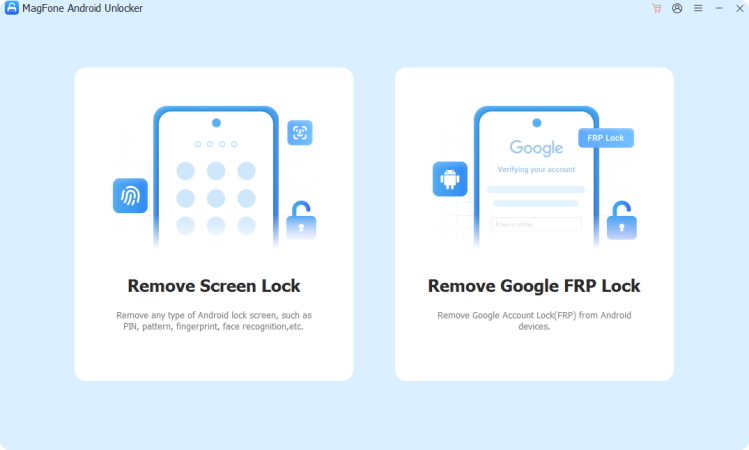
Install MagFone Android Unlocker on a PC, open it, and connect your HONOR phone with a USB cable. Pick Remove Screen Lock from the main screen, wait while the software detects your device, then hit Continue.
Step 2 Boot the Phone into Recovery Mode
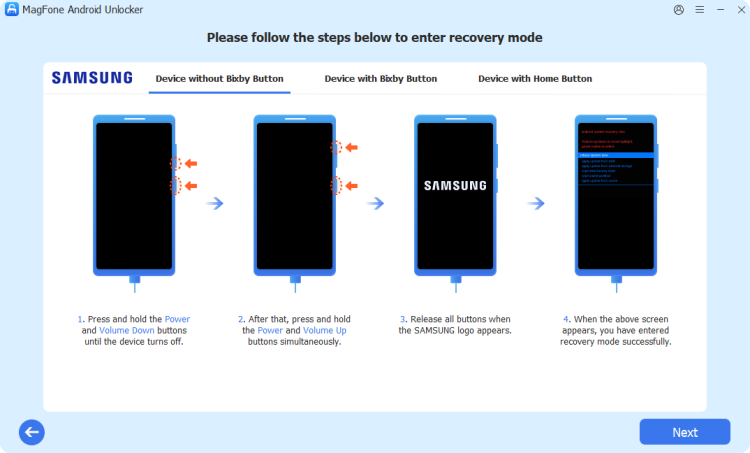
Once the removal process starts, follow the prompts to switch your phone into recovery mode. This usually means holding a specific button combination that varies by model. With the device in recovery mode, select Next and confirm with Continue.
Step 3 Bypass the Screen Lock on Honor Phone
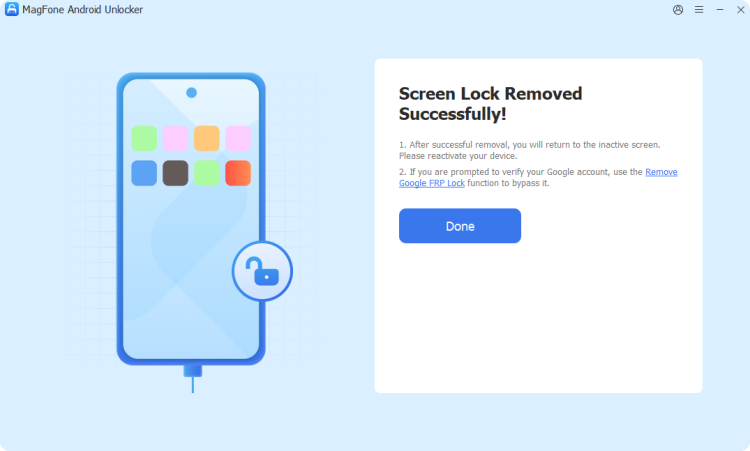
Keep following the on-screen prompts until the screen lock is fully stripped away. When finished, go back to the software and click Next. Leave the phone connected to the computer the entire time, until the tool confirms the unlock is done.
Method 2. Use Recovery Mode Reset
Recovery mode reset is HONOR's own built-in option for wiping a locked device without extra software. It erases everything on the phone, including the lock itself, so it's best used when regaining access matters more than keeping your data.
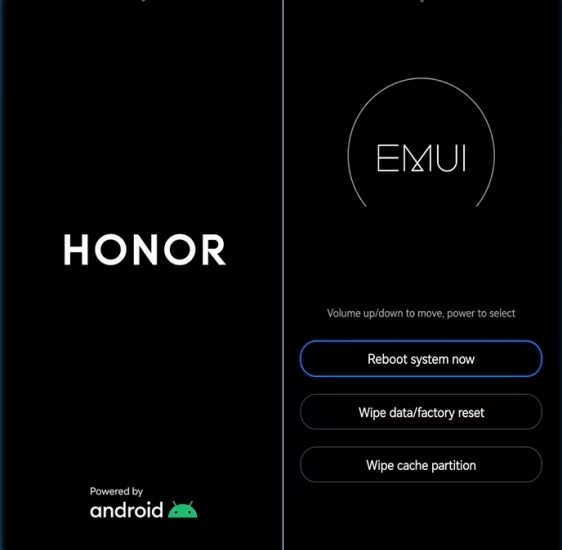
Step 1. Power off your Honor phone and hold Power + Volume Up simultaneously.
Step 2. Release Power when the Honor logo appears, but keep holding Volume Up until the recovery menu loads.
Step 3. Use the Volume buttons to navigate and Power to select Wipe data/factory reset.
Method 3. Use Google Find Hub
Google Find My Device (also known as Find Hub) lets you erase a lost or locked HONOR phone remotely, as long as it was already linked to a Google account and connected to the internet. It won't reveal your old password, but wiping the device removes the lock along with it.
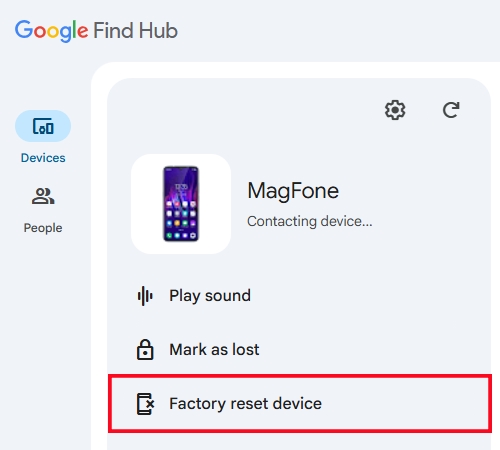
Step 1. On another phone or computer, open Google Find My Device and sign in with the Google account linked to your locked HONOR phone.
Step 2. Select your HONOR device from the list of devices shown.
Step 3. Choose Factory reset device and confirm, then wait for the command to reach your phone once it's back online.
Part 3. How to Unlock Honor Phone Without Google Account
Realistically, there's almost no way around the FRP (Factory Reset Protection) lock on a HONOR phone without outside help, since Google built it specifically to resist bypassing. The most dependable workaround is a dedicated FRP removal tool. Here's how to clear the FRP lock on a HONOR phone using UNLOCKTOOL, software built specifically for this kind of bypass.
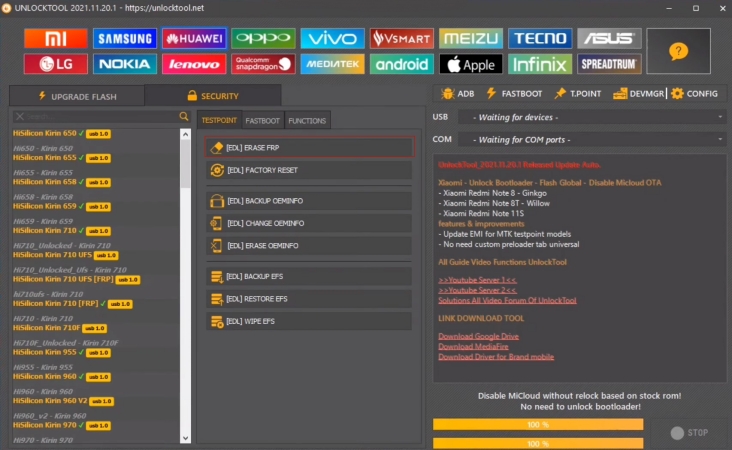
Step 1. Power off the HONOR phone, then connect it to your computer with a USB cable.
Step 2. Hold down the Power button and the Volume Up button together, then select HUAWEI on the UNLOCKTOOL interface.
Step 3. Type your phone's brand into the search box on screen, then click the ERASE FRP button.
Step 4. Wait for the unlocking process to finish, after which you can access the phone normally.
Part 4. Conclusion
Getting locked out of a HONOR phone isn't the end of the road. Whether you're facing a forgotten password, a locked secondhand device, or a stubborn FRP wall, one of these four methods should get you back in. Keep in mind that most unlocking routes wipe your data, so regular backups are worth the small effort to avoid losing photos, contacts, and files for good.

Dylan Jones
Editor in chief




