








Struggling with a locked Android device after a factory reset can be frustrating, especially without the right tools. FRPFile FirmwareBD has emerged as a go-to platform for accessing firmware files, bypass utilities, and repair solutions. But is it truly reliable and safe to use? This guide explores its features, pricing, safety, and usability, helping you decide whether it's the right choice or if a better alternative suits your needs.

- Part 1. FRPFile FirmwareBD: Main Features
- Part 2. FRPFile FirmwareBD: Pros and Cons
- Part 3. FRPFile FirmwareBD: Usage Guide
- Part 4. FRPFile FirmwareBD: Best Alternative
- Part 5. Conclusion
Part 1. FRPFile FirmwareBD: Main Features
FRPFile FirmwareBD is mainly used as a resource hub where users can download firmware files, FRP bypass tools, and Android repair utilities. It is particularly popular among technicians who need quick access to unlocking solutions, firmware flashing tools, and device repair packages for multiple Android brands and chipsets. Below, we list a few more details you may want to know about frpfile/firmwarebd.com.
01FRPFile FirmwareBD Compatibility
FRPFile FirmwareBD supports a wide range of Android devices across different brands, versions, and chipsets, though compatibility may vary depending on the specific tool or firmware.
| Supported Brands | Supported Versions | Supported Chipsets |
|---|---|---|
| Samsung | 10 to 14 | Exynos, Qualcomm |
| Xiaomi | 10 to 13 | Qualcomm, MTK |
| Huawei | 9 to 12 | Kirin, Qualcomm |
| Vivo / OPPO | 10 to 13 | MTK, Qualcomm |
| Others | Varies | MTK / Qualcomm |
02FRPFile FirmwareBD Price
FRPFile FirmwareBD is generally free to use, allowing users to download firmware files, FRP bypass tools, and utilities without registration or subscription fees. However, since it relies on third-party hosting platforms, users may encounter ads or pop-ups.
03FRPFile FirmwareBD Safety
FRPFile FirmwareBD is not secure enough because it distributes files from third-party sources rather than official developers. Some downloads may be outdated, modified, or bundled with harmful software. Additionally, fake mirror sites can increase security risks.
04FRPFile FirmwareBD Support
FRPFile FirmwareBD offers limited support, mainly in the form of basic guides or instructions included with certain downloads. There is no official customer service, live chat, or dedicated help center. Users must rely on personal experience or external forums for troubleshooting.
Part 2. FRPFile FirmwareBD: Pros and Cons
Before using FRPFile FirmwareBD, it's important to evaluate both its strengths and weaknesses. While it offers a wide range of free tools and firmware resources, it also comes with potential risks, especially for beginners who lack technical expertise or download files from unverified sources.
 Pros
Pros- Large variety of tools.
- Free and easy downloads.
- Supports many Android devices.
- Frequently updated tools and firmware.

- Potential malware security risks.
- Requires advanced technical knowledge.
- No official customer support.
- Limited device compatibility.
Part 3. FRPFile FirmwareBD: Usage Guide
If you decide to use FRPFile FirmwareBD for FRP bypass, you can download the required files from frpfile/firmwarebd.com and then follow the instructions below to complete the FRP bypass on Android devices.
Step 1 Visit the Official Website
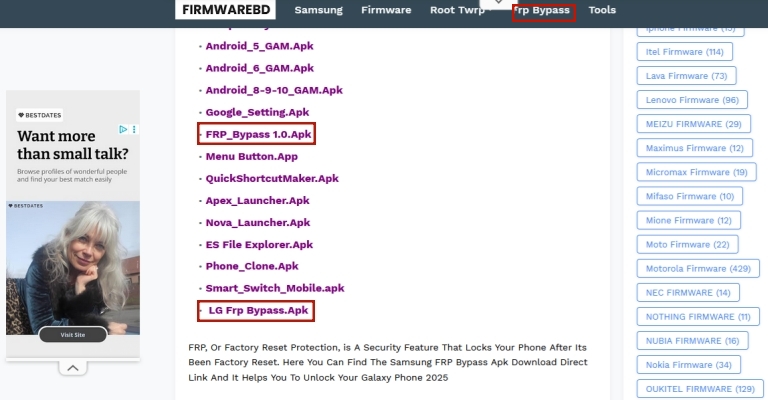
Open a browser, search for the official FRPFile FirmwareBD website, and avoid sponsored ads or fake mirror links to ensure safe access.
Step 2 Choose a FRP Firmware
Select a suitable FRP tool or firmware from the results, ensuring it matches your device model, Android version, and specific chipset requirements.
Step 3 Connect Device and Run the Tool
Connect your phone to the computer using USB, launch the FRP tool, and follow on-screen instructions to begin the bypass process.
Part 4. FRPFile FirmwareBD: Best Alternative
While FRPFile FirmwareBD provides a wide range of free tools, it often lacks reliability, security assurance, and user-friendly guidance. In contrast, MagFone Android Unlocker offers a safer and more streamlined experience. It eliminates the need for complex manual steps, has no risk of downloading unsafe files, and provides a guided interface suitable even for beginners, making it a more dependable solution for Android FRP removal.
| Feature | FRPFile FirmwareBD | MagFone Android Unlocker |
|---|---|---|
| Ease of Use | A Little Complex | Easy |
| Safety | Risk of malware | Secure and verified |
| Success Rate | 70% | 99% |
| Support | No official support | Customer support available |

MagFone Android Unlocker
Easily bypass Motorola FRP lock, highly efficient and convenient operation.
Step 1 Establish Connection and Start MagFone
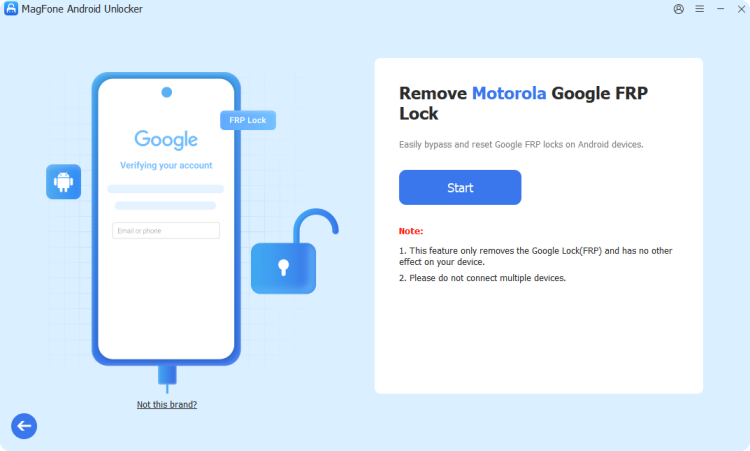
Begin by linking your Samsung device to a computer using a reliable USB cable. Install and launch MagFone Android Unlocker on your system. Once opened, navigate to the main interface and choose the option designed for removing Google FRP locks to initiate the process.
Step 2 Identify Your Device Brand and Version
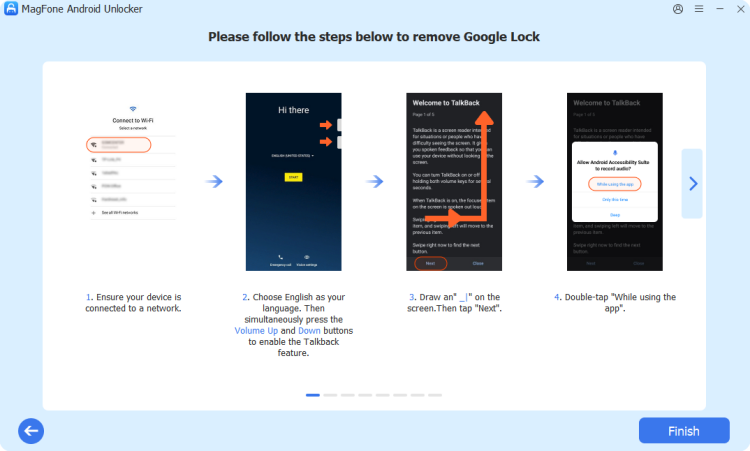
Allow the software to automatically detect your connected device. If detection does not occur, manually select the correct brand and model. Then specify the Android version running on your phone and proceed by confirming the selections to move forward.
Step 3 Complete the FRP Removal Process
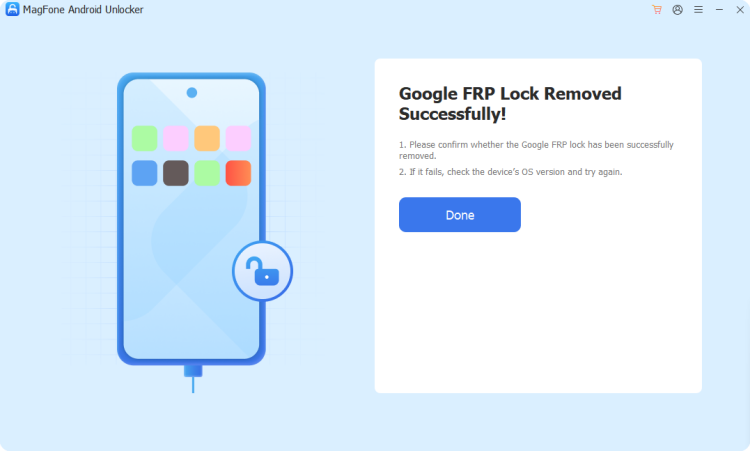
Follow the on-screen instructions carefully as displayed by the software. Perform the required actions on your phone step by step. Once the process begins, wait patiently while the tool removes the FRP lock. After completion, finalize the procedure and regain full access to your device.
Part 5. Conclusion
FRPFile FirmwareBD serves as a useful platform for accessing firmware files and FRP bypass tools, especially for experienced users and technicians. However, its risks, complexity, and lack of support make it less suitable for beginners. For a safer, easier, and more reliable experience, choosing a dedicated solution like MagFone Android Unlocker is often the better option.

Dylan Jones
Editor in chief





