








Wondering whether Syncios Data Recovery is the right tool for retrieving lost or deleted iPhone data? We have tested the full features of Syncios Data Recovery and have concluded this review. In this review, you will learn about what Syncios can recover for you, how to use it to recover data, and a better alternative solution to recover lost or deleted data on iPhone.
- Part 1. What is Syncios Data Recovery?
- Part 2. How to Use Syncios Data Recovery
- Part 3. Reviews about Syncios Data Recovery
- Part 4. Best Alternative to Syncios Data Recovery
- Part 5. Conclusion
Part 1. What is Syncios Data Recovery?
Syncios Data Recovery is a desktop data recovery tool for iOS users. It can help users retrieve lost data from an iPhone, iPad, or iPod, an iTunes backup, or an iCloud backup. It works in various loss circumstances, including physical damage and software glitches. It supports a range of data types, including photos, messages, contacts, notes, voice recordings, etc. Below is some basic information you can learn about Syncios Data Recovery.

| Supported Recovery Options | Recover from iPhone, iPad, iPod Recover from iTunes Backup Recover from iCloud |
| Supported Data Types | Camera Roll, Photo Stream, Contacts, Messages, Call History, Notes, Calendar, Reminders, Safari Bookmark, Voice Memos, WhatsApp, Viber Kik |
| Supported iDevice | iPhone 4s ~ iPhone 18 Series iPad 2 ~ iPad Pro iPod 5 ~ 7 |
| Supported iOS Version | iOS 9 - iOS 27 |
| Supported System | Window 11/10/8.1/8/7 Mac OS X 10.9 ~ 26 |
Syncios offers a yearly subscription and a lifetime license for users, with both plans covering one computer and up to five devices.
| Subscription | Price | Support Device |
|---|---|---|
| Yearly | $39.95 | 1-5 devices/1 PC |
| Lifetime | $49.95 | 1-5 devices/1 PC |
Part 2. How to Use Syncios Data Recovery
Syncios Data Recovery's interface is quite clear, so you can easily use it to recover data from iPhone devices or a backup. To recover deleted data on your iPhone, you can follow the steps below.
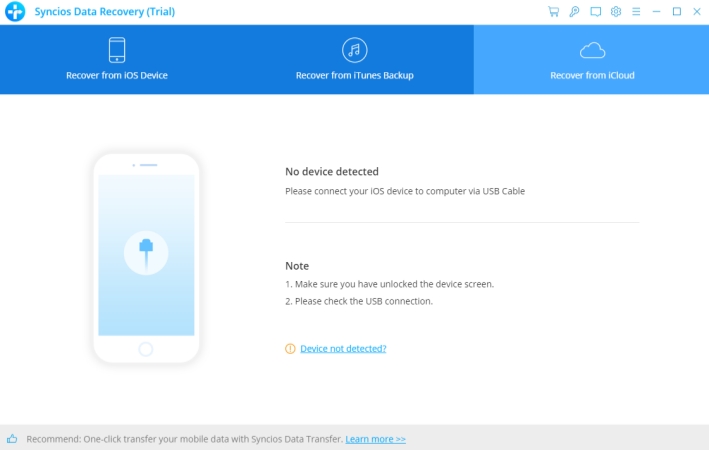
Step 1. Use a data cable to connect your iPhone to the computer and open Syncios Data Recovery.
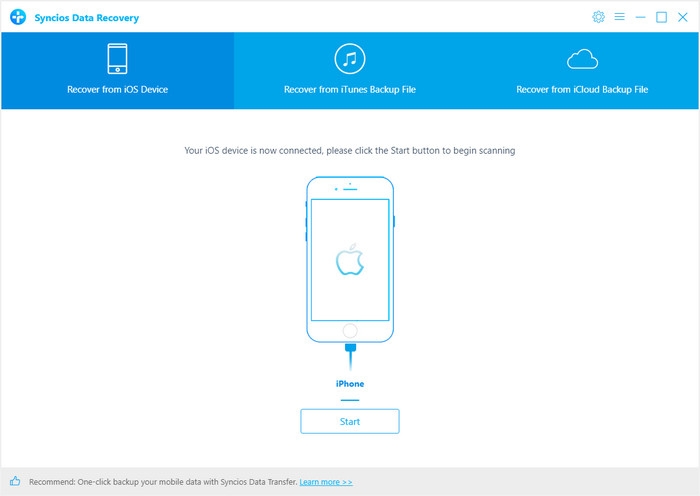
Step 2. Click Recover from iOS Device, then click Start if your iPhone is detected.
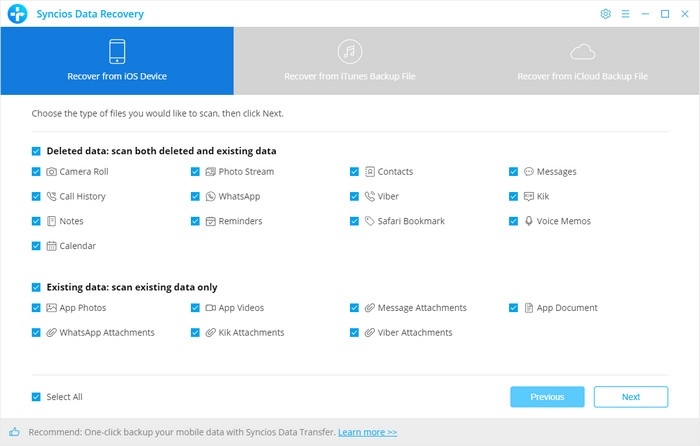
Step 3. Select the data you want to recover, then click Start Scanning to scan. Make sure your iPhone is unlocked and connected during scanning.
Step 4. After scanning, select the result and click Recover to computer.
Part 3. Reviews about Syncios Data Recovery
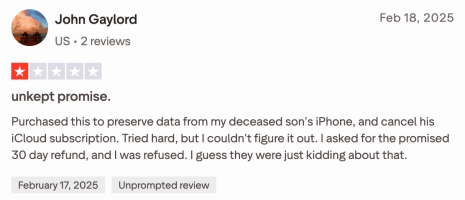
Though Syncios gets an average of 4.3 ratings on Trustpilot, the 5-star ratings and the 1-star ratings make up roughly equal shares. And Syncios didn't receive any reviews in 2026. From the existing reviews, we can learn that Syncios may work normally in recovering lost data from devices directly, but some users report difficulties recovering data from an iCloud backup.
- Clear interface
- Supports recovery of most types of media
- Preview thumbnails before recovery
- Requires enough disk space to scan iPhone data
- Not available to recover data from iCloud
Based on our own testing, we also found that Syncios requires enough storage on your computer to scan your iPhone data. So if there is not sufficient storage, you will be paused at the first step and can't preview or recover any data at all. So make sure there is enough storage on your computer while using Syncios Data Recovery. Despite the shortage, you can still use it to scan and check if there is any lost data on your device. If you are looking for a better alternative, keep reading, and we will introduce a better one we have tested as well.
Part 4. Best Alternative to Syncios Data Recovery
If you are looking for a more versatile iPhone data management tool, MagFone iPhone Data Recovery may be a reliable choice. It can not only help recover data from your iPhone, iTunes backup, and iCloud sync, but it can also help back up your iPhone and restore backups to your iPhone. So there is no chance your data will go missing. See how MagFone iPhone Data differs from Syncios Data Recovery.

MagFone iPhone Data Recovery
Recover data from iPhone and iPad in three recovery modes without data overwritting and device reset.
| Compare | Syncios Data Recovery | MagFone iPhone Data Recovery |
|---|---|---|
| Recover Data from iOS Device | ✔️ | ✔️ |
| Recover Data from iTunes Backup | ✔️ | ✔️ |
| Recover Data from iCloud | ✔️ | ✔️ |
| Back Up iPhone | Additional paid service | ✔️ |
| Restore iPhone Backup | Start from $27.45 | ✔️ | Starting Price | $39.95 | $39.95 |
| Recommendation | ⭐⭐⭐ | ⭐⭐⭐⭐⭐ |
MagFone iPhone Data Recovery offers three basic data recovery features, like Syncios. With a stronger iPhone backup and restore feature, MagFone iPhone Data Recovery adds extra protection for your data, allowing you to recover data without relying on iCloud and iTunes.
Step 1 Run MagFone iPhone Data Recovery
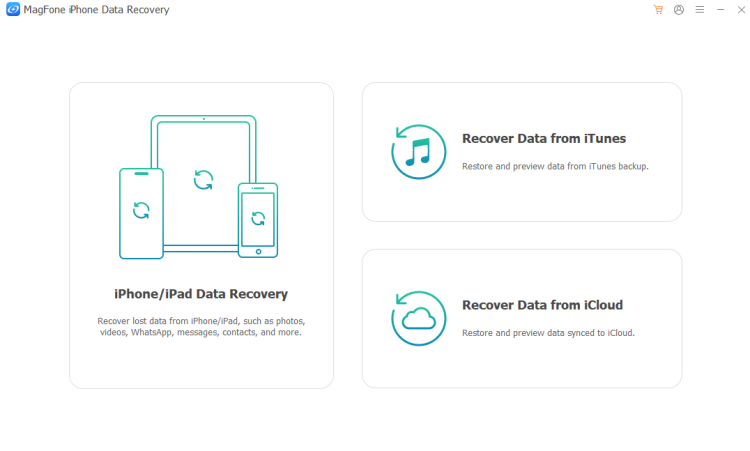
First, download the MagFone iPhone Data Recovery package on a computer, install it, and launch it.
Step 2 Scan for Recoverable Data on iPhone
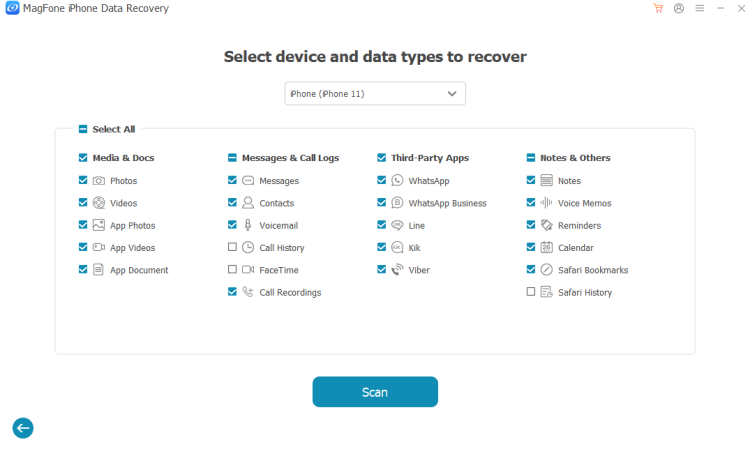
Choose iPhone/iPad Data Recovery on the computer, select the data you want to recover, and click Scan to scan for recoverable data on iPhone.
Step 3 Recover Deleted Data from iPhone
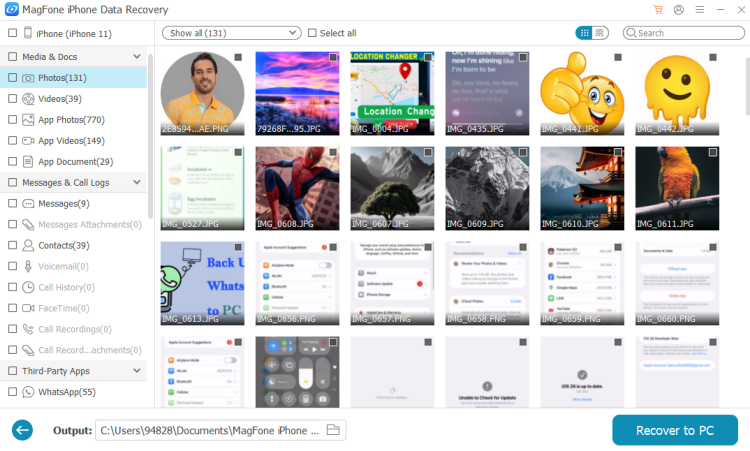
After MagFone scans the data, you can preview it, then select the data you need, and click Recover to PC or Recover to Mac to recover the data.
Part 5. Conclusion
Syncios Data Recovery can be a useful option for recovering lost iPhone data, but its results may vary depending on the device and situation. Before subscribing to it, preview its recovery efficiency and user feedback to understand its capabilities and limitations. If it doesn't meet your needs, consider a suitable alternative like MagFone iPhone Data Recovery. Ultimately, the best option is the one that fits your recovery needs and helps you protect your data going forward.

Edgar Davis
Editor in chief




