








Is Gihosoft iPhone Data Recovery safe, and does it actually work? More importantly, should you stick with the free version or upgrade to the Pro edition? If you're looking for clear answers, you're in the right place. We thoroughly tested Gihosoft iPhone Data Recovery to evaluate its features, performance, and overall reliability. In this review, we'll walk you through everything you need to know and also share a strong alternative we discovered during testing.

- Part 1. What Is Gihosoft iPhone Data Recovery?
- Part 2. How to Use Gihosoft iPhone Data Recovery Free
- Part 3. Gihosoft iPhone Data Recovery Review: Hands-On Testing
- Part 4. Best Alternative to Gihosoft iPhone Data Recovery
- Part 5. Conclusion
Part 1. What Is Gihosoft iPhone Data Recovery?
Gihosoft iPhone Data Recovery is a specialized tool designed to help iPhone, iPad, and iPod users retrieve lost or deleted data from their iOS devices. Available for both Windows and Mac, this software promises to recover over 12 types of files, including photos, videos, messages, contacts, WhatsApp chat history, and more, through three flexible recovery modes: directly from your device, from iTunes backup, or from iCloud backup.

| Key Features | Recover from iOS device Recover from iTunes backup Recover from iCloud backup |
| Supported Recovery Data | Camera Roll, Photo Stream, App Photos, App Videos, Messages, Messages Attachment, Contacts, Call History, Voicemail, WhatsApp & Attachments, Viber & Attachments, Notes, Calendar, Reminders, Safari Bookmarks, Voice Memos |
| Device Compatibility | iPhone 3GS to iPhone 11 iPad Pro 12.9-inch/11-inch/10.5-inch, iPad 2018 (6th)/2017 (5th), iPad Air 2, iPad Air, iPad Mini 4/3/2, iPad/iPad 2/3/4 iPod touch 6/5/4 |
| Supported Operating System | Windows and Mac |
Pricing Plans of Gihosoft iPhone Data Recovery
Gihosoft iPhone Data Recovery includes a free version, while the Pro version is available through a lifetime plan. Users can choose between a personal license and a family license depending on their needs.
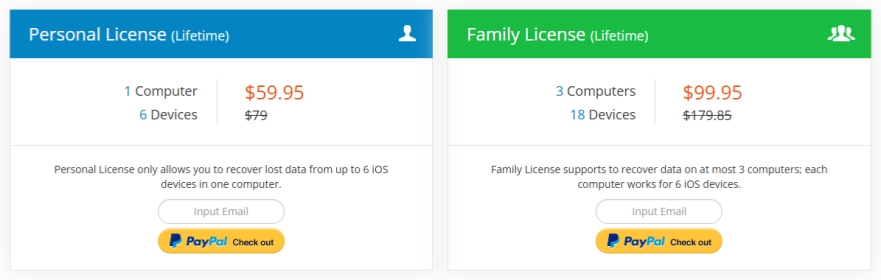
| Personal License | Family License |
|---|---|
| 1 Computer & 6 Devices | 3 Computer & 18 Devices |
| $59.95 | $99.95 |
Part 2. How to Use Gihosoft iPhone Data Recovery Free
Now you have a general understanding of what Gihosoft iPhone Data Recovery offers, and you may be curious about the operation and its performance. Due to its wizard-style interface, the operation is quite easy. In this section, we'll walk you through how to use Gihosoft iPhone Data Recovery Free, so you can see what the process looks like and what you can expect from the free version in real use.
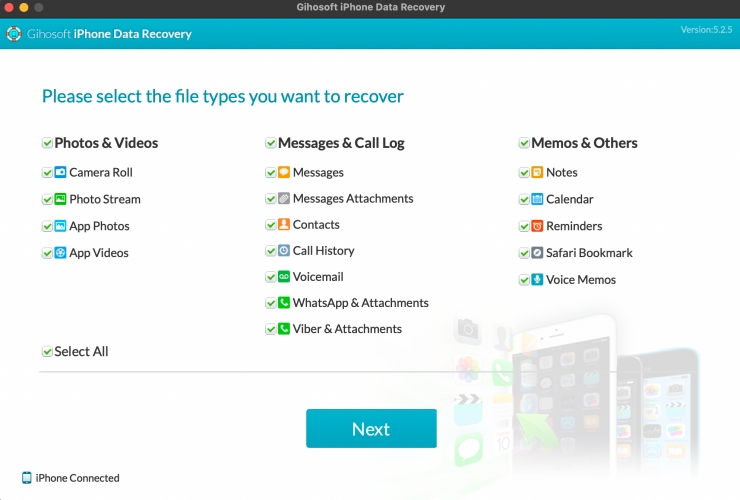
Recover Data from iDevice
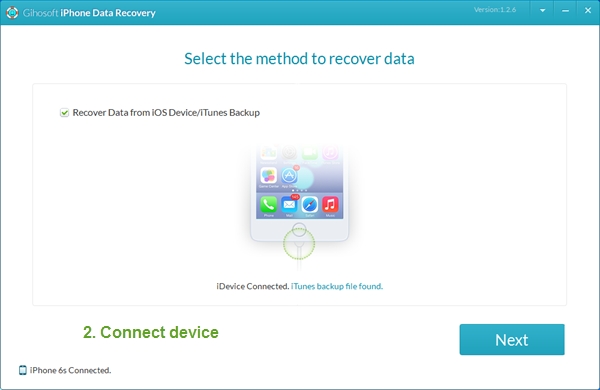
Step 1. Use a data cable to connect your iPhone to the computer, and open Gihosoft iPhone Data Recovery.
Step 2. Select the Data you want to recover and click Next twice.
Step 3. After scanning, choose the data you want and click Recover to recover data from the device.
Recover Data from iTunes Backup
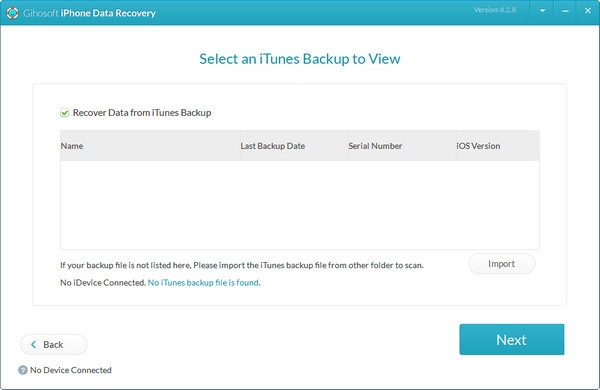
Step 1. Open Gihosoft iPhone Data Recovery and select the data you want to recover.
Step 2. Click Next, choose View iTunes Backup, and select an iTunes backup.
Step 3. Preview scanned data from iTunes backup, then select and click Recover to export the data to your computer.
Recover Data from iCloud Backup
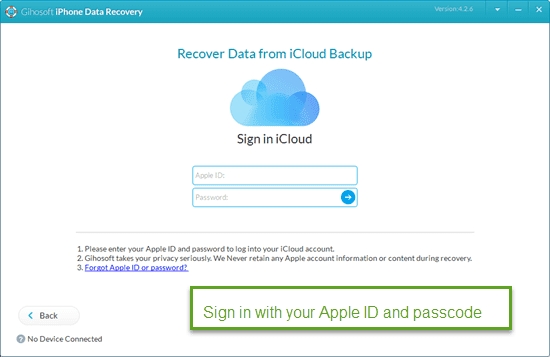
Step 1. Open Gihosoft iPhone Data Recovery and select the data that matters.
Step 2. Click Next, then choose View iCloud Backup.
Step 3. Sign in to your iCloud account and choose an iCloud backup to scan.
Step 4. Select data and click Recover to export the data.
Part 3. Gihosoft iPhone Data Recovery Review: Hands-On Testing
After using three recovery features of Gihosoft iPhone Data Recovery, it's time to see how the software performs. In this part, we'll take a closer look at our hands-on experience, including the user interface, scanning speed, recovery success rate, overall stability, pros and cons to help you judge whether it suitable for you.
User interface: 4/5.
Though the three features are not displayed on the landing page, Gihosoft iPhone Data Recovery provides a wizard-style interface. Users can get started quickly.
Scanning speed: 2.5/5.
It may take a long time to scan your data, but it deserves waiting.
Recovery success rate: 3.5/5.
According to users' comments, the recovery success varies a lot. Gihosoft iPhone Data Recovery does help recover data from devices for some users. But it's not always successful in finding what users need.
Stability: 2/5.
The Recover from iCloud backup feature doesn't work normally. And you are unable to scan iPhone data if the software detects that there is an encrypted iTunes backup file.
 Pros
Pros- Supports select data before scan
- Supports recovering Notes, Reminders, Safari, Calendar, Voice Memos in free version
- A good option from free tool
- Safe and privacy-focused

- Lack of update for a long time
- Not clear recovery options
- Takes a long time to verify the iCloud account
Part 4. Best Alternative to Gihosoft iPhone Data Recovery
Although Gihosoft iPhone Data Recovery is promoted as the best free iPhone data recovery software for Windows and Mac, its free version comes with noticeable limitations. To access more advanced features and remove usage restrictions, you'll need to upgrade to the Pro version.
At the beginning, we said that we found a better option during the testing process. If you're looking for a more capable alternative, MagFone iPhone Data Recovery is worth considering. It can help in a variety of data loss situations, such as accidental deletion, unexpected system issues, or even a damaged iPhone. In addition, MagFone is compatible with the latest iOS system and the latest iDevice models, and it supports recovering up to 22 types of data. Next, let's take a quick look at MagFone iPhone Data Recovery.
| Supported Device | iPhone 4 to iPhone 17 All models of iPad Pro, iPad Air, iPad mini, and iPad iPod touch 2 to iPod touch 7 |
| Supported Operating System | Windows 11, 10, 8, 7 Mac OS X 10.8 or above |
| Supported iOS | iOS 7 to iOS 26 |
| Three Recovery Mode | Recover from iOS device Recover data from iTunes backup Recover data from iCloud |
| Supported Recovery Data | Photos, Messages, Notes, Phone, Contacts, Safari, Calendars, Reminders, WhatsApp, Kik, Viber, LINE, and WhatsApp Business data |

MagFone iPhone Data Recovery
Recover data from iPhone and iPad in three recovery modes without data overwritting and device reset.
After getting a general idea of what MagFone iPhone Data Recovery offers, the next step is to see how it works in practice. Next, we will show how to use MagFone iPhone Data Recovery so you can better understand how easy it is to retrieve data with this alternative.
Step 1 Connect iPhone to Computer
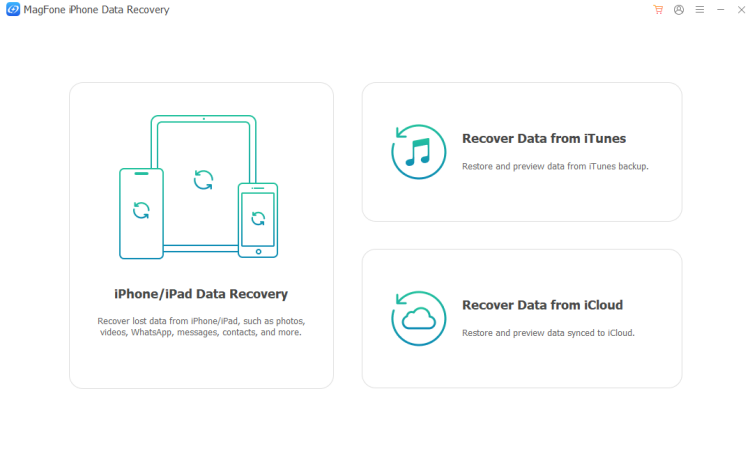
Download and install MagFone iPhone Data Recovery on your computer. Then use a data cable to connect your iPhone to the computer.
Step 2 Scan iPhone Data
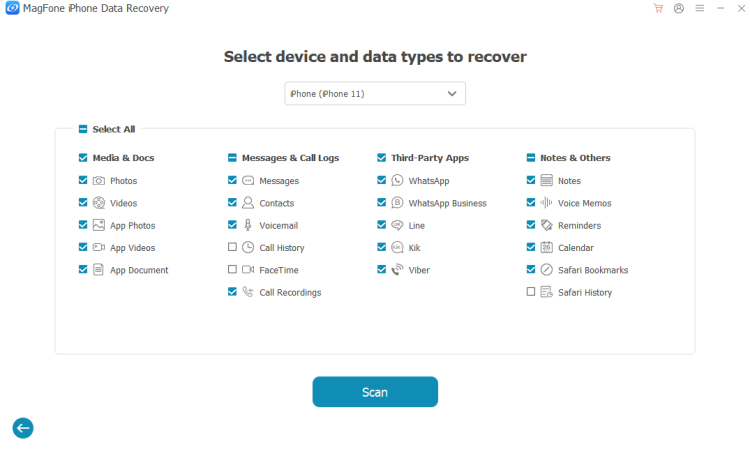
Choose iPhone/iPad Data Recovery from the three options. Then select the data you want to recover and click Scan. To proceed, you need to enter the passcode on your iPhone.
Step 3 Recover iPhone Data without Backup
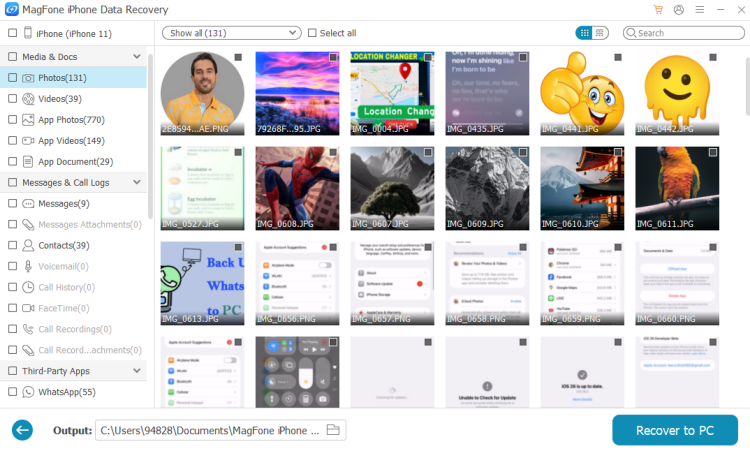
After scanning, you can view all the selected data. Just select the data that matters and click Recover to PC or Recover to Mac to restore it.
Part 5. Conclusion
Overall, Gihosoft iPhone Data Recovery is a decent option for users who want to recover basic data from Notes, Calendar, Reminders, Safari, and Voice Memos. It offers a simple interface and supports multiple data types, but its free version is quite limited, and the full experience requires a paid upgrade. Based on our testing, it can work well in some situations, but it may not be the most powerful choice for everyone. If you want more flexible features and a potentially better recovery experience, considering an alternative like MagFone may be worthwhile.

Edgar Davis
Editor in chief




