








In today's digital world, data loss is a common issue, especially on mobile devices, including iPhones and iPads. It's not strange that some data on iPhone goes missing due to an unkown reason. And it's not surprising that you want to recover some accidentally deleted data from your iPhone. Whether you've lost notes, deleted photos, messages, or other essential data, finding the right recovery tool can save you from significant frustration. In this review, we will explore FonePaw iPhone Data Recovery in depth, from its features, pricing plans, pros and cons, to real user reviews.

- Part 1. Overview of FonePaw iPhone Data Recovery
- Part 2. How to Use FonePaw iPhone Data Recovery
- Part 3. Real Review of FonePaw iPhone Data Recovery
- Part 4. Best Alternative to FonePaw iPhone Data Recovery
- Part 5. Conclusion
Part 1. Overview of FonePaw iPhone Data Recovery
FonePaw iPhone Data Recovery is a powerful tool designed to recover lost or deleted data from iPhones, iPads, and iPods. Whether you've accidentally deleted important files, lost data after a system crash, or even encountered a device failure, FonePaw offers an easy solution to retrieve a wide range of data types, including photos, videos, contacts, messages, WhatsApp conversations, call history, and more. FonePaw iPhone Data Recovery is compatible with the latest iOS version and the latest iPhone models.

Three main features of FonePaw iPhone Data Recovery:
- Recover lost or deleted data on iPhone
- Restore data from iCloud backup
- Restore data from iTunes backup
Pricing Plans of FonePaw iPhone Data Recovery
FonePaw iPhone Data Recovery is not freeware. It offers a free trial with limited services. To fully recover iPhone data, you need to purchase a license. FonePaw iPhone Data Recovery offers three pricing plans based on different service time.

| Pricing Plans | Windows | Mac |
|---|---|---|
| One-Month License | $49.95 | $59.96 |
| One-Year License | $55.97 | $66.47 |
| Single-user License | $66.47 | $69.97 |
Pros & Cons of FonePaw iPhone Data Recovery
Not all the tool is perfect, including FonePaw iPhone Data Recovery. Below, we break down the main pros and cons of FonePaw iPhone Data Recovery to help you make a more informed decision when choosing a recovery tool.
- Support data recovery from iOS devices, iTunes and iCloud backups
- Intuitive interface
- A wide range of iPhone data
- Free version limitations
- More expensive than relevant alternatives
- Some feature fails to response
- Unstable success rate
Is FonePaw iPhone Data Recovery Safe?
Beyond the basic information about FonePaw iPhone Data Recovery, what users care about most is safety. FonePaw iPhone Data Recovery attaches great importance to data security and privacy, and it states that it does not collect or use users' personal data during the recovery process.
Part 2. How to Use FonePaw iPhone Data Recovery
You have had a basic view of FonePaw iPhone Data Recovery. It's time to see how it actually works in practice and if it really works. One of the standout features of FonePaw iPhone Data Recovery is its ability to recover data from iOS devices. Here are the steps to recover lost or deleted data using FonePaw iPhone Data Recovery:
Step 1. Download FonePaw iPhone Data Recovery to your computer. Then plug your iPhone into the computer using a data cable.
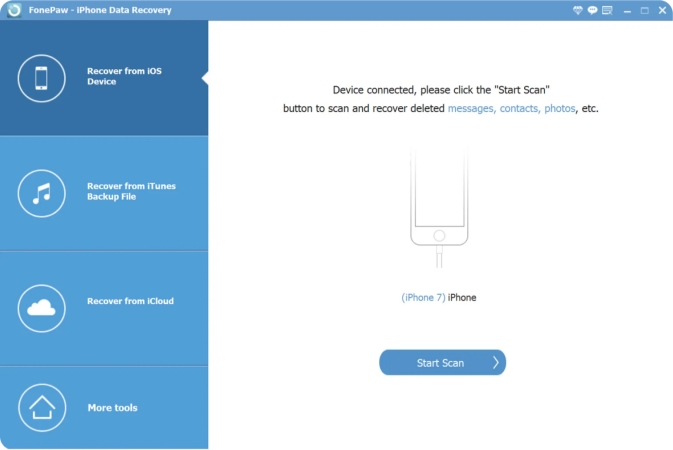
Step 2. Click Recover from iOS Device in the left feature list. When the device is detected, click Start Scan to scan iPhone data.
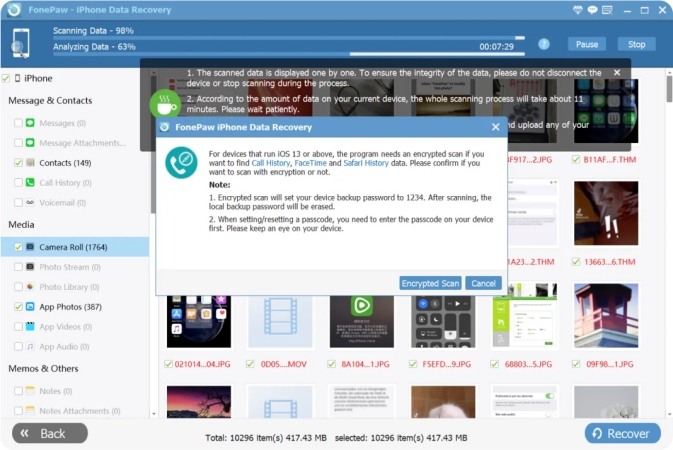
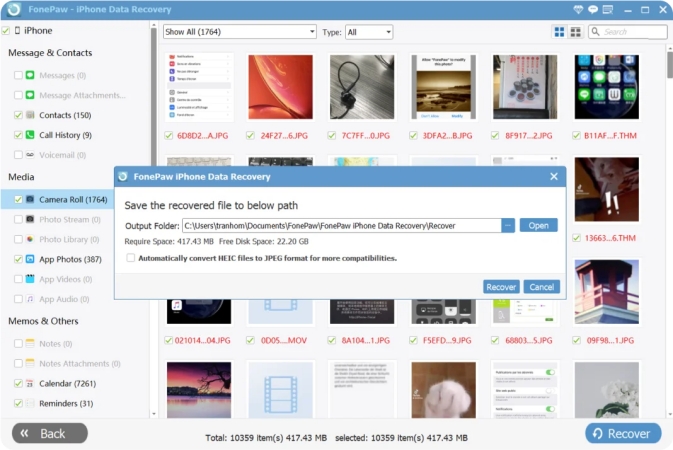
Step 3. After iPhone data is scanned completely, you can click each category to check your data. Then select the lost or deleted data and click Recover to restore them to your computer.
Part 3. Real Review of FonePaw iPhone Data Recovery
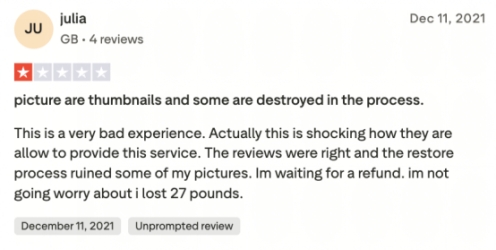
FonePaw iPhone Data Recovery has received mixed reviews from real users. On Trustpilot, there are 258 real user reviews of FonePaw iPhone Data Recovery, with 32% positive reviews and 55% negative reviews. The reviews mainly discussed the recovery ability, success rate, after-sale services, and refund guarantee.
Many users reported successfully recovering their lost iPhone data with this tool. Its intuitive interface and relatively high success rate make it a popular choice among iPhone users.

However, some users have pointed out a few drawbacks. Some have reported that the program doesn't work at all. A few users have also expressed dissatisfaction with FonePaw's customer support, citing slow response times when they faced technical issues or had questions. In addition, the refund policy appears to differ from what is stated. There may even be data loss during the recovery process.

Part 4. Best Alternative to FonePaw iPhone Data Recovery
While FonePaw iPhone Data Recovery is a viable option for retrieving lost or deleted iPhone data, it's not the only solution. If you're looking for a tool with higher flexibility and smoother operation, MagFone iPhone Data Recovery stands out as a stronger alternative.
As a dedicated iOS data recovery and management tool, MagFone iPhone Data Recovery supports restoring up to 22 types of iPhone data, including photos, videos, messages, contacts, call history, WhatsApp data, notes, and more. In addition to iPhone data recovery, it can also extract and restore data from iTunes backups and iCloud backups.
| MagFone iPhone Data Recovery | FonePaw iPhone Data Recovery | |
|---|---|---|
| Retrieve Data from Device | ✔️ | ✔️ |
| Restore Data from iTunes Backup | ✔️ | ✔️ |
| Recover Data from iCloud | ✔️ | ✔️ |
| Preview All Data | Free | Paid |
| Pricing Plan | Start from $27.95 | Start from $49.95 |
| Success Rate | Higher | Lower |
| Customer and Refund Service | More Trustable | Less Trustable |
| Ratings | 4.3 on TrustPilot | 3.9 on TrustPilot |
| Recommendation | ⭐⭐⭐⭐⭐ | ⭐⭐⭐⭐ |
One of its biggest advantages over FonePaw is its flexible, selective recovery process. You can choose the specific data types or even individual files you want to scan and recover, which not only saves time but also avoids restoring unnecessary data. If you want more control, higher efficiency, and a smoother recovery experience, MagFone iPhone Data Recovery is definitely worth considering. Here's how to recover iPhone data with MagFone iPhone Data Recovery:

MagFone iPhone Data Recovery
Recover data from iPhone and iPad in three recovery modes without data overwritting and device reset.
Step 1 Launch MagFone iPhone Data Recovery
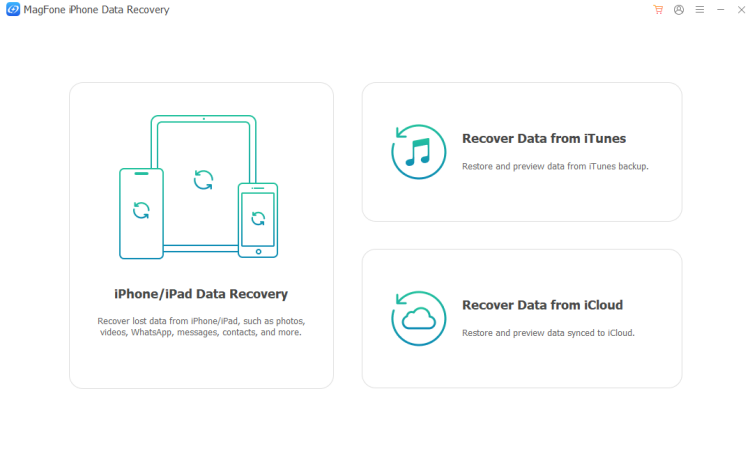
Download MagFone iPhone Data Recovery on your computer. At the same time, connect your iPhone to the computer using a data cable.
Step 2 Select iPhone Data to Scan
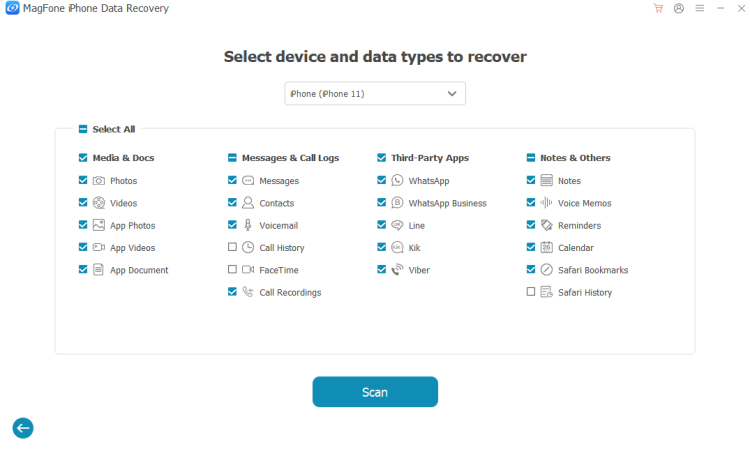
Click iPhone/ iPad Data Recovery on the main interface. Choose the data you want to recover when your iPhone is detected successfully. Then click Scan to scan the selected data on the iPhone.
Step 3 Recover Deleted or Lost iPhone Data
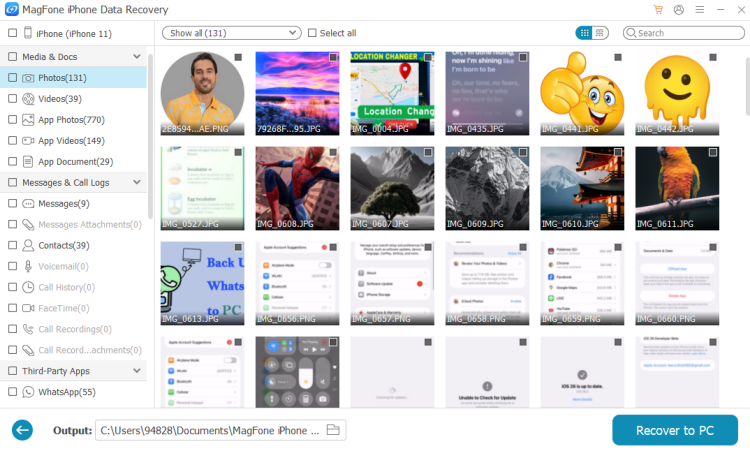
After the scan, you can preview the selected iPhone data. If you want to recover them, just click Recover to PC.
Part 5. Conclusion
FonePaw iPhone Data Recovery is a decent choice for users who just need a simple way to recover lost iPhone data. However, its cost and efficiency may be a drawback for some. If you want a more flexible and reliable option, MagFone iPhone Data Recovery is the better pick, which lets you selectively scan and recover exactly what you need.

Edgar Davis
Editor in chief





