








Does FoneLab actually work? When you accidentally delete something on your iPhone, whether it's photos, text messages, or contacts, you will Google for a recovery method. And FonLab iPhone Data Recovery will appear among the search results. At this time, you will wonder about the real performance of this FoneLab iOS data recovery software. That's exactly what this review sets out to answer. We've dug into how each recovery mode performs in practice, what data types FoneLab can reliably restore, and what real users are saying beyond the marketing claims.
- Part 1. Overview of FoneLab iPhone Data Recovery
- Part 2. How Does FoneLab iPhone Data Recovery Work
- Part 3. Does FoneLab iPhone Data Recovery Actually Work?
- Part 4. Best Alternative to FoneLab iPhone Data Recovery
- Part 5. Conclusion
Part 1. Overview of FoneLab iPhone Data Recovery
FoneLab iPhone Data Recovery is a desktop-based data recovery tool developed by FoneLab, designed to help iPhone, iPad, and iPod Touch users retrieve lost or deleted data without requiring a full device restore. It runs on both Windows and macOS, and works across three recovery pathways: directly from the iOS device via USB, from a locally stored iTunes backup, or from an iCloud backup file. Beyond data recovery, the software also bundles several companion tools, including iOS System Recovery, iOS Data Backup & Restore feature, and WhatsApp Transfer, making it a broader iOS utility suite rather than a single-purpose recovery app.

| Supported Operating System | Windows 11/10/8.1/8/7 macOS 10.7 and above(macOS 26 included) |
| Supported Devices | iPhone 3GS ~ iPhone 17 iPad Pro, iPad, iPad 2, iPad 3, iPad 4, iPad Air, iPad Air 2, iPad mini, iPad mini 2, iPad mini 3 iPod touch 6, iPod touch 5, iPod touch 4 |
| Supported OS | iOS 26, iPadOS 26, and former |
Pricing Plans of FoneLab iPhone Data Recovery
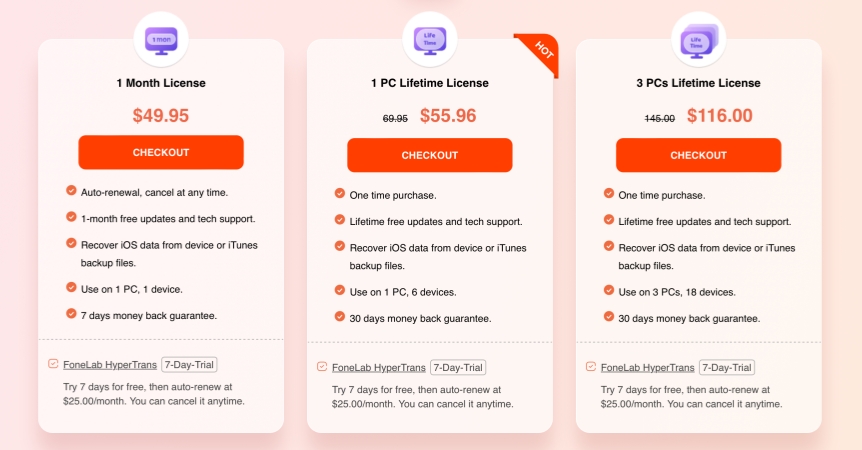
FoneLab iPhone Data Recovery offers three purchasing options, each covering both Windows and macOS versions. The current pricing is structured as follows:
| Pricing Plans | Cost | Support Device |
|---|---|---|
| 1 Month License | $49.95 | 1 PC, 1 device |
| 1 PC Lifetime License | $55.96 | 1 PC, 6 devices |
| 3 PCs Lifetime License | $116.00 | 3 PCs, 18 devices |
Part 2. How Does FoneLab iPhone Data Recovery Work
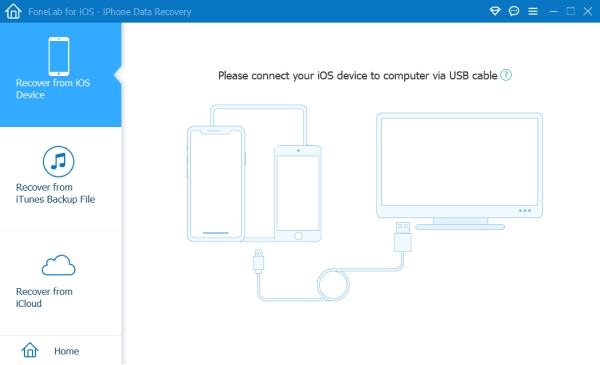
FoneLab iPhone Data Recovery provides three recovery modes for users to choose from. The supported data and work procedure of each recovery mode vary. You can choose the suitable recovery mode based on your needs.
Recover from iOS Device
FoneLab can help you recover data from your iOS device directly, no matter what scenarios you lost or deleted the data.
| Supported Data Types | Messages, Contacts, Phone, Notes, calendar, Reminders, Safari, WhatsApp, Kik, Viber, LINE, and Messenger data |
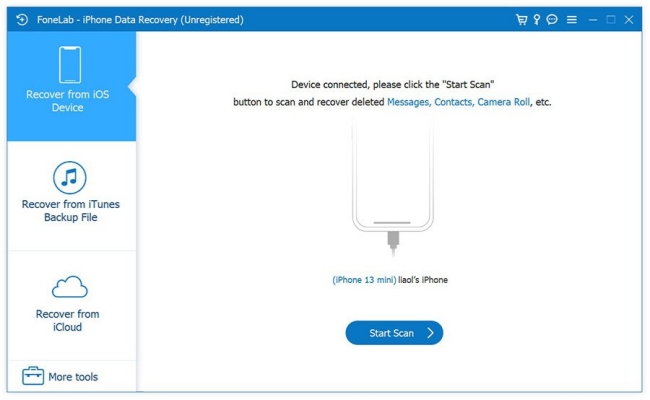
Step 1. Use a data cable to connect your device to a computer, then open FoneLab.
Step 2. Choose iPhone Data Recovery, then choose Recover from iOS Device.
Step 3. Click Start Scan to let the tool scan your device data.
Step 4. Select the deleted data and click Recover to recover.
Recover from iTunes Backup File
FoneLab can also help recover data from iTunes backup and provide a way to figure out what you have in the iTunes backup.
| Supported Data Types | Messages, Contacts, Phone, Notes, calendar, Reminders, Safari, WhatsApp, Kik, Viber, LINE, and Messenger data |
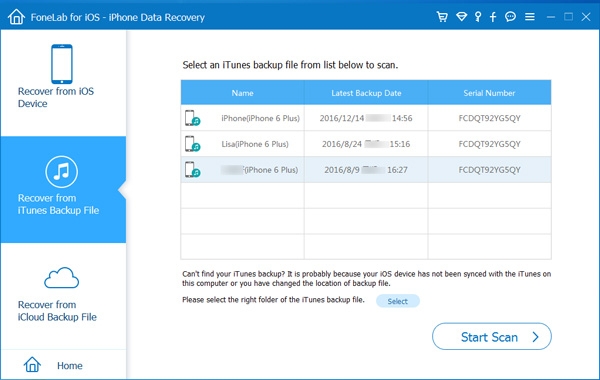
Step 1. Open FoneLab and click Recover from iTunes Backup File.
Step 2. Choose an iTunes backup from the list and click Start to allow the tool to scan data in the iTunes Backup.
Step 3. Choose the data you want and click Recover to export the data to your computer.
Recover from iCloud Backup File
This recovery mode allows you to restore data, including Contacts, Photos, Notes, Calendars, and Reminders that you have synced to iCloud.
| Supported Data Types | Photos, Contacts, Notes, Calendars and Reminders |
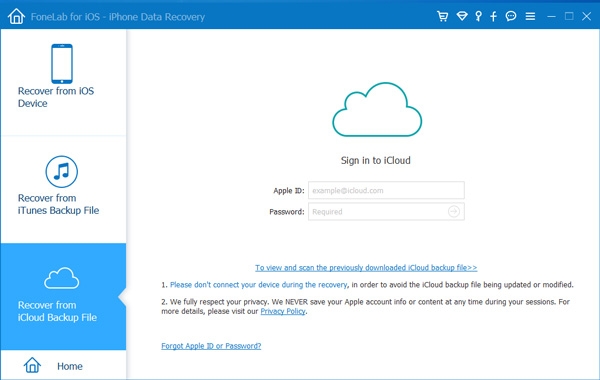
Step 1. Open FoneLab and click Recover from iCloud.
Step 2. Enter your Apple ID details and complete the verification. Then the tool will scan the data you have synced to iCloud.
Step 3. Select the data you want and click Recover to recover them.
-
Can FoneLab get private browsing history?
No, FoneLab can only get browsing history in normal mode instead of private browsing history.
-
Can FoneLab recover Snapchat memories?
No, FoneLab now doesn't support Snapchat data recovery.
-
Can FoneLab pull deleted texts from iCloud?
No, FoneLab can only pull deleted Photos, Contacts Notes, Calendars, and Reminders data from iCloud.
Part 3. Does FoneLab Actually Work?
Before downloading and installing an iPhone data recovery tool, what users focus on most is its efficiency and success rate. Does FoneLab really work? This is one of the questions people actually type into Google. More than what FoneLab states to do, what the real users' comments matter more to our potential users. Here we collected users' reviews from Trustpilot and combined them with our own experience to let you know in-depth about this iOS data recovery software.
Positive Reviews:
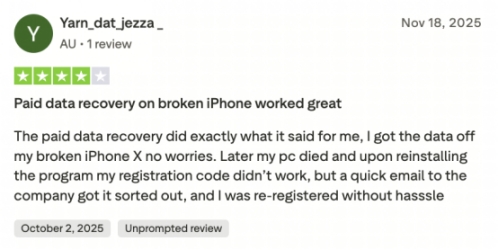
According to 5‑star reviews, FoneLab does work for many users, successfully recovering data from iPhone and iPad in real cases. In these positive reviews, customers also praise FoneLab for its quick and helpful responses to support requests, especially when they run into activation or technical issues.
Negative Reviews:
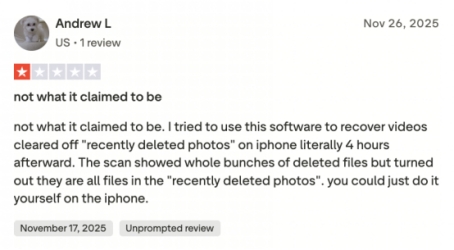
However, the performance of FoneLab iPhone Data Recovery is not stable. According to some users, it is not what it claims to be, and it is unable to recover permanently deleted data. And some users said it was a trash app in the Reddit community, and recovered files are corrupted and can't be opened.
Combined with real user experience, we can conclude the pros and cons of FoneLab iPhone Data Recovery as follows:
- Allow to preview data before recovery
- Wide applicable scenarios
- Clear clarification of paid service
- Easy to use
- Quick scanning of data
- Unable to select data to scan before the scanning
- Recovery performance is not stable
- Not work as what it claims to
Part 4. Best Alternative to FoneLab iPhone Data Recovery Tool
For many users, FoneLab iPhone Data Recovery looks attractive on paper, but its real performance doesn't always match the promises. On top of these performance issues, FoneLab's basic price makes it harder to justify, especially if you're not sure it will actually recover what you need.
If you share these concerns, it makes sense to look for a tool that is more budget‑friendly, easier to trust, and still powerful enough to handle recovery needs. This is where MagFone iPhone Data Recovery becomes a strong alternative to FoneLab. It focuses on practical functions that most users actually need, such as recovering deleted photos, messages, contacts, call history, WhatsApp data, and more from iPhone, iPad, and iPod touch. For users who are cautious about security and value, MagFone iPhone Data Recovery provides a more reassuring option.
| Features | iPhone/iPad/iPod data recovery Recover data from iTunes Recover data from iCloud |
| Support Data | Photos, Messages, Notes, Phone, Contacts, Safari, Calendars, Reminders, WhatsApp, Kik, Viber, LINE, and WhatsApp Business data |
| Support Operating System | Windows 11, 10, 8, 7 Mac OS X 10.8 or above |
| Supported iOS Devices | iPhone 4 ~ iPhone 17 All models of iPad Pro, iPad Air, iPad mini, and iPad iPod Touch 2 ~ iPod Touch 7 |
| Supported iOS/iPadOS | iOS 7 ~ iOS 26 |

MagFone iPhone Data Recovery
Recover data from iPhone and iPad in three recovery modes without data overwritting and device reset.
Here, we briefly introduce how to use MagFone iPhone Data Recovery to recover data from an iOS device.
Step 1 Open MagFone iPhone Data Recovery
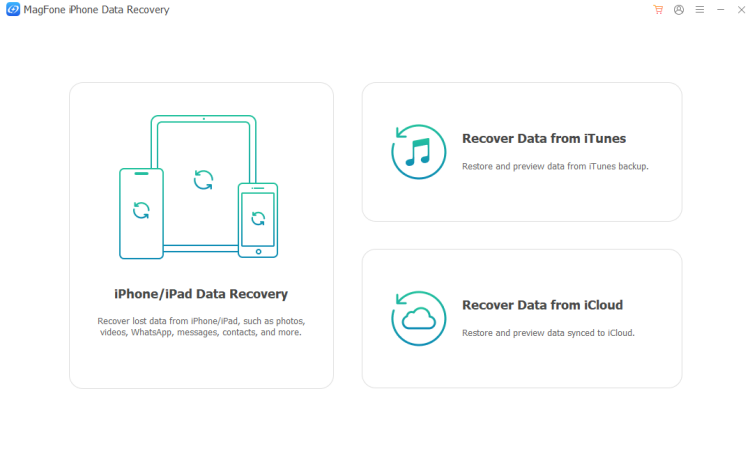
Use a data cable to link your iPhone to a computer and open MagFone iPhone Data Recovery to start.
Step 2 Select and Scan Device Data
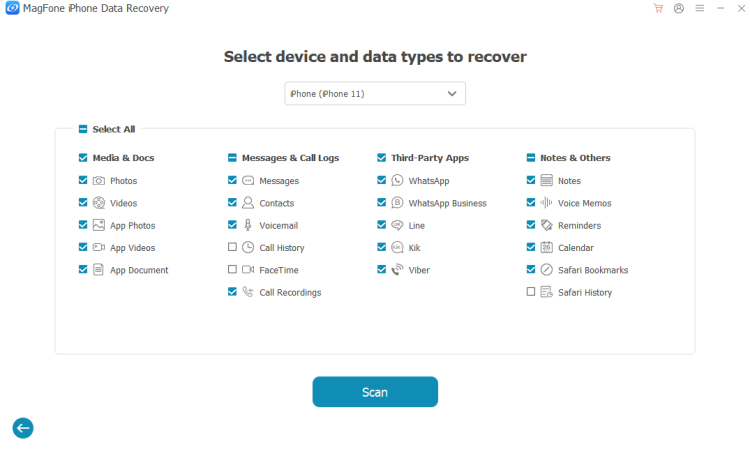
Choose iPhone/iPad Data Recovery, then select the data you want to recover and click Scan to allow the tool to scan your iPhone data.
Step 3 Recover Lost or Deleted Data
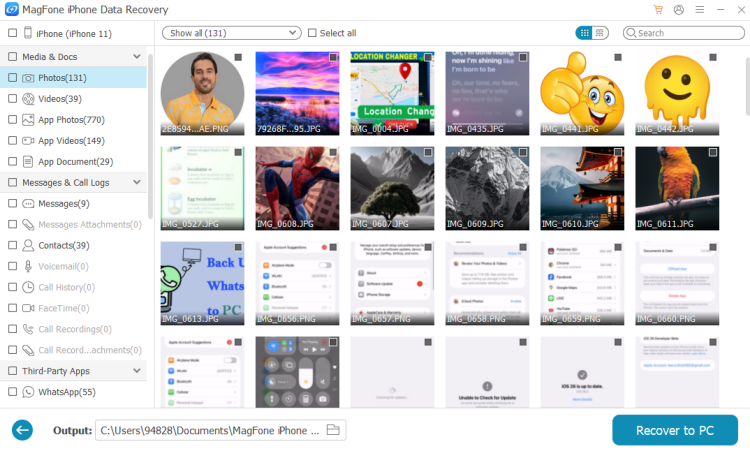
After scanning, you can preview the selected iPhone data on the screen. And you can choose Only Show deleted to filter and quickly find deleted items on iPhone. Then select and click Recover to PC to recover them.
Part 5. Conclusion
Losing important data from your iPhone can be stressful, so choosing a reliable recovery tool matters. To avoid unnecessary loss, you can try FoneLab's free feature to scan deleted or lost data on your device to verify its efficiency, then decide whether to purchase. If you are seeking a more cost-effective and reliable option, MagFone iPhone Data Recovery is a strong alternative.

Edgar Davis
Editor in chief




