








PokeGo++ is not the same as the official Pokémon GO Plus+ accessory released by Nintendo. It is instead a modified version of Pokémon GO that includes additional features beyond those found in the official game. For longtime Pokémon GO players, it was once one of the most talked-about third-party tools available. Around seven years ago, it gained significant popularity, but is it still around and useful in 2026? If you're curious about Pokémon GO++, this guide covers everything you need to know about it.

- Part 1. Does PokeGo++ Still Work in 2026?
- Part 2. How to Download PokeGo++ App
- Part 3. How to Use PokeGo++ for Spoofing
- Part 4. Best Alternative to PokeGo++ App
- Part 5. Conclusion
Part 1. Does PokeGo++ Still Work in 2026?
Yes, PokeGo++ is still workable in 2026. Many players still look for PokeGo++ app because of the convenience it provides. The app can spoof your GPS location, simulate walking routes, and help you monitor nearby Gyms, Raids, battles, and potential Shiny Pokémon. These features reduce the need for physical travel and can make Pokémon GO gameplay more efficient and less time-consuming.
Part 2. How to Download PokeGo++ App
While PokeGo++ was extremely popular several years ago, its original website is no longer active. Today, users looking for a pokego++ download must rely on third-party platforms and app repositories.
01PokeGo++ Download on iOS
iOS users can install the PokeGo++ app through BuildStore. BuildStore is an independent iOS app marketplace that provides access to custom-built and modified applications.
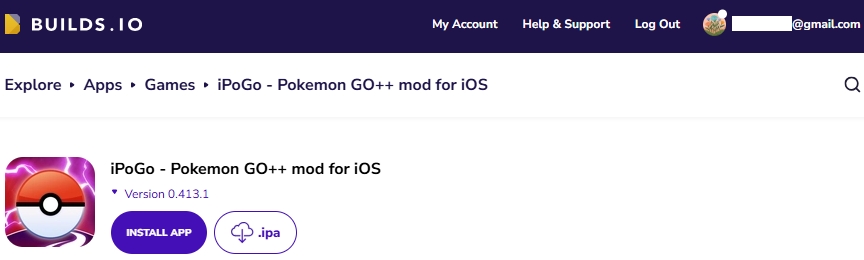
However, BuildStore is a paid service. To use it, you must purchase a subscription plan, with pricing starting at $4.59 per month. After subscribing and registering your device, you can search for PokeGo++ and install it directly on your iPhone or iPad.

02PokeGo++ Download on Android
For Android users, obtaining a PokeGo++ download package has become increasingly difficult. Currently, there is no widely recognized platform that offers a stable version of PokeGo++ for Android devices. Additionally, modified app stores such as TutuApp no longer provide access to PokeGo++.
If you're using Android and are looking for GPS spoofing features for Pokémon GO, alternative tools such as Fake GPS Location and MagFone Location Changer may be worth considering.
Part 3. How to Use PokeGo++ for Spoofing
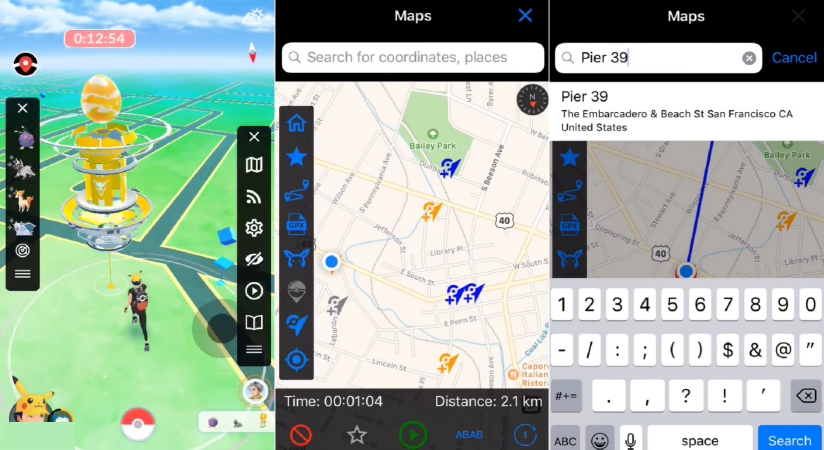
Once you've successfully installed PokeGo++ on your iPhone or iPad, you can begin setting it up for location spoofing within Pokémon GO.
Step 1. Uninstall the official Pokémon GO app from your device if it is already installed.
Step 2. Open the Settings app, navigate to General, then select Profiles & Device Management.
Step 3. Locate the profile associated with the modified Pokémon GO application and mark it as trusted.
Step 4. Return to your Home Screen and launch the Pokémon GO app.
Step 5. Open the PokeGo++ menu and enable the location-related features you would like to use, such as teleporting or route simulation.
Step 6. Go back to the game map, access the PokeGo++ controls again, and start using the spoofing functions during gameplay.
Part 4. Best Alternative to PokeGo++ App
Although PokeGo++ remains well-known among Pokémon GO players, it comes with several limitations. The app is no longer officially maintained, and finding reliable download sources has become increasingly difficult. Users may also encounter compatibility issues, revoked certificates, or security risks when installing modified applications from third-party websites.
For players looking for a more reliable solution, MagFone Location Changer offers a practical alternative. It provides official downloads through its website and supports features such as instant teleportation, customizable movement routes, and joystick controls. These tools allow you to navigate the Pokémon GO world more freely. Here's how to use MagFone Location Changer.

MagFone Location Changer
Easily change your GPS location on iOS and Android devices to anywhere with one click, while not requiring root or jailbreaking!
Step 1 Connect Device and Run MagFone Location Changer

Use a USB cable to connect your iPhone or Android device to your computer. Enable Developer Mode or the required permissions on the device when prompted. Next, open MagFone Location Changer and choose Start and Game Mode feature from the screen.
Step 2 Teleport to a New Location in Pokémon GO

When the interactive map appears, browse to your desired destination or enter an address into the search field. Once you've located the place you want to use in Pokémon GO, confirm your selection by clicking Start Modifying and apply the changes.
Part 5. Conclusion
PokeGo++ was once one of the most popular Pokémon GO spoofing tools available, and many players still search for how to get pokego++ today. While the original project is no longer officially supported and its website has disappeared, some third-party sources still provide access to the app. However, due to installation challenges and reliability concerns, many users now prefer newer alternatives such as MagFone Location Changer for GPS spoofing, route simulation, and joystick-based gameplay.

Olivia Wood
Editor in chief




