








If you've been exploring ways to change your location in Pokemon GO, chances are you've stumbled across gospoofer.com. It promises powerful spoofing features, easy setup, and completely free access. This sounds almost too good to be true. If you're hesitant about trying it, that's a smart instinct. This latest full review breaks down everything you need to know, helping you decide whether GoSpoofer is actually worth your time or a risk best avoided.

- Part 1. Is GoSpoofer Safe/Free/Legit to Use?
- Part 2. How to Get GoSpoofer for Pokemon GO
- Part 3. How to Get Best Alternative to GoSpoofer
- Part 4. Conclusion
Part 1. Is GoSpoofer Safe/Free/Legit to Use?
When searching for a location spoofing tool, one of the first concerns is whether it is safe, free, and legitimate. Before downloading anything, it's essential to evaluate these factors carefully. Below are the clear answers to help you assess the gospoofer.com properly.
01Is GoSpoofer Safe?
No, GoSpoofer is not considered safe. Several real users on Reddit forums have reported that the tool feels like a scam and doesn't deliver what it promises. Many describe it as "too good to be true," with misleading advertisements and suspicious installation steps.

02Is GoSpoofer Free?
Yes, according to its website, GoSpoofer claims to be completely free. It advertises 100% free access with no subscription fees or hidden charges.
03Is GoSpoofer Legit?
No. GoSpoofer is not legit for Pokemon Go. It is not permitted by the official Pokemon Go guidelines and is actually a Pokemon GO spoofing method that manipulates your location.
Part 2. How to Get GoSpoofer for Pokemon GO
Next, let's look at how you would supposedly get this tool. On the official website, users are guided through a complicated process that involves clicking download buttons, completing human verification steps, and navigating multiple redirects before accessing the software.
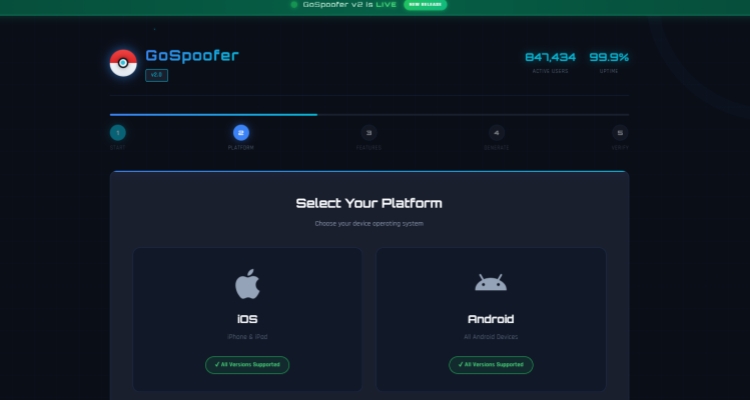
Step 1. Visit the gospoofer.com and click the START INJECTION button.
Step 2. Procceed to select your platform (iOS or Android).
Step 3. Configure the spoofer by selecting the features you want and click GENERATE SPOOFER.
Step 4. Then you need to verify your device. After that, you can get the software.
Part 3. How to Get Best Alternative to GoSpoofer
Since GoSpoofer raises multiple concerns, it's important to explore safer and more reliable alternatives. Choosing a trustworthy tool can protect your device, your data, and your Pokemon GO account while still giving you the features you're looking for.
01MagFone Location Changer vs. GoSpoofer
MagFone Location Changer stands out compared to GoSpoofer in several key aspects. It offers a more secure and stable experience, with transparent functionality and consistent performance. Below is a comparison highlighting the main differences between the two tools.
| Tool Name | GoSpoofer | MagFone Location Changer |
|---|---|---|
| Safety | Low | High |
| Reliability | Unstable | Stable |
| Difficulty | Complicated | Easy to use |
| Main Features | Basic spoofing claims, unclear functionality | GPS teleport, route simulation, joystick control |
| Customer Support | None | Available |
02How to Get MagFone Location Changer
Unlike the complex and confusing download process on gospoofer.com, you can directly download MagFone Location Changer from its official website. It provides a straightforward installation, allowing you to choose between a Windows version or a macOS version without unnecessary steps.
03How to Use MagFone Location Changer
After installation, you can easily teleport or create virtual movement routes within your Pokemon GO app using the tool.

MagFone Location Changer
Easily change your GPS location on iOS and Android devices to anywhere with one click, while not requiring root or jailbreaking!
Step 1 Select Location Mode in MagFone

Once you have installed MagFone Location Changer on your computer, open the program and link your iPhone using a USB cable. When the interface appears, click Start > Next and choose the Pokemon GO location-changing mode to proceed.
Step 2 Change Character Location Instantly

After entering the map screen, either search for a destination using the search bar or manually pick a spot on the map. When the location loads, confirm your selection and apply the change by clicking Start Modifying.
Part 4. Conclusion
In summary, while gospoofer.com may appear appealing due to its free claims and advertised features, it comes with significant risks and credibility issues. Reports from users suggest it is neither safe nor reliable. Instead of risking your account or device, choosing a trusted alternative like MagFone Location Changer offers a far more secure and effective solution for enhancing your Pokemon GO experience.

Olivia Wood
Editor in chief




