









Spoofing applications have gained immense popularity among users seeking enhanced privacy, security, and entertainment. SpooferX is one such tool that claims to offer top-notch spoofing capabilities. But does it live up to the hype? In this comprehensive SpooferX review, we will explore its features, functionality, pros, cons, and how it compares with competitors. If you are considering using SpooferX, read on to find out if it's the right choice for you.

- Part 1. Spoofer X Reviews: Is It Worth Using in 2026?
- Part 2. How to Install and Use SpooferX Pokemon GO
- Part 3. Best Alternative to SpooferX for iOS & Android
- Part 4. Conclusion
Part 1. Spoofer X Reviews: Is It Worth Using in 2026?
In this part, we'll explore SpooferX in detail and help you decide whether it's truly worth using in 2026 or not.
1.1 Key Features of SpooferX
As a Pokemon GO spoofer for iOS, SpooferX is specifically developed for Pokemon GO users. It is compatible with Apple devices like iPhone and iPad, as well as the latest iOS versions. With this tool, you can access these features on your iPhone or iPad.
Advanced GPS Spoofing
SpooferX enables precise location modification, allowing users to teleport anywhere in the world. This is particularly useful for Pokemon GO that restrict access based on geographic regions.
No Jailbreaking Required
SpooferX is compatible with iOS devices. Unlike some competitors that requiring jailbreaking, SpooferX works seamlessly without modifying the system files of your device.
Speed and Route Customization
Users can set custom speeds to simulate walking, biking, or driving. This makes it easier to blend naturally into location-based applications without triggering security flags.
Cooldown Warnings
One of the standout features of SpooferX is its cooldown warnings, which helps users avoid detection and bans in Pokemon GO.
Easy User Interface
With an intuitive interface, even beginners can navigate the app effortlessly. The one-click teleportation feature is a favorite among users who need quick and efficient location changes.
1.2 Subscription Plans of SpooferX
SpooferX offers both free and paid versions. While the free version provides basic spoofing features, the pain version ($4.99/month) unlocks advanced capabilities like fast catch, cooldown warnings, and more. The following is the main differences between free and paid versions.
1.3 Pros and Cons of SpooferX
Although SpooferX can bring many benefits, there are still some drawbacks. Before using SpooferX, let's check the pros and cons of SpooferX.
 Pros
Pros- Simple and easy to use;
- Work on iOS without jailbreaking;
- Offer precise location manipulation;
- Reduce the risks of getting banned in games.

- Have ban detection risk;
- Requires sideloading installation;
- Certificates frequently revoked;
- Not compatible with Android devices.
As you can see, SpooferX offers powerful spoofing features like teleporting, auto-walking, and raid tracking, making it attractive for Pokemon GO players. However, it is not 100% safe, as it uses a modified game client that is easily detected by Niantic. This leads to a high ban risk, frequent app crashes, and certificate revokes. Even with cooldown warnings in the paid version, risks remain. Overall, SpooferX may be convenient, but it's not truly worth using in 2026 for long-term account safety.
Part 2. How to Install and Use SpooferX Pokemon GO
SpooferX works with a wide range of iOS devices, including the latest iPhone and iPad. But making SpooferX install on an iOS device is a bit difficult, as it is not available in the App Store. If you still want to download and use SpoofeX to spoof Pokemon GO, here's how to.
2.1 How to Download and Install SpooferX
There are two ways to download and install SpooferX on an iOS device. Depending on your own needs, you can choose any of the following way to download and install SpooferX.
Method 1. Install SpooferX from Sideloadly
📝Requirements:
Windows PC & iTunes;
Sideloadly;
SpooferX IPA File.
Step 1. Run Sideloadly and plug your iPhone into your computer.
Step 2. Drag the IPA to Sideloadly and log in with a valid Apple ID.
Step 3. Wait to complete and unplug your iPhone.
Step 4. Go to Settings > General > Profile & Device Management.
Step 5. Tap the Trust button to trust the app.
Method 2. Install SpooferX from AltStore
📝Requirements:
Windows PC & iTunes;
AltStore.
Step 1. Download and install AltStore on your iPhone.
Step 2. Choose to trust the AltStore app and search SpooferX in AltStore.
Step 3. Go to download and install SpooferX.
2.2 How to Use SpooferX Pokemon GO
After installing SpooferX on your iPhone or iPad, you can use Spoofer to spoof in Pokemon GO at any time. Here's how to spoof in Pokemon GO with SpooferX.
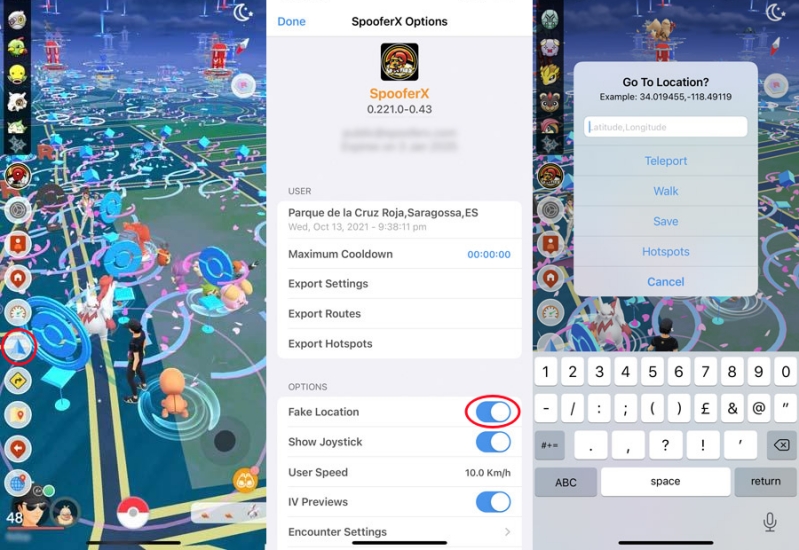
Step 1. Open the SpooferX app on your iPhone and tap the Settings button.
Step 2. Under SpooferX options, scroll down to Options and enable Fake Location.
Step 3. Go back to the map interface and tap the blue triangle button at the left side.
Step 4. Enter the GPS coordinate in the pop-up window and select Teleport.
Part 3. Best Alternative to SpooferX for iOS & Android
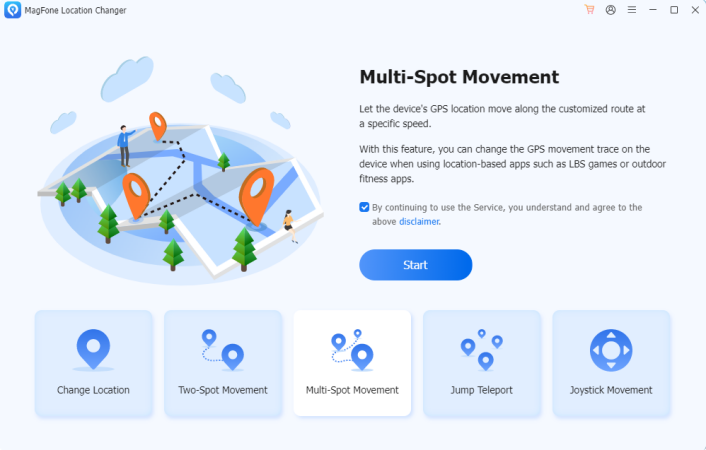
MagFone Location Changer is a reliable GPS spoofing tool that offers features similar to iSpoofer, but with lower risk and full customer support. Unlike iSpoofer, which is limited to iOS, MagFone is a versatile solution that works on both iOS and Android devices without requiring jailbreaking or rooting. This makes it especially useful for users who want to access location-based content in apps like Pokemon GO. There are some key features of this tool.
Key Features of MagFone Location Changer:
- Easily teleport your device's GPS to any location worldwide
- Customize routes and speeds to mimic real-world movement
- Offers modes such as Two-Spot, Multi-Spot, and Jump Teleport
- Support devices running the latest versions of iOS and Android
- Accessible even for individuals without technical expertise
 User Feedback:
Part 4. Conclusion
If you are looking for a reliable and feature-rich GPS spoofing tool for Pokemon GO, SpooferX is a solid choice. It outperforms many competitors by offering a user-friendly experience, enhanced security features, and precise location teleportation. However, SpooferX doesn't work on Android devices. If you are looking to spoof in Pokemon GO across all platforms, MagFone Location Changer is worth considering. Have a try, and you'll find it out!

Olivia Wood
Editor in chief





