








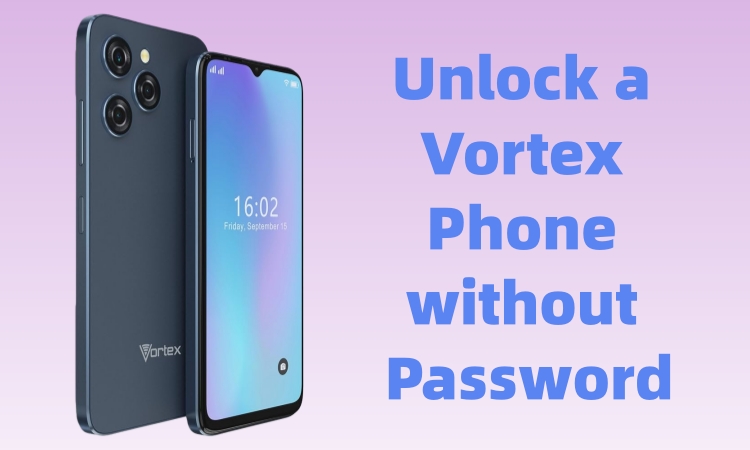
A "Vortex phone" is usually a budget-friendly Android smartphone from Vortex Cellular distributed through Lifeline programs. If you're searching for how to unlock a Vortex phone, you're likely facing one of two problems: you either forgot the screen lock like PIN, pattern, or password, or your phone is locked to a specific carrier and won't accept another SIM card. Different locks require different methods, and choosing the wrong one can lead to data loss or permanent access issues. Here we will show you how to unlock a Vortex phone, whether your phone is locked by screen locks or SIM. Let's dive into the details now!
- Part 1. What's Types of Locks on a Vortex Phone?
- Part 2. How to Unlock a Vortex Phone (Screen Lock Removal)
- Part 3. How to Unlock a Vortex Cell Phone (SIM Unlock)
- Part 4. FAQs about Unlocking a Vortex Phone
- Part 5. Conclusion
Part 1. What's Types of Locks on a Vortex Phone?
Before taking any action, it's important to understand what kind of "lock" your Vortex phone has. Each type of lock requires a different solution, so identifying the right one is critical. In general, there are two kinds of locks on a Vortex phone, including:
01Screen Lock (Password, PIN, or Pattern)
This prevents access to the phone's home screen. It's usually caused by:
- Forgetting the PIN, pattern, or password
- Buying a second-hand phone with a lock still enabled
02SIM or Network Lock (Carrier Lock)
This restricts the phone to one carrier while switching to another carrier. You'll notice this if:
- Another SIM card shows "No Service" or "SIM Not Supported"
- The phone was originally sold by a specific carrier
Part 2. How to Unlock a Vortex Phone (Screen Lock Removal)
If your Vortex phone is locked at the screen level, you can unlock your device at home. There are several methods available for unlocking a Vortex phone. Try the methods below in order from easiest and safest to most drastic.
Method 1. Unlock a Vortex Phone via Android Unlocker
If you can't access your Vortex phone and want to unlock it quickly, you may consider using MagFone Android Unlocker. This tool is designed to help Android users remove certain types of screen locks when they are locked out of their own devices. Not a carrier unlock tool, MagFone Android Unlocker focuses on screen lock removal, such as PIN, pattern, and password, which is often the main issue when users search for how to unlock a Vortex phone. Below is how to unlock a Vortex phone with MagFone Android Unlocker.

MagFone Android Unlocker
Remove multiple kinds of screen locks on over 5000 Android devices and delete Google FRP lock without a password.
Step 1 Connect Your Vortex Phone to MagFone
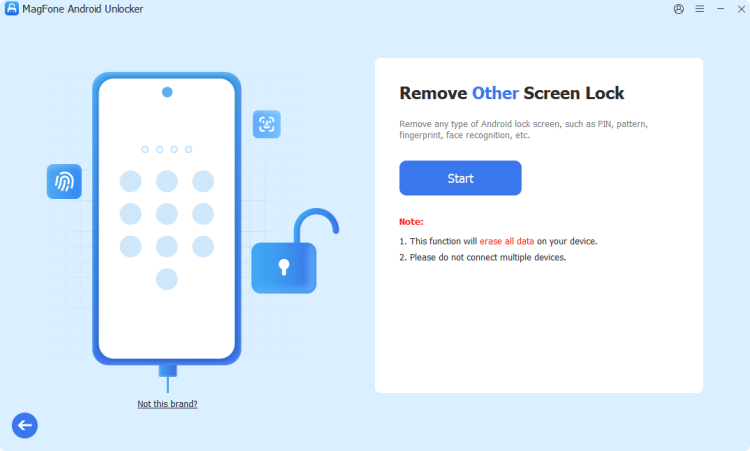
Install and open MagFone Android Unlocker on your computer, then select Remove Screen Lock. Use a USB cable to connect the locked Vortex phone to the computer.
Step 2 Put Your Vortex Phone into Recovery Mode
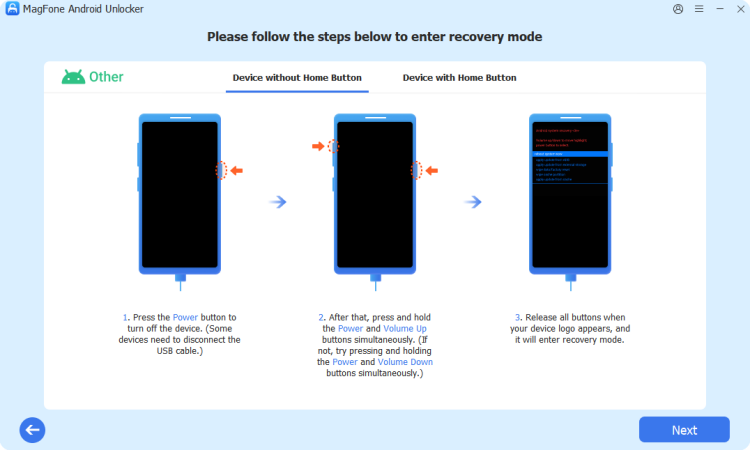
Follow on-screen instructions to make your Vortex phone enter Recovery Mode. Once in Recovery Mode, go back to click Next > Continue on the MagFone software.
Step 3 Unlock Your Vortex Phone without Password
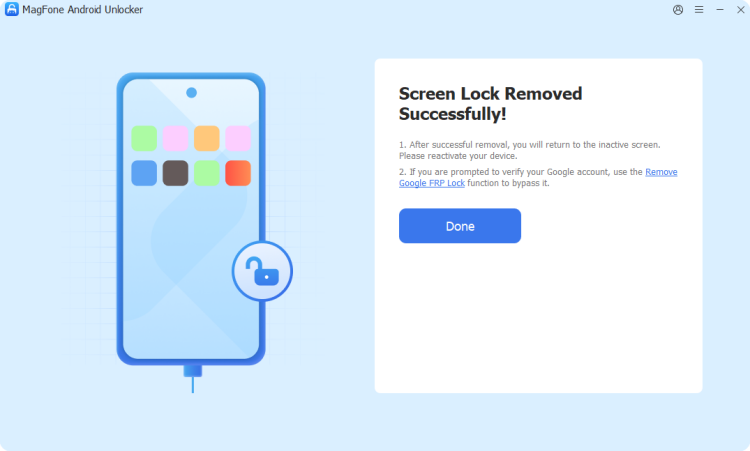
Continue to follow the onscreen instructions on your Vortex phone. Then MagFone processes the device and removes the screen lock after clicking the Next button.
Method 2. Unlock a Vortex Phone via Google's Find My
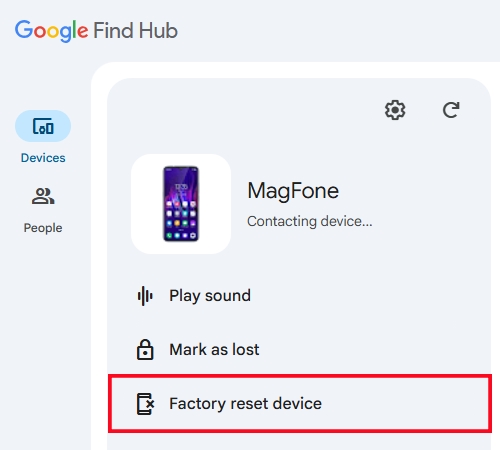
If your Vortex phone is connected to a Google account and has internet access, Google's official tool like Google's Find My web and Find My app may help. With your Google account credentials, you can remotely erase your Vortex phone to the default settings, then set up your device again without a screen lock. Follow the steps below to unlock a Vortex phone.
Step 1. Visit the Google's Find My web on another phone or computer.
Step 2. Sign in using the same Google account.
Step 3. Select your Vortex phone and click Factory reset device.
Step 4. Click Next and enter your Google account password.
Step 5. Click Reset to confirm the action of resetting your phone.
Note:
This will trigger Google FRP protection after factory reset. When you set up your Vortex phone, you have to verify with your Google account and password to unlock FRP lock.
Method 3. Unlock a Vortex Phone in Recovery Mode
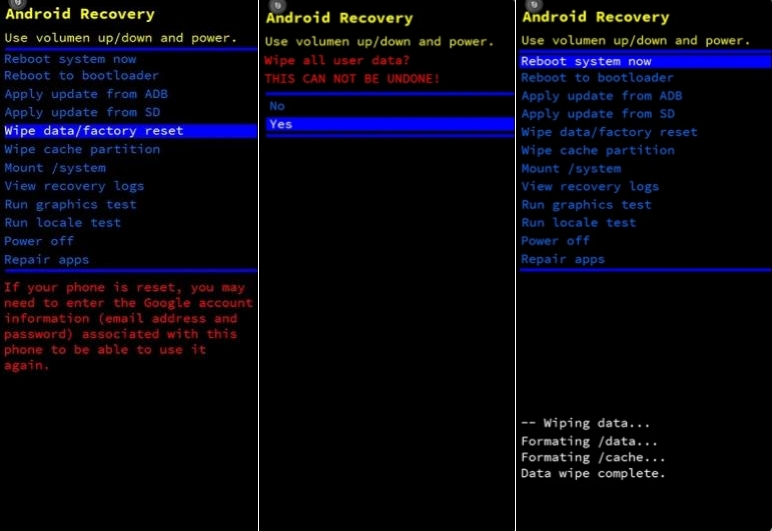
Using Recovery Mode to remove screen locks is the most common way to unlock a Vortex phone when the password is forgotten. Once your Vortex phone is in Recovery Mode, you can reset your device to factory settings. All data and settings, including screen locks on the Vortex phone, will be erased. Here's how to unlock a Vortex phone in Recovery Mode.
Step 1. Power off your Vortex phone by pressing the Power button.
Step 2. Press and hold both Power and Volume Up buttons.
Step 3. Release buttons when the Recovery Mode screen appears.
Step 4. Select Wipe data/factory reset, then Factory reset device.
Step 5. After that, reboot your device and set it up.
Note:
If your Vortex phone is linked to a Google account and has Find My Device enabled, you may need the original Google account to pass FRP after reset.
Part 3. How to Unlock a Vortex Cell Phone (SIM Unlock)
If your Vortex phone works but your phone won't accept another SIM, it's likely carrier-locked. When your Vortex phone is network locked, you're prompted for an "unlock code". In this case, you can try the following solutions to unlock a SIM-locked Vortex phone.
Method 1. Request an Official Carrier Unlock
The safest and most recommended method to unlock a SIM-locked Vortex phone is to request an official carrier unlock. But for an official carrier unlock, make sure that your phone is fully paid off and doesn't have active contract. To do that, you'll need provide your IMEI number and original carrier details. Once approved, the carrier provides unlock instructions or a code.
Method 2. Try IMEI-Based Unlock Service
Some online IMEI-based unlocking services like Direct Unlock claim to help users unlock a Vortex phone remotely using the IMEI number. But not all Vortex phones are supported. Besides, the unlocking results vary by carriers. It's easy to unlock a SIM-locked Vortex phone with an online unlocking service. Here's how it generally works.
Step 1. Provide IMEI and carrier information of your Vortex phone.
Step 2. Receive an unlock code, then insert a new SIM and enter the code.
Part 4. FAQs about Unlocking a Vortex Phone
How to unlock a Vortex phone without losing data?
In most cases, you cannot unlock a Vortex phone without losing data. Screen lock removal usually requires a reset, whether you use an Android unlocker or Google's Find My. If you unlock a SIM-locked Vortex phone, you won't need to worry about the data loss.
How to unlock a Vortex phone without password?
To unlock a Vortex phone without a password, you can use an Android Unlocker like MagFone Android Unlocker or use Recovery Mode. But maybe you'll be prompted to enter your Google account and password to pass FRP lock during setup.
How to unlock a Vortex phone for free?
Several methods can help you unlock a Vortex phone for free. Recovery Mode can help in unlocking a screen-locked Vortex phone, while for a SIM-locked Vortex phone, you can request an official carrier unlock, that is completely free.
What if my Vortex phone is still locked after reset?
That's likely Google FRP. You must sign in with the previously synced Google account. After entering your Google account credentials, you can bypass the FRP lock, then access your Vortex phone. If you forget your Google account, you can use a FRP bypass tool to bypass it.
Part 5. Conclusion
To successfully unlock a Vortex phone, start by identifying whether you're dealing with a screen lock or a carrier lock. All the methods aforementioned can help you unlock a Vortex phone whether it's locked by screen locks or network. To quickly unlock a Vortex phone with PIN, password, or pattern, consider using MagFone Android Unlocker that easily removes all types of screen locks on all Android devices.

Teresa Miller
Editor in chief





