









If you google "unlock TCL phone", chances are your device is locked and you can't use it the way you want. However, TCL phones can be locked in different ways, and each lock requires a different unlocking method. If you want a fast and clear solution, not a long technical explanation, you have come to the right place. This guide first gives you a quick answer and then walks you through the right unlocking method based on your exact situation. Let's explore how to unlock a TCL phone now.
- Part 1. How Do I Unlock My TCL Phone?
- Part 2. How to Unlock TCL Phone without Computer for Free
- Part 3. Part 3. Quick Method to Unlock a TCL Phone (100% Working)
- Part 4. FAQs about TCL Phone Unlock
- Part 5. Conclusion
Part 1. How Do I Unlock My TCL Phone?
Several methods can help you unlock a TCL phone. However, unlocking a TCL phone doesn't always mean the same thing. Some users forget their screen password, others face a Google FRP lock after a reset, and some simply want to use their TCL phone with a different carrier. Go to identify your exact situation, then choose a suitable method to unlock your TCL phone.
Step 1: Identify the Lock on Your TCL Phone
Before taking action, it is important to understand what kind of lock your TCL phone has. Different locks require different solutions. Identifying the lock type first can save you time and prevent unnecessary data loss. Common lock types on a TCL phone include:

Screen Lock
You see a lock screen and can't enter the phone after too many failed attempts.
Google FRP Lock
After resetting the phone, you're asked to sign in with a previously synced Google account.
SIM / Carrier Lock
Your TCL phone works, but shows "SIM not supported" or "Network locked" when using another carrier's SIM card.
Step 2: Choose a Way to Unlock Your TCL Phone
Here we focus on unlocking a forgotten PIN, pattern, or password on a TCL phone. All methods of unlocking a screen lock on a TCL phone are as follows. This comparison helps you quickly identify the most suitable unlocking method for your situation.
| Unlock Method | Requirements | Data Loss | Difficulty | Reliability |
|---|---|---|---|---|
| Forgot Password | Google login credentials | ❌ | Easy | High |
| Google Find My Device | Another device and Google login credentials | ✔️ | Medium | Medium |
| Recovery Mode Reset | Google login credentials | ✔️ | Medium | Medium |
| Third-Party Tool | None | ✔️ | Easy | High |
Part 2. How to Unlock TCL Phone without Computer for Free
If you forgot your TCL phone password, pattern, or PIN, there are official and safe methods to start, but most will erase data and have limitations. Using the Forgot Password feature can protect the device data, while methods like erasing data with Google Find My Device and executing a factory reset can cause data loss. Follow the methods step by step now.
Method 1. Unlock TCL Phone via Forgot Password
🔴Best for: Using Google account credentials to reset a new password
Unlike other Android devices, TCL phones have a built-in functionality that allows users to reset the forgotten screen password by linking a Google account. On the device locked screen, users can utilize the 'Forgot Password' feature to remove the previous password and set a new one. Provided that you remember your Google login credentials, start with the following steps.
Step 1. Enter the wrong password or draw the incorrect pattern several times.
Step 2. Tap Forgot Pattern or Forgot Password on the lock screen.
Step 3. Sign in using the Google account previously linked to the phone.
Step 4. Set a new screen lock like the password, pattern, or PIN.
📢 What to know:
Resets a new password
Not delete any data
Requires internet access and Google account login
Method 2. Unlock TCL Phone via Find My Device (Data Loss)
🔴Best for: Screen lock removal when Google account is available
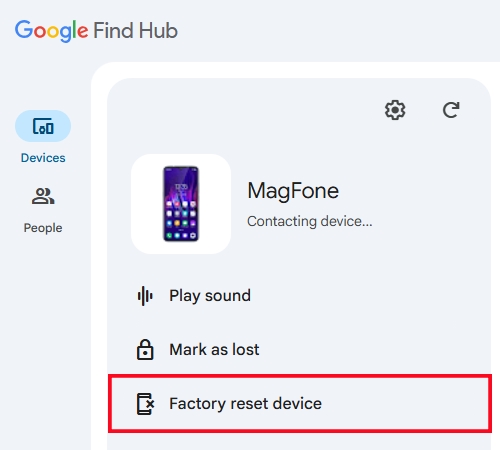
Google Find My Device, a powerful resource hub, is designed to remotely manage Android devices, including erasing phone data. By using the remote erasure feature, you can clear your screen lock, but it will also delete all data stored on the device. To use the Find My Device feature, you need another device and have Google login credentials. Here's how to.
Step 1. Visit Google Find My Device in a browser on another device.
Step 2. Sign in using the Google account synced with your phone.
Step 3. From the device list, find and select your TCL phone.
Step 4. Click Factory reset device > Next, then enter your Google login password.
Step 5. Confirm with the Reset button to erase your device.
📢 What to know:
Removes PIN, pattern, or password
Deletes all local data
Requires internet access and Google account login
Method 3. Unlock TCL Phone via Factory Reset (Data Loss)
🔴Best for: Forgotten screen password with no Google access
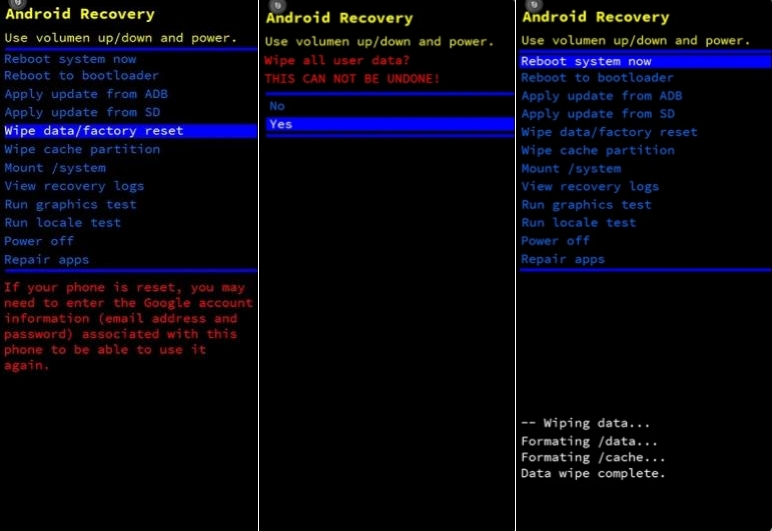
When neither linking a Google account nor using Google Find My Device are viable options, manual factory reset is feasible to unlock a locked TCL phone. Booting the device into Recovery mode with hardware buttons can erase all data and settings, including the screen lock. But after a reset, you may face Google FRP lock. Follow the steps below to unlock a TCL phone.
Step 1. Power off your TCL phone by pressing the Power button.
Step 2. Press and hold both Power and Volume Up buttons together for about five seconds.
Step 3. Once accessing the Fastboot mode, release both Power and Volume up buttons.
Step 4. Press the volume buttons to locate Enter Recovery, then confirm with the power button.
Step 5. In the Recovery mode, select Clear Data > Clear All Data.
Step 6. Confirm to perform a complete factory reset, then wait to reboot the device.
📢 What to know:
Removes screen lock
Erases all data and settings
Triggers Google FRP lock after reset
Part 3. Quick Method to Unlock a TCL Phone (100% Working)
Sometimes, standard Android solutions like Google Find My Device or recovery mode reset may not always be practical. If you can't access the home screen on your TCL phone and have forgotten your Google login credentials, some computer-based unlocking methods work better when the phone itself is inaccessible.
MagFone Android Unlocker is a desktop unlocking tool designed to help remove Android screen locks on supported devices, including TCL phone models. Also, it is capable of bypassing Google FRP on many Android devices without a password. It works by connecting the locked phone to a computer and guiding users through a controlled unlocking process. Here's how to unlock a TCL phone without password using MagFone.

MagFone Android Unlocker
Remove multiple kinds of screen locks on over 5000 Android devices and delete Google FRP lock without a password.
Step 1 Install and Launch MagFone Software
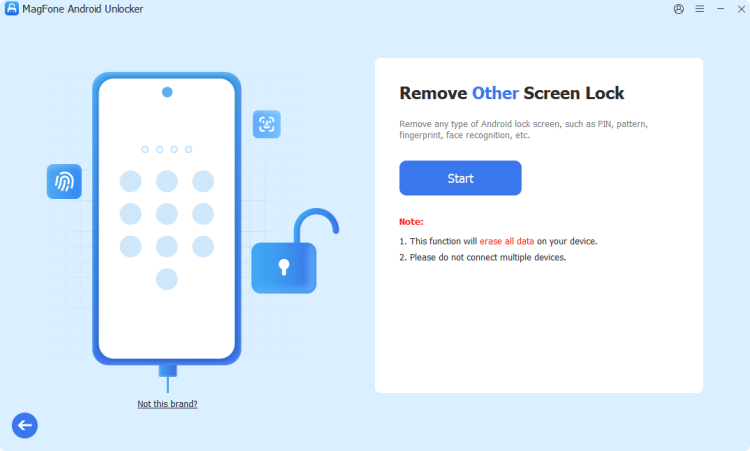
Download and install MagFone Android Unlocker on a Windows or macOS computer, then open the program. Go to connect your locked TCL phone to the computer through a USB cable and choose Remove Screen Lock. The software will attempt to detect the device automatically.
Step 2 Follow On-Screen Instructions to Start
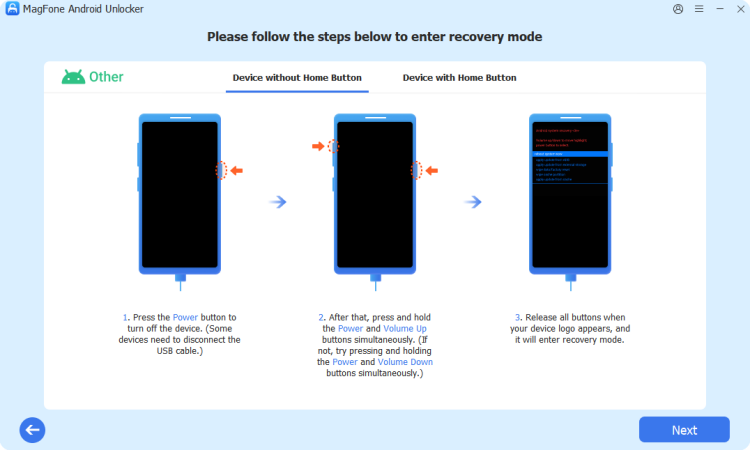
MagFone provides guided steps specific to your device and Android version. Follow onscreen instructions to enter recovery or download mode. Once the device is in recovery mode, click the Next button on the software, then click the Continue button to confirm.
Step 3 Start to Unlock TCL Phone without Password
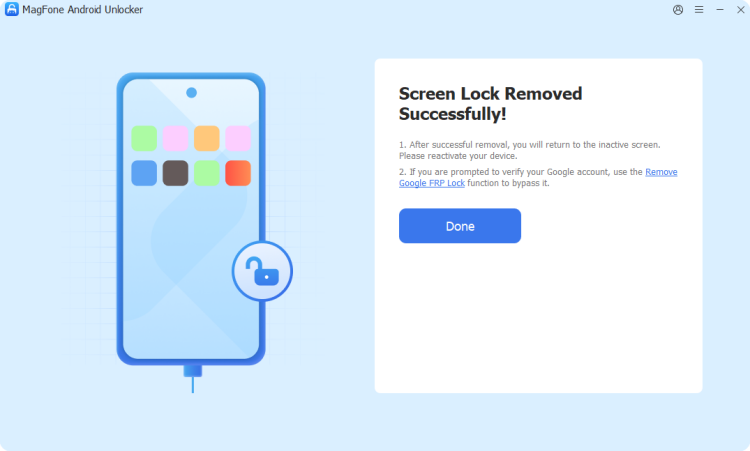
Continue to follow onscreen instructions to remove the screen lock on the device. After performing all the steps, go back to click the Next button on the software. Finally, you'll see the prompt of success unlocking. Now you can use your device again.
Part 4. FAQs about TCL Phone Unlock
How to unlock TCL phone without losing data?
In most cases, you cannot unlock a TCL phone without losing data. Only using the Forgot Password feature can help to reset a new password for unlock the locked TCL phone. Other methods like using Google Find My Device or performing a factory reset will cause data loss.
How to unlock TCL phone for any carrier?
It is recommended to request carrier unlock if your phone is paid off and your account is in good standing. If carrier support is unavailable, some services provide unlock codes using TCL phone model, IMEI number, or original carrier. But those third-party services cannot guarantee the success to unlocking a SIM-locked TCL phone.
Does factory reset remove Google FRP lock?
No, a full factory reset cannot remove Google FRP lock. Usually, Google FRP appears after a reset. To remove Google FRP, you have to sign in with the original Google account. If without the credential of the linked Google account, use a professional FRP bypass tool.
Can I unlock a second-hand TCL phone?
Yes. If you get a second-hand TCL phone with the screen lock, use the Forgot Password feature or Google Find My Device to unlock the device. For Google FRP lock and SIM lock, only if the previous owner removed their Google account and carrier lock. When you cannot get in touch with the previous owner, use a third-party service to remove FRP lock or SIM lock.
Part 5. Conclusion
Unlocking a TCL phone doesn't have to be confusing. The key is choosing the right solution based on what type of lock you're dealing with, not trying every method blindly. This quick guide focuses on helping you unlock your TCL phone with the screen lock efficiently. If you're looking for a quick for the removal of the screen lock or Google FRP, try MagFone Android Unlocker to regain access to your TCL phone quickly and safely.

Dylan Jones
Editor in chief





