








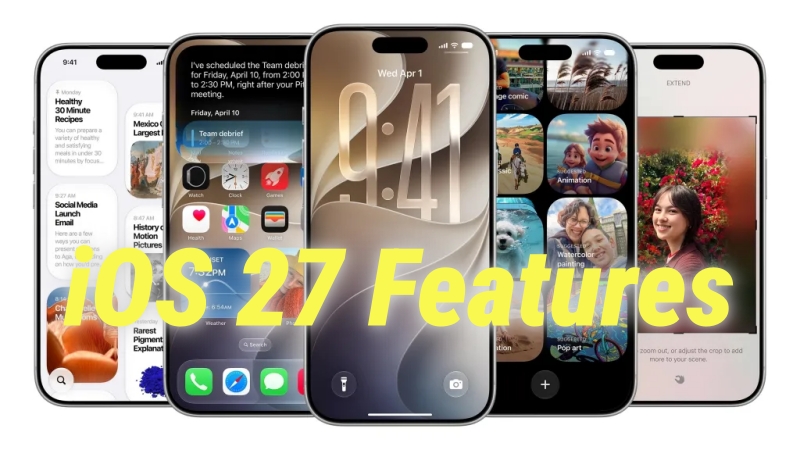
Apple officially kicked off its annual Worldwide Developers Conference (WWDC 2026) on June 8, unveiling iOS 27, the next major operating system update for the iPhone. This year, the focus shifts heavily toward deeper intelligence, refined user agency, and a sophisticated evolution of how we interact with our devices daily.
If you are wondering what new capabilities are coming to your device, when you can download the update, or whether your current iPhone is compatible, this comprehensive guide covers everything Apple announced on stage.
- Part 1. 11 Major iOS 27 New Features Come
- Part 2. iOS 27 Supported Devices and Release Timeline
- Part 3. How to Install the iOS 27 Developer Beta Safely
- Part 4. FAQs about iOS 27 Features
- Part 5. Conclusion
Part 1. 11 Major iOS 27 New Features Come
This year, Apple has focused heavily on making your daily iPhone experience more intuitive, customizable, and efficient. Instead of forcing you to relearn how to use your phone, this update refines the tools you already rely on every day. The developer preview is live right now, with a public beta dropping soon. Here are the 7 major iOS 27 features that will fundamentally improve how you use your iPhone later this year.
The Siri AI Revolution
The centerpiece of iOS 27 is a ground-up re-engineering of Apple's virtual assistant, now officially referred to as Siri AI. Rather than acting as a simple voice command tool, Siri AI operates as an integrated system assistant with deep contextual awareness.
A New Standalone App Interface
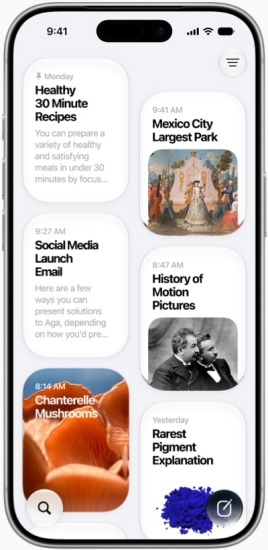
For the first time, Siri features a standalone app. This opens up a clean, conversational workspace similar to a desktop AI chat interface, maintaining a complete history of your past queries, text interactions, and shared files. When you use Siri outside of the app, a beautiful full-screen edge illumination appears, integrated tightly with the Dynamic Island to show you real-time text transcriptions of your conversation.
Onscreen Awareness and Personal Context
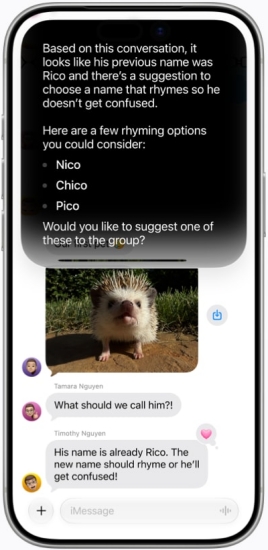
Siri AI can now understand and interact with content across your applications in real-time. If a friend texts you a flight number, you can activate Siri and simply say, "Track this flight," without references your personal calendar to check for scheduling conflicts, and creates a live tracking widget automatically.
Voice Customization and Expressivity
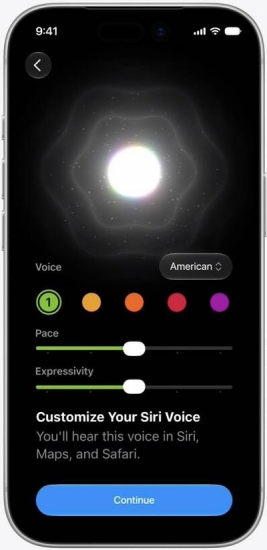
Apple has deployed advanced neural text-to-speech models that allow users to customize Siri's speaking pace, tone, and expressivity. The voice now dynamically adjusts its cadence based on the context of the information it is delivering. Use a calmer tone for late-night queries or a clearer, more deliberate pace when reading aloud complex step-by-step instructions.
Apple Intelligence Upgrades and Creative Tools
Building upon its foundational machine learning models, iOS 27 introduces the second generation of Apple Intelligence, expanding system-wide creative and editing utilities.
Next-Gen Image Playground

The updated Image Playground utility moves beyond basic illustrations to support highly detailed, photorealistic rendering styles. Users can generate customized graphics directly inside the Messages app or create bespoke artwork tailored for Lock Screens and Contact Posters using simple descriptive text prompts.
Advanced Editing in the Photos App
The Photos app receives two major AI-driven features: Spatial Reframing and Extend.
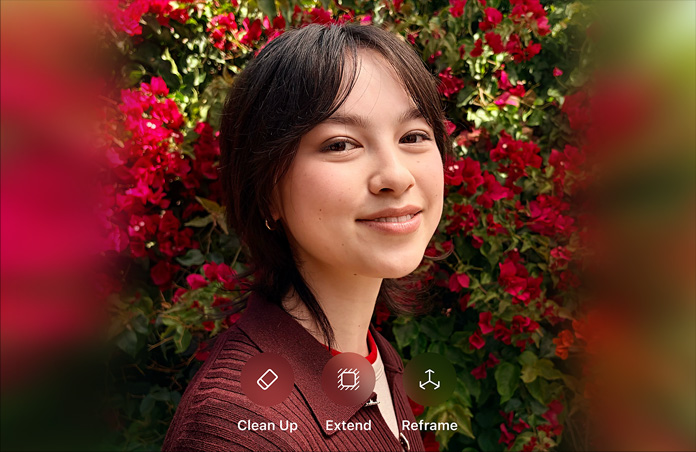
- Spatial Reframing: Automatically adjusts the perspective of architectural or landscape shots to correct tilted horizons and awkward angles without losing image resolution.
- Extend: Uses generative modeling to naturally build out the borders of a tightly cropped photo, filling in missing backgrounds seamlessly.
System-Wide "Write with Siri" Text Tools
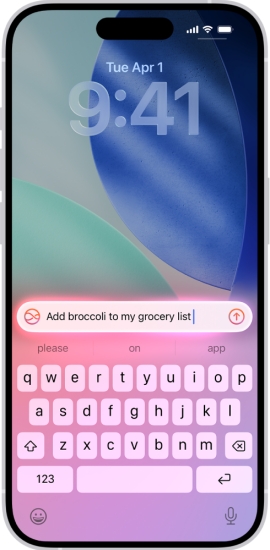
Writing Tools are now fully integrated across all native and third-party text fields. The new "Write with Siri" feature offers deep structural proofreading, the ability to completely rewrite passages to match specific professional or casual tones, and automated summarization of long email threads or documents into concise bullet points.
Visual and Everyday Usability Tweaks
Beyond artificial intelligence, iOS 27 introduces structural refinements designed to improve daily usability, accessibility, and hardware customization.
The Liquid Glass Interface Slider
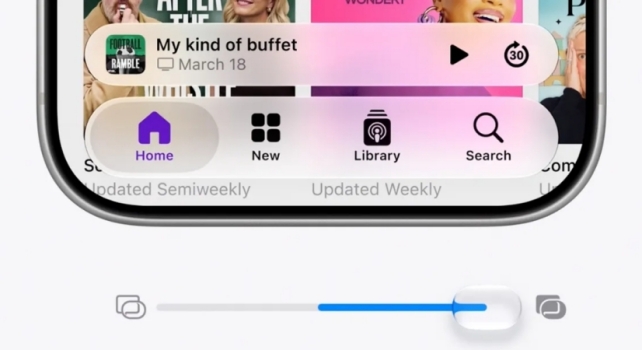
The iPhone user interface receives an elegant cosmetic update with the Liquid Glass design language. A new system-wide customization slider allows users to adjust the transparency, blur intensity, and background opacity of app windows, home screen folders, and control center modules to match their specific aesthetic preferences or accessibility needs.
Custom Equalizer Controls for AirPods
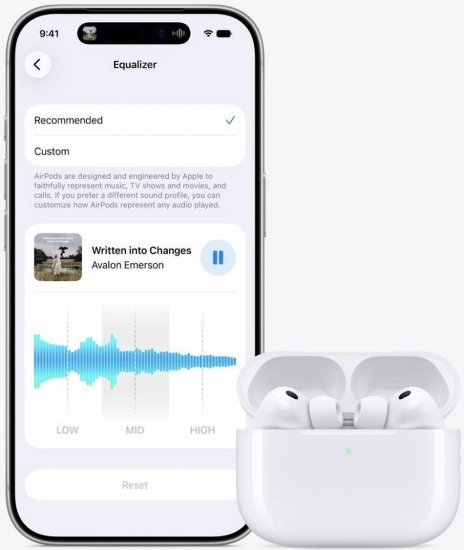
A long-requested audio feature arrives in the Settings app under AirPods management. Users can now access a fully customizable, multi-band parametric Equalizer (EQ) to fine-tune frequencies, save custom sound profiles for different genres, and sync those audio profiles across all iCloud-connected Apple devices.
Smart Safari Enhancements
Safari introduces a "Notify Me" feature that allows users to track specific changes on web pages such as stock alerts, price drops, or article updates and receive native push notifications when the content shifts. Additionally, a streamlined extensions toolbar makes managing third-party web tools significantly cleaner on smaller mobile screens.
Privacy, Security, and Family Features
Aligning with Apple's core philosophy of data security and user privacy, iOS 27 brings critical upgrades to automated account management and digital safety.
Automated Credential Auditing in the Passwords App
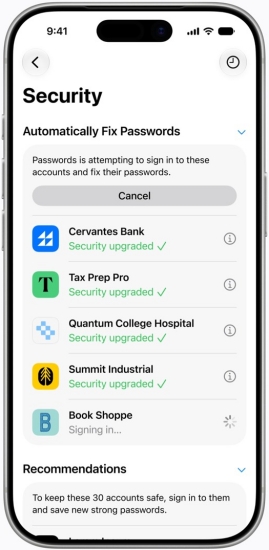
The standalone Passwords app now features automated credential monitoring. The system securely scans saved credentials against known data breaches and automatically flags weak, duplicate, or compromised passwords. For supported websites, the app can securely cycle and replace weak credentials with strong, randomly generated keys with a single tap.
Enhanced Parental Controls and Safety Filters
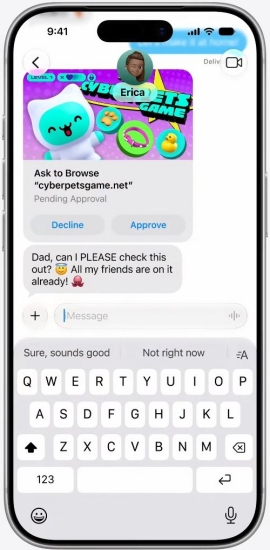
The iOS 27 parental control suite introduces robust tools to protect younger users. Parents can implement automated content filters that detect and safely blur graphic imagery, gore, or violence across third-party web browsers and messaging platforms. New "Ask to Browse" request funnels allow children to request temporary access to restricted educational sites directly through a system notification sent to the parent's device.
Part 2. iOS 27 Supported Devices and Release Timeline
With the introduction of iOS 27, Apple has rolled out so many new features related to Apple Intelligence. Most users can't wait to get started. But it is necessary to figure out iOS 27 compatible devices and release date. To help you plan your next update, we break down the official iOS 27 supported devices, alongside the explicit phase-by-phase rollout schedule leading to the final public launch.
iOS 27 Supported Devices
Apple confirmed that iOS 27 maintains broad hardware support, keeping the iPhone 11 series and newer on the compatibility list, while officially sunsetting support for older A12 Bionic devices like the iPhone XS and XR generations.
| iPhone Model Series | iOS 27 Compatibility Status |
|---|---|
| iPhone 16/ 17 / 18 Series | Fully Supported (All Advanced AI Features) |
| iPhone 12 / 13 Series | Supported (Core OS Features Only) |
| iPhone 11 Series | Supported (Legacy Performance Maintenance Only) |
| iPhone XS / XR / Older | Not Supported |
iOS 27 Expected Release Dates
Based on Apple's release schedule following the WWDC announcements, iOS 27 rolls out in three distinct phases over the year. Throughout the whole process, Apple releases different versions of iOS 27, including iOS 27 Developer Beta, iOS 27 Public Beta, and iOS 27 official version.
- iOS 27 Developer Beta: Available right now. It was released immediately following the WWDC keynote on June 8, 2026.
- iOS 27 Public Beta: Expected to launch in mid-July 2026. This version is meant for early adopters who want to try the new features before the final release but prefer a slightly more stable build than the initial developer version.
- iOS 27 Official Public Release: Scheduled for mid-September 2026. The final, polished version will roll out globally to all users alongside the launch of the new iPhone models.
| Release Stage | Target Date | Audience | Expected Stability |
|---|---|---|---|
| Developer Beta | June 8, 2026 | Registered Developers | Low (Prone to bugs and battery drain) |
| Public Beta | July 2026 | Early Adopters / Public | Moderate (Some app crashes possible) |
| Official Launch | September 2026 | General Public | High (Stable for everyday primary use) |
Part 3. How to Install the iOS 27 Developer Beta Safely
If you don't want to wait until the official public rollout this fall, you can download and install the iOS 27 Developer Beta now directly through your iPhone's built-in software update menu. Following are the steps to get iOS 27 Developer Beta.
Step 1. Navigate to the Apple Developer Member Center on a web browser.
Step 2. Sign in with your standard Apple ID to activate a free developer testing tier.
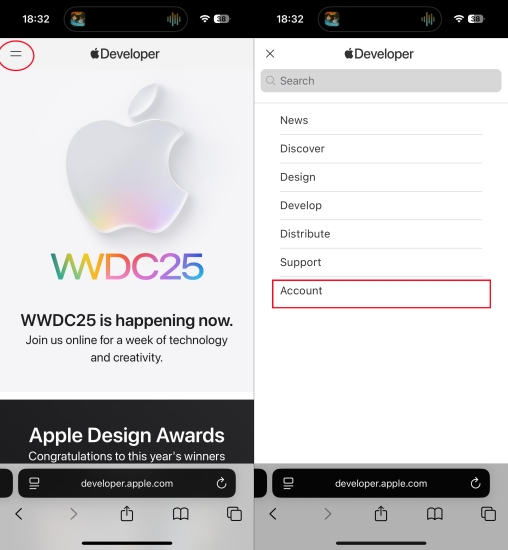
Step 3. Back up your iPhone completely via iCloud or your computer to protect your data.
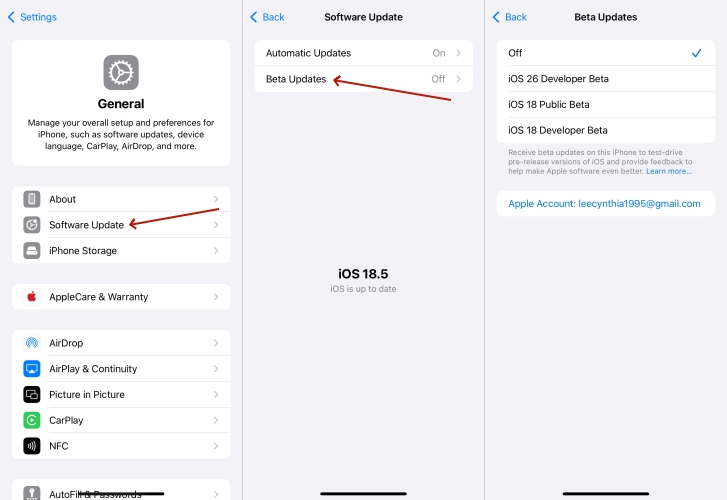
Step 4. Open your iPhone and go to Settings > General > Software Update.
Step 5. Tap on Beta Updates and select the iOS 27 Developer Beta from the list.
Step 6. Return to the main update screen and tap Download and Install.
⁉️Important Note:
Developer betas are intended for testing environments and frequently contain system bugs, increased battery drain, or app instability. It is highly recommended to install beta software only on a secondary device for testing.
How to Install the iOS 27 Developer Beta Without a Developer Account
While Apple lets you toggle beta updates directly if your Apple ID is linked to a developer program, you might not want to go through the hassle of registering an official developer account or dealing with manual configuration adjustments. If you still want to explore the new features of iOS 27 early, there are alternative methods available.
Using a third-party utility can help you bypass the standard manual setup. For instance, MagFone iOS System Recovery features a dedicated iOS beta exploration tool built directly into its interface. This specific function allows you to download and install the iOS 27 beta firmware package onto your iPhone, without requiring your personal Apple ID to have formal developer status.
If you decide to use a desktop utility to install the firmware, follow these general guidelines:

MagFone iOS System Recovery
Support exploring iOS beta without a developer account and downgrading iOS version without iTunes easily.
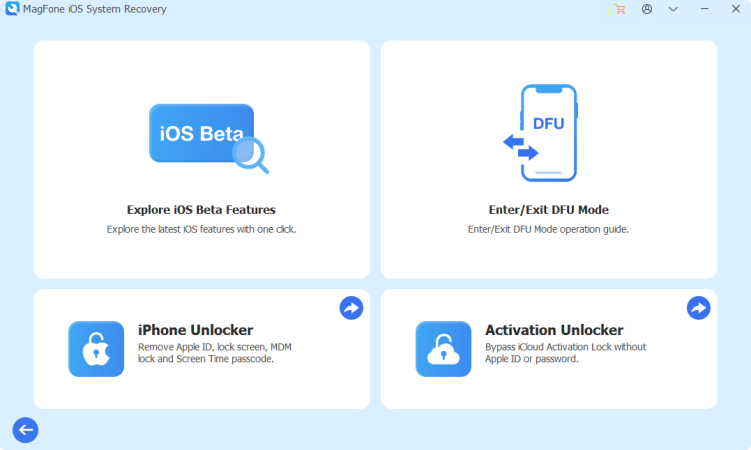
Step 1. Plug your iPhone into your Mac or PC using a stable USB cable.
Step 2. Open the utility and navigate to Explore iOS Beta Features.
Step 3. Choose the verified iOS 27 firmware package.
Step 4. Run the utility to flash the update onto your device.
Part 4. FAQs about iOS 27 Features
When does iOS 27 come out?
The iOS 27 Developer Beta was officially released on June 8, 2026. With an Apple Developer Account, you can get direct software toggle within Settings > General > Software Update. The iOS 27 Public Beta will then be available to early adopters and public enthusiasts in mid-July. Or you can wait for iOS 27, which is expected to be released to the public in mid-September.
Will iPhone 11 get iOS 27?
Yes, the iPhone 11 will officially get iOS 27. The entire iPhone 11 lineup is supported, including iPhone 11, iPhone 11 Pro, and iPhone 11 Pro Max. But its older A13 Bionic hardware won't be able to handle everything. You will only get core performance optimizations, basic security updates, and standard system modifications like the Liquid Glass interface customization tools.
Is iOS 27 available in the EU and China at launch?
While core system optimization and interface tools like the Liquid Glass slider roll out globally, certain advanced Siri AI communication frameworks and regional cross-app integrations face localized regulatory reviews. Apple indicates these advanced intelligence modules will roll out sequentially across different regions over late 2026.
Will my old iPhone slow down if I upgrade to iOS 27?
iOS 27 utilizes a modular architecture. Older devices like the iPhone 11 and 12 series receive stability patches, security updates, and performance optimizations tailored to their chipsets, while resource-heavy on-device AI features remain restricted to newer hardware to prevent performance degradation.
Part 5. Conclusion
With iOS 27, Apple is moving beyond traditional software updates to change how we interact with our devices daily. By transforming Siri into a deeply integrated assistant, introducing the flexible Liquid Glass design language, and adding highly requested features like custom AirPods EQ and automated credential updates, this release focuses heavily on user convenience and system intelligence.
Whether you choose to jump into the developer beta right now, wait for the public beta in July, or hold out for the polished, official release this September, iOS 27 promises to make your iPhone feel entirely new. Just remember to back up your device before testing any early software, and get ready to experience a much smarter mobile ecosystem later this year.

Teresa Miller
Editor in chief




