








Pokemon GO players often look for tools that can enhance gameplay, automate repetitive tasks, and make location-based activities more convenient. Among the many options available, PGTools has become a frequently discussed solution in the spoofing community. Many users are curious about its features, pricing, safety, and overall effectiveness. If you are considering using PGTools for Pokemon GO, this guide will answer the most common questions and compare it with alternative solutions to help you make an informed decision.

- Part 1. Common Questions About PGTools
- Part 2. How to Download PGTools for Pokemon GO
- Part 3. How to Use PGTools Features in Pokemon GO
- Part 4. PGTools vs. MagFone: Which Is Better to Spoof?
- Part 5. Conclusion
Part 1. Common Questions About PGTools
Before downloading or subscribing to any Pokemon GO utility, you can understand how it works and what limitations may apply first. PGTools is widely used among Android players, but many newcomers still have questions about its functions, safety, and requirements. Below are the most frequently asked questions regarding PGTools.
01What Does PGTools Do?
PGTools is an Android-based automation toolkit designed for Pokemon GO players. It helps users automate certain in-game activities, improve efficiency during gameplay, and simplify tasks that would otherwise require constant manual interaction. Many players use it for farming resources, catching Pokemon, and managing routine activities more effectively. Main features of PGTools include:
- Auto Catch functionality
- Auto Spin Pokestops
- Nearby Pokemon scanning
- Quest automation
- Team Rocket automation
- Route and walking support
- Inventory management assistance
- Custom movement settings
- Auto transfer options
- GPX route support
02Is PGTools Free?
Yes. PGTools follows a freemium model. The base application can be downloaded and used without charge, allowing users to access some basic functions. However, the free version includes speed limitations and restricted capabilities. To unlock advanced automation tools and the complete feature set, users must purchase a premium subscription plan.
03Is PGTools Safe?
PGTools is a fairly popular tool among Pokémon GO users, and downloading it from the official website is generally considered safe. However, no third-party tool is 100% risk-free. To avoid soft bans or shadow bans in Pokémon GO, don't teleport too often and use its features responsibly.

04Does PGTools Require Root Access?
Yes. PGTools require a physical Android device that has been rooted. Root access is necessary for the software to function properly and access the advanced features provided by the platform. Users without a rooted Android device may need to consider alternative solutions like MagFone Location Changer.
Part 2. How to Download PGTools for Pokemon GO
Downloading PGTools is relatively straightforward. To ensure security and access to the latest software version, it is recommended that users obtain the application directly from the official PGTools website. Follow the instructions below to install the most recent release on your Android device.
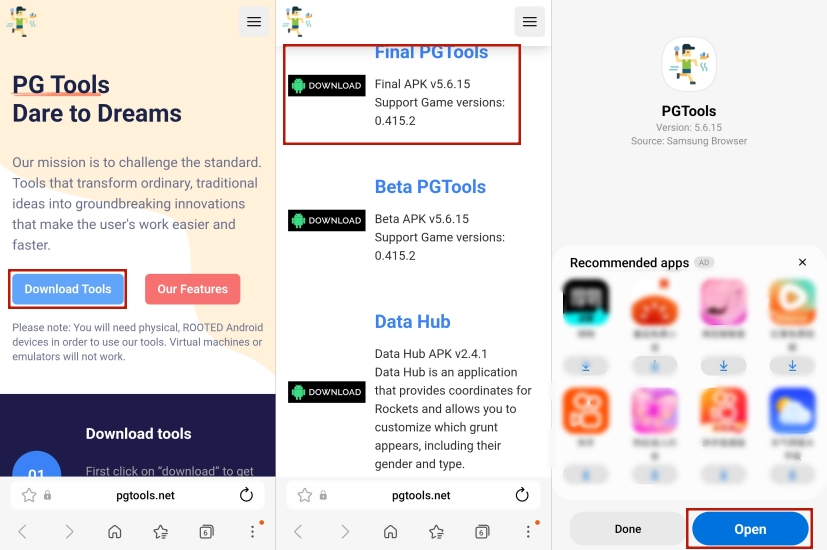
Step 1. Go to https://pgtools.net/ and tap Download Tools on your Android phone.
Step 2. You'll be send to the downoad section, tap the Final PGTools to download the apk file.
Step 3. Wait for the PGTools to download and tap Open to launch this tool.
Part 3. How to Use PGTools Features in Pokemon GO
PGTools includes a wide variety of functions and automation tools. The following guide demonstrates the basic workflow so you can determine whether PGTools meets your gameplay requirements.
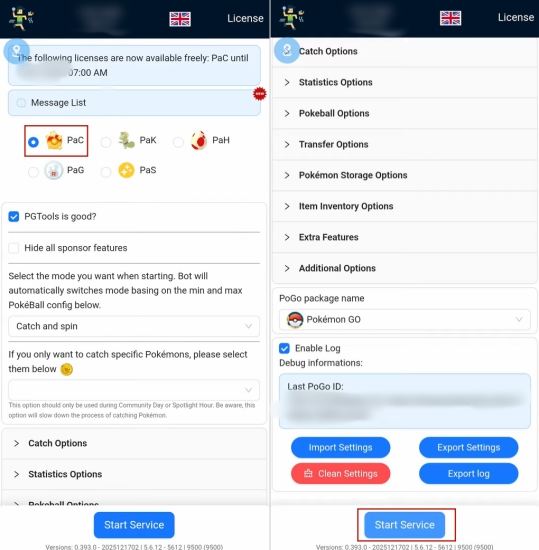
Step 1. Open PGTools and choose the PaC, PaK, PaH, PaG, or PaS option.
Step 2. In each of them, you'll see different options, check and finish each of the options.
Step 3. Finally, tap Start Service to apply your hack features of PGTools in Pokemon GO.
Note:
1) PaC (Auto Catcher): Automatically catches Pokémon, spins PokéStops, manages inventory items, and supports customizable catch filters.
2) PaK: This module is not widely documented in public PGTools resources. Its exact function may vary by version or subscription tier, so checking the latest PGTools documentation or Discord announcements is recommended.
3) PaS (Auto Sundo): Searches for and targets rare, high-value Pokémon, including potential Shiny and 100% IV (Sundo) Pokémon based on user-defined filters.
4) PaG (Auto Grunter): Automates Team GO Rocket encounters, including finding, battling, and defeating Rocket Grunts and Leaders.
5) PaH (Auto Hatcher): Simulates walking to hatch Eggs automatically and helps manage incubator usage efficiently.
Part 4. PGTools vs. MagFone: Which Is Better to Spoof?
Both PGTools and MagFone Location Changer are popular among players who want greater flexibility while playing Pokemon GO. However, the two solutions target different types of users. PGTools focuses heavily on Android automation and requires root access, while MagFone offers a simpler location-changing experience for users who prefer a more beginner-friendly approach.
01Pros and Cons of PGTools
Although PGTools provides numerous automation capabilities, it also comes with certain limitations. Understanding both advantages and disadvantages can help determine whether it is the right solution for you.
 Pros
Pros- Extensive automation functions
- Supports route customization
- Active user community
- Freemium pricing model

- Requires rooted Android devices
- Detection risk still exists
- Premium features cost extra
- Not easy enough to use
02Reasons to Choose MagFone Location Changer
MagFone Location Changer is often a better option for users who want a straightforward location spoofing experience without dealing with Android rooting procedures. It provides a simple interface, supports location modification with only a few clicks, and works for various location-based applications. Users who prioritize ease of use, flexible route simulation, and convenient setup may find MagFone more suitable than PGTools. Here's a simple usage guide.

MagFone Location Changer
Easily change your GPS location on iOS and Android devices to anywhere with one click, while not requiring root or jailbreaking!
Step 1 Connect Device and Launch MagFone

Use a USB cable to connect your smartphone to your computer. Enable Developer Mode if required by your device. Next, open MagFone Location Changer and select the location-changing mode. Click the button to continue and proceed to the next screen.
Step 2 Modify Your Pokemon GO Location

Once the map interface appears, browse to your preferred destination or enter an address using the search function. After selecting the target location, confirm your choice and apply the modification. The updated location will then be reflected within Pokemon GO.
Part 5. Conclusion
PGTools is a popular Pokemon GO automation platform that offers a variety of tools designed to simplify gameplay. While the software can be downloaded for free, many advanced functions require a paid subscription. It is generally safe when downloaded from the official source, but users should remain aware of potential account risks. Since PGTools requires a rooted Android device, players seeking a simpler alternative may find MagFone Location Changer to be a more convenient solution.

Edgar Davis
Editor in chief





