








How do I change my account location? I moved to Spain about 1.5 years ago, but my Roblox account is still stuck on my old country. The "Location" field in Account Settings is locked. Because of this, some regional features don't match where I actually live now."
—— From Reddit
Have you ever logged into Roblox only to find that the cool concert is "not available in your region"? Or perhaps you've moved to a new country and noticed your Robux prices are still stuck in a currency you no longer use. It's a common frustration for the millions of players in the Roblox metaverse.
While the platform aims for a borderless experience, digital red tape often gets in the way. Whether you are seeking lower latency, region-exclusive items, or just want your profile to reflect your current home, knowing how to change your account location on Roblox is a vital skill. In this comprehensive guide, we'll explore how to change your account location on Roblox, and the "why" behind Roblox's geographic boundaries.
- Part 1. Can You Change Account Location on Roblox?
- Part 2. How to Change Your Account Location on Roblox
- Part 3. How to Change Roblox Location More Than Once
- Part 4. FAQs about Roblox Location Change
- Part 5. Conclusion
Part 1. Can You Change Account Location on Roblox?
You can't manually change your Roblox account location in your account settings. Roblox automatically detects and updates your region over time. If you've recently moved, the system will adjust your location on its own. For a faster solution, you can try the methods outlined in this guide.
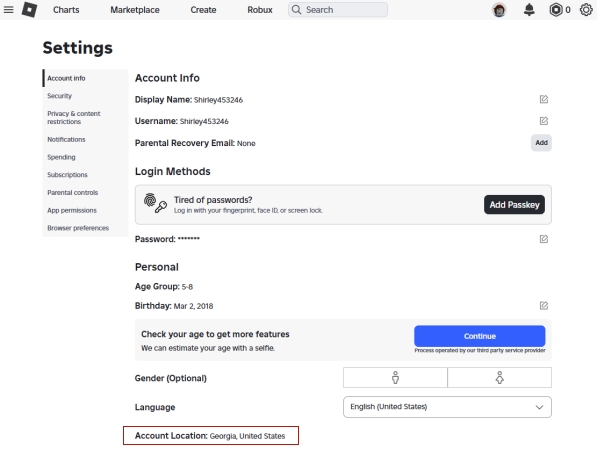
Roblox doesn't just ask where you are for fun; your location data acts as a key that unlocks specific parts of the platform. Here is the logic behind how Roblox tracks and uses your "home base":
Economic Localization: The primary reason for location tracking is billing. Roblox adjusts the cost of Robux and Premium subscriptions based on your country's local economy and tax laws.
Safety and Compliance: Different countries have different privacy laws (like GDPR in Europe). Your location ensures Roblox applies the correct legal protections to your account.
Content Curation: Some developers choose to geo-lock their games due to licensing or local regulations. Your location determines which "front page" experiences you see.
The "Double Check" System: Roblox uses both your Account Settings (what you tell them) and your location signals (IP address and GPS location). If these two conflict, you might see errors when trying to make purchases.
Part 2. How to Change Your Account Location on Roblox
You cannot manually change your Roblox account location through account settings because Roblox automatically manages regional data. The only official way to update your account location is by contacting Roblox Support. They handle location changes for valid reasons.
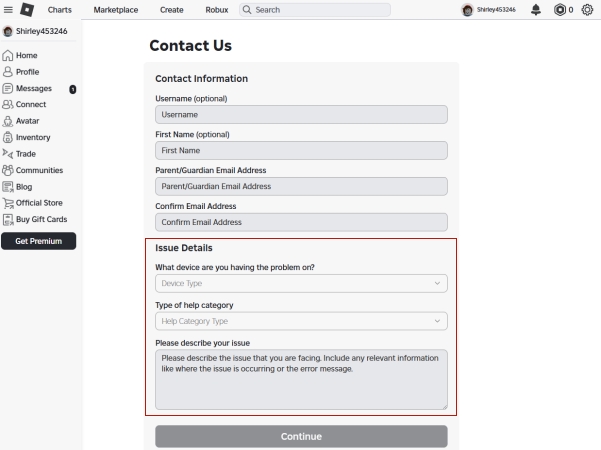
Step 1. Go to the official Roblox Support page and log in with your Roblox account credentials.
Step 2. Fill out the support form. Under Issue Details, select your Device Type. For Type of Help, choose How To > How To - Change My Location.
Step 3. In the Description box, clearly and politely explain why you need to change your location (for example, moving to a new country).
Step 4. Tap Continue and complete the verification. You'll receive a confirmation that your request has been submitted to Roblox Support.
Part 3. How to Change Roblox Location More Than Once
If Roblox Support is unable to change your account location or you've reached the location change limit, there are alternative methods to adjust your Roblox region. These include using location-changing apps, VPNs, or adjusting settings, allowing you to pick the method that works best for you.
Method 1. Change Roblox Account Location via Location Changer
MagFone Location Changer is a powerful and reliable tool that allows you to instantly fake your device's GPS location, making it an ideal solution for Roblox players who want to appear in different regions. This software lets you simulate locations anywhere across the globe, so the game detects your chosen position while your device's real location remains unchanged. You can easily modify your GPS to explore new areas in Roblox like this.

MagFone Location Changer
Easily change your GPS location on iOS and Android devices to anywhere with one click, while not requiring root or jailbreaking!
Step 1 Launch MagFone and Connect Devices

Download and open MagFone Location Changer on your computer. Connect your phone using a USB cable or Wi-Fi. Make sure Developer Mode is enabled on your device so the software can simulate location changes smoothly.
Step 2 Select Your Desired Roblox Location

Use the built-in map or input specific coordinates to choose the city or region you want Roblox to detect. Hit "Start Modifying" to instantly update your device's GPS, letting Roblox recognize your new location immediately.
Method 2. Change Roblox Account Location Using VPN
Using a VPN is one of the easiest ways to mask your real location on Roblox. By routing your connection through a server in another country, Roblox detects the VPN's IP instead of your actual one. NordVPN is a reliable choice that offers fast servers in multiple regions, perfect for gaming.
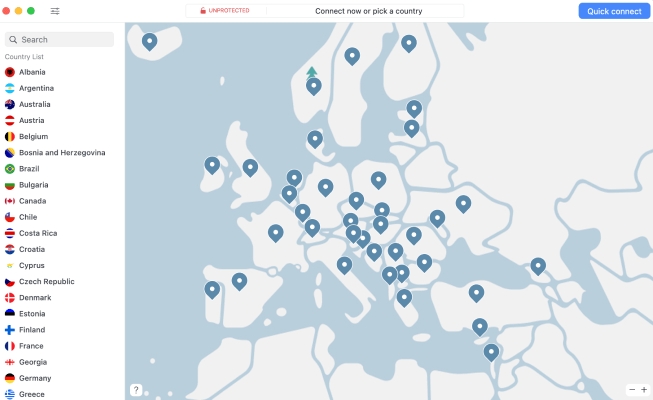
Step 1. Download NordVPN and sign in.
Step 2. Pick a server in the desired country.
Step 3. Click Connect to activate the VPN.
Step 4. Launch Roblox while VPN is active. Then check your Roblox region to confirm the change.
Method 3. Change Roblox Account Location in Settings
Roblox can also check your device's system region settings. Adjusting your device's regional settings can make the game recognize a different country. Here's how to modify your system location on various devices.
For iOS: Go to Settings → Media & Purchases → View Account → Country/Region.
For Android: Open Google Play Store → Profile → Settings → General → Account Preferences → Country.
For Windows: In Settings, access Time & Language → Language & region → Country or region.
For Mac: In the Apple menu, enter System Settings → General → Language & Region → Region.
Part 4. FAQs about Roblox Location Change
Can someone find your location on Roblox?
Other players can't see your GPS or IP address. However, if you have your location set to "public" in your profile (which is rare), they might see your country.
How do you turn off location on Roblox?
To turn off your location on Roblox, you need to disable location tracking directly on your device. This prevents the game from accessing your GPS. The following steps show how to stop Roblox from using location services on both iOS and Android devices.
For iOS:
Step 1. Open your device Settings.
Step 2. Enter Apps and scroll down until you find Roblox in your app list.
Step 3. Tap Location and select Never.
For Android:
Step 1. Open Settings and go to Applications.
Step 2. Find Roblox in the list.
Step 3. Tap Permissions. Then select Location and choose Don't Allow.
How to hide location on Roblox?
The most effective way is a VPN combined with "Ghosting" your GPS. By using these, you ensure that neither your internet service provider nor the game servers know your true physical coordinates.
Part 5. Conclusion
Roblox location settings affect pricing, content access, and account compliance. Players seeking region-specific experiences can rely on official support, GPS spoofing apps, VPNs, or system region adjustments. Each method offers a way to align the account with your actual or preferred location. By understanding these options, you can enjoy a smoother, customized Roblox experience while protecting your privacy.

Olivia Wood
Editor in chief





