








MeetMe is one of the world's most popular dating apps, designed to provide users with location-based social services. Many MeetMe users wonder how to change location on MeetMe, whether it's to meet people from different cities or countries, expand their social circle, or want to hide their real location to protect privacy. In this guide, we will cover several methods about altering your location on MeetMe.
- Part 1.Best Method to Change Location on MeetMe (iOS & Android)
- Part 2. How to Change Location on MeetMe
- Part 3. FAQs about MeetMe Location
- Part 4. Conclusion
Part 1. Best Method to Change Location on MeetMe (iOS & Android)
If you're looking for a simple way to change your location on MeetMe, one of the most user-friendly tools available is MagFone Location Changer. Since MeetMe relies heavily on your device's GPS data, MagFone Location Changer can help you simulate a different location on your iPhone or Android phone. Whether to explore new areas, meet people from other cities, or maintain your privacy, MagFone Location Changer is the perfect tool to easily change your MeetMe location with a single click. Below is a simple step-by-step guide.

MagFone Location Changer
Easily change your GPS location on your MeetMe to anywhere with one click, while not requiring jailbreaking!
Step 1 Connect Phone to Computer and Run MagFone Software

Install and launch MagFone Location Changer on your computer, then connect your phone to the computer via a USB cable or WiFi connection. Turn on Developer Mode on your device and select a location simulation mode in the MagFone program.
Step 2 Start to Change MeetMe Location to Anywhere

On the world map, select the place you want your device to change. Or enter coordinates in the search bar to locate your desired place. Then click the Start Modifying button to change your location in the MeetMe app to your chosen location.
Part 2. How to Change Location on MeetMe
MeetMe uses your device's GPS to determine your location, which is central to its functionality. To meet people outside your area, there are other unofficial methods like using VPN services or jailbreaking the device to help you change your location in the MeetMe app. If you don't use a desktop spoofing too like MagFone Location Changer, you can change your MeetMe's location with the following methods. But these methods have relatively limited functionaliy and cannot accurately modify the location.
| Quick Guide | Platform | Complexity | Change GPS location | Change to Anywhere | Accuracy | Risk Level |
|---|---|---|---|---|---|---|
| Magfone Location Changer | iOS & Android | Easy | Yes | Yes | High | Minor |
| Fake GPS Location | Android | Medium | Yes | Yes | Medium | Moderate |
| Jailbreak | iOS | Medium | No | No | Low | Severe |
| VPN Services | iOS & Android | Easy | No | No | Low | Moderate |
Method 1. Change MeetMe Location via Fake GPS Location (Android)
Fake GPS Location is a virtual GPS location app for Android that you can use to change your MeetMe location for free. However, its functionality is relatively limited. The software is unstable during operation and can only modify the location, not set the route. You can try using this tool to change your location by following these steps.
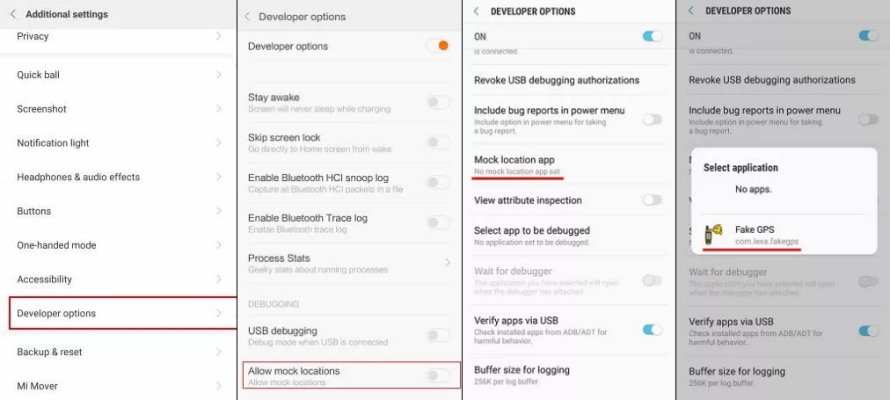
Step 1. Go to Settings, then turn on Developer Mode.
Step 2. Under Developer Options, select Allow mock locations.
Step 3. Tap Select Mock Location App.
Step 4. Select Fake GPS Location to change your device's location.
Method 2. Change MeetMe Location via Jailbreak (iOS)
Another way to change your location in MeetMe on your iPhone is by jailbreaking, but it will brings some risks and causes data loss. Using third-party jailbreaking software can allow you to change your device's location without restrictions.
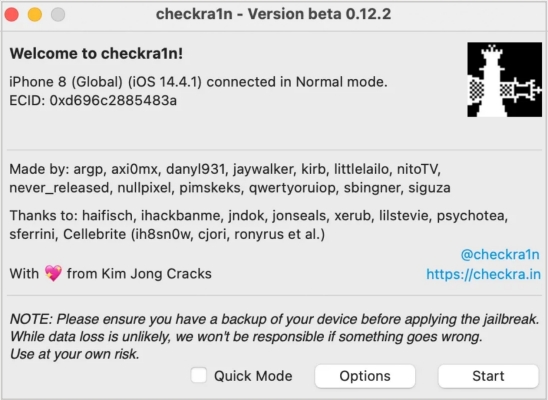
Step 1. Go to the official Checkra1n website and download the tool for macOS or Linux.
Step 2. Charge your device to at least 50%, and use a reliable Lightning-to-USB cable.
Step 3. Open the Checkra1n app as an administrator. If your system blocks it, go to System Preferences > Security & Privacy to allow the app manually.
Step 4. Follow the Checkra1n instructions to enter DFU Mode: hold the right key combo until detection.
Step 5. Once your device is in DFU Mode, Checkra1n will jailbreak automatically.
Step 6. After that, you'll see the Checkra1n loader app on your device. It confirms the jailbreak was successful and you can now proceed with bypass steps.
Method 3. Change MeetMe Location via VPN Services (iOS & Android)
Besides using location spoofing tools or jailbreaking, you can use a VPN service to change your location in the MeetMe app to another country. It can change your IP address, which can influence location-based features. But it is not suitable for a precise location change.
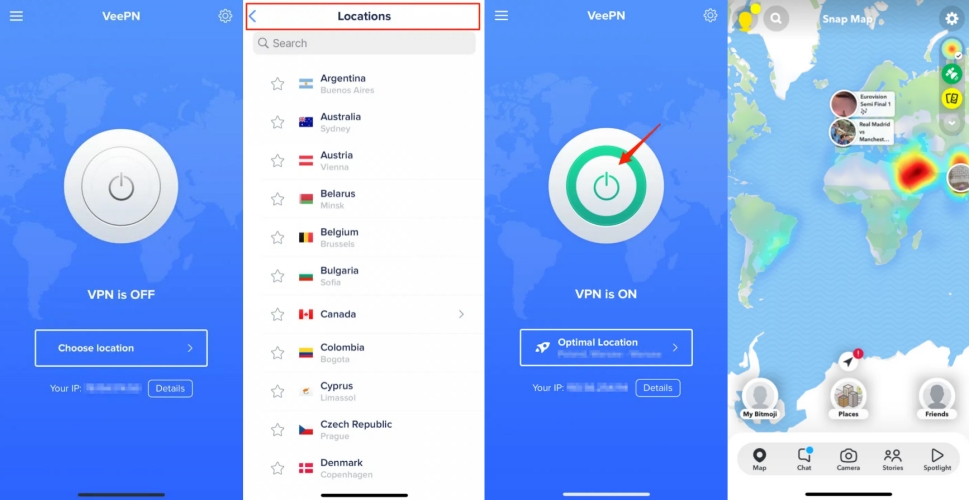
Step 1. Download and install a VPN service.
Step 2. Run the application and allow VPN configuration settings.
Step 3. Select an available server location.
Step 4. Tap the connect button to change the IP address.
Part 3. FAQs about MeetMe Location
How to hide location on MeetMe Location?
If you're concerned about your location being tracked, MeetMe allows you to hide your profile. Here's how to hide your location in MeetMe.
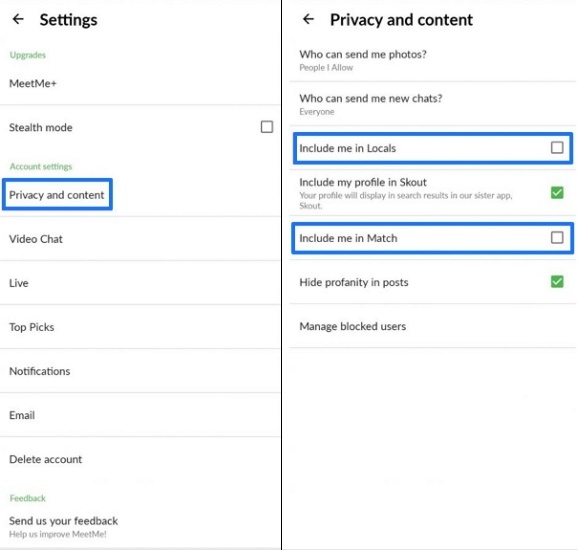
Step 1. In the Settings, locate and tap Privacy and Content.
Step 2. Uncheck the checkboxes for Add me to local users and Add me to matches.
How to update location in your profile on MeetMe?
To update your location shown in your profile on MeetMe, you can edit it directly. Follow these steps to update your location in the MeetMe app or on the MeetMe site.
In the MeetMe App
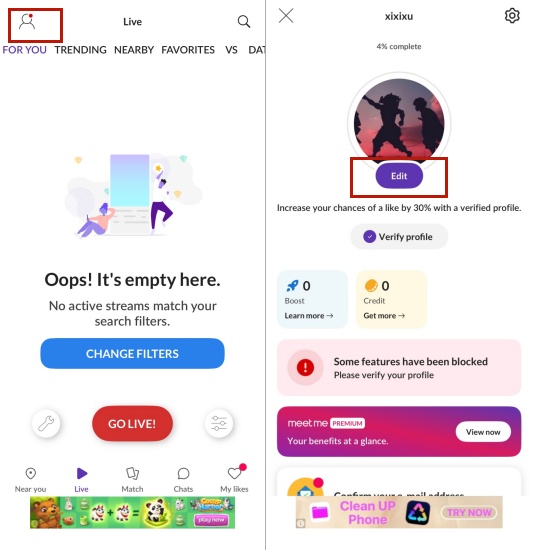
Step 1. Tap the icon in the upper left corner of the screen.
Step 2. Select Edit.
On the MeetMe Site
Step 1. Tap your name in the left-hand menu.
Step 2. Then select Edit, and your profile details will be displayed on the right side of that menu.
How to change country on MeetMe?
As MeetMe uses device GPS location, you can only change the country in MeetMe to your current place. To change your country in MeetMe, follow the steps below. But if you want to change to another coutry to expand your visibility, consider using MagFone Location Changer.
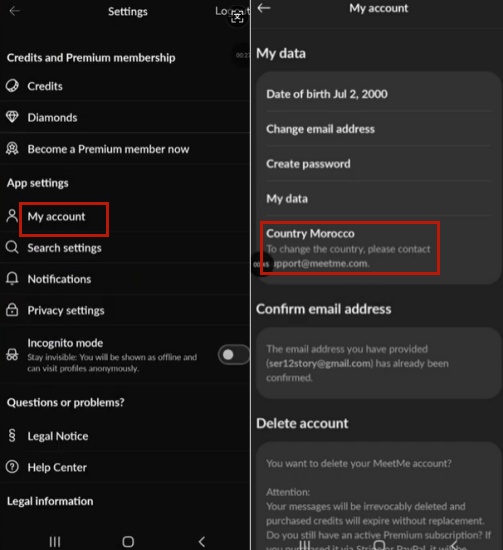
Step 1. Go to Setting, then tap My account
Step 2. Select Country Morocco.
Part 4. Conclusion
Changing your location on MeetMe can open up many opportunities to meet new friends, experience different dating scenarios, and connect with people all over the world. The best way to change your MeetMe location is using Magfone Location Changer, a powerful app that can do everything from changing your location to simulating walking at different speeds.

Edgar Davis
Editor in chief




