








Yubo is a popular social discovery app that lets users meet new people, chat, and connect with friends around the world through live streaming and swiping features. Many users wonder how to expand their social circle beyond their current region, which is why learning how to change location on Yubo becomes important. In this guide, we clearly explain how to change your location on Yubo app using effective methods anyone can follow quickly.

- Part 1. Benefits of Changing Location on Yubo App
- Part 2. How to Change Your Location on Yubo App
- Part 3. How to Change Location on Yubo in Minutes
- Part 4. Conclusion
Part 1. Benefits of Changing Location on Yubo App
Changing your location on Yubo can unlock a wider social experience and help you meet people from different countries and cultures. It also improves matchmaking variety, increases visibility, and makes your account more engaging for global interaction. Benefits include:
- Better match variety: Changing regions helps the algorithm suggest more diverse profiles.
- Increased engagement: A new location may boost profile visibility and interactions.
- Cultural discovery: Learn trends, lifestyles, and conversations from other regions.
Part 2. How to Change Your Location on Yubo App
In the Yubo app, you can update or switch between different regions on your account. To do this, you need to adjust your device and app GPS settings. Here's how you can change your location information within the Yubo app.
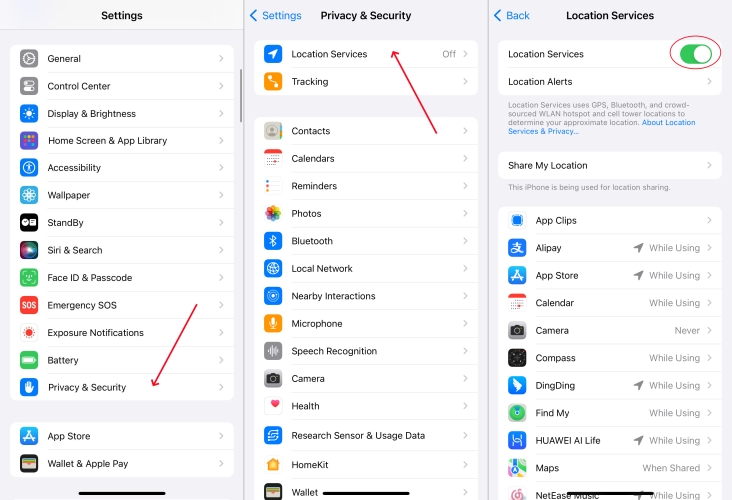
Step 1. Open Settings, then tap Privacy & Security and make sure Location Services is turned on.
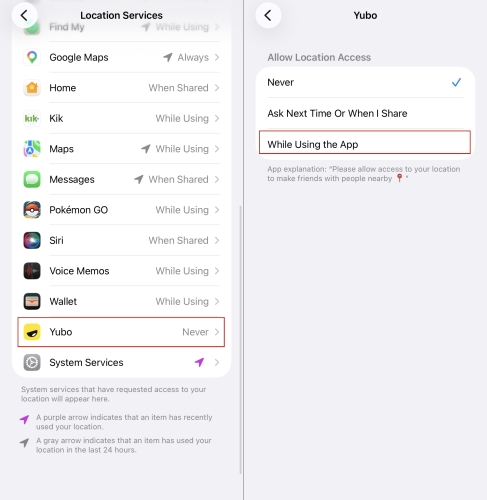
Step 2. Scroll down, find the Yubo app, and set its location access to While Using the App.
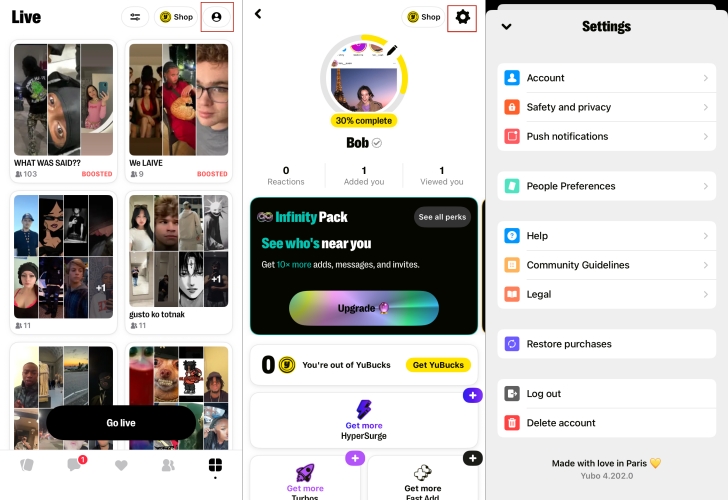
Step 3. Launch the Yubo app, then tap your profile and open the Settings icon.
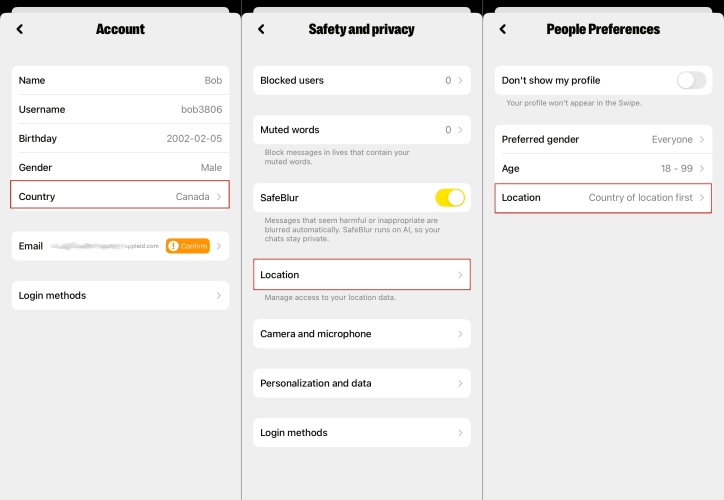
Step 4. In the Settings page, you can adjust your location for your account, privacy, and preferences.
Notes:
- Account location settings: you can set the country where you stay.
- Safety and rpivacy location settings: you can manage access to your location data like use your location to find friends neaby, hide your location for others, or refresh your city to update location data.
- People Prefernces location settings: You can adjust the location of the users you want to encounter on the Yubo app.
Part 3. How to Change Location on Yubo in Minutes
In addition to built-in steps, there are two useful methods to change your location on the Yubo app instantly and easily.
01Change Location via MagFone Location Changer
Sometimes the built-in Yubo location feature may not function as expected or may offer limited accuracy depending on your device or network conditions. In such cases, using a third-party tool like MagFone Location Changer becomes a reliable alternative. It allows you to simulate GPS movement and set a virtual location anywhere in the world. With a few simple clicks, you can modify your location on the Yubo app without technical skills or setup.

MagFone Location Changer
Easily change your GPS location on iOS and Android devices to anywhere with one click, while not requiring root or jailbreaking!
Step 1 Launch MagFone Location Changer

Install MagFone Location Changer on your computer and open it. Connect your iPhone or Android device using a USB cable. On the main interface, select the Start and then Next option to select the Pokemon GO game mode.
Step 2 Set and Change Location on Yubo

Go to the top-right menu and select the first tab to select a location point. Once finished, click Start Modifying to set a virtual location for the Yubo app. Then you can explore more content and encounter more people from that area.
02Change Location Using a VPN Service
Another great way to change your location on the Yubo app is by using a VPN service. It is a widely used method to mask your network location on iPhone and Android devices. There are many VPN providers available, both free and paid, giving you flexibility to choose. Below we list 8 useful VPNs, including free options.
8 Best VPN Location Changers in 2026
Discover the 8 best VPN location changers in 2026, including free and paid options and easily spoof your IP with these top tools.
Read More >>Part 4. Conclusion
To conclude, changing your location on Yubo can be done easily using different methods depending on your needs. While the built-in settings may work in some cases, tools like MagFone Location Changer and VPN services provide more flexibility and reliability. These options help you access different regions, enhance privacy, and improve your overall experience on the app. Always choose the method that best fits your device and personal preferences for a smooth usage experience.

Olivia Wood
Editor in chief




