








Changing your location on Match can make a big difference in who you see and who sees you. Whether you've moved to a new city, are planning ahead for travel, or simply want to explore matches elsewhere, it's crucial to learn how Match location settings work. This guide walks you through how to change location on Match and what to do if you can't change location on Match. Let's move on.
- Part 1. Can You Change Your Location on Match?
- Part 2. Official Way to Change Location on Match
- Part 3. How to Change Your Location on Match Fast
- Part 4. How to Fix Can't Change Location on Match
- Part 5. Conclusion
Part 1. Can You Change Your Location on Match?
When you create a new Match account, you'll be asked to enter a ZIP code to set your location. Match primarily relies on this initial location, and other members can only see your city or general area, not your exact location.
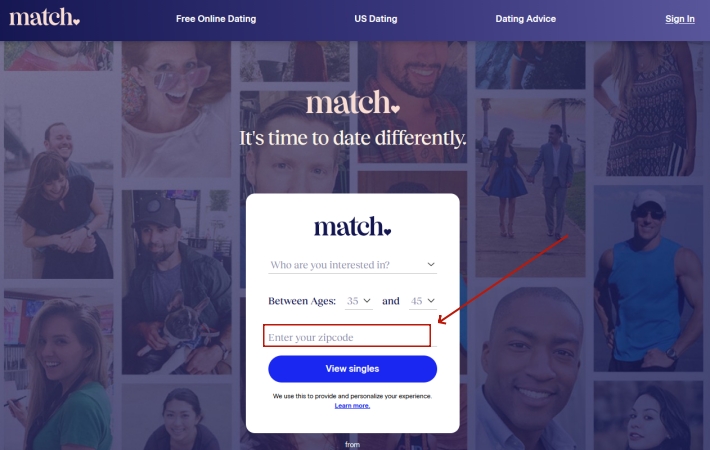
You can change your location on Match, and the platform expects users to update it when they move or want more accurate local matches. Changing your location directly influences who appears in your match suggestions and where your profile is shown in search results, which is why users frequently update their location to:
- Travel dating: Connect ahead of travel by matching with locals at your destination, making plans before arrival and avoiding cold starts there.
- Prepare for relocation: Preview dating opportunities in a future city to build connections early, easing transitions before physically relocating.
- Broaden search results: Increase visibility by centering your profile on a nearby city, especially when living rurally.
- Privacy control: Maintain privacy by showing a general area instead of exact location while still accessing relevant nearby matches.
Part 2. Official Way to Change Location on Match
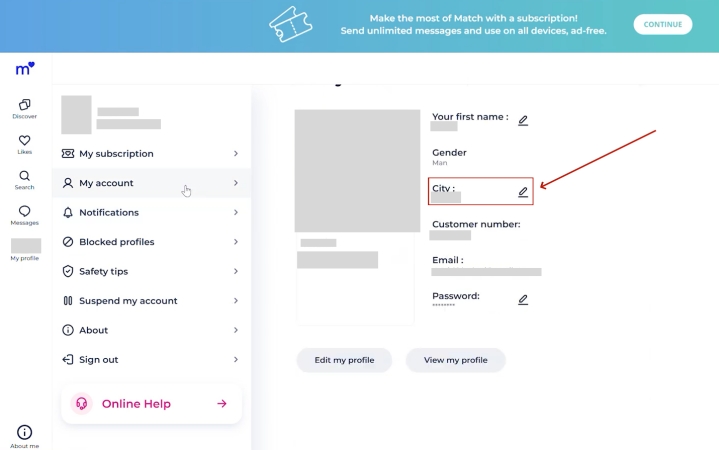
Match.com frequently updates its website and app page over the years, which has left many users unsure how to change their location. Because of these ongoing updates, older guides may no longer apply. Below is the current, updated method for changing your location on match.com in 2026.
Part 3. How to Change Your Location on Match Fast
While the official methods change your "Home" address, the Match app still uses your device's background GPS to determine how far away you are from other users in real-time. If you want to "teleport" your phone's actual GPS signal so that the app believes you are physically in another city, a dedicated tool like MagFone Location Changer is the most effective solution. Next is how to change your location on Match with MagFone Location Changer.

MagFone Location Changer
Easily change your GPS location on Sniffies to anywhere with one click, while not requiring root or jailbreaking!
Step 1 Connect Device and Run MagFone

Install and launch MagFone Location Changer on your computer, then connect your phone via USB or Wi-Fi. Enable Developer Mode on your device and select a location simulation mode in the software.
Step 2 Choose a New Location on Match

On the map or by entering coordinates, select the city or area you want your device to appear in. Click Start Modifying to immediately update your GPS location so the Match app recognizes your new position.
Part 4. How to Fix Can't Change Location on Match
Sometimes, the app refuses to save your new zip code, or it keeps reverting to your old location. Based on tech support threads and Reddit advice, here are the most common fixes.

1. Check Zip Code Validity
Ensure you are using a valid, 5-digit US Zip code or the correct format for international postal codes. The Match database is strict about formatting.
2. Clear Cache and Cookies
If you are on a browser, old data might be "sticking." Clear your history and try again. Here's how to.
- On Chrome: Settings > Privacy and security > Delete browsing data > Delete data.
- On Safari: Settings > Apps > Safari > Clear History and Website Data.
- On Android Browser: Settings > Apps > [Browser] > Clear cache.
3. Disable Location Services
On your phone, go to Settings > Privacy > Location Services and toggle it off for Match. Then, try setting your zip code manually in the app. This prevents the GPS from overriding your manual entry.
4. The "24-Hour Reinstall"
A popular Reddit fix involves deleting the app, waiting 24 hours for the server cache to clear, and then reinstalling it while physically in (or spoofed to) the new location.
5. Align Location Across Devices
If you use Match on both mobile and desktop, make sure your profile location is consistent on all devices. Update your location on the app and on Match.com, then log out and back in to ensure the changes sync properly across platforms.
Part 5. Conclusion
Changing your location on Match is the best way to expand your horizons, whether you're moving across the country or just across the state line. While the official manual zip code update works for basic profile display, tools like MagFone Location Changer provide a more seamless experience for those who want to truly "live" in a new city digitally.

Edgar Davis
Editor in chief





