








Do you know how to change location on Monkey? Sometimes, you might need to change your location on Monkey. One major reason may be privacy concerns, and some users may also want to communicate with people from different regions or countries. Since Monkey provides social services based on users' GPS location, changing your location is essential when you want to connect with people from different places and broaden your social interactions and experiences. Check out this guide on how to change your location on Monkey in some proven ways.
- Part 1. How to Change Location on Monkey [Current Position]
- Part 2. How to Change Your Location on Monkey to Anywhere
- Part 3. How to Hide Location on Monkey
- Part 4. Conclusion
Part 1. How to Change Location on Monkey [Current Position]
Monkey allows users to change their location on both its website and app, thereby altering the geographical range of their chat matches. Whether you want to broaden your search to match users further away, or narrow your search to find users nearby, you can adjust the settings accordingly. Here's a simple step-by-step guide on how to change your location on Monkey.
How to change Location on Monkey Website
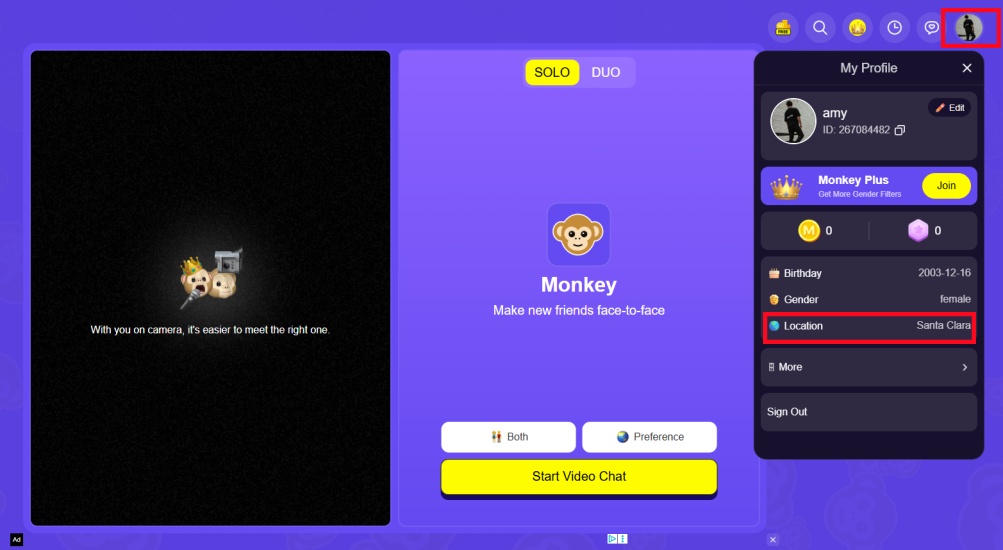
Step 1. Log in to the Monkey website.
Step 2. Click My Profile in the upper right corner.
Step 3. Then change your location.
How to change Location on Monkey App
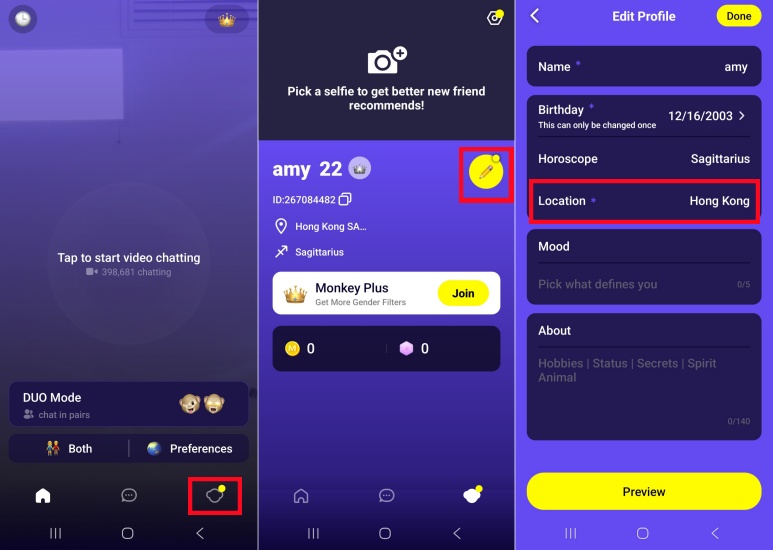
Step 1. Log in to the Monkey app.
Step 2. Tap the icon in the bottom right corner, then tap the edit icon.
Step 3. Change your desired location.
Part 2. How to Change Your Location on Monkey to Anywhere
Changing your location in the Monkey settings menu is simple and convenient, but if you want to change your location to another city to meet people from different places and connect with others, the settings menu might not be the best option. Many users need to change location on Monkey so that the application recognizes them as being in a different location, thus expanding their chat matching range. Don't worry, there are methods available.
Method 1. Change Location on Monkey via MagFone Location Changer
Sometimes, you may need to change your location not only to a city or region, but also to a precise location, allowing Monkey to match you with more accurate chat partners based on your geographical location. If you're looking for a simple way to change your precise location on Monkey, one of the most user-friendly tools is MagFone Location Changer. Try to use this tool to change your location on Monkey by following these steps.

MagFone Location Changer
Easily change your GPS location on Monkey to anywhere with one click, while not requiring root or jailbreaking!
Step 1 Connect Phone to Computer and Launch MagFone Software

Download and launch MagFone Location Changer on your computer, then connect your phone to the computer via a USB cable or WiFi connection. After enabling Developer Mode on your device, select a location simulation mode in the MagFone program.
Step 2 Start to Change Monkey Location to Anywhere

On the world map, select the place you want your device to change. Or enter specific coordinates in the search bar to find your desired location. Click the Start Modifying button, and your location will update to the spot you want in Monkey.
Method 2. Change Location on Monkey via Fake GPS Location
For Android users, in addition to the methods mentioned above, you can also use the Fake GPS Location app to change your location on Monkey, but its functionality is relatively limited. For example, it sometimes is unstable and fails to change the location. Follow the steps below to change location on Monkey.
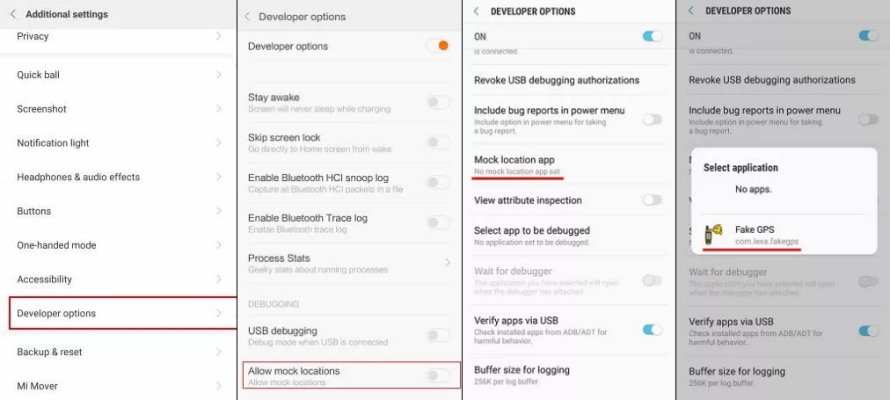
Step 1. Install and run Fake GPS Location on your phone.
Step 2. Go to Settings and enable Developer Mode.
Step 3. Tap Select Mock Location App > Fake GPS Location.
Step 4. Then enter the coordinate of the location you want to change or search using regional keywords in the app.
Step 5. Tap Start to change your location on Monkey.
Method 3. Change Location on Monkey via VPN Services
A common way to change your location on Monkey is to use a VPN to change the location in app. VPN services work by changing your device’s IP address, thereby affecting functions that depend on location. However, it's not suitable for changing your location precisely.
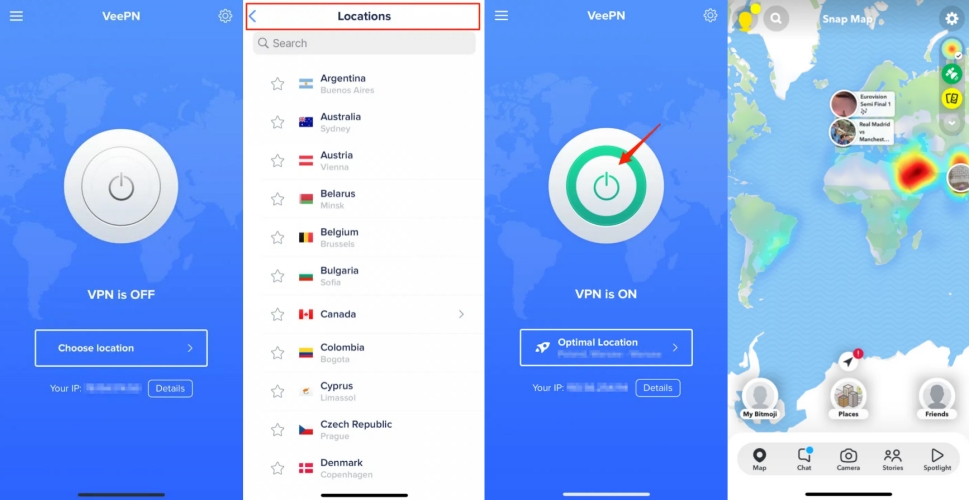
Step 1. Download and install a VPN service on your device.
Step 2. Run the app and allow VPN to configure settings.
Step 3. Select an available server location.
Step 4. Tap the connect button to change your phone's IP address.
Method 4. Change Location on Monkey via Proxy Servers
Using a proxy server can also change your location on Monkey, but this will only change the virtual location associated with your IP address, not the actual physical location determined by your device's GPS. It's also important to note that proxy servers have limited applicability and are usually only effective for a single application or browser. Below are the detailed steps.
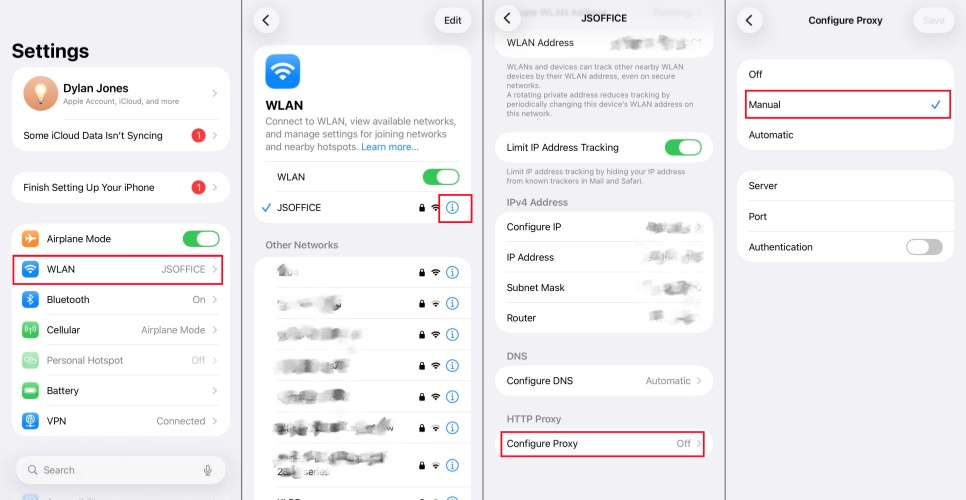
Step 1. Open Settings on your device and tap WLAN.
Step 2. Tap the (i) icon next to your connected Wi-Fi network.
Step 3. Tap Configure Proxy at the bottom of the screen and select Manual.
Step 4. Enter the server address and port number.
Step 5. Then input your username and password for authentication.
Step 6. Tap Save to apply the proxy server.
Part 3. How to Hide Location on Monkey
For privacy reasons, you may sometimes not want to reveal your real location. If you want to hide your location information on Monkey, here are methods for both the Monkey website and Monkey app to show you how to hide your real location on Monkey.
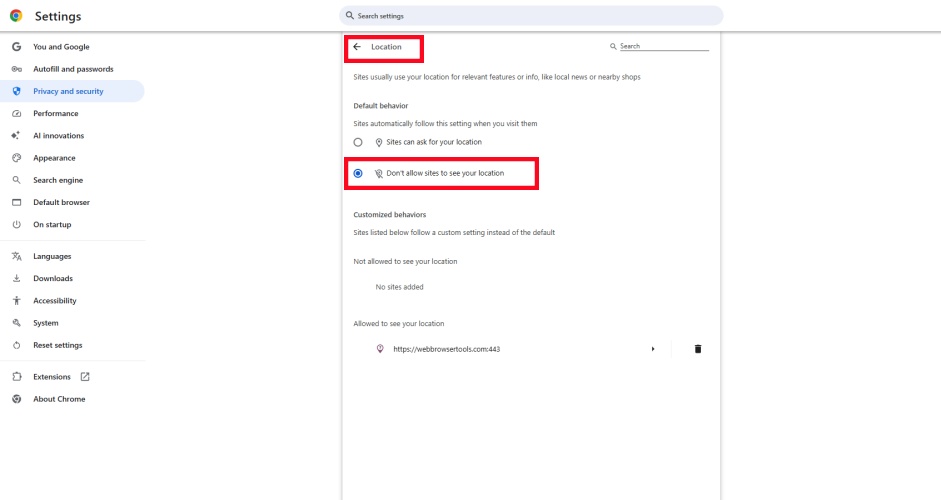
Hide Location on Monkey Website
Step 1. Click the icon in the upper right corner of your Chrome browser.
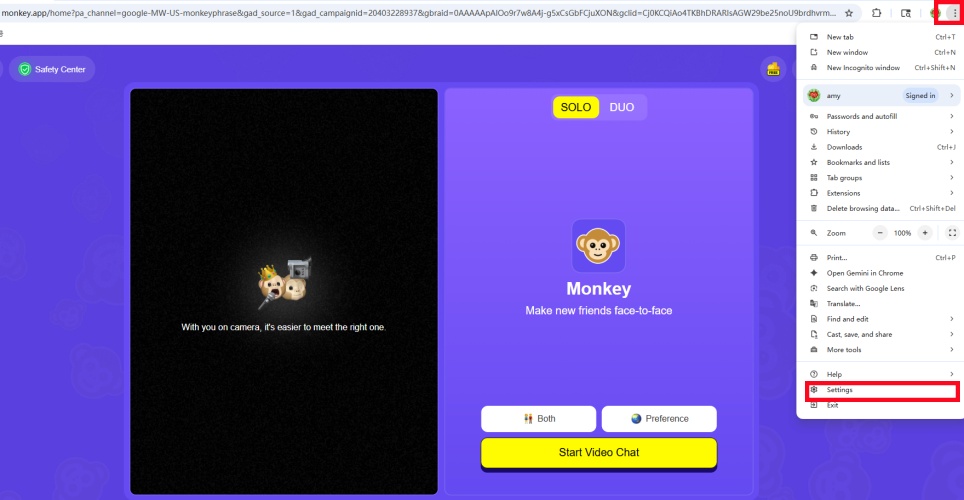
Step 2. Then hit Settings > Privacy and security > Site settings.
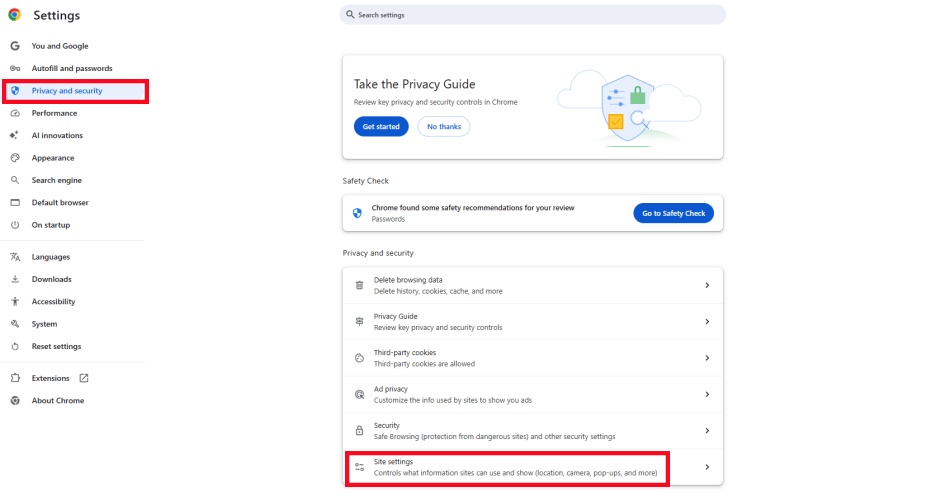
Step 3. Select Don't allow sites to see your location under Location.
Hide Location on Monkey App
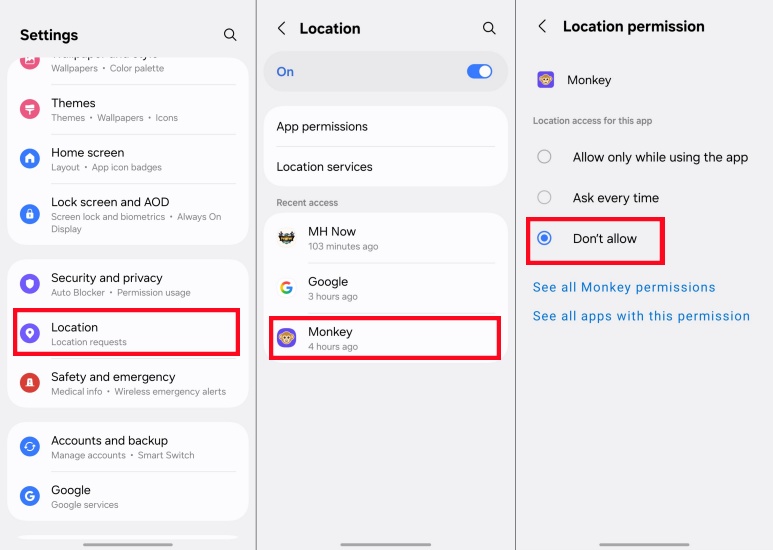
Step 1. Go to Settings on your phone.
Step 2. Tap Location, and find Monkey.
Step 3. Under Location Permission select Don't Allow.
Part 4. Conclusion
Monkey allows you to experience different chat and dating scenarios and connect with people from various regions. Therefore, changing your location on Monkey opens up endless social possibilities. Whether you need to change location on Monkey for whatever reason, professional tools like MagFone Location Changer can help you easily accomplish this task. This tool is not only safe and reliable but also easy to use. Start to change your location on Monkey with MagFone Location Changer now.

Edgar Davis
Editor in chief





