








Grubhub is one of the most widely used food delivery platforms in the United States, connecting hungry customers with restaurants and drivers who deliver food to their doors. For couriers, the app assigns orders based on a set delivery region, but life circumstances change (a move, a relocation, or simply a desire to work in a busier area), and that's when drivers start looking for a way to switch their assigned market. Here, we show you how to change location on Grubhub with step-by-step instructions.
- Part 1. Can I Change My Grubhub Driver Location?
- Part 2. How to Change Location on Grubhub Driver Step by Step
- Part 3. Extra Tip: How to Change Location on Apps [iOS/Android]
- Part 4. Conclusion
Part 1. Can I Change My Grubhub Driver Location?
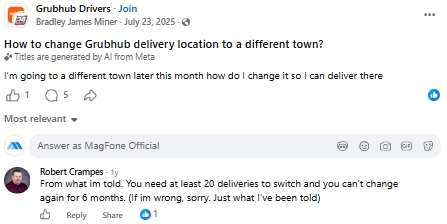
The short answer is yes, you can switch your delivery region on Grubhub. That said, drivers who have gone through the process report on Facebook that the option isn't always straightforward, and the turnaround time can feel longer than expected, especially when Grubhub support needs to manually review and approve the change.
Part 2. How to Change Location on Grubhub Driver Step by Step
While the process isn't the smoothest experience Grubhub offers its couriers, there are two main routes you can take to update your delivery region. One relies on contacting Grubhub directly, while the other uses settings built into the driver app.
Option 1. Send a Request to Grubhub
If you're an active courier hoping to move to a different delivery zone, the most reliable route is to formally notify Grubhub through their driver support channel. This method involves filling out a short online form with your account details and preferred new ZIP code, after which the support team reviews and processes the switch on their end.
Step 1. Head to the Grubhub for Drivers support page and locate the Delivery Partners Request Form.
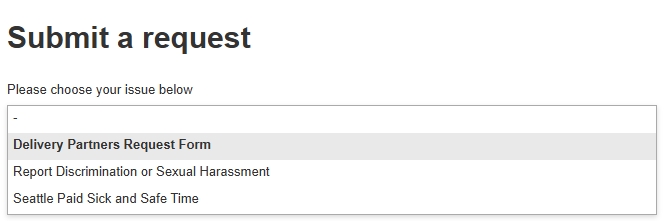
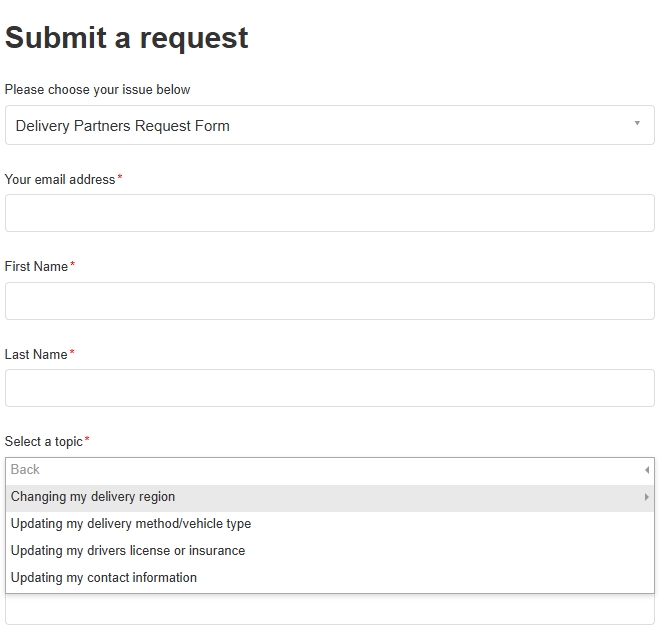
Step 2. Enter all your information. In the Select a topic section, choose I have delivered a Grubhub order > Account updates > Change my delivery region.
Step 3. Finally, add any extra context that might help support understand your situation, such as why you're relocating.
Step 4. Review your entries and select Submit. Grubhub typically takes a few business days to process these market change requests.
Note:
Certain high-demand markets, including Seattle and New York City, are generally closed off to transfer requests, and newer couriers may face additional capacity limits until they reach a higher partner tier.
Option 2. Update Your Market on App
For drivers who applied to a market but haven't started delivering yet, or who moved before their application was fully processed, there's a quicker in-app method. This approach lets you leave your original waitlist and pick a new market directly from your task list.
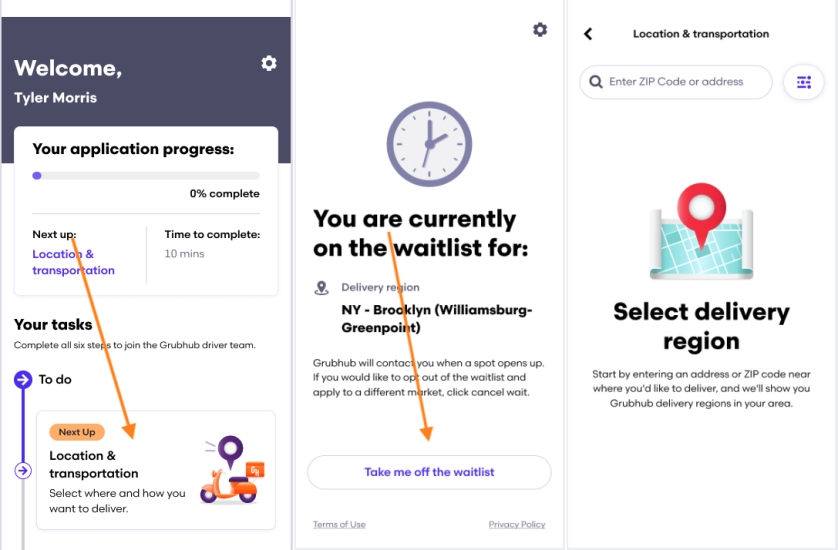
Step 1. Open the Grubhub for Drivers app and log into your account.
Step 2. Navigate to your current application's task list from the home screen.
Step 3. Find and tap the step labeled Location & transportation within that task flow.
Step 4. Scroll to select the Take me off the waitlist option to remove yourself from the waitlist.
Step 5. Once you're off the waitlist, enter ZIP code or address to choose the new market you'd like to apply.
Note:
This route is best suited for couriers who are still in the onboarding phase, since it works through the application task list rather than an active driver account.
Part 3. Extra Tip: How to Change Location on Apps [iOS/Android]
Beyond food delivery apps, location settings play a major role in plenty of other mobile experiences, from Find My and Google Maps to location-based games like Pokemon GO. When people want to adjust the GPS position an app reads on their phone, a tool such as MagFone Location Changer often comes up as a go-to solution.
MagFone Location Changer is a desktop program built to simulate GPS coordinates on mobile devices, whether that's for guarding personal privacy or getting an edge in games. It supports Windows and Mac computers alongside iOS and Android phones, letting you jump your device's position anywhere on the map. On top of basic teleporting, it comes packed with extras like simulated movement along a route and a virtual joystick for manual control. After installing the program, the steps below walk through a typical setup.

MagFone Location Changer
Easily change your GPS location on iOS and Android devices to anywhere with one click, while not requiring root or jailbreaking!
Step 1 Connect Your Device and Launch MagFone
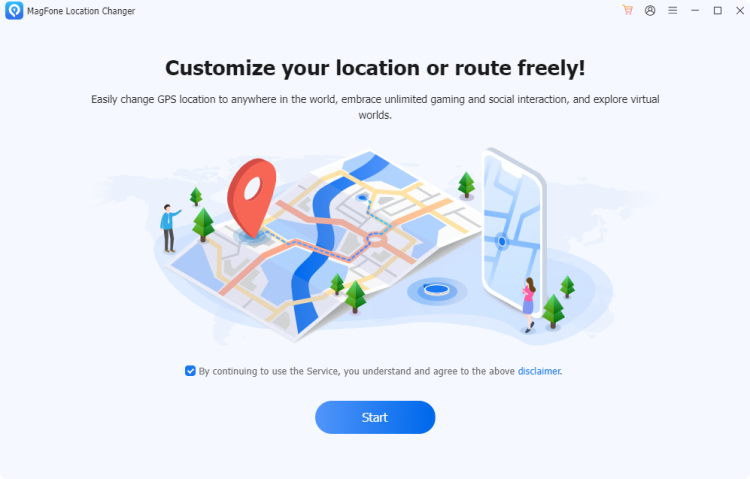
Before anything else, turn on Developer Mode on your phone, then plug it into your computer with a USB cable. With the connection established, open MagFone Location Changer on the desktop, select the Change Location tool from the menu, and click Start to begin the session.
Step 2 Change Your Virtual Location on Apps
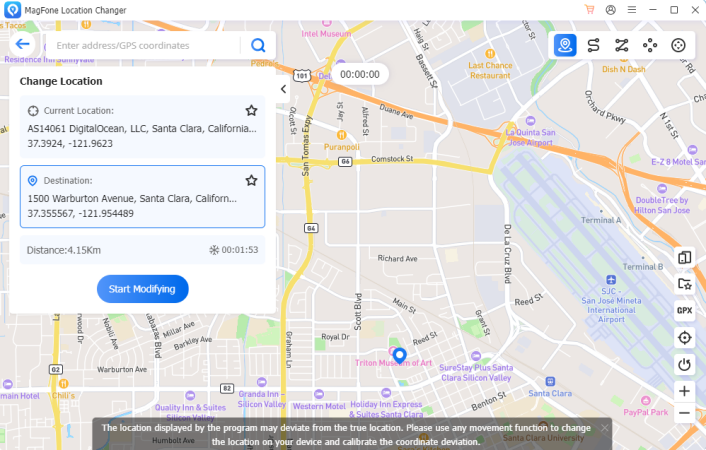
Scroll and pan across the map shown on your screen until you find your target destination, or type an address directly into the search bar so the program can pinpoint it automatically. After confirming your choice, click the button to apply the modification.
Part 4. Conclusion
Changing your Grubhub driver location is possible, though it takes a bit more patience than a simple settings toggle, either by submitting a formal request to support or adjusting your market through the app's task list before you're fully onboarded. And for anyone needing to spoof location on other apps entirely, tools like MagFone Location Changer offer a flexible alternative.

Olivia Wood
Editor in chief




