








Pokemon GO, the revolutionary augmented reality game developed by Niantic, has captivated millions of players worldwide. However, one common query among players is how to change location in Pokemon GO. Whether you're aiming to catch region-exclusive Pokemon, participate in raids and events across the globe, or simply explore new virtual terrains, this guide will provide you with all the necessary details. Learn how to change your location in Pokemon GO now.

- Part 1. Reasons to Change Location in Pokemon GO
- Part 2. Limitations to Spoof Location in Pokemon GO
- Part 3. How to Change Location in Pokemon GO on iPhone/Android
- Part 4. FAQs about Changing Location in Pokemon GO
- Part 5. Conclusion
Part 1. Reasons to Change Location in Pokemon GO
Players navigate their surroundings to catch Pokemon, battle in gyms, and participate in events. Location is a crucial aspect of the game, making it essential for players to understand how to optimize their experience by exploring different areas. However, changing your location in Pokemon GO can open up a world of possibilities. Here are some key reasons why players opt to spoof their location.
Reason 1. Catch Region-Exclusive Pokemon: Certain Pokemon are exclusive to specific regions. For example, Kangaskhan is only found in Australia.
Reason 2. Participate in Remote Raids: Join global raids to battle legendary Pokemon without being physically present.
Reason 3. Explore New Areas: Virtually traveling to different locations allows you to experience PokeStops, Gyms, and events worldwide.
Reason 4. Expand Your Pokedex: Changing locations can help you complete your Pokedex faster.
Part 2. Limitations to Spoof Location in Pokemon GO
Location spoofing in Pokemon GO is restricted by Niantic, and modern anti-cheat systems require players to be more careful than before. There are a few important points to keep in mind if you're changing your location in Pokemon GO.
Note 1. Control Moving Speed: Pokemon GO now uses advanced detection systems that can identify unnatural movement patterns. Rapid long-distance jumps or unrealistic travel speeds can trigger warnings or penalties.
Note 2. Follow Cooldown Rules: Therefore, even if spoofing works properly, it often requires cooldown management. Ignoring cooldown rules can increase the risk of detection.
Note 3. Wrong Location Signals: Not all location issues come from intentional spoofing, because real-world conditions can also affect how the game reads your position. Weak mobile data or Wi-Fi signals may cause delayed or inaccurate GPS updates. Dense urban environments with tall buildings can distort satellite signals, leading to sudden drifting or "jumping" avatars.
Part 3. How to Change Location in Pokemon GO on iPhone/Android
There are several ways to change your location in Pokemon GO, but only a few are actually available and practical for you. Let's take a quick look.
Method 1. Change Pokemon GO Location via MagFone Location Changer
If you are interested in using GPS spoofing tools to change your location, a variety of tools are available. But when it comes to the best Pokemon GO location spoofer, MagFone Location Changer is a top-notch option. MagFone Location Changer is a powerful location changing tool that enables both iOS and Android users to change their location without jailbreaking or rooting. By using MagFone software, you can easily and efficiently change your location in Pokemon GO with one click. You can follow this step-by-step guide on how to change location for Pokemon GO with MagFone Location Changer.

MagFone Location Changer
Easily change your GPS location on iOS and Android devices to anywhere with one click, while not requiring root or jailbreaking!
Step 1 Connect Device and Run MagFone Software

Use a USB cable to connect your device to your computer, then enable Developer Mode on the device. After that, launch MagFone Location Changer on the computer and select the Change Location option. Continue to click the Start button.
Step 2 Start to Change Location for Pokemon GO

On the map, find the target location you want to change to. Or you can enter the target address in the search bar and use the search function to find the location. Then click the Start Modifying button to change your location in Pokemon GO.
Method 2. Change Pokemon GO Location with Fake GPS Location
GPS spoofing apps are the most common method for changing your location in Pokemon GO. In addition to MagFone Location Changer, here we recommend a free location spoofing tool for Android to you. That is Fake GPS Location that can be downloaded and install from the Google Play Store. With Fake GPS Location, you can change your location in Pokemon GO with several taps. Here's how to use Fake GPS Location to spoof your location in Pokemon GO.
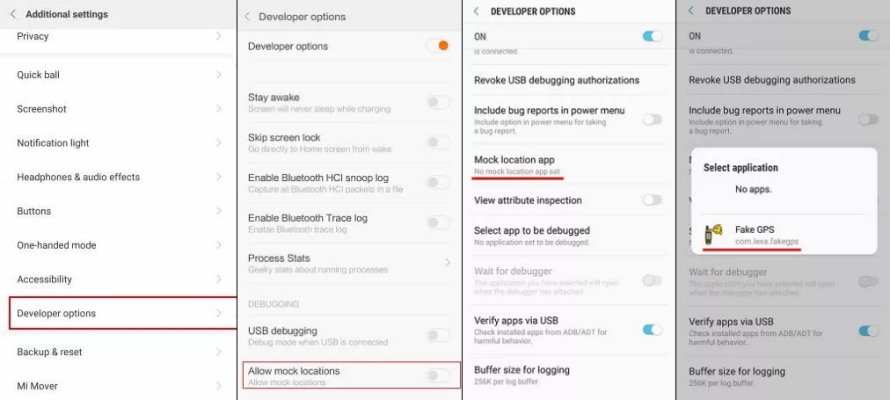
Step 1. Fire up Fake GPS Location on your Android device.
Step 2. Go to Settings > Developer Mode and turn on Developer Mode.
Step 3. Enable Allow mock locations and tap Select Mock Location App.
Step 4. Choose Fake GPS Location and change your location for Pokemon GO.
Method 3. Change Pokemon GO Location Using 3uTools
Some desktop applications allow you to change your GPS location by connecting your phone to your computer. 3uTools is a free tool that have many features, including GPS spoofing. By using 3uTools, you can change your location for Pokemon GO on your iPhone. But it is only compatible with the iPhone running below iOS 18. Also, it fails to change location in Pokemon GO sometimes. Follow the steps below to use 3uTools for Pokemon GO.
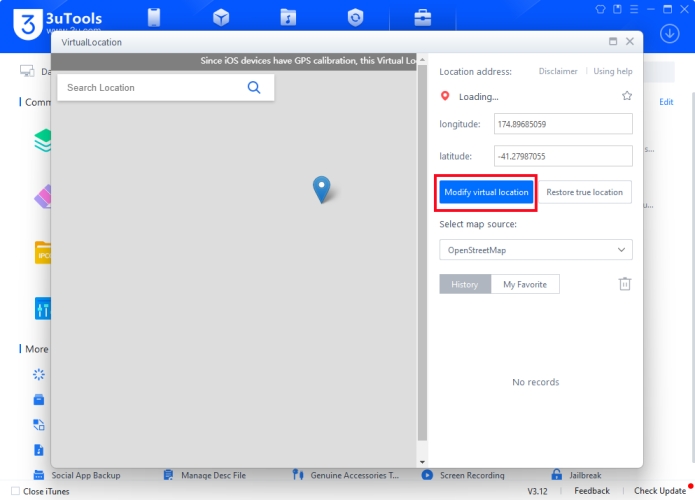
Step 1. Launch 3uTools on your computer, then connect your iPhone through a USB cable.
Step 2. Navigate to the Toolbox tab and select the Virtual Location tool.
Step 3. Enter the GPS coordinate on the map and click the Modify Virtual Location button.
Method 4. Change Pokemon GO Location by Jailbreaking
Advanced users many opt to jailbreak or root their devices for enhanced spoofing capabilities. This method allows for greater control but comes with increased risks, including voiding your warranty and potential security vulnerabilities. After jailbreaking an iPhone or rooting an Android device, you can install a GPS spoofing app from the third-party platform, instead of only from the App Store or the Google Play Store.
Part 4. FAQs about Changing Location in Pokemon GO
How to change your location on Pokemon GO for free?
You can use free GPS spoofing apps. However, free methods are often less stable and more easily detected by the game's anti-cheat system.
How to change your location in Pokemon GO without moving?
MagFone Location Changer allows you to teleport your character anywhere in the world without physically traveling. It also provides adjustable movement speed controls, helping you simulate more natural travel patterns and reduce the risk of detection.
Does a VPN change your location on Pokemon GO?
A VPN does not change your in-game location. It only changes your IP address, not your GPS location. Since Pokemon GO relies mainly on GPS data, a VPN alone cannot move your character or effectively spoof your location. However, a VPN can help if the app is unavailable for download in your region.
Part 5. Conclusion
Changing your location in Pokemon GO can enhance your gameplay and help you achieve goals that would otherwise be challenging. Whether to use a GPS changing tool or connect to a VPN service, you can successfully change your location in Pokemon GO. However, if you want to safely and quickly spoof location in Pokemon GO, it is suggested to use a GPS changing tool like MagFone Location Changer. Go to have a try, and you can teleport to anywhere in Pokemon GO.

Edgar Davis
Editor in chief





