








Many people search for Checkra1n iCloud bypass after encountering Apple’s Activation Lock screen on an iPhone or iPad. If you’re new to jailbreak or iOS security, it’s easy to assume that Checkra1n is an iCloud unlocking tool. In reality, Checkra1n is a jailbreak utility for certain older Apple devices. While it has been associated with some third-party software on compatible hardware, it does not directly remove Apple's Activation Lock by itself.
However, you can still bypass iCloud with Checkra1n if your iPhone is locked to iCloud Activation Lock. This beginner-friendly guide explains what Checkra1n does, which devices are supported, and how to bypass iCloud with Checkra1n. Also, we will share a better alternative to Checkra1n iCloud bypass if you're locked out of a device you own.
- Part 1. What Is Checkra1n?
- Part 2. How to Use Checkra1n iCloud Bypass [Windows/Mac]
- Part 3. Better Alternative to Checkra1n iCloud Bypass
- Part 4. FAQs about Checkra1n iCloud Bypass
- Part 5. Conclusion
Part 1. What Is Checkra1n?
Checkra1n is a jailbreak tool built around the checkm8 bootrom exploit, a hardware-level vulnerability affecting certain older Apple devices. Unlike software vulnerabilities that can often be fixed with operating system updates, a bootrom vulnerability exists in the device's hardware. As a result, the exploit remains applicable only to compatible hardware generations.
Checkra1n is primarily intended for:
- Installing jailbreak tweaks
- Research and development
- Security testing
- Accessing advanced system customization on supported devices
Importantly, Checkra1n is not an iCloud unlocking tool. Jailbreaking a device doesn't remove the Apple ID associated with Activation Lock. But it can help you bypass iCloud Activation Lock, allowing to access some features on an iCloud locked device again.
Compatibility of Checkra1n iCloud Bypass
Compatibility depends on the underlying hardware rather than simply the iOS version. Generally, Checkra1n supports devices based on A7–A11 chipsets, which include models such as:
| Processor Family | Typical Device Example |
| A7 | iPhone 5s |
| A8 | iPhone 6 and iPhone 6 Plus |
| A9 | iPhone 6s, iPhone SE (1st generation) |
| A10 | iPhone 7 series |
| A11 | iPhone8, iPhone 8 Plus, iPhone X |
Devices using A12 chips and newer are not compatible with the original checkm8-based Checkra1n approach. Before assuming compatibility, always verify your specific model and software version using current project documentation.
Pros and Cons of Checkra1n Bypass iCloud
As a highly regarded jailbreaking tool, Checkra1n comes with its own set of advantages and limitations. While Checkra1n has become a go-to solution for many due to its stability and reliability, it may not be the ideal choice for everyone. Factors like device compatibility, ease of use, and long-term functionality play a critical role in deciding whether this tool is right for you. Before attempting to jailbreak any device, consider the following limitations.
 Pros
Pros- Cost-free and widely accessible
- Built on the reliable hardware-based Checkm8 exploit
- Work locally on both Mac and Windows

- Only compatible with specific devices and iOS versions
- Require some technical know-how to use
- May void warranties and expose devices to vulnerabilities
- Not remove the Activation Lock record associated with Apple's servers
Part 2. How to Use Checkra1n iCloud Bypass [Windows/Mac]
As previously mentioned, Checkra1n is highly versatile, offering compatibility with both Windows and Mac platforms, making it accessible to a broad range of users. Below, we outline some technical specifications of the tool to ensure your setup meets the requirements.
| Checkra1n | Windows | Mac | |
|---|---|---|---|
| Compatibility | Need a USB drive with Linux distribution | MacOS 10.12 Sierra or later | |
| Support OS | iOS 12.0 to iOS 14.8.1 | ||
| Supported devices | Only Devices with an A5 to A11 Chip | ||
Option 1. How to Bypass iCloud with Checkra1n on Windows
Checkra1n on Windows requires additional setup due to its reliance on a Linux environment. You'll need to create a bootable USB drive to run Checkra1n in a compatible Linux system. This method ensures that even Windows users can bypass the iCloud Activation Lock without requiring native Windows support. Follow these steps to execute the bypass process.
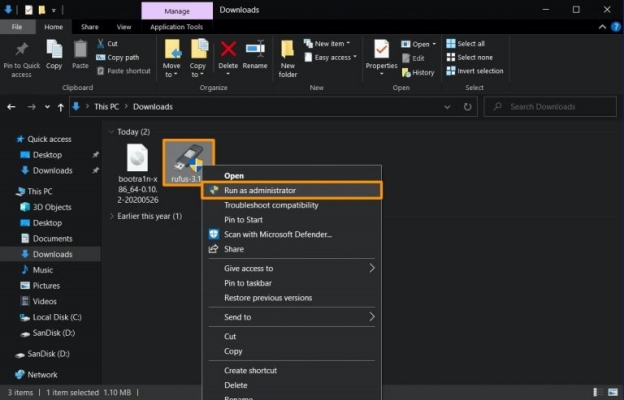
Step 1. Download the required files from Checkra1n on your computer.
Step 2. Connect your iPhone or iPad and USB flash drive to the computer.
Step 3. Right-click on the Rufus utility, select Run as administrator, and then confirm.
Step 4. If prompted, download additional files. Select the bootra1n .ISO file in Rufus and click Open.
Step 5. Continue to select Write in ISO image mode and then select OK.
Step 6. Click Start to flash the bootra1n .ISO onto the USB drive.
Step 7. Verify the warning that the drive will be reformatted, then select OK.
Step 8. After flashing, reboot your PC and enter BIOS by pressing F2 or Delete on the keyboard.
Step 9. Set the USB drive as the first boot device.
Step 10. Save changes and restart. When bootra1n appears, press Enter to begin the Checkra1n bypass process.
Option 2. How to Bypass iCloud with Checkra1n on Mac
For Mac users, the process is more straightforward, as Checkra1n is natively supported on macOS. With the correct version installed, you can directly run the tool to bypass the iCloud Activation Lock. The user-friendly interface ensures that both beginners and experienced users can complete the process efficiently.
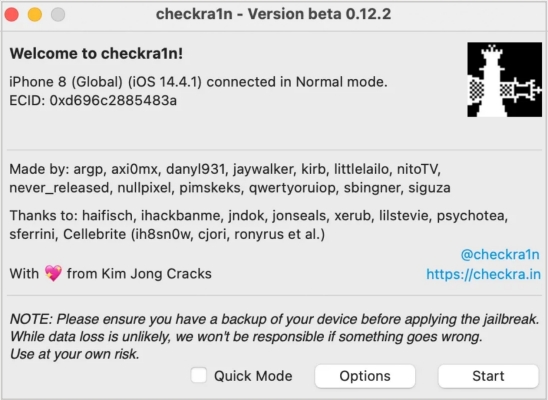
Step 1. Link your iPhone to a Mac, then download and fire up Checkra1n.
Step 2. After Checkra1n detects your connected device, click on the Start button at the bottom right to automatically enter Recovery Mode.
Step 3. Operate as the onscreen guide displaying in Checkra1n to put the device into DFU mode.
Step 4. Once the device is in DFU mode, Checkra1n will start to jailbreak it.
Step 5. After jailreaking the device, install the Checkra1n Loader app (Cydia) on your device.
Step 6. Simply access Checkra1n Loader on your device and head to the Bypass section.
Step 7. Choose a suitable method on your device screen to bypass the iCloud activation lock.
Step 8. When the iCloud bypass is completed, your device can be unlocked. You can set it up from scratch.
Part 3. Better Alternative to Checkra1n iCloud Bypass
If Checkra1n iCloud bypass is too complicated for you, you may also come across specialized iCloud unlocking software such as MagFone iPhone Unlocker. Rather than being a jailbreak tool, MagFone iPhone Unlocker is designed to help users remove iCloud Activation Lock and fix some iCloud related issues on iOS devices. Compared to Checkra1n iCloud bypass, MagFone iPhone Unlocker is an easier and safer choice.
| Features | Checkra1n | MagFone Activation Unlocker |
|---|---|---|
| Supported iOS | iOS 12 to iOS 14.8.1 | iOS 12 to iOS 16.7.5 |
| Supported Device | Limited to specific models (A5-A11) | All iPhones, iPads, and iPod Touch |
| Supported OS | Mac and Linux | Windows and Mac |
| Need to Jailbreak | Yes | No |
| Easy to Operate | ⭐ | ⭐⭐⭐⭐⭐ |
| Technical Support | No | Yes |
MagFone iPhone Unlocker stands out for its easy-to-operate process and no jailbreak requirement. It can support the iCloud lock removal on the iPhone and iPad up to iOS 16.7.5. With MagFone iPhone Unlocker, you can bypass the iCloud Activation Lock without jailbreaking the device and in one click. If you're new to the iCloud removal process, this tool offers a quick and easy experience. Follow the minimal steps to bypass the iCloud lock and regain access to your devices in no time.

MagFone iPhone Unlocker
Bypass iCloud Activation Lock on iPhone, iPad, and iPod touch without the original Apple ID or password.
Step 1Access MagFone iPhone Unlocker
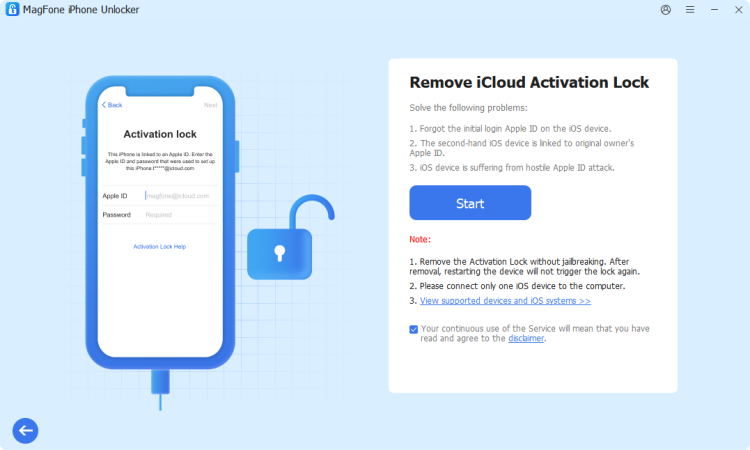
To begin, launch MagFone iPhone Unlocker after connecting your iPhone to your computer. When you enter the main interface of the software, select Remove iCloud Activation Lock and click Start to initiate the iCloud Activation Lock removal process.
Step 2Bypass the iCloud Activation Lock
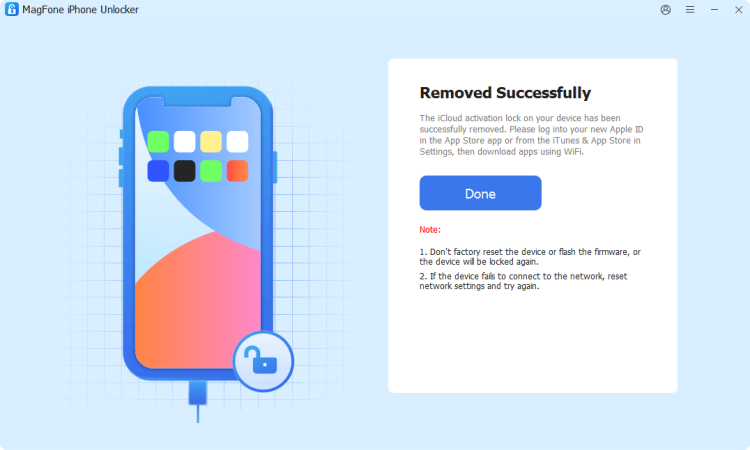
Then put the device into recovery mode by following the onscreen instruction. MagFone will start to bypass the iCloud Activation Lock automatically. Keep your device connected throughout the iCloud Activation Lock removal process to ensure success.
Part 4. FAQs about Checkra1n iCloud Bypass
-
Does Checkra1n remove Activation Lock?
No. Checkra1n is a jailbreak utility and does not remove Apple's Activation Lock by itself. But you can temporarily bypass iCloud with Checkra1n by jailbreaking your device. Then you can access some features without entering the Apple ID password.
-
Does Checkra1n work on newer iPhones?
No. Devices based on A12 chips and newer are not compatible with the original Checkra1n approach. Currently, Checkra1n only supports iPhone X or below.
-
Is Checkra1n safe?
When obtained from official sources and used on supported devices, Checkra1n is widely recognized within the jailbreak community. However, jailbreaking still carries risks and should be approached with care.
-
Can Checkra1n change the Apple Account linked to a device
No. The Apple Account associated with Activation Lock cannot be changed through Checkra1n as jailbreaking and Activation Lock are separate mechanisms.
Part 5. Conclusion
Searches for Checkra1n iCloud bypass often stem from a misunderstanding of what Checkra1n actually does. While it is a well-known jailbreak utility for certain older Apple devices, it does not directly remove Apple's Activation Lock. If you own an Activation Locked device, the best course of action is to recover access to the associated Apple Account or ask the previous owner to remove the device from their account. Or try using a professional iCloud Activation Lock removal tool like MagFone iPhone Unlocker to get your iPhone unlocked.

Dylan Jones
Editor in chief





