








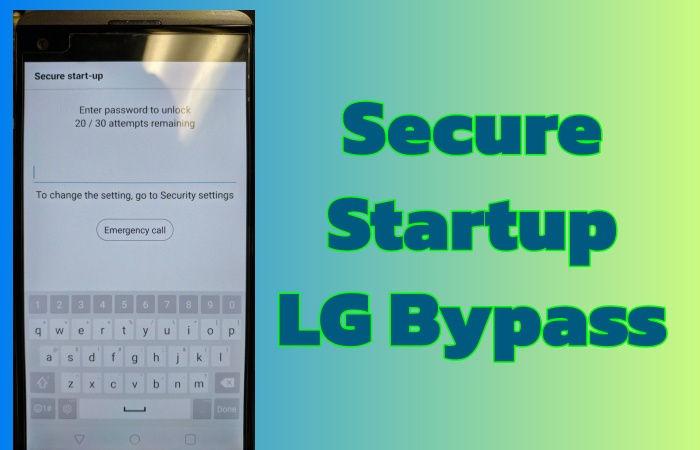
LG Secure Startup refers to security features on LG devices. But if you forget the password to access your LG phone, or your phone triggers the Secure Startup after rebooting, you will find your LG phone locked out. So if you are encountering this situation or looking for the methods to bypass LG Secure Startup, you are in the right place. This detailed guide will introduce what LG Secure Startup is and how to bypass it.
- Part 1. What Is LG Secure Startup?
- Part 2. Best Way to Secure Startup LG Bypass (High Success Rate)
- Part 3. How to Bypass Secure Startup on LG Phone
- Method 1. Unlock LG Phone Secure Startup via Forgot Pattern
- Method 2. Get Past Secure Startup on LG Phone via Hard Reset
- Method 3. Bypass Secure Startup on LG Phone via Google Find My
- Method 4. Disable Secure Startup on LG Phone via Android ADB
- Method 5. Get Rid of Secure Startup on LG Phone via Safe Mode
- Part 4. Conclusion
Part 1. What Is LG Secure Startup?
LG Secure Startup is designed to protect your data with a password, PIN, or pattern, or using Safe Mode for troubleshooting by disabling third-party apps to fix issues. This secure feature will ensure your LG phone is accessed with the correct credentials, and avoid unknown and unauthorized accessing. But if you forget the password or don't know the password, entering the LG phone will be difficult.
Part 2. Best Way to Secure Startup LG Bypass (High Success Rate)
Is there any safe and high success rate method to bypass LG Secure Startup? MagFone Android Unlocker is absolutely the best way. It supports all models of LG phones running Android versions from 4 to 16. No matter why the password is lost or what kind of credentials, MagFone Android Unlocker can help you bypass it successfully and easily. Follow the step-by-step guide to bypass LG Secure Startup with MagFone Android Unlocker.

MagFone Android Unlocker
Remove multiple kinds of screen locks on over 5000 Android devices and delete Google FRP lock without a password.
Step 1 Connect Your LG Phone to MagFone
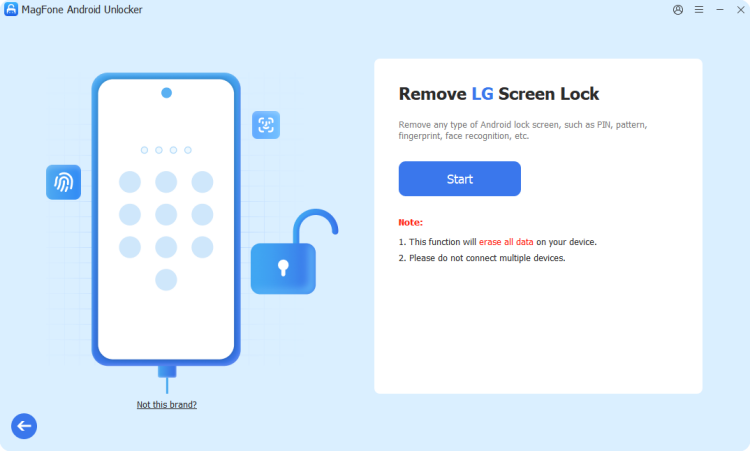
Connect your LG phone to your computer with a USB cable. After MagFone Android Unlocker is downloaded and installed, open the interface and click Remove Screen Lock. Wait for your LG phone to be detected by MagFone Android Unlocker, and then select Continue.
Step 2 Put LG Phone into Recovery Mode
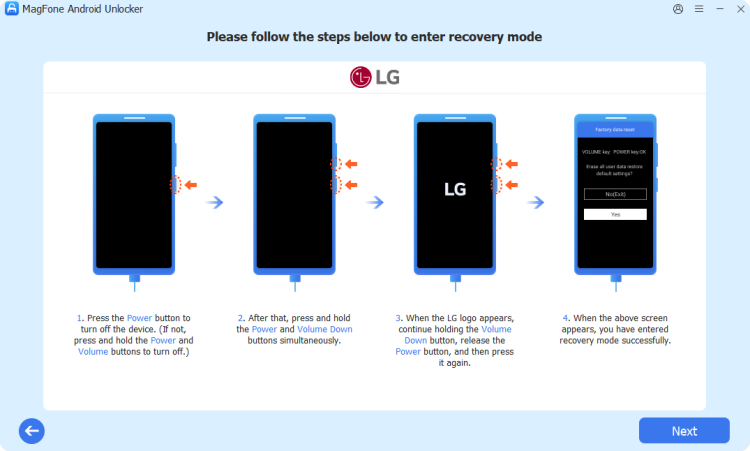
Before bypassing the Secure Startup, you should follow the on-screen instruction to operate your LG phone into Recovery Mode. When it is ready, click Next and then click Continue.
Step 3 Bypass LG Secure Startup Successfully
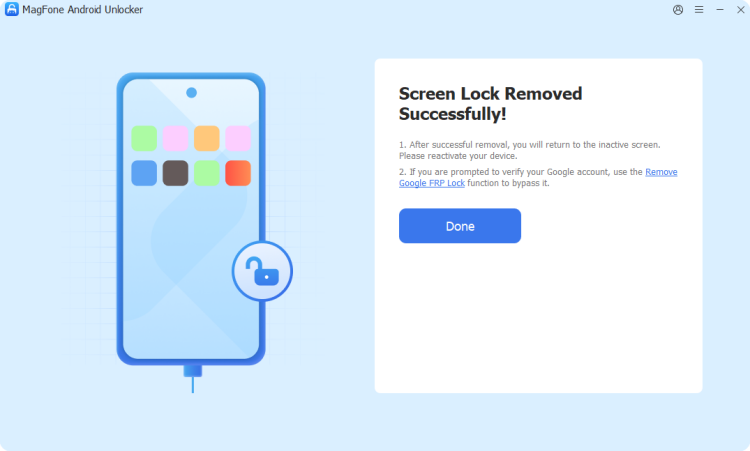
Continue with the steps on your computer screen to bypass Secure Startup on your LG phone. When the operation finishes, click Next. MagFone Android Unlocker will bypass Secure Startup in several minutes.
Part 3. How to Bypass Secure Startup on LG Phone
If you prefer a free method and don't mind complex steps, there are some other methods like hard reset available for you. You should select a suitable and accessible way to bypass Secure Startup on your LG phone.
Method 1. Unlock LG Phone Secure Startup via Forgot Pattern
Unlocking LG phone Secure Startup by Forgot Pattern is the most original and easiest way without data loss. If you enter the wrong password over five times, the option of Forgot Pattern will appear on your LG phone, you can recover a new password by inputting your Google account.
📝Requirements:
Android 4.4 and below
Google account and password
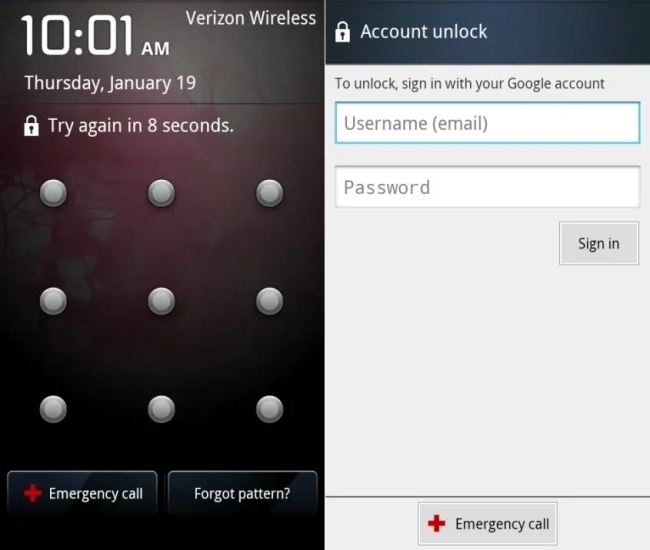
Step 1. Input wrong passwords over five times.
Step 2. Tap Forgot pattern when the choice appears.
Step 3. Sign in with your Google account and password to check your identity.
Step 4. Set a new password for next access.
Method 2. Get Past Secure Startup on LG Phone via Hard Reset
Performing a hard reset is a method deeper than Forgot Pattern, because this method will erase all data on your LG phone. This method is suitable for users who don't mind data loss.
📝Requirements:
Google account and password
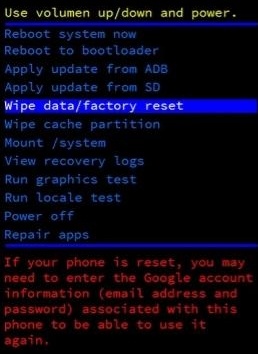
Step 1. Completely power off your LG phone.
Step 2. Press and hold the Power button and the Volume Up button at the same time. When the LG logo appears, release the Power button.
Step 3. Press the Power button again until the recovery menu displays.
Step 4. Use the Volume buttons to select Wipe data/factory reset, and confirm with the Power button.
Step 5. Reboot your LG phone, and access it with Google account.
Method 3. Bypass Secure Startup on LG Phone via Google Find My
Different from the above two methods, you can get past Secure Startup on LG phone via Google Find My remotely. Google Find Hub, which was known as Google Find My Device in the past, is a feature for Android users to locate, lock, or erase Android devices remotely. So, with Google Find My, you can erase your locked LG phone remotely via either the Google Find Hub site or the Google Find Hub app to remove Secure Startup.
On the Google Find Hub Site:
📝Requirements:
A network-connected device
Google account and password
Enabled Find My before
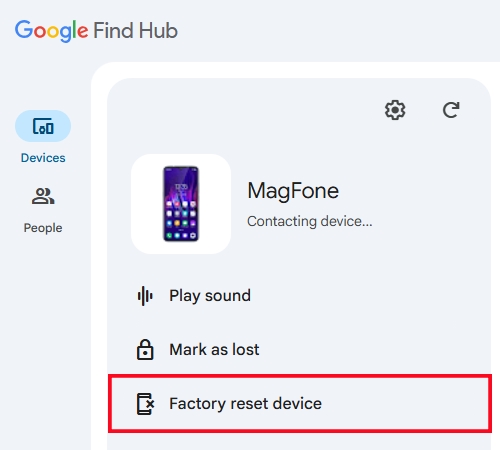
Step 1. Search for Find My hub in a browser and sign in with your Google account.
Step 2. Click Devices to select your locked LG phone.
Step 3. Click Factory reset device, then pick Next.
Step 4. Confirm by inputting your Google password, and then click Reset.
In the Google Find My App:
📝Requirements:
Another Android device with a network connection
Google account and password
Enabled Find My before
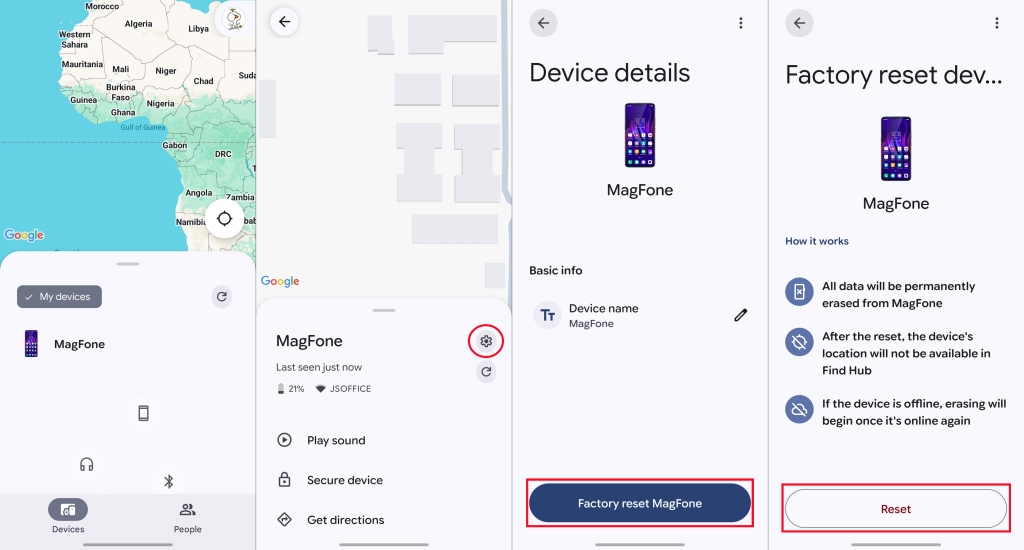
Step 1. Find another Android device with the Find Hub app.
Step 2. Log in with your Google account that was logged in to your LG phone before.
Step 3. Find your LG phone from the list of Devices.
Step 4. Tap the Settings icon in the upper-right corner.
Step 5. Tap Factory reset device > Next.
Step 6. After entering your Google password, choose Reset.
Method 4. Disable Secure Startup on LG Phone via Android ADB
Android Debug Bridge (ADB) connects Android phones with a computer and sends orders to control phones remotely. So it is possible to disable Secure Startup on LG phone via ADB commands, but it is a little complex to operate, especially for beginners.
📝Requirements:
Google account and password
Enabled ADB debugging before
A computer
Step 1. Connect your LG phone to a computer through a USB cable.
Step 2. Open the Command Prompt window on your computer.
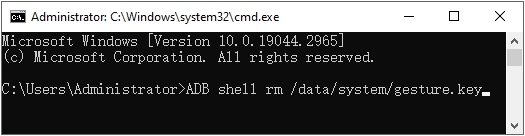
Step 3. Type ADB commands like adb shell rm/data/system/gesture.key, and then click Enter.
Step 4. Your LG phone will reboot automatically without Secure Startup.
Method 5. Get Rid of Secure Startup on LG Phone via Safe Mode
If your password is set by a third-party app, you will have an extra method to get rid of LG Secure Startup. When your phone is in Safe Mode, any third-party apps will be disabled by default. So you can unlock your LG phone without Secure Startup via Safe Mode quickly.
📝Requirements:
Screen lock is set by a third-party app
Step 1. Press the Power button to turn off your LG phone.
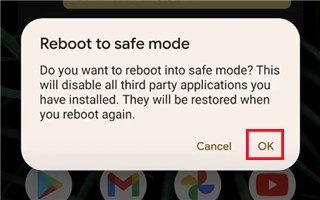
Step 2. Press and hold the Volume down button and the Power button to enter Safe Mode.
Step 3. Locate Settings > Apps.
Step 4. Select and uninstall the app you set screen lock before.
Step 5. Restart your LG phone to exit Safe Mode and open it without Secure Startup.
Part 4. Conclusion
Locked out by LG Secure Startup seems difficult to unlock, but it is accessible in fact. There are six methods for you to bypass Secure Startup on LG phone. Pay attention to the different requirements, so you should choose a suitable method. If you prefer a easy and high success rate way, MagFone Android Unlocker is the best choice to get rid of LG Secure Startup.

Dylan Jones
Editor in chief





