








Factory Reset Protection (FRP) is a built-in Android security feature designed to protect Samsung phones and tablets from unauthorized access. However, if you've bought a second-hand Samsung tablet, or forgotten your Google or Samsung account credentials, FRP can lock you out after a factory reset. You are not alone, and not fret. Here we will tell you how to avoid the FRP lock before the reset and provide several ways for you to remove FRP lock on Samsung tablet.
- Part 1. Can You Remove FRP on Samsung Tablet?
- Part 2. How to Remove Samsung Tablet FRP before Factory Reset
- Part 3. Best Method to Samsung Tablet FRP Bypass (No Password)
- Part 4. How to Make Samsung Tablet FRP Bypass without PC
- Part 5. Conclusion
Part 1. Can You Remove FRP on Samsung Tablet?
Sure! You will be asked to enter your Google or Samsung account credentials for verification during the setup if you didn't log out of your account before resetting. And if the password is forgotten, your Samsung tablet will be locked by Factory Reset Protection. However, you can remove the FRP lock on your Samsung tablet by many practical methods.
| Method | Password | Easy to Operate | Success Rate |
|---|---|---|---|
| Factory Settings | Google or Samsung password | Easy | High |
| MagFone Android Unlocker | ❌ | Easy | High |
| Google Account Recovery | ❌ | Medium | Medium |
| Google Keyboard | ❌ | Complex | Medium |
| SIM PIN Code | ❌ | Medium | Medium |
Part 2. How to Remove Samsung Tablet FRP before Factory Reset
If you have signed in to your Google or Samsung account on your Samsung tablet before, try to remove it before resetting it to the original status. In this way, you can activate your Samsung tablet after a factory reset smoothly without a FRP lock.
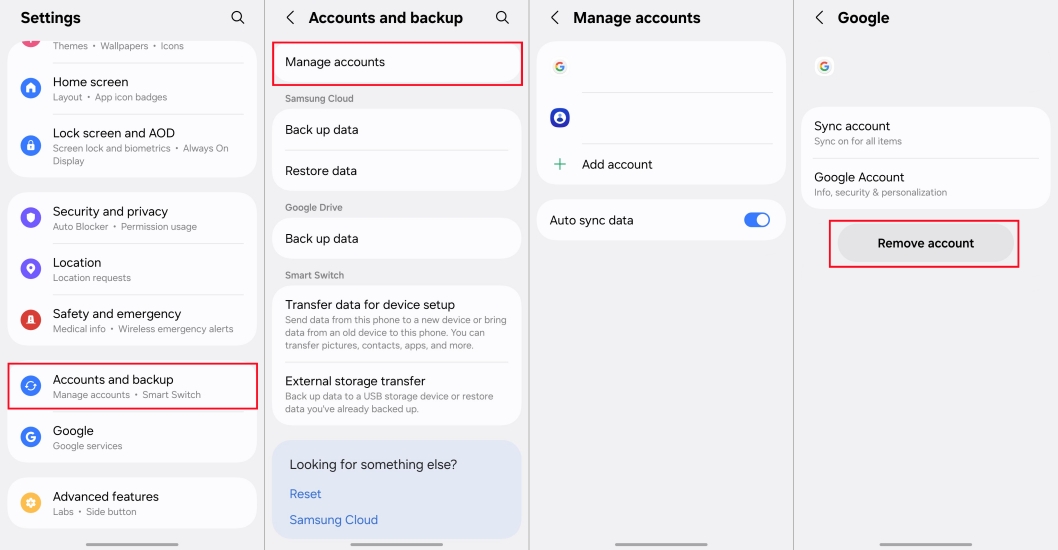
Step 1. Navigate to Settings and tap Accounts and backup > Manage accounts.
Step 2. Select your Google account or Samsung account and press Remove account.
Step 3. Input your password to confirm your decision.
Part 3. Best Method to Samsung Tablet FRP Bypass (No Password)
Forgot your Google or Samsung password and not able to bypass the FRP lock on your Samsung tablet? MagFone Android Unlocker will provide professional solutions for you. The powerful tool is designed to remove any kind of lock on Samsung devices, including the FRP lock. It supports most Android brands and Android versions and doesn't require technical skills. With a detailed guide and easy steps, you can bypass the FRP lock on your Samsung tablet successfully.

MagFone Android Unlocker
Remove multiple kinds of screen locks on over 5000 Android devices and delete Google FRP lock without a password.
Step 1 Launch and Fire up MagFone
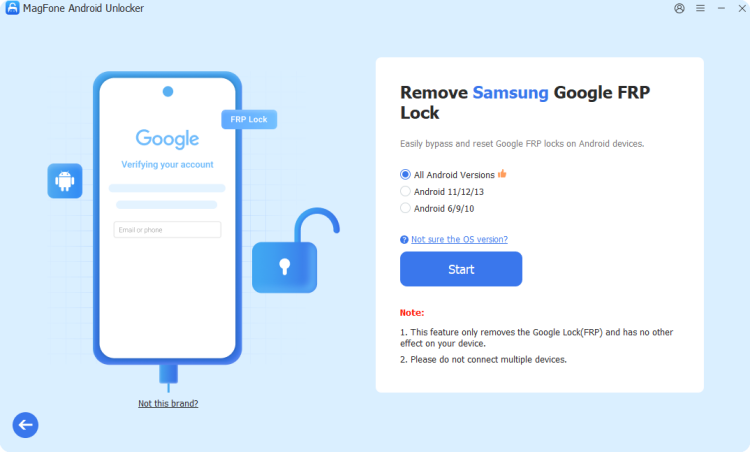
Download and open MagFone Android Unlocker on your computer. With a USB cable connected, wait for your Samsung tablet to be detected by the MagFone program.
Step 2 Start to Bypass FRP Lock
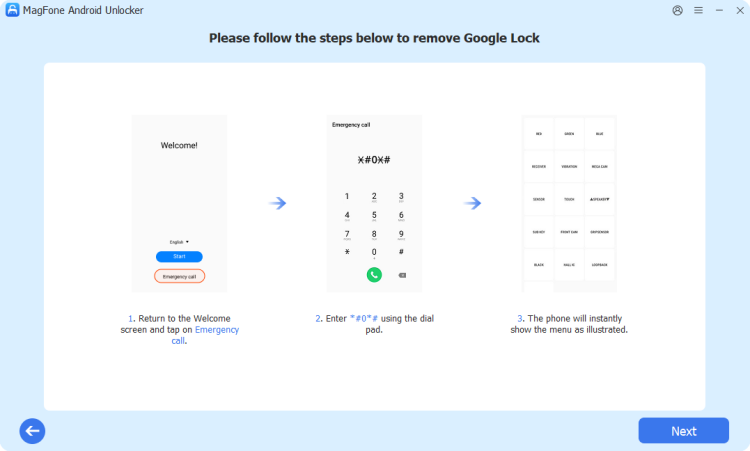
Proceed to follow the onscreen steps in the program to set up your Samsung tablet. Then, click Next to go to the next step.
Step 3 Bypass FRP Lock Safely
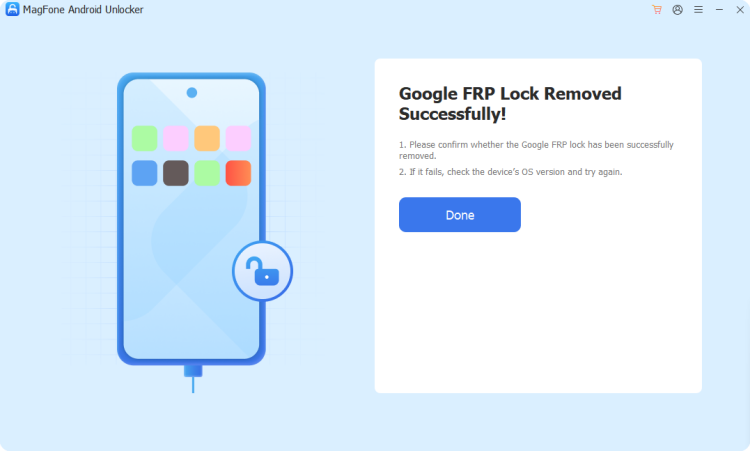
MagFone will bypass the FRP lock on your Samsung tablet quickly and safely. You can set up your tablet without verifying the FRP.
Part 4. How to Make Samsung Tablet FRP Bypass without PC
MagFone Android Unlocker can bypass the FRP lock with a computer conveniently. But if you prefer the method without PC, or you are searching for a free method, you can bypass the FRP lock with another Android device using the methods below. Note that these methods may not be suitable for every tablet; try one effective method to bypass the FRP lock.
Method 1. Bypass FRP on Samsung Tablet via Google Account Recovery
Google Account Recovery can help you set a new password to replace the old password. With the latest password, you can open your Samsung tablet without Factory Reset Protection.
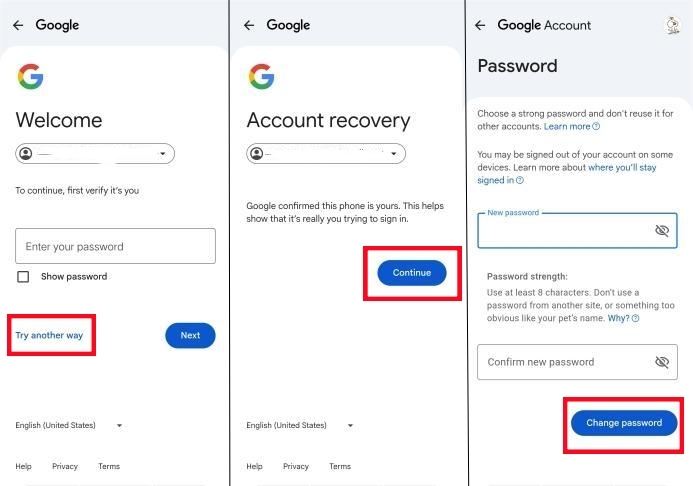
Step 1. Search for Google Account Recovery in a browser. When you need to enter your password, choose Try another way on this page.
Step 2. Press Continue to finish the verification part of Google.
Step 3. Once verified, you can create a new password to open your Samsung tablet.
Method 2. Bypass FRP on Samsung Tablet via Google Keyboard
Using Google Keyboard is a traditional method, more difficult than using Google Account Recovery. You can access the system menu directly to enable the OEM Unlock from the keyboard's input options. But this method is only suitable for someone who has an old Samsung tablet running Android 5 to Android 7.
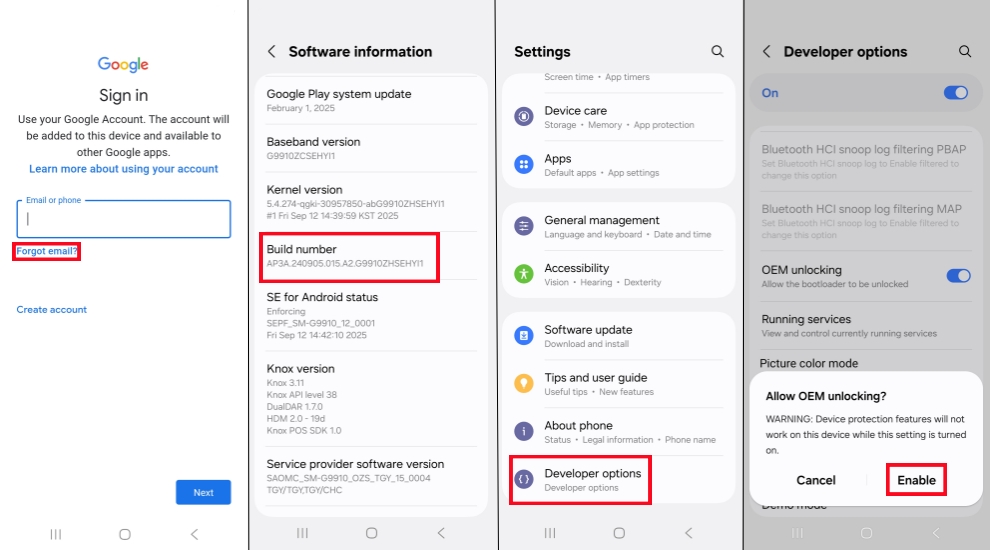
Step 1. After factory resetting your Samsung tablet, connect it to a Wi-Fi network and go through the setup steps.
Step 2. When you are asked to Verify your account, open the text field to go to Google Keyboard.
Step 3. Choose Google Keyboard Settings and find the three dots icon in the upper-right corner.
Step 4. Tap Help & Feedback > Use Google Keyboard > Webserach > Settings.
Step 5. Select About phone > Software information > Build number, tap Build number for seven times to open Developer options and OEM unlocking.
Step 6. Press the Back icon twice and restart your Samsung tablet freely.
Method 3. Bypass FRP on Samsung Tablet via SIM PIN Code
If your Samsung tablet is equipped with a SIM card, you can try this method to bypass the FRP lock. The SIM PIN is a security code to prevent unauthorized use when your tablet restarts or the SIM card is removed. So you can reset the password by removing the SIM card.
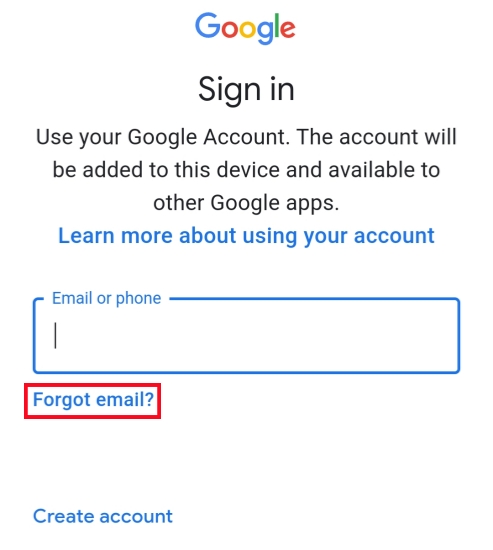
Step 1. Power off your tablet and take out the SIM card carefully. Then put it into another Android device.
Step 2. Factory resetting your tablet. Tap Forgot email when you need to open the tablet with a Google account.
Step 3. Choose to use your phone number to reset the password, and you will receive a verified link on the other Android device.
Step 4. After verifying your identity, you can set a new password to enter your tablet.
Part 5. Conclusion
Don't be stressed when you find your Samsung tablet is locked by Factory Reset Protection. The above methods can help you bypass it easily. Of course, if you remember the password, you can remove the FRP lock in Settings before the reset. You can also remove FRP lock on Samsung tablet without a password via MagFone Android Unlocker, Google Keyboard, and SIM PIN Code. Or you can try recovering your Google password, then verify your tablet to remove the FRP lock. But using MagFone Android Unlocker is the best method to bypass the FRP lock on your Samsung tablet safely and easily.

Dylan Jones
Editor in chief





